
1. Safety Instructions
- Always disconnect power before performing any maintenance or installation.
- Ensure the power adapter and controller are kept dry. The light fixture is IP68 waterproof, but the controller is not.
- Do not operate if any part of the light or cable is damaged.
- Keep out of reach of children.
- This product is designed for indoor use with aquariums only.
2. Package Contents
Please check that all items are present:
- AQQA LED Aquarium Light Fixture
- External Controller with Power Cable
- Extendable Brackets (2 pcs)
- Power Adapter
- User Manual
3. Product Overview
The AQQA LED Aquarium Light is designed to provide optimal lighting for your aquatic environment, featuring multiple modes and adjustable settings.
Key Features:
- Full Spectrum Lighting: Utilizes premium 5050 and 2835 LEDs for bright illumination, enhancing plant growth and fish colors.
- IP68 Waterproof: The light fixture can be directly submerged in water for versatile use.
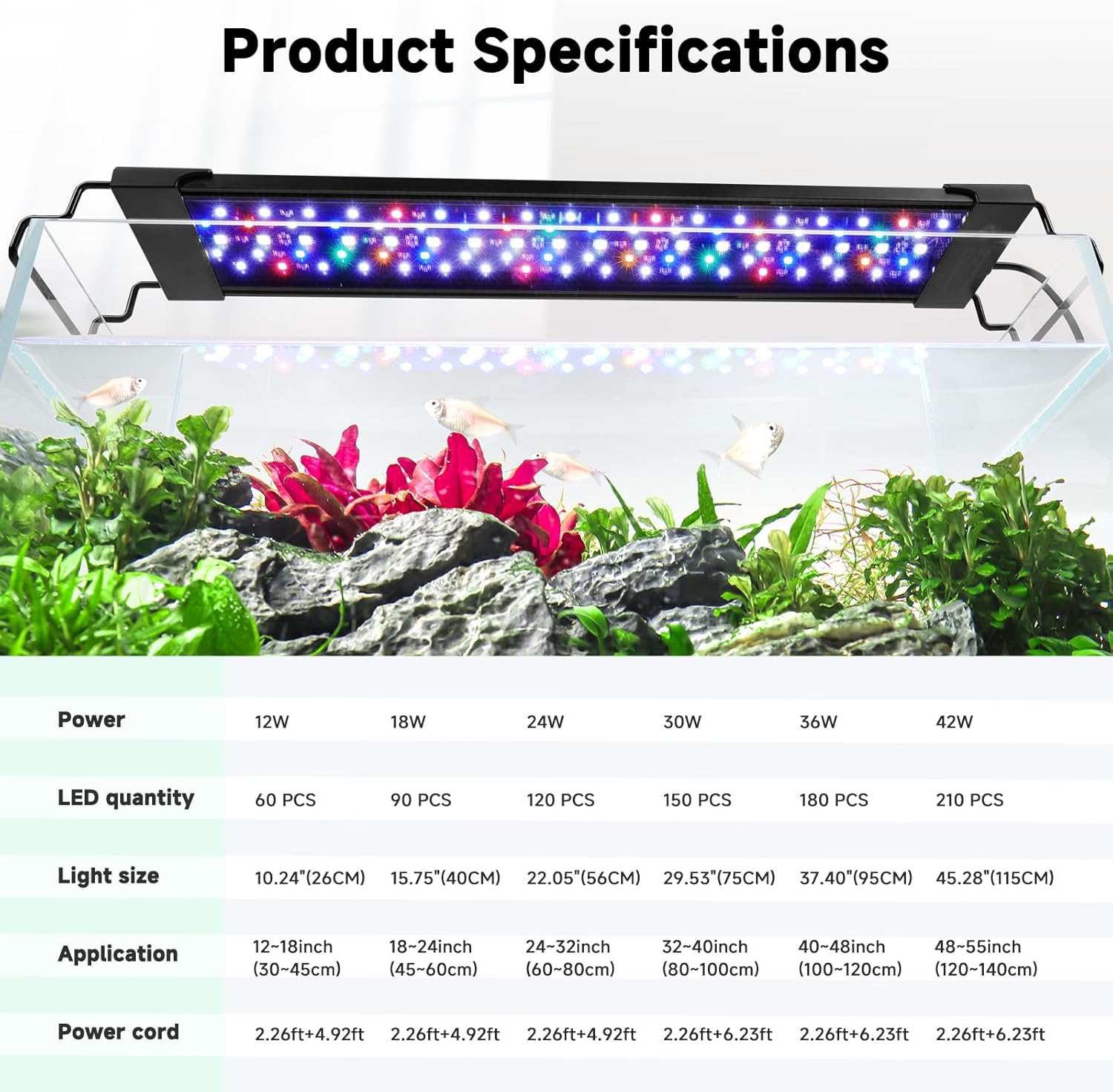
- Extendable Brackets: Adjustable brackets accommodate various aquarium sizes (24-32 inches for this model).
- 24/7 Mode: Simulates a natural 24-hour sunrise and sunset cycle.
- DIY Mode: Customizable settings for color, brightness, and timer.
- Memory Function: Retains previous settings after power loss.

4. Setup
4.1 Bracket Installation
- Unscrew the plastic nuts from the clip-on brackets.
- Align the bracket with the rail on the light fixture and slide it into place.
- Secure the bracket by tightening the plastic nuts.
- Repeat for the second bracket on the opposite side of the light fixture.

4.2 Light Placement
- Place the assembled light fixture onto the rim of your aquarium.
- Adjust the extendable brackets to fit your tank's width securely.
- Ensure the light is stable and level over the aquarium.

4.3 Power Connection
- Connect the light fixture cable to the external controller.
- Connect the power adapter to the controller.
- Plug the power adapter into a suitable electrical outlet.
5. Operating Instructions
5.1 Controller Overview
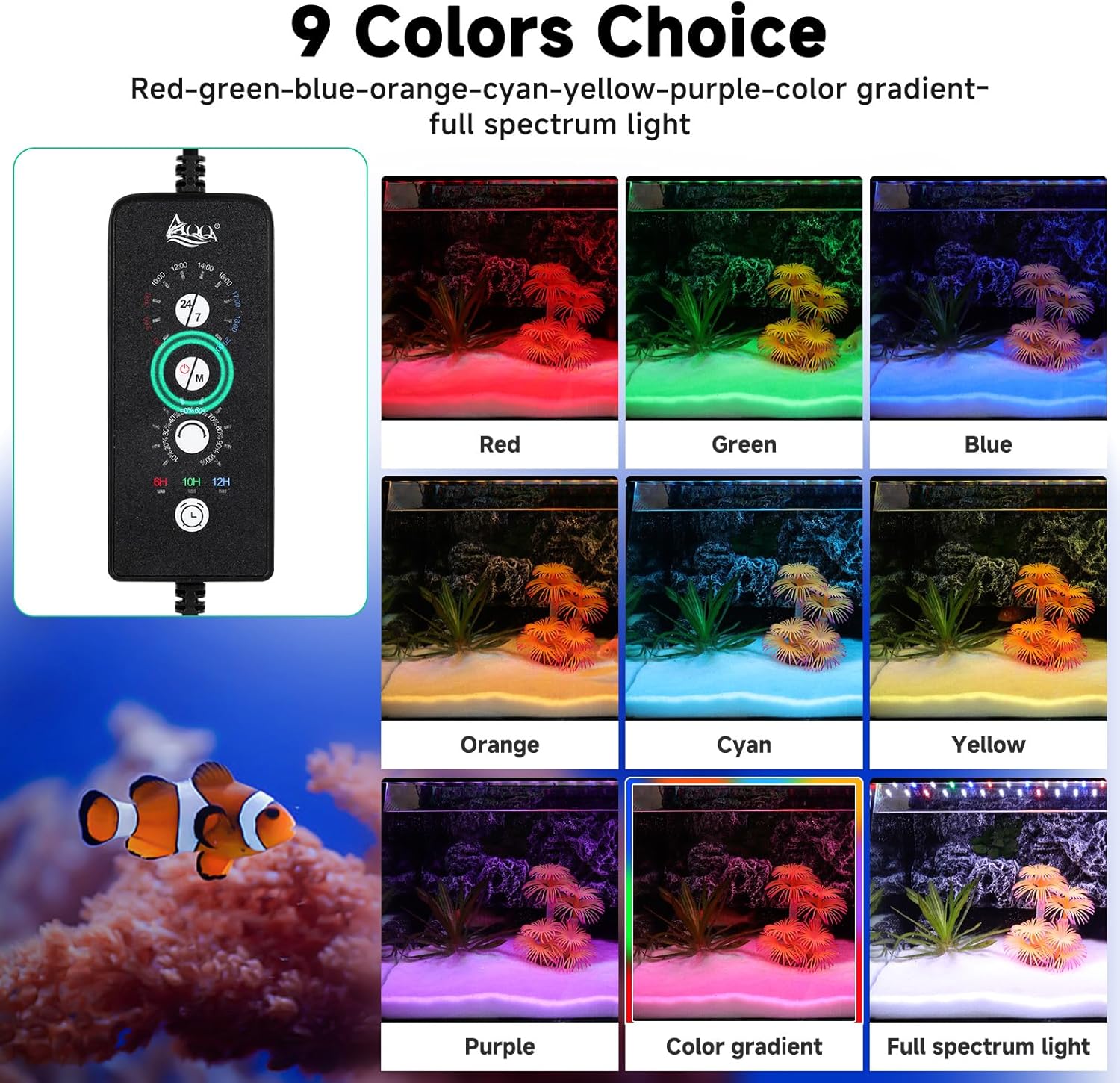
The external controller allows you to manage all light functions. Familiarize yourself with the buttons:
- ON/OFF & Lighting Options Button: Press to turn on/off, change light color, or enter color cycle. Press and hold for 3 seconds to turn off.
- Brightness Options Button: Adjusts light brightness (10 levels).
- Timer Button: Sets lighting duration (6H/10H/12H).
- 24/7 Mode Button: Activates the automatic 24/7 cycle.
5.2 DIY Mode
In DIY mode, you have full control over color, brightness, and timer settings.
- Turn On/Off: Press the ON/OFF button to toggle the light.
- Color Selection: Press the ON/OFF & Lighting Options Button repeatedly to cycle through 9 available colors (Red, Green, Blue, Orange, Cyan, Yellow, Purple, Color Gradient, Full Spectrum Light).
- Brightness Adjustment: Use the Brightness Options Button to select from 10 levels of brightness (10% to 100%). Note: Brightness cannot be adjusted in 24/7 mode.
- Timer Setting: Press the Timer Button to set the lighting duration to 6 hours, 10 hours, or 12 hours. The light will automatically turn on and off daily based on this setting.

5.3 24/7 Mode
The 24/7 mode simulates a natural 24-hour light cycle, promoting plant growth and providing a natural environment for fish.
- Activate 24/7 Mode: Long press the 24/7 button on the controller. The controller uses 16 time points as a reference for the initial running time setting.
- Confirm Time: Click the 24/7 button again to confirm the current time.
- Select Mode: Use the "▲" and "▼" buttons to choose between different preset 24/7 modes (e.g., M1: 6:00 AM - 9:00 PM, M2: 7:00 AM - 10:00 PM, M3: 8:00 AM - 11:00 PM).
- Confirm Mode: Click the 24/7 button to confirm your selected mode.

6. Maintenance
- Cleaning: Regularly wipe the light fixture with a soft, damp cloth to remove any water spots or algae buildup. Ensure the light is unplugged before cleaning.
- Controller Care: Keep the controller dry at all times. Avoid splashing water onto it.
- Inspection: Periodically check the power cable and connections for any signs of wear or damage.
7. Troubleshooting
- Light not turning on: Check all power connections. Ensure the power adapter is plugged into a working outlet. Verify the controller is properly connected to the light fixture.
- Incorrect time/mode in 24/7 mode: Re-enter the 24/7 mode setup and ensure the current time and desired mode are correctly selected and confirmed.
- Brightness not adjusting: Ensure you are in DIY mode. Brightness adjustment is disabled in 24/7 mode.
- Flickering lights: Check for loose connections. If flickering persists, contact customer support.
8. Specifications
| Feature | Detail |
|---|---|
| Model Number | AQ090-12W |
| Power | 24W |
| Tank Size Compatibility | 24-32 inch (60-80 cm) |
| Waterproof Rating | IP68 (Light Fixture Only) |
| LED Type | Premium 5050 and 2835 LEDs |
| Material | Aluminum Alloy Housing |
| Dimensions | 5.08 x 5.08 x 5.08 cm (Product) |
| Item Weight | 0.89 Kilograms |
9. Warranty and Support
AQQA products come with a standard manufacturer's warranty. For specific warranty details, please refer to the product packaging or contact AQQA customer support.
Customer Support:
If you encounter any issues or have questions regarding your AQQA LED Aquarium Light, please contact our customer support team through the retailer's platform or visit the official AQQA website for assistance.


