
1. Important Safety Information
Please read these instructions carefully before using your VonHaus Pedestal Fan. Keep this manual for future reference.
- Ensure the fan is placed on a stable, level surface.
- Do not insert fingers or foreign objects into the fan grille.
- Keep the fan away from water or other liquids.
- Unplug the fan from the power outlet before cleaning or maintenance.
- This appliance is not intended for use by persons (including children) with reduced physical, sensory or mental capabilities, or lack of experience and knowledge, unless they have been given supervision or instruction concerning use of the appliance by a person responsible for their safety.
- Children should be supervised to ensure that they do not play with the appliance.
2. Package Contents
Verify that all components are present before assembly.
- Fan Head Assembly (with 5 blades)
- Front and Rear Grilles
- Pedestal Pole (Adjustable Height)
- Base
- Remote Control (with battery)
- User Manual
3. Setup and Assembly
Follow these steps to assemble your VonHaus Pedestal Fan.
- Attach the Base: Securely attach the pedestal pole to the base using the provided screws.
- Assemble the Fan Head:
- Place the rear grille onto the motor housing, aligning the notches.
- Attach the fan blades to the motor shaft, ensuring they are firmly in place.
- Secure the front grille to the rear grille using the clips or screws provided, ensuring it is tightly closed.
- Mount Fan Head to Pedestal: Attach the assembled fan head to the top of the pedestal pole. Ensure it clicks into place or is secured with the locking mechanism.
- Adjust Height: Loosen the height adjustment knob on the pedestal pole, extend or retract the pole to your desired height (up to 128 cm), and then tighten the knob securely.

Image: This diagram illustrates the adjustable features of the fan, including its height range of 110-128 cm, a tilting range of +7 to -15 degrees, and an 80-degree left/right oscillation capability. The fan base is 42 cm wide.
4. Operating Instructions
Your VonHaus Pedestal Fan offers multiple settings for personalized comfort.
Control Panel and Remote Control
The fan can be operated using the touch-sensitive LED display on the unit or the included remote control.

Image: This image displays the fan's LED touch panel, which includes controls for power, speed, mode, timer, and oscillation. It also shows the remote control, which allows for convenient adjustment of all fan functions from a distance.
Power On/Off
Press the Power button on the control panel or remote to turn the fan on or off.
Speed Settings
The fan features 24 adjustable speeds. Use the + and - buttons on the control panel or remote to increase or decrease the airflow intensity.

Image: This image highlights the fan's powerful DC motor and its capability to provide 24 different airflow speeds, allowing users to select their desired cooling level. It also references a 15-hour timer function.
Operating Modes
Select from 3 programmed modes to suit your preference:
- Comfort Mode: Provides a steady, consistent airflow.
- Natural Mode: Simulates a natural breeze by varying fan speed.
- Night Mode: Operates at a lower speed with reduced noise (minimum 35 dB) and dims the LED display for undisturbed sleep.

Image: This image depicts the fan in a bedroom, illustrating its three programmed modes: Comfort, Natural, and Night. It emphasizes that the digital display dims in Night mode and the fan operates at a minimum noise level of 35 dB.
Oscillation
Press the Oscillation button to activate or deactivate the 80° left-to-right oscillation feature, distributing air across a wider area.
Timer Function
The fan includes a 15-hour timer. Press the Timer button repeatedly to set the desired operating duration in 1-hour increments. The fan will automatically turn off after the set time.
Adjustable Tilt
Manually adjust the fan head's vertical tilt within a range of +7° to -15° to direct airflow precisely where needed.
5. Maintenance
Regular cleaning and maintenance will ensure optimal performance and longevity of your fan.
Cleaning
- Always unplug the fan before cleaning.
- Use a soft, damp cloth to wipe down the exterior surfaces. Do not use abrasive cleaners or solvents.
- To clean the fan blades, carefully remove the front grille (refer to assembly instructions for reverse steps). Wipe the blades with a damp cloth. Ensure blades are dry before reattaching the grille.
- Do not immerse the fan in water or allow water to drip into the motor housing.
Storage
When not in use for extended periods, store the fan in a cool, dry place, preferably in its original packaging, to protect it from dust and damage.
6. Troubleshooting
If you encounter any issues with your fan, refer to the following common problems and solutions.
- Fan does not turn on:
- Check if the power cord is securely plugged into a working electrical outlet.
- Ensure the power button has been pressed.
- Verify that the remote control battery is not depleted.
- Weak airflow:
- Increase the speed setting.
- Ensure the fan grilles and blades are clean and free from dust buildup.
- Check for any obstructions blocking the airflow.
- Fan is noisy:
- Ensure the fan is on a stable, level surface.
- Check if any parts are loose or vibrating. Tighten if necessary.
- Clean the fan blades and grilles to remove any debris that might cause imbalance.
- Remote control not working:
- Replace the battery in the remote control.
- Ensure there are no obstructions between the remote and the fan's receiver.
- Point the remote directly at the fan's control panel.
If the problem persists after trying these solutions, please contact VonHaus customer support.
7. Specifications
| Feature | Detail |
|---|---|
| Model Number | 8100085 |
| Brand | VonHaus |
| Dimensions (L x W x H) | 42 x 42 x 128 cm |
| Weight | 6.22 kg |
| Power | 50 Watts |
| Number of Speeds | 24 |
| Operating Modes | 3 (Comfort, Natural, Night) |
| Oscillation | 80° (Left/Right) |
| Tilt Adjustment | +7° / -15° |
| Timer | Up to 15 hours |
| Control Method | Remote Control, Touch Panel |
| Number of Blades | 5 |
| Material | Metal |
| Color | White |
| Indoor/Outdoor Use | Indoor |
| Included Components | Remote Control |
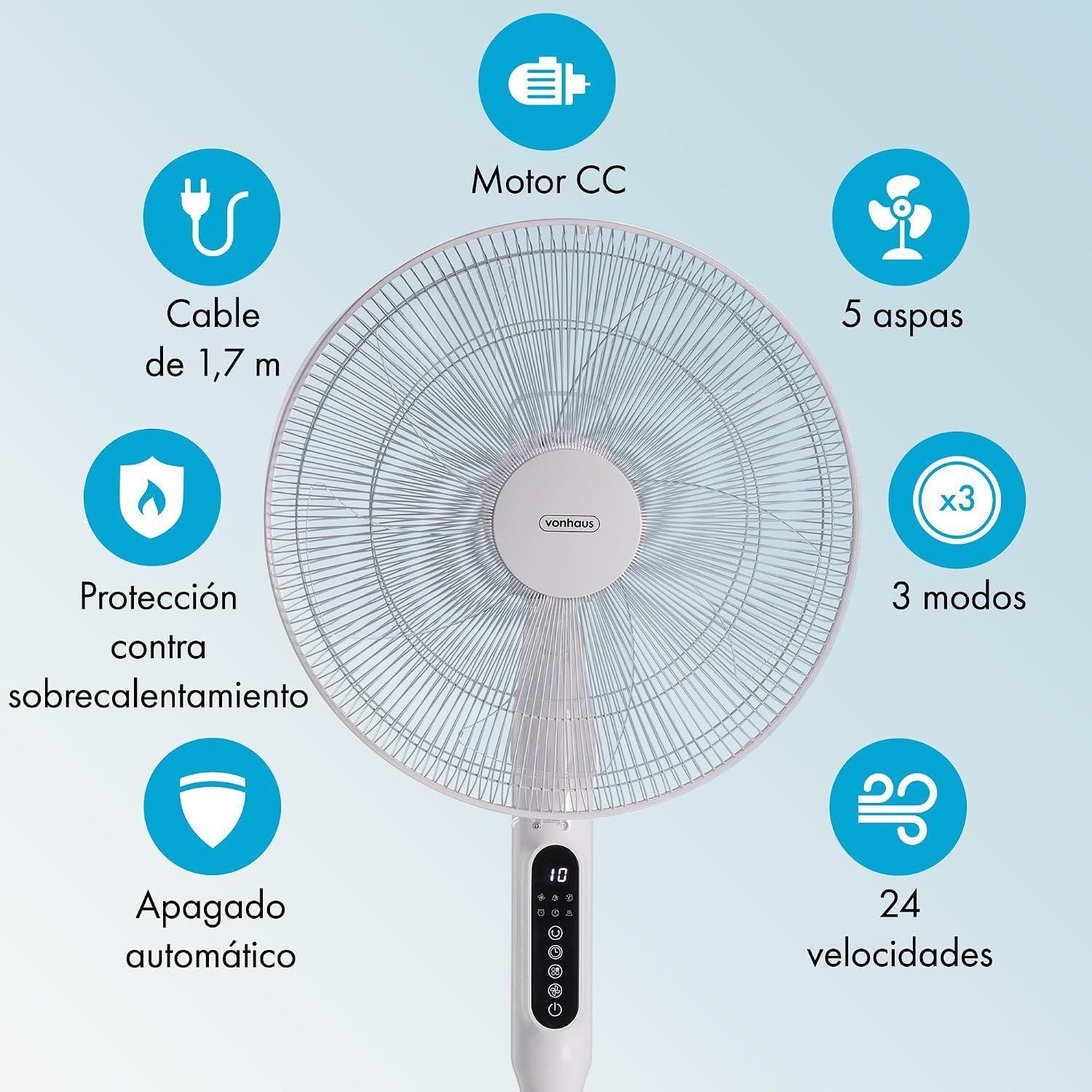
Image: This graphic summarizes the fan's main features, including a DC motor, 5 blades, 3 operating modes, 24 speeds, 1.7m cable, overheat protection, and automatic shut-off.
8. Warranty and Support
All VonHaus products come with a minimum 2-year warranty. This warranty covers manufacturing defects and ensures that we are available to assist you if any issues arise with your product.
For technical support, troubleshooting assistance, or warranty claims, please contact VonHaus customer service through the retailer where you purchased the product or visit the official VonHaus website for contact information.
Please retain your proof of purchase for warranty purposes.

