
1. Introduction
Thank you for choosing the TIMEURE Talking Watch. This timepiece is specifically designed to assist individuals with visual impairments, seniors, and the elderly by providing clear, audible time and date announcements. Its user-friendly design ensures ease of operation and reliable performance. Please read this manual carefully to understand the features and proper use of your new watch.
2. Product Overview
The TIMEURE Talking Watch combines traditional analog display with advanced voice announcement features. Key functionalities include:
- Authentic American Pronunciation: Clear and loud voice announcements for time, date, day of the week, alarm time, and hourly chime.
- Radio Controlled: Automatically sets and adjusts time for accuracy.
- Automatic Daylight Saving Time (DST) Adjustment: No manual changes required for DST.
- Jumbo Numbers: Large, easy-to-read numbers on the analog dial.
- Alarm and Hourly Chime: Customizable audible alerts.
- Long Battery Life: Designed for extended use without frequent battery changes.

Image: Overview of the TIMEURE Talking Watch highlighting its multi-functional features for daily needs.
3. Setup
Before initial use, ensure the watch has a working battery. The watch comes with a CR2032 battery installed.
3.1 Initial Time Synchronization
The watch is radio-controlled and will attempt to synchronize with the atomic clock signal automatically. This process may take some time, especially in areas with weak signals. For best reception, place the watch near a window overnight.
3.2 Setting Time Zone
The watch supports four time zones: Pacific Time, Mountain Time, Central Time, and Eastern Time. To set your desired time zone:
- Press the designated button (typically the top right button) three times.
- The watch will announce the currently selected time zone (e.g., "USA (Pacific) time updated").
- Continue pressing the button three times until the desired time zone is announced.

Image: Visual guide for operating the watch buttons to announce time, date, and set time zones or alarms.
4. Operating Instructions
4.1 Announcing Time and Date
To hear the current time and date:
- First Push: Press the designated button (typically the top right button) once to hear the current time (e.g., "The time is 10:10 am.").
- Second Push: Press the same button a second time to hear the current date (e.g., "Today is Friday Dec. 10th").
4.2 Setting the Alarm
To set or adjust the alarm time:
- Press and hold the designated button (typically the top right button) for approximately 3 seconds until the watch announces, "Hold 3 seconds into setting mode."
- Follow the voice prompts to set the desired alarm hour and minute.
- The watch will announce the alarm time (e.g., "The alarm time is 6 am.").
4.3 Hourly Chime
The watch may feature an hourly chime function. Refer to the specific instructions provided with your watch for enabling or disabling this feature, as button sequences can vary slightly.
5. Maintenance
5.1 Cleaning
Wipe the watch case and band with a soft, dry cloth. Avoid using harsh chemicals or abrasive materials, which can damage the finish.
5.2 Battery Replacement
The watch uses one CR2032 battery. When the voice announcements become faint or the watch stops functioning, it is time to replace the battery. It is recommended to have a professional watch repair service replace the battery to ensure proper sealing and functionality.
5.3 Water Resistance
This watch is designed for daily use and is generally splash-resistant. Avoid submerging the watch in water, showering, or swimming with it, as this can cause damage.
6. Troubleshooting
- Watch not speaking: Check if the battery needs replacement. Ensure the volume is not set to minimum (if adjustable).
- Incorrect time: Allow time for the radio signal synchronization. If the issue persists, try placing the watch near a window overnight. Ensure the correct time zone is selected.
- Weak or unclear voice: This often indicates a low battery. Replace the CR2032 battery.
If you encounter persistent issues not covered here, please contact customer support.
7. Specifications
- Model Name: TU2210
- Model Number: TU2211
- Manufacturer: TIMEURE
- Display: Analog
- Watch Movement Type: Japanese Quartz
- Power Source: Battery Powered
- Battery Type: 1 x CR2032 (included)
- Case Diameter: 37.3 Millimetres
- Case Thickness: 15.4 Millimetres
- Band Width: 18 Millimetres
- Suitable Wrist Size (Metal Band): Minimum 160mm / 6.3 inch to Maximum 210mm / 8.26 inch
- Suitable Wrist Size (Leather Band): Minimum 155mm / 6.1 inch to Maximum 210mm / 8.26 inch
- Band Material Type: Leather (for TU2210) or Metal (for TU2211)
- Dial Color: White
- Band Color: Black (Leather) or Silver (Metal)
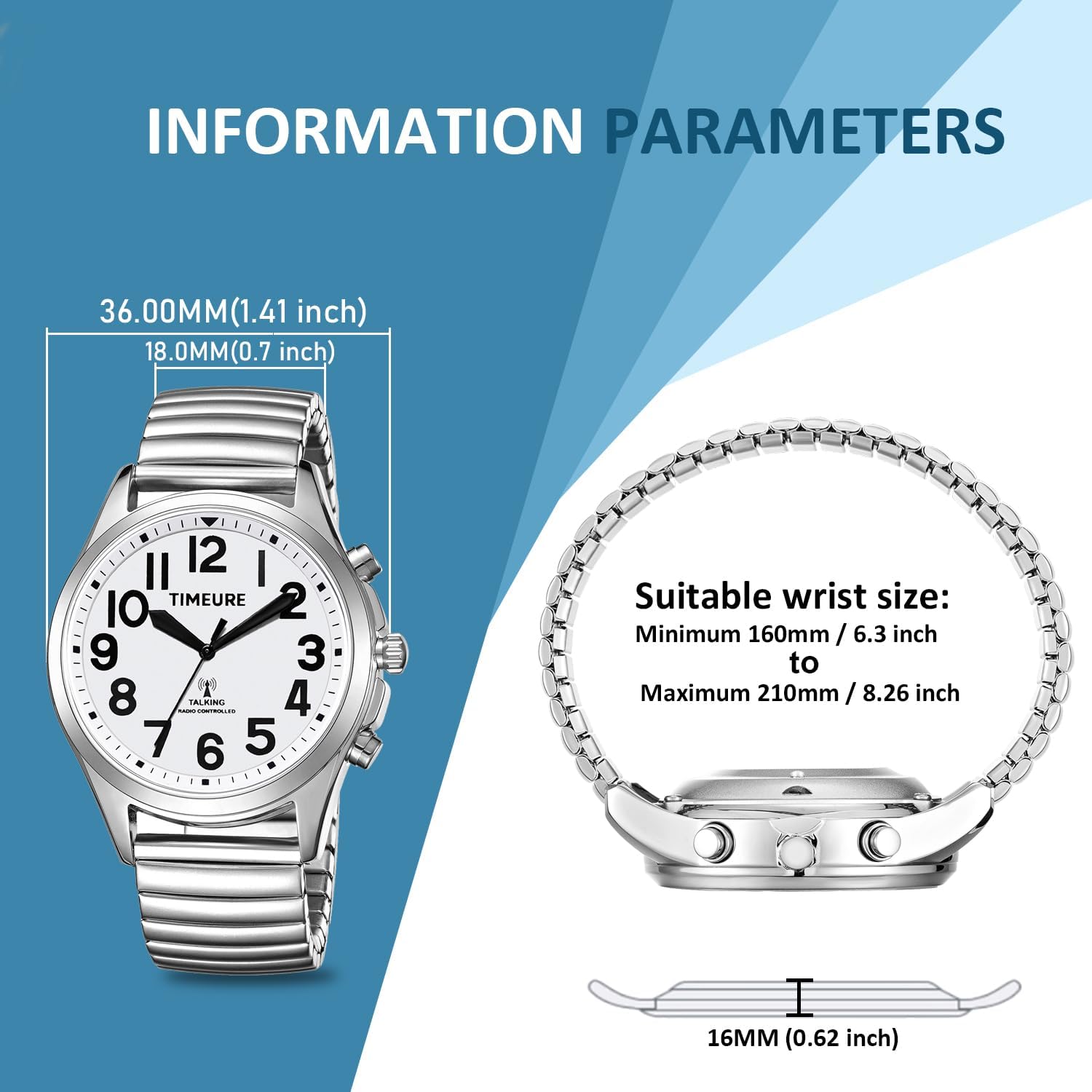
Image: Information parameters for the metal band version of the TIMEURE Talking Watch, including dimensions and suitable wrist size.

Image: Information parameters for the leather band version of the TIMEURE Talking Watch, including dimensions and suitable wrist size.
8. Warranty and Support
For warranty information or technical support, please refer to the documentation provided at the time of purchase or contact your retailer. You may also visit the official TIMEURE website for further assistance.