
1. Introduction
Thank you for choosing the VGR V-931 Professional Hair Trimmer. This manual provides essential information for the safe and effective use of your new grooming tool. Please read these instructions carefully before first use and keep them for future reference.
2. Package Contents
The VGR V-931 Professional Hair Trimmer package includes the following items:
- 1x Hair Trimmer (VGR V-931)
- 4x Cutting Guide Combs (various lengths)
- 1x Blade Protection Cap
- 1x USB Charging Cable (Type-C)
- 1x Cleaning Brush
- 1x Lubricating Oil
- 1x User Manual Book

Image: VGR V-931 Hair Trimmer and its included accessories.
Video: Unboxing and overview of the VGR V-931 Professional Hair Trimmer and its accessories.
3. Product Features
- Digital LED Display: Provides real-time information on battery percentage, charging status, oil indicator, and current RPM speed. Includes an auto-testing function for optimal performance.
- Adjustable Speed Control: Features a dedicated button to adjust motor speed from 5500 RPM to 7000 RPM, allowing for precise control over cutting power.
- Long Runtime Battery: Equipped with a high-capacity 1600mAh lithium battery, offering up to 240 minutes of continuous operation on a single charge. Fast charging capability ensures a full charge in approximately 2.5 hours.
- Ceramic and Powder Metallurgic Blades: Precision-engineered U-Type blades designed for sharpness, durability, and smooth, snag-free trimming while being gentle on the skin.
- Type-C USB Charging: Modern and convenient Type-C USB charging for easy power replenishment.
- Corded & Cordless Operation: Offers flexibility for use without a cord or plugged in for continuous power during extended grooming sessions.

Image: Key features of the VGR V-931 Hair Trimmer.
4. Setup and Charging
4.1 Initial Charge
Before first use, fully charge the trimmer for approximately 2.5 hours. Connect the Type-C USB charging cable to the trimmer and a suitable USB power adapter (not included). The LED display will show charging status and battery percentage.
4.2 Attaching Cutting Guide Combs
To attach a cutting guide comb, align the comb with the trimmer blade and push it firmly until it clicks into place. To remove, gently pull the comb away from the blade.
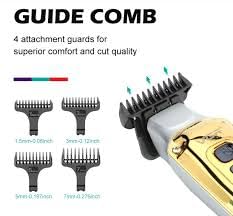
Image: Various cutting guide combs for different hair lengths.
5. Operation
5.1 Power On/Off
Press the power button once to turn the trimmer ON. Press it again to turn it OFF.
5.2 Adjusting Speed
While the trimmer is ON, use the speed control buttons (usually '+' and '-') to cycle through the available RPM settings (5500-7000 RPM). The current speed will be displayed on the LED screen.
5.3 Trimming Hair
Ensure hair is clean and dry. Select the desired cutting guide comb. Hold the trimmer with the blade flat against the skin and move it slowly against the direction of hair growth. For detailed trimming or outlining, remove the guide comb and use the bare blade carefully.
6. Maintenance and Cleaning
6.1 Cleaning the Blades
After each use, turn off the trimmer and remove any attached guide comb. Use the provided cleaning brush to remove loose hairs from the blade and the trimmer head. For a more thorough clean, the blade can be carefully detached (refer to specific instructions if provided in the physical manual for blade removal) and rinsed under running water. Ensure the blade is completely dry before reattaching.
6.2 Oiling the Blades
Regular oiling helps maintain blade sharpness and prolongs the life of your trimmer. After cleaning, apply 1-2 drops of the provided lubricating oil to the blades. Turn the trimmer on for a few seconds to distribute the oil evenly, then wipe off any excess.

Image: Close-up of the trimmer blade for maintenance reference.
7. Troubleshooting
| Problem | Possible Cause | Solution |
|---|---|---|
| Trimmer does not turn on. | Low battery or not charged. | Charge the trimmer fully. |
| Trimmer pulls hair or cuts poorly. | Blades are dull, dirty, or not oiled. | Clean and oil the blades. If issues persist, consider blade replacement. |
| Trimmer stops during use. | Battery is depleted. | Recharge the trimmer. |
| LED display shows warning (flashing yellow/red). | Blade current exceeds safe levels (yellow) or high current/battery temperature (red). | Turn off the trimmer, clean blades, and allow to cool. If red light persists during charging, disconnect immediately and contact support. |
8. Specifications
| Feature | Detail |
|---|---|
| Model Number | VGR V-931 |
| Blade Material | Ceramic & Powder Metallurgic Blades |
| Motor Speed | 5500-7000 RPM (Adjustable) |
| Battery Type | 1600mAh Lithium Battery |
| Runtime | Up to 240 minutes |
| Charging Time | Approx. 2.5 hours |
| Charging Interface | Type-C USB |
| Operation Mode | Corded & Cordless |
| Item Weight | 173 g |
| Product Dimensions | 15 x 4 x 4 cm |
| Country of Origin | China |
9. Warranty and Support
The VGR V-931 Professional Hair Trimmer comes with a 1-year warranty from the date of purchase. This warranty covers manufacturing defects under normal use. For warranty claims, technical support, or any inquiries, please contact VGR customer service:
- Email: customercare@vgrofficial.in
- Phone: 9667796740 (From 10:00 AM to 6:00 PM, Monday to Saturday)
- Website: www.vgrofficial.in
Please retain your proof of purchase for warranty validation.


