
1. Introduction
This manual provides essential instructions for the safe and effective use of your KFD 24V 1.5A Power Adapter, model TDW-1789-DE. This adapter is specifically designed to power the Yoocaa 12 Pods Hydroponics Growing System (model YO-SPD12-001), providing the necessary 24 Volts DC at 1.5 Amperes for its LED grow light and other components.
Please read this manual thoroughly before operating the device and retain it for future reference.
2. Safety Instructions
To ensure safe operation and prevent damage, observe the following safety precautions:
- Input Voltage: Ensure the wall outlet voltage is within the adapter's specified input range of 100-240V AC.
- Dry Environment: Use the adapter only in dry indoor environments. Avoid exposure to water, moisture, or high humidity.
- Ventilation: Do not cover the adapter during use, as this may lead to overheating.
- Cable Integrity: Regularly inspect the power cable for any signs of damage. Do not use if the cable or plug is damaged.
- Proper Connection: Ensure the adapter's output plug is securely and correctly connected to the hydroponics system.
- Built-in Protections: The adapter features multiple safety protections, including Over Voltage Protection (OVP), Over Current Protection (OCP), Short Circuit Protection (SCP), Over Load Protection, Over Temperature Protection, and Over Charger Protection. These features are designed to protect both the adapter and the connected device.

3. Package Contents
Verify that all items are present in the package:
- KFD 24V 1.5A Power Adapter (Model TDW-1789-DE)
- European Power Cable

4. Setup
Follow these steps to connect your power adapter to the Yoocaa Hydroponics Growing System:
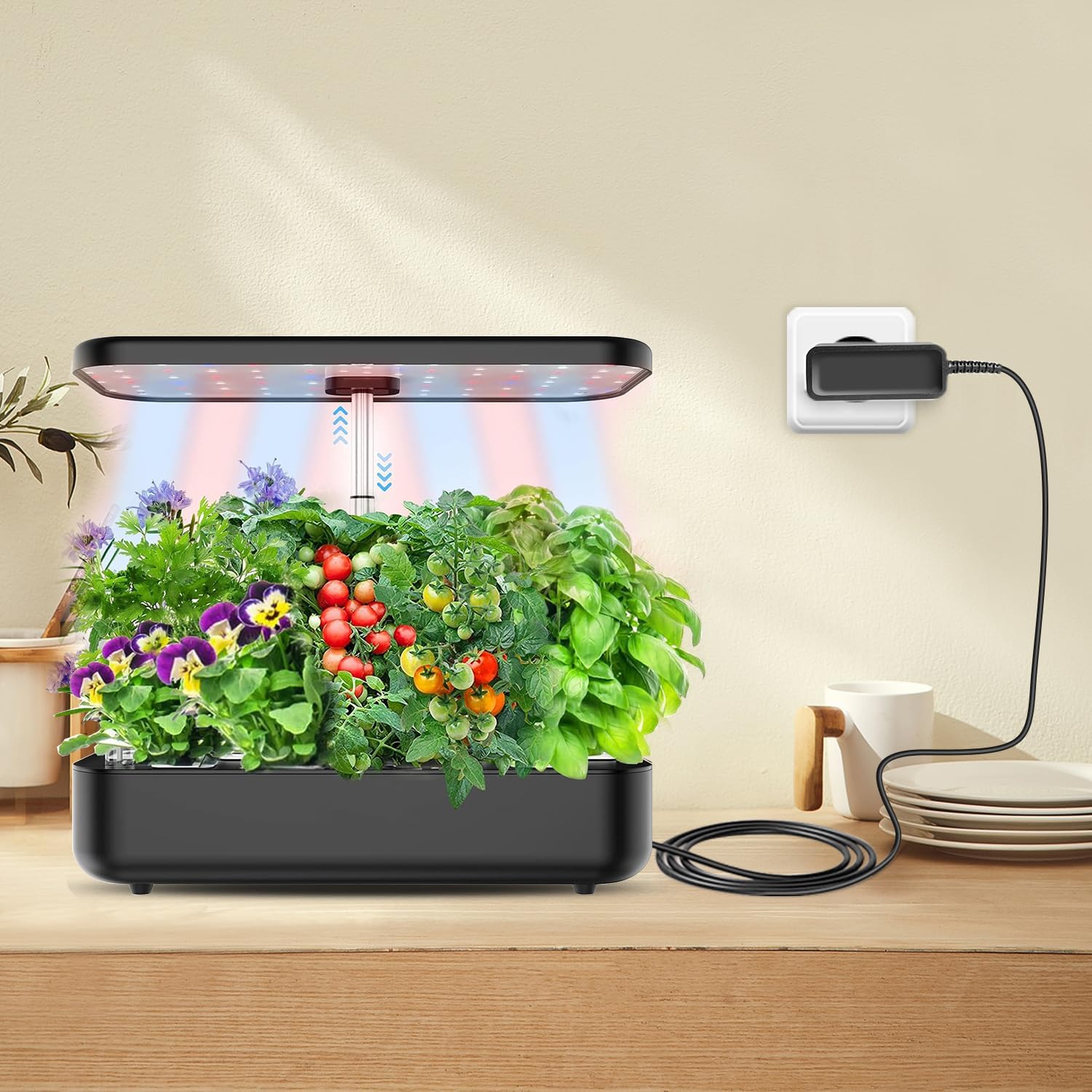
- Identify the Charging Interface: Locate the power input port on your Yoocaa 12 Pods Hydroponics Growing System. This is typically on the underside or back of the unit.
- Connect the Adapter: Insert the output plug of the KFD power adapter into the charging interface of the hydroponics system. Ensure a firm and secure connection.
- Plug into Wall Outlet: Insert the European power plug of the adapter into a standard 100-240V AC wall outlet.
- Verify Power: Once connected, the hydroponics system should receive power, and its indicators (e.g., LED grow lights) should activate according to the system's design.

5. Operating
The KFD 24V 1.5A Power Adapter functions as a continuous power supply for your Yoocaa Hydroponics Growing System. Once properly connected and plugged into a live electrical outlet, it will provide the necessary power to operate the system's components, such as the LED grow lights and water pump.
- Ensure the hydroponics system's power switch (if applicable) is in the 'ON' position.
- The adapter does not have user-adjustable settings; its operation is automatic upon connection to power.
6. Maintenance
Proper maintenance ensures the longevity and safe operation of your power adapter:
- Cleaning: Disconnect the adapter from the power outlet and the hydroponics system before cleaning. Use a soft, dry cloth to wipe the exterior. Do not use liquid cleaners or solvents.
- Storage: When not in use, store the adapter in a cool, dry place, away from direct sunlight and extreme temperatures.
- Cable Care: Avoid sharp bends, kinks, or excessive pulling on the power cable. While the cable is designed for durability with a 10,000+ bend lifespan, improper handling can still cause damage.
- Plug Durability: The nickel-plated metal plug is designed for anti-oxidation and to maintain a secure connection even after 5000 normal plugging cycles.


7. Troubleshooting
If you encounter issues with your power adapter, refer to the following common problems and solutions:
| Problem | Possible Cause | Solution |
|---|---|---|
| No power to hydroponics system |
|
|
| Hydroponics system not functioning correctly (e.g., dim lights) |
|
|
| Adapter feels excessively hot |
|
|
8. Specifications
| Brand | KFD |
| Model Number | TDW-1789-DE |
| Input Voltage | AC 100-240V, 50/60Hz |
| Output Voltage | DC 24V |
| Output Current | 1.5A |
| Power Output | 36W |
| Special Features | Short Circuit Protection, Over Voltage Protection (OVP), Over Current Protection (OCP), Over Load Protection, Over Temperature Protection, Over Charger Protection |
| Certifications | TUV, GS, CB, CE, UL, ROHS, FCC, REACH |
| Power Source | Corded Electric |
| Cable Length | Approx. 5.9 ft (1.8 meters) |
9. Warranty and Support
KFD is committed to providing high-quality power solutions. This product has been thoroughly tested to ensure superior performance and reliability.
- Warranty: This product comes with a 3-year warranty. Please retain your proof of purchase for warranty claims.
- Customer Support: For any questions, technical assistance, or warranty inquiries, please contact KFD customer support through your retailer or the official KFD website.

