
VILTROX AF 16mm F1.8 Z
VILTROX AF 16mm F1.8 Z Full Frame Lens User Manual
Model: AF 16mm F1.8 Z
1. Introduction
This manual provides detailed instructions for the safe and effective use of your VILTROX AF 16mm F1.8 Z Full Frame Lens. Please read this manual thoroughly before using the product to ensure optimal performance and longevity. This lens is designed for Nikon Z-Mount cameras, offering a wide-angle perspective with a large F1.8 aperture.
2. Safety Information
- Do not look at the sun or other strong light sources through the lens, as this may cause permanent vision damage.
- Keep the lens away from water and moisture to prevent damage to internal electronic components.
- Avoid dropping or subjecting the lens to strong impacts.
- Do not attempt to disassemble or repair the lens yourself. Contact authorized service personnel for repairs.
- Store the lens in a dry, cool place, away from direct sunlight and extreme temperatures.
- Keep out of reach of children.
3. Product Overview
The VILTROX AF 16mm F1.8 Z is a full-frame wide-angle prime lens featuring a fast F1.8 aperture, designed for Nikon Z-Mount mirrorless cameras. It incorporates advanced optical elements and a built-in LCD screen for convenient operation.
3.1 Lens Components
- Lens Hood: Reduces flare and protects the front element.
- Focus Ring: For manual focusing.
- Aperture Ring: Adjusts the lens aperture.
- LCD Display: Shows aperture, focus distance, and other shooting parameters.
- AF/MF Switch: Toggles between autofocus and manual focus.
- Function Buttons (Fn1, Fn2): Customizable buttons for quick access to camera functions.
- Click ON/OFF Switch: Enables or disables click stops on the aperture ring.
- Lens Mount: Connects the lens to the camera body.
- USB-C Port: For firmware updates.
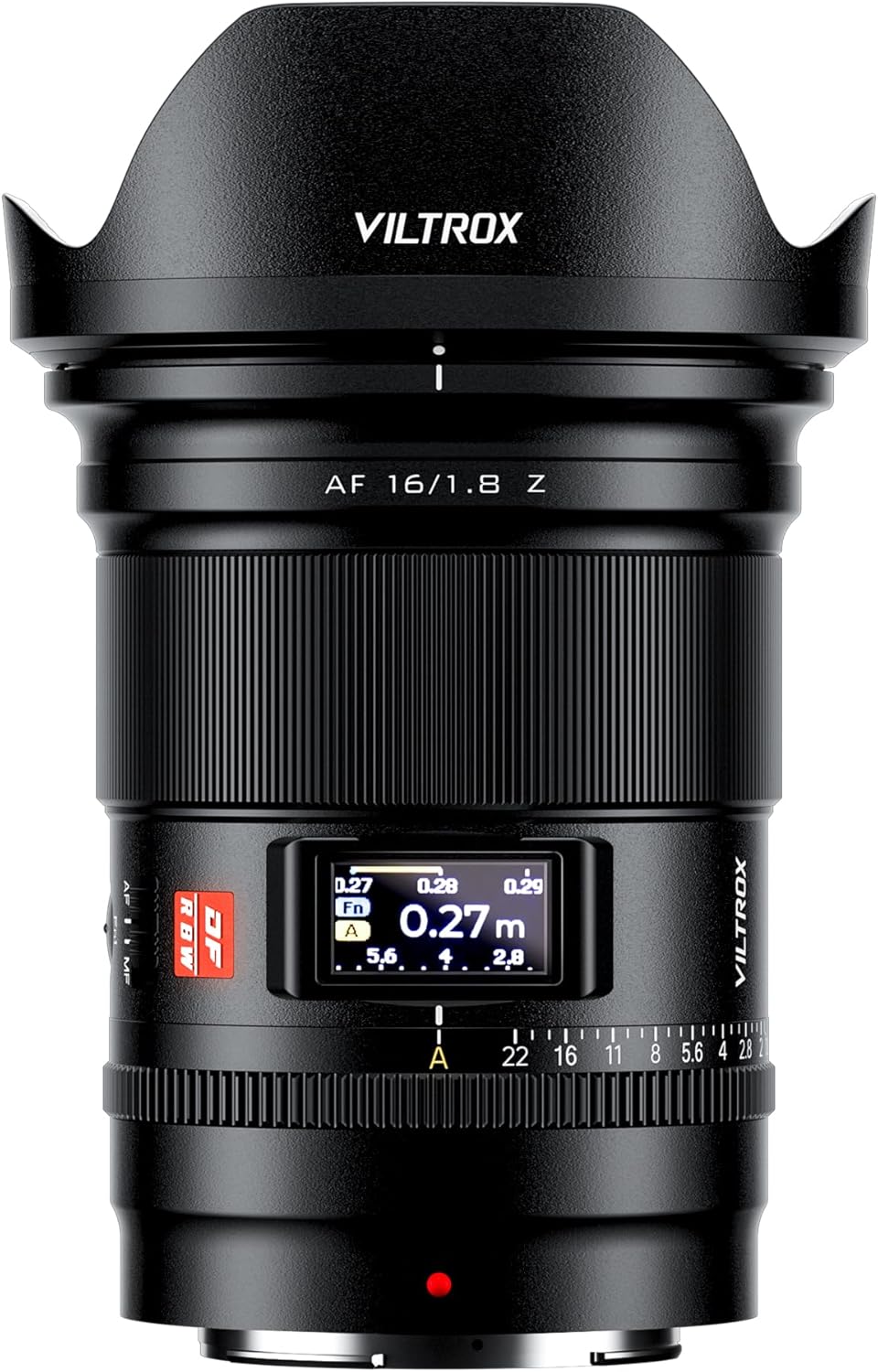
Figure 3.1: Front view of the VILTROX AF 16mm F1.8 Z lens with the lens hood attached.

Figure 3.2: Front view of the VILTROX AF 16mm F1.8 Z lens without the lens hood, showing the front element and filter thread.

Figure 3.3: Rear view of the VILTROX AF 16mm F1.8 Z lens, showing the Nikon Z-mount and the USB-C port.

Figure 3.4: Side view of the VILTROX AF 16mm F1.8 Z lens, highlighting the AF/MF switch and function buttons.

Figure 3.5: Detailed view of the lens controls, including the CLICK switch, LCD display, and Fn buttons.
4. Setup
4.1 Attaching the Lens
- Ensure both the camera and lens are powered off.
- Remove the rear lens cap and the camera body cap.
- Align the mounting mark on the lens (red dot) with the mounting mark on the camera body.
- Insert the lens into the camera mount and rotate it clockwise until it clicks into place.
- Attach the lens hood by aligning its mark with the mark on the front of the lens and rotating until it locks.

Figure 4.1: The VILTROX AF 16mm F1.8 Z lens correctly mounted on a Nikon Z-Mount camera body.
4.2 Detaching the Lens
- Ensure the camera is powered off.
- Press and hold the lens release button on the camera body.
- Rotate the lens counter-clockwise until it detaches from the camera body.
- Immediately attach the rear lens cap to the lens and the body cap to the camera to protect the sensors and lens elements.
4.3 Firmware Updates
The lens features a USB-C port for firmware updates. Visit the official VILTROX website (www.viltrox.com) for the latest firmware and instructions. Ensure the lens is connected to a computer and follow the provided update procedure.
5. Operation
5.1 Autofocus (AF) and Manual Focus (MF)
Use the AF/MF switch on the lens barrel to select between autofocus and manual focus modes. In AF mode, the lens utilizes an STM stepping motor for precise and quiet focusing, supporting face and eye detection where available on your camera.
Figure 5.1: Location of the AF/MF switch on the lens barrel.
5.2 Aperture Control
The lens features an aperture ring for direct control over the aperture. The CLICK ON/OFF switch allows you to enable or disable the click stops, providing smooth, stepless aperture changes for video recording or precise adjustments.
Figure 5.2: The CLICK ON/OFF switch and aperture ring for aperture control.
5.3 LCD Display
The built-in LCD display provides real-time information such as aperture value, focus distance, and depth of field. This allows for quick monitoring of key shooting parameters without needing to check the camera's screen.
Figure 5.3: The LCD display showing focus distance and aperture settings.
5.4 Function Buttons (Fn1, Fn2)
The two customizable function buttons (Fn1 and Fn2) can be assigned various camera functions through your camera's menu system. Refer to your camera's instruction manual for details on customizing these buttons.
Figure 5.4: Location of the Fn1 and Fn2 function buttons.
5.5 Optical Design and Performance
The lens features an optical design of 15 elements in 12 groups, including 3 aspherical elements and 4 ED (Extra-low Dispersion) glass elements. This construction aims to achieve high resolution from the center to the edges of the frame and effectively suppress chromatic aberrations and color fringing.

Figure 5.5: Exploded view illustrating the optical elements within the lens.
6. Maintenance
- Cleaning the Lens Surface: Use a soft, clean microfiber cloth specifically designed for optical lenses. For stubborn smudges, use a small amount of lens cleaning solution applied to the cloth, not directly to the lens.
- Cleaning the Lens Body: Wipe the lens body with a soft, dry cloth. Do not use organic solvents like paint thinner or benzene.
- Storage: When not in use, attach the front and rear lens caps and store the lens in a dry, well-ventilated area, away from direct sunlight and high temperatures. If storing for extended periods, place it in a sealed container with desiccant to prevent mold and mildew.
- Avoid Extreme Conditions: Protect the lens from sudden temperature changes, which can cause condensation. If condensation occurs, allow the lens to acclimatize gradually in a dry environment before use.
7. Troubleshooting
| Problem | Possible Cause | Solution |
|---|---|---|
| Lens not recognized by camera / Aperture not detected. | Improper mounting; dirty electrical contacts; firmware issue. |
|
| Autofocus is slow or inaccurate. | Low light conditions; subject lacks contrast; AF/MF switch in MF position; outdated firmware. |
|
| LCD display is blank or not functioning. | Camera not powered on; lens not properly mounted; display setting. |
|
| "Click" sound from aperture ring is absent or present when not desired. | CLICK ON/OFF switch position. | Adjust the CLICK ON/OFF switch on the lens barrel to the desired position. "ON" for click stops, "OFF" for stepless aperture. |
8. Specifications
| Model | AF 16mm F1.8 Z |
| Focal Length | 16mm |
| Maximum Aperture | F1.8 |
| Minimum Aperture | F16 |
| Lens Mount | Nikon Z |
| Format Compatibility | Full Frame |
| Optical Design | 15 Elements in 12 Groups (3 Aspherical, 4 ED) |
| Autofocus Motor | STM Stepping Motor |
| Minimum Focusing Distance | 0.27m (0.9ft) |
| Filter Size | 77mm |
| Dimensions (D x L) | Approximately 4.06 x 3.35 x 3.35 inches |
| Weight | Approximately 1.21 pounds (550g) |
| Included Accessories | Lens, Lens Hood, Front Lens Cap, Rear Lens Cap |
9. Warranty & Support
VILTROX products typically come with a limited warranty. Please refer to the warranty card included with your product for specific terms and conditions, including the warranty period and coverage details. Retain your proof of purchase for warranty claims.
For technical support, service, or inquiries, please visit the official VILTROX website or contact their customer service department:
- Official Website: www.viltrox.com
- Manufacturer: Shenzhen Jueying Technology Co., Ltd.
- Contact Information: Refer to the product packaging or official website for the most current contact details.
10. Product Videos
The following videos provide additional visual guidance and information about the VILTROX AF 16mm F1.8 Z lens.
No official seller videos are available for this product at this time.
Related documentsAF 16mm F1.8 Z


Ask a question about this manual
Ask about setup, troubleshooting, compatibility, parts, safety, or missing instructions. Manuals+ will review the question and use this page’s manual context to help answer it.