
DATOUBOSS 12V 3000W
DATOUBOSS 3000 Watts Pure Sine Wave Inverter User Manual
Model: 12V 3000W | Brand: DATOUBOSS
1. Introduction
The DATOUBOSS 3000-watt Pure Sine Wave Inverter is designed to convert 12V DC power to 110V/120V AC power, suitable for a wide range of applications including solar power systems, RVs, vehicles, and powering various home and office equipment. It features high conversion efficiency and comprehensive safety protections.
- Powerful and Efficient: Delivers a peak surge of 6000W with 95% conversion efficiency, outperforming modified sine wave inverters.
- Enhanced Safety Features: Utilizes high-frequency transformers and pure copper cables for stable power delivery. Includes dual 110V AC outlets.
- Robust Protection: Equipped with safeguards against under-voltage, over-voltage, overload, over-temperature, short-circuit, and reverse polarity. Features an integrated cooling fan system.
- Intuitive Monitoring: Large, high-definition LCD display shows real-time voltage and temperature. Includes a cooling fan and GFCI for operational safety.
- Versatile Applications: Housed in durable aircraft-grade aluminum alloy, suitable for solar power systems, RVs, vehicles, water pumps, home entertainment, and office equipment.
2. What's in the Box
Upon opening your DATOUBOSS 3000W Pure Sine Wave Inverter package, you should find the following items:
- User Manual
- 2*20-Inch Cables
- 3000 Watts Pure Sine Wave Inverter Unit

Figure 2.1: The DATOUBOSS 3000W Pure Sine Wave Inverter unit, along with the included red and black power cables and a remote control.
3. Setup and Installation
Proper setup is crucial for the safe and efficient operation of your inverter. Follow these steps carefully:
3.1 Unboxing and Inspection
Carefully remove all components from the packaging. Inspect the inverter and accessories for any signs of damage during transit. Ensure all listed items in "What's in the Box" are present.
3.2 Connecting to Power Source (Battery)
The inverter requires a 12V DC power source, typically a battery. Use the provided 4AWG cables for connection. Ensure the battery is adequately charged and capable of supplying the necessary current for your intended load.
- Identify the positive (+) and negative (-) terminals on both the inverter and your battery. The inverter's input terminals are robust, measuring 7.5mm for secure connections.
- Connect the red (positive) cable to the positive (+) terminal of the inverter. Secure it firmly with the provided nuts and washers.
- Connect the black (negative) cable to the negative (-) terminal of the inverter. Secure it firmly.
- Connect the other end of the red (positive) cable to the positive (+) terminal of your 12V battery.
- Connect the other end of the black (negative) cable to the negative (-) terminal of your 12V battery.
- Ensure all connections are tight and secure to prevent arcing or overheating.

Figure 3.1: Rear panel of the inverter with clearly marked positive and negative terminals for battery connection.

Figure 3.2: The dual fan design ensures effective heat dissipation for stable performance.
Video 3.1: A comprehensive overview of the DATOUBOSS Pure Sine Wave Inverter, including unboxing, component identification, and detailed steps for connecting the inverter to a battery and testing with various loads. This video demonstrates the setup process and highlights key features and safety functions.
4. Operating Instructions
Once the inverter is securely connected to your power source, you can begin operating it:
- Turn on the inverter using the power switch located on the rear panel. The LCD display will illuminate, showing battery voltage and output wattage.
- Plug your AC appliances into the dual 110V/120V AC outlets on the inverter. Ensure the total wattage of your appliances does not exceed the inverter's continuous power rating (3000W).
- Monitor the LCD display for real-time information on input voltage, output voltage, and power consumption.
- When finished, turn off the inverter before disconnecting any appliances or the battery.
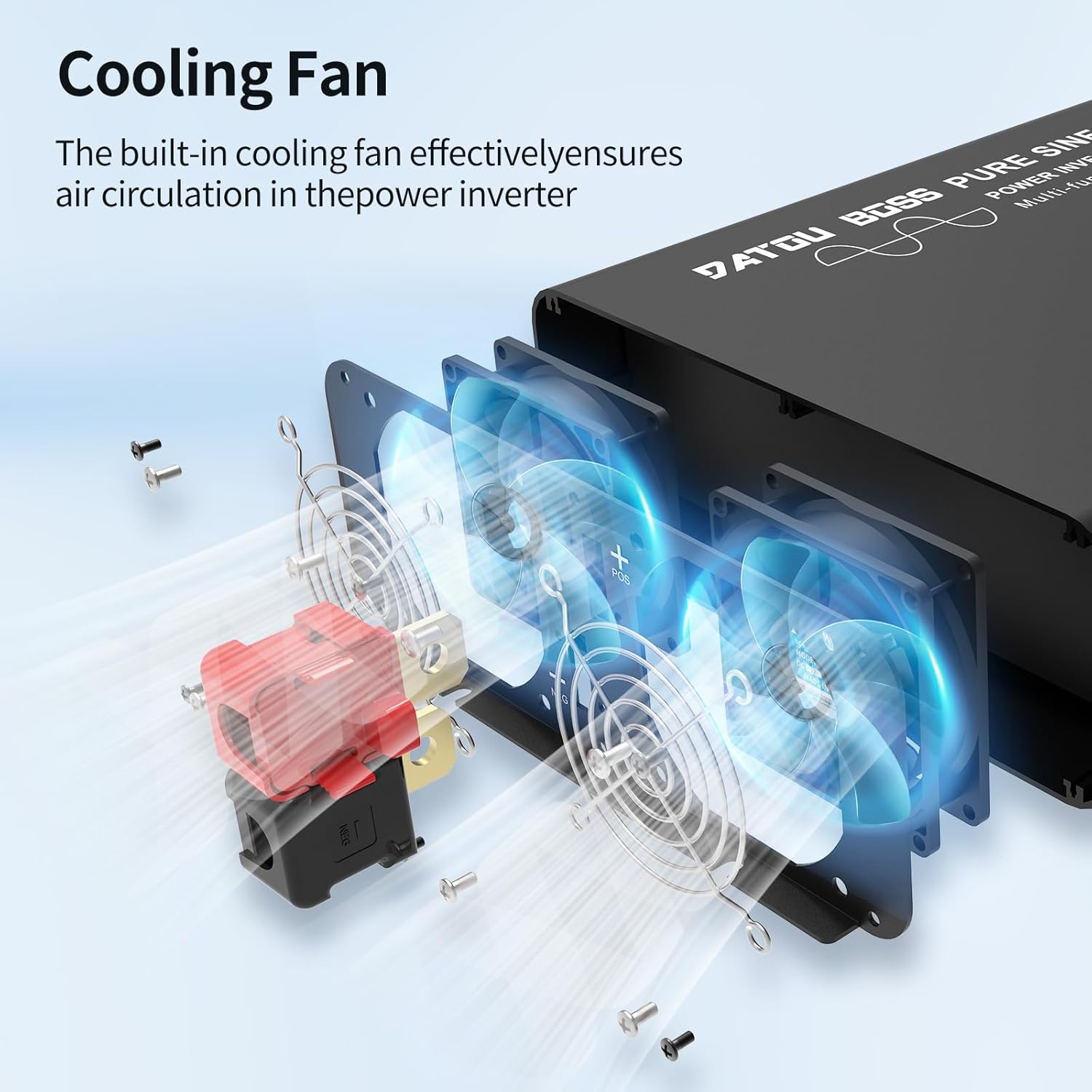
Figure 4.1: The inverter can power a wide array of devices, from small electronics to larger appliances.

Figure 4.2: Versatile applications for the inverter, providing power anytime and anywhere.
5. Maintenance
To ensure the longevity and optimal performance of your DATOUBOSS inverter, regular maintenance is recommended:
- Keep the inverter clean and free from dust and debris. Use a soft, dry cloth for cleaning.
- Ensure proper ventilation around the inverter. Do not block the cooling fan vents.
- Periodically check all cable connections to ensure they remain tight and free from corrosion.
- Store the inverter in a cool, dry place when not in use, away from direct sunlight and moisture.
6. Troubleshooting
This section provides solutions to common issues you might encounter with your inverter. For more complex problems, please contact customer support.
6.1 Common Issues and Solutions
| Problem | Possible Cause | Solution |
|---|---|---|
| No Power Output | Loose battery connections, low battery voltage, inverter switch off. | Check and tighten all connections. Recharge battery. Turn on inverter switch. |
| Overload Alarm | Connected appliance exceeds inverter's rated power. | Reduce the load by disconnecting some appliances. |
| Overheating Alarm | Poor ventilation, excessive load, high ambient temperature. | Ensure clear airflow around the inverter. Reduce load. Allow inverter to cool down. |
| Low Voltage Protection | Battery voltage drops below safe operating level. | Recharge or replace the battery. |
| Short Circuit Protection | Short circuit detected in the output. | Disconnect all loads and check for short circuits in wiring or appliances. |
6.2 Protection Feature Demonstrations
The inverter is equipped with several automatic protection features to ensure safe operation. These are demonstrated in the video below:
- Low Voltage Protection: The inverter will shut down if the input DC voltage drops too low, protecting your battery from deep discharge.
- Over Voltage Protection: The inverter will shut down if the input DC voltage exceeds a safe limit, protecting the unit from damage.
- Overload Protection: If the connected load exceeds the inverter's capacity, it will shut down to prevent damage.
- Short Circuit Protection: In case of a short circuit in the output, the inverter will immediately cut power to prevent hazards.
- Overheating Protection: The internal cooling fans activate to prevent overheating. If temperatures continue to rise, the inverter will shut down.

Figure 6.1: Visual representation of the inverter's comprehensive safety protection system.
7. Specifications
Detailed technical specifications for the DATOUBOSS 3000W Pure Sine Wave Inverter:
| Specification | Value |
|---|---|
| Brand | DATOUBOSS |
| Model Name | 3000 Watt Inverter |
| Item Model Number | 12V 3000W |
| Wattage | 3000 watts |
| Peak Power | 6000W |
| Input Voltage | 12V DC |
| Output Voltage | 110V/120V AC |
| Power Source | Solar and Battery Powered |
| Recommended Uses | Vehicle, Office, RV, Car, Truck, Power Converter, Home |
| Package Dimensions | 20 x 13.5 x 8 inches |
| Item Weight | 16.46 pounds |
| Date First Available | July 27, 2021 |

Figure 7.1: Physical dimensions of the inverter for planning installation space.
8. Warranty and Support
For warranty information, technical support, or service inquiries, please refer to the contact details provided on the product packaging or visit the official DATOUBOSS website. Keep your purchase receipt as proof of purchase for warranty claims.
Related documents12V 3000W


Ask a question about this manual
Ask about setup, troubleshooting, compatibility, parts, safety, or missing instructions. Manuals+ will review the question and use this page’s manual context to help answer it.