
1. Introduction
Welcome to the Shark Stratos Cordless Stick Vacuum Cleaner user manual. This document provides essential information for the safe and efficient operation, maintenance, and troubleshooting of your IZ400EUTBK model. The Shark Stratos is designed for powerful cleaning across various surfaces, featuring advanced technologies like PowerFins Plus, Clean Sense IQ, and Anti-Hair Wrap.
2. Important Safety Information
Please read all instructions carefully before using your Shark Stratos vacuum cleaner. Failure to follow these instructions may result in electric shock, fire, or serious injury.
- Always unplug the charger from the electrical outlet when not in use and before cleaning.
- Do not use outdoors or on wet surfaces.
- Do not allow to be used as a toy. Close attention is necessary when used by or near children.
- Use only as described in this manual. Use only manufacturer’s recommended attachments.
- Do not handle plug or vacuum cleaner with wet hands.
- Do not put any object into openings. Do not use with any opening blocked; keep free of dust, lint, hair, and anything that may reduce airflow.
- Keep hair, loose clothing, fingers, and all parts of body away from openings and moving parts.
- Use extra care when cleaning on stairs.
- Do not use to pick up flammable or combustible liquids, such as gasoline, or use in areas where they may be present.
- Do not pick up anything that is burning or smoking, such as cigarettes, matches, or hot ashes.
- Do not use without dust cup and/or filters in place.
3. Package Contents
Your Shark Stratos IZ400EUTBK package includes the following components:
- Shark Stratos Cordless Stick Vacuum Cleaner (EU plug)
- 1 Lithium-ion Battery
- Charging Station
- Car Detail Kit
- Pet Accessories
- Crevice Tool
- Multi-Surface Tool
- Anti-Allergen Brush
- Storage Bag
4. Assembly
Follow these general steps to assemble your Shark Stratos vacuum cleaner. Refer to the included quick start guide for detailed diagrams.
- Insert the wand into the floor nozzle until it clicks securely into place.
- Insert the handheld vacuum into the top of the wand until it clicks securely into place.
- Ensure all connections are firm before use.
5. Key Features
5.1. Clean Sense IQ Technology
The Clean Sense IQ technology automatically detects dirt and adjusts cleaning power to pick up to 50% more dirt compared to the Shark IZ400EUT in ECO mode. This ensures optimal cleaning performance on various debris levels.

Image: The vacuum head with Clean Sense IQ technology detecting dirt and adjusting power.
5.2. DuoClean + PowerFins Plus
This system combines two brush-rolls in one head to clean all floor types. The PowerFins Plus brush-roll is specifically designed to pick up more hair and fine debris, gliding seamlessly from carpets to hard floors.
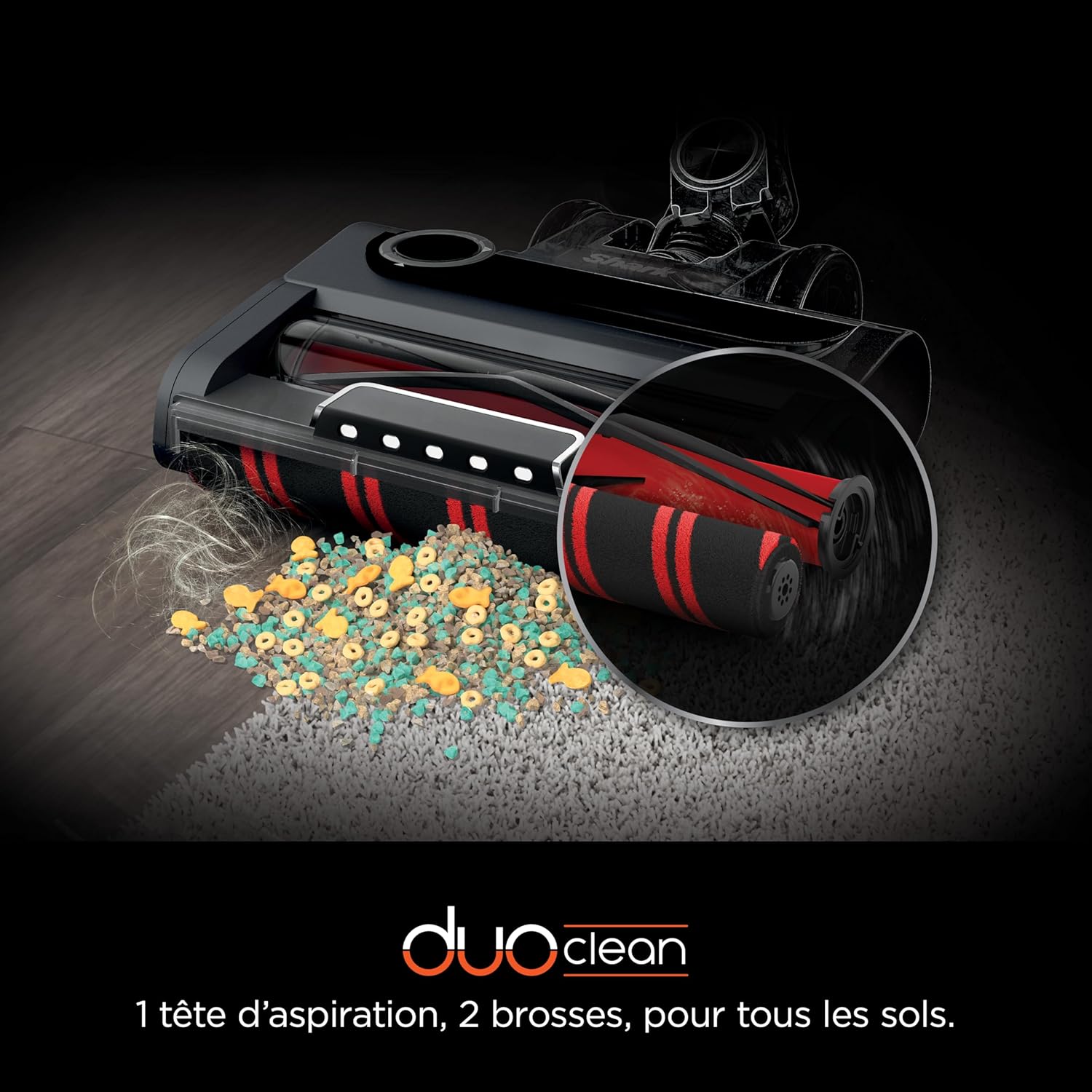
Image: Close-up of the DuoClean PowerFins Plus brush-rolls, demonstrating their ability to pick up various debris on different surfaces.
5.3. Anti-Hair Wrap Technology
The Anti-Hair Wrap feature actively removes hair and pet fur from the brush-roll as you clean, preventing tangles and maintaining consistent performance.

Image: The Anti-Hair Wrap brush-roll mechanism, designed to prevent hair tangles.
5.4. Flexology
The flexible wand allows you to reach under furniture with ease and folds for compact, freestanding storage. This design enhances maneuverability and convenience.

Image: A user demonstrating the Flexology feature to clean under low-lying furniture.
5.5. Anti-Allergen Complete Seal
The Anti-Allergen Complete Seal system captures 99.9% of dust and allergens inside the vacuum, preventing them from being released back into the air. This is beneficial for allergy sufferers.

Image: Visual representation of the Anti-Allergen Complete Seal system, showing how it traps dust and allergens.
5.6. Up to 60 Minutes Run Time
The removable Lithium-ion battery provides up to 60 minutes of run time (in ECO mode with a non-motorized tool). The battery can be charged on or off the vacuum for convenience.

Image: The removable battery being charged separately from the vacuum.
6. Operating Instructions
6.1. Powering On/Off
Press the power button located on the handheld unit to turn the vacuum on or off.
6.2. Mode Selection
Use the mode selection buttons to switch between different cleaning modes: Carpet mode for deep cleaning carpets and Hard Floor mode for gentle cleaning on hard surfaces. The Clean Sense IQ will automatically adjust power within these modes.
6.3. Handheld Conversion
To convert to a handheld vacuum, press the release button on the wand and detach the handheld unit. Attach desired accessories for targeted cleaning of stairs, upholstery, or car interiors.

Image: The versatile use of the Shark Stratos, including its conversion to a handheld vacuum for various cleaning tasks.
6.4. Official Product Video
Watch this video for a visual guide on the features and operation of the Shark Stratos Cordless Stick Vacuum.
Video: An overview of the Shark Stratos cordless vacuum cleaner, highlighting its key features and ease of use.
7. Maintenance
Regular maintenance ensures optimal performance of your Shark Stratos vacuum cleaner.
7.1. Emptying the Dust Cup
Empty the dust cup after each use or when the debris reaches the MAX fill line. Press the dust cup release button and hold it over a trash bin, then press the empty lever to release the bottom flap.
7.2. Cleaning Filters
The vacuum uses foam filters. Rinse filters with cold water only. Allow them to air dry completely for at least 24 hours before reinstalling. Refer to the full manual for recommended cleaning frequency.
7.3. Cleaning Brush-rolls
Periodically check the brush-rolls for any debris or hair buildup. While the Anti-Hair Wrap technology minimizes tangles, occasional inspection is recommended. Remove any stubborn debris manually.
8. Troubleshooting
If you encounter any issues with your Shark Stratos vacuum, refer to the following common solutions:
- Vacuum not turning on: Ensure the battery is fully charged and correctly inserted. Check if the power button is pressed firmly.
- Loss of suction: Check the dust cup for fullness and empty if necessary. Inspect filters for blockage and clean them. Ensure all connections (wand to nozzle, handheld to wand) are secure.
- Brush-roll not spinning: Check for obstructions in the brush-roll area. Ensure the vacuum is in the correct mode for the surface (e.g., Carpet mode for carpets).
- Short run time: Ensure the battery is fully charged. Run time varies based on power mode and accessory usage. Using boost mode or motorized accessories will reduce run time.
For more detailed troubleshooting, please visit the Shark support website or contact customer service.
9. Specifications
| Model Number | IZ400EUTBK |
| Dimensions (L x W x H) | 27 x 17 x 114 cm |
| Weight | 5.11 Kilograms |
| Power Source | Battery Powered |
| Battery Type | Lithium-ion |
| Voltage | 25.2 Volts |
| Run Time | Up to 60 minutes (in ECO mode with non-motorized tool) |
| Charge Time | 4 hours |
| Filter Type | Foam |
| Noise Level | 80 Decibels |
| Recommended Surface | Carpets, Hard Floors, Indoor, Car Interior, All Floors |
10. Warranty and Support
Your Shark Stratos vacuum cleaner comes with a 5-year warranty upon registration with Shark. The battery is covered by a 2-year warranty. Please register your product on the official Shark website to activate your warranty.
For further assistance, product registration, or to purchase accessories, please visit the official Shark website: Shark Official Store


