
Introduction
This manual provides essential information for the safe and efficient use of your Philips 1000 Series DST1040/30 Steam Iron. Designed for effective crease removal, this 2000W steam iron features a non-stick soleplate, variable steam settings, and a 250ml water tank. Please read these instructions carefully before first use and retain them for future reference.
- Powerful Performance: Up to 2000W power for quick heating and efficient ironing.
- Variable Steam Settings: Delivers continuous steam up to 20g/min and a 90g steam boost for stubborn creases.
- Non-stick Soleplate: Ensures smooth gliding on all fabric types.
- Convenient Design: Features a large 250ml water tank for fewer refills and a slim tip for hard-to-reach areas.
- Hygienic and Safe: Designed to remove 99.99% bacteria in 10 seconds and includes a calc-clean solution for longevity.
Important Safety Information
Always follow basic safety precautions when using electrical appliances to reduce the risk of fire, electric shock, and personal injury.
- Read all instructions before use.
- Do not leave the iron unattended while it is connected to the mains or on an ironing board.
- Keep the iron and its cord out of reach of children and pets when it is switched on or cooling down.
- Do not immerse the iron, power cord, or plug in water or other liquids.
- Ensure the voltage indicated on the iron corresponds to your local mains voltage before connecting.
- Always unplug the iron from the electrical outlet before filling or emptying water, and when not in use.
- Use the iron only for its intended purpose as described in this manual.
- Do not operate any appliance with a damaged cord or plug, or after the appliance malfunctions or has been dropped or damaged in any manner.
- The soleplate of the iron can become extremely hot and cause burns. Avoid direct contact with the hot soleplate.
- Place the iron on a stable, heat-resistant surface when resting.
Product Components
Familiarize yourself with the parts of your Philips 1000 Series Steam Iron.
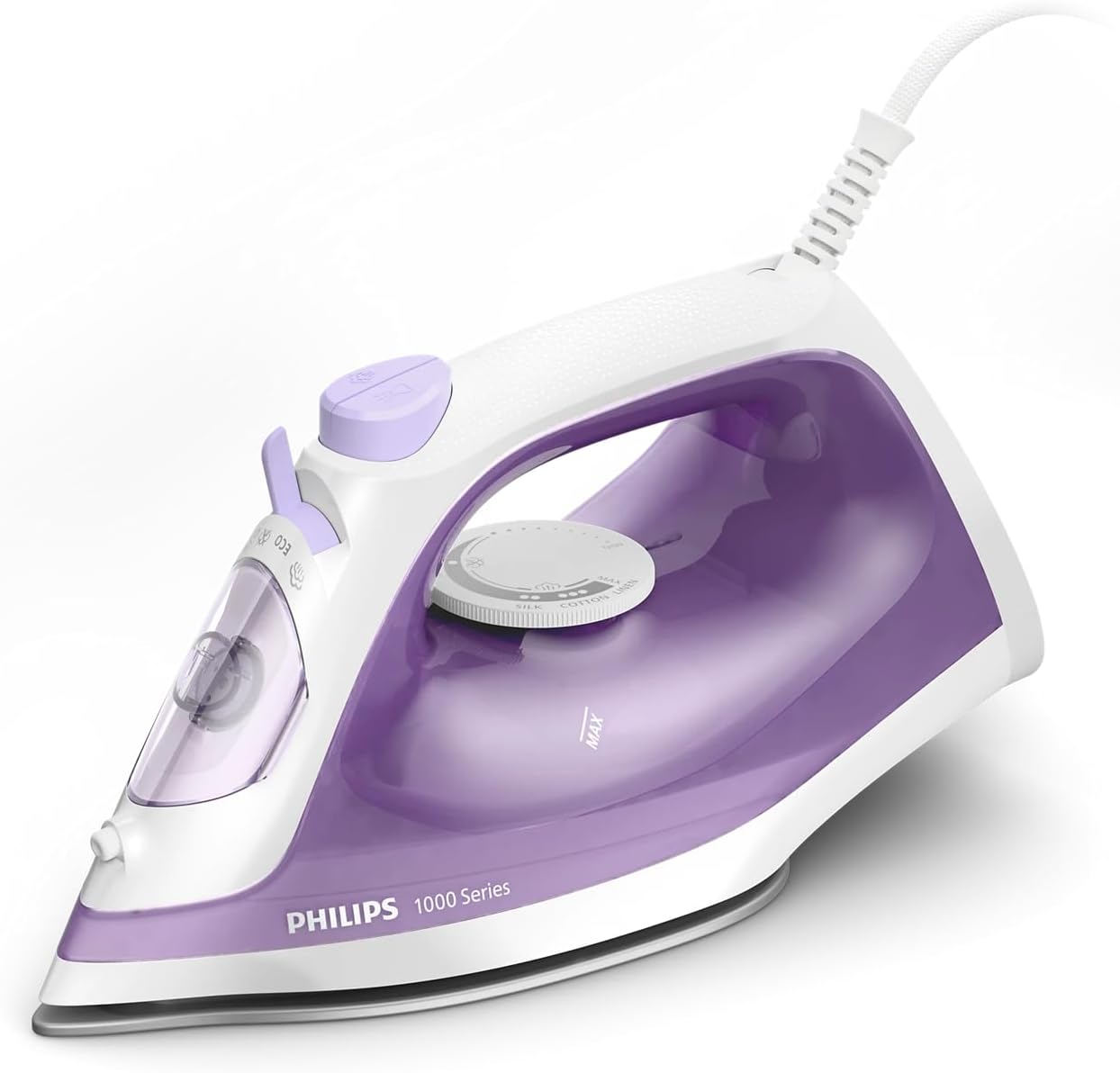
Figure 1: Overview of the Philips 1000 Series DST1040/30 Steam Iron, showing the water tank, soleplate, temperature dial, and steam controls.
- Water filling inlet with cover
- Spray nozzle
- Steam boost button
- Spray button
- Steam control slider (Dry ironing, Eco, Max)
- Temperature dial
- Indicator light
- Non-stick soleplate
- Power cord
Setup
Before using your steam iron for the first time, follow these steps:
- Unpack: Remove all packaging materials and labels from the iron.
- Initial Cleaning: Wipe the soleplate with a soft, damp cloth to remove any manufacturing residues.
- Fill Water Tank: Ensure the iron is unplugged. Open the water filling inlet cover and fill the 250ml water tank with tap water up to the 'MAX' mark. Do not overfill. Close the cover securely.

Figure 2: Image showing the large 250ml water tank of the Philips 1000 Series Steam Iron, indicating its capacity for fewer refills during use.
- First Use (Dry Ironing): Plug the iron into a grounded wall socket. Set the steam control slider to the 'Dry ironing' position. Turn the temperature dial to the 'MAX' setting. Allow the iron to heat up until the indicator light turns off, signaling it has reached the set temperature. Iron an old piece of fabric for a few minutes to remove any remaining residues.
Operating Instructions
Temperature and Steam Selection
Always check the garment's care label for recommended ironing temperature. Sort fabrics by type and iron those requiring lower temperatures first.
- Dry Ironing: Set the steam control slider to 'Dry ironing'. Select the desired temperature using the temperature dial.
- Steam Ironing: Ensure the water tank is filled. Set the steam control slider to 'Eco' for moderate steam or 'Max' for maximum continuous steam (20g/min). Select the appropriate temperature for your fabric (usually higher settings are required for steam). Wait for the indicator light to turn off before starting to iron.

Figure 3: Top-down view of the Philips 1000 Series Steam Iron on a garment, illustrating its 2000W steam power for effective ironing.
Steam Boost Function
For stubborn creases, press the steam boost button. This delivers a powerful 90g shot of steam. Wait a few seconds between shots to allow the iron to reheat and produce optimal steam.

Figure 4: The Philips 1000 Series Steam Iron emitting a powerful 90g steam boost to remove stubborn creases from a blue fabric.
Vertical Steaming
The iron can be used to refresh hanging garments, curtains, or delicate fabrics. Hold the iron vertically, close to the fabric, and press the steam boost button. Do not let the soleplate touch the fabric directly.

Figure 5: The Philips 1000 Series Steam Iron being used in a vertical position to steam a hanging garment, showcasing its vertical steam function.
Spray Function
For dampening fabrics or tackling stubborn wrinkles, press the spray button to release a fine mist of water.
Non-stick Soleplate
The specially coated non-stick soleplate allows for smooth gliding over various fabrics. Avoid ironing over zippers, metal buttons, or sharp objects to prevent scratching the soleplate.

Figure 6: Close-up view of the Philips 1000 Series Steam Iron's non-stick soleplate, highlighting its smooth surface for effortless gliding.
Maintenance
Regular maintenance ensures optimal performance and extends the life of your iron.
After Each Use
- Unplug the iron and allow it to cool down completely.
- Empty any remaining water from the water tank.
- Wipe the soleplate and the outer casing with a soft, damp cloth. Do not use abrasive cleaners or scouring pads.
- Store the iron upright on its heel rest to prevent soleplate damage.
Calc-Clean Solution
To maintain steam performance and prevent calc build-up, use the integrated calc-clean function periodically (e.g., once a month, depending on water hardness and usage frequency). Refer to the full product manual for detailed instructions on performing the calc-clean procedure.
Troubleshooting
If you encounter issues with your iron, consult the following common problems and solutions:
| Problem | Possible Cause | Solution |
|---|---|---|
| Iron does not heat up. | Not plugged in; power outlet fault; temperature dial set to 'OFF' or too low. | Ensure the iron is securely plugged into a working outlet. Check the circuit breaker. Turn the temperature dial to a suitable setting. |
| No steam or insufficient steam. | Water tank empty; temperature too low for steam; steam control slider set to 'Dry ironing'; calc build-up. | Fill the water tank. Set the temperature dial to a steam-appropriate setting (e.g., cotton, linen). Set the steam control slider to 'Eco' or 'Max'. Perform the calc-clean procedure. |
| Water leaks from the soleplate. | Temperature too low for steam; steam function used while iron is not hot enough; overfilling water tank. | Ensure the iron is fully heated before using steam. Set the temperature to a higher setting. Do not overfill the water tank. |
| Water spray function not working. | Water tank empty; spray nozzle clogged. | Fill the water tank. Check if the spray nozzle is clear; gently clean if necessary. |
| Iron leaves marks on fabric. | Soleplate dirty; incorrect temperature for fabric; residues from previous ironing. | Clean the soleplate. Adjust temperature according to fabric type. Iron an old cloth first. |
If the problem persists after trying these solutions, please contact Philips customer support.
Specifications
| Feature | Specification |
|---|---|
| Brand | Philips |
| Model Name | DST1040/30 |
| Wattage | 2000 watts |
| Continuous Steam Output | 20g/min |
| Steam Boost | 90g/min |
| Water Tank Capacity | 250ml |
| Soleplate Type | Non-stick |
| Product Dimensions (L x W) | 26L x 11.1W centimetres |
| Item Weight | 0.89 Kilograms |
| Voltage | 220 Volts |
| Frequency | 50 Hz |
| Color | Purple & White |
| Base Material | Stainless Steel |
| Country of Origin | China |
Warranty and Support
Your Philips 1000 Series DST1040/30 Steam Iron comes with a 2-year worldwide guarantee from the date of purchase. This warranty covers manufacturing defects under normal use.
For warranty claims, technical support, or further assistance, please contact Philips customer service in your region. Keep your proof of purchase (receipt or invoice) for warranty validation.
You can find contact information for Philips customer support on the official Philips website or through the documentation included with your product.


