
1. Introduction
The DEWIN FNB58 is a professional USB tester designed for comprehensive monitoring and analysis of USB power delivery. This device integrates USB-A, Micro USB, and Type-C interfaces, making it compatible with a wide range of devices. It provides precise measurements of voltage, current, power, capacity, and supports various fast charging protocols. This manual provides detailed instructions for setup, operation, and maintenance of your FNB58 USB Tester.
2. Safety Information
- Do not expose the device to moisture or extreme temperatures.
- Avoid dropping or subjecting the device to strong impacts.
- Do not attempt to disassemble or modify the device, as this will void the warranty and may cause damage or injury.
- Ensure proper connection of cables to avoid short circuits or damage to connected devices.
- Use the device within its specified voltage and current limits (4-28V, 0-7A).
3. Product Overview
The FNB58 USB Tester features a durable CNC aluminum shell and a 2.0-inch IPS display for clear readability. It is equipped with multiple ports and function keys for versatile operation.
3.1 Device Components

Figure 3.1: FNB58 USB Tester with labeled ports and controls.
- Type-C Input: For connecting to a power source or device under test.
- Micro Input: For connecting to a power source or device under test via Micro USB.
- Type-C Output: For connecting to a device to be charged or tested.
- PD ON/OFF Switch: Power Delivery control switch.
- USB-A Output: For connecting to a device to be charged or tested via USB-A.
- USB-A Input: For connecting to a power source or device under test via USB-A.
- PC Interface: For connecting to a computer for software interaction.
- Function Keys: Used for navigation and selection within the device menu.
- BACK Button: Used to return to the previous menu or screen.
3.2 Display Features

Figure 3.2: Key features displayed on the FNB58 USB Tester screen.
- 2.0-inch IPS HD Display: Provides a clear, wide-angle view of all data.
- Multi-Digit Display: Shows voltage, current, and power with up to six digits for high precision.
- Real-time Monitoring: Displays VBUS, IBUS, PBUS, and temperature.
- Graphical Curves: Supports displaying voltage and current curves over time.
4. Specifications
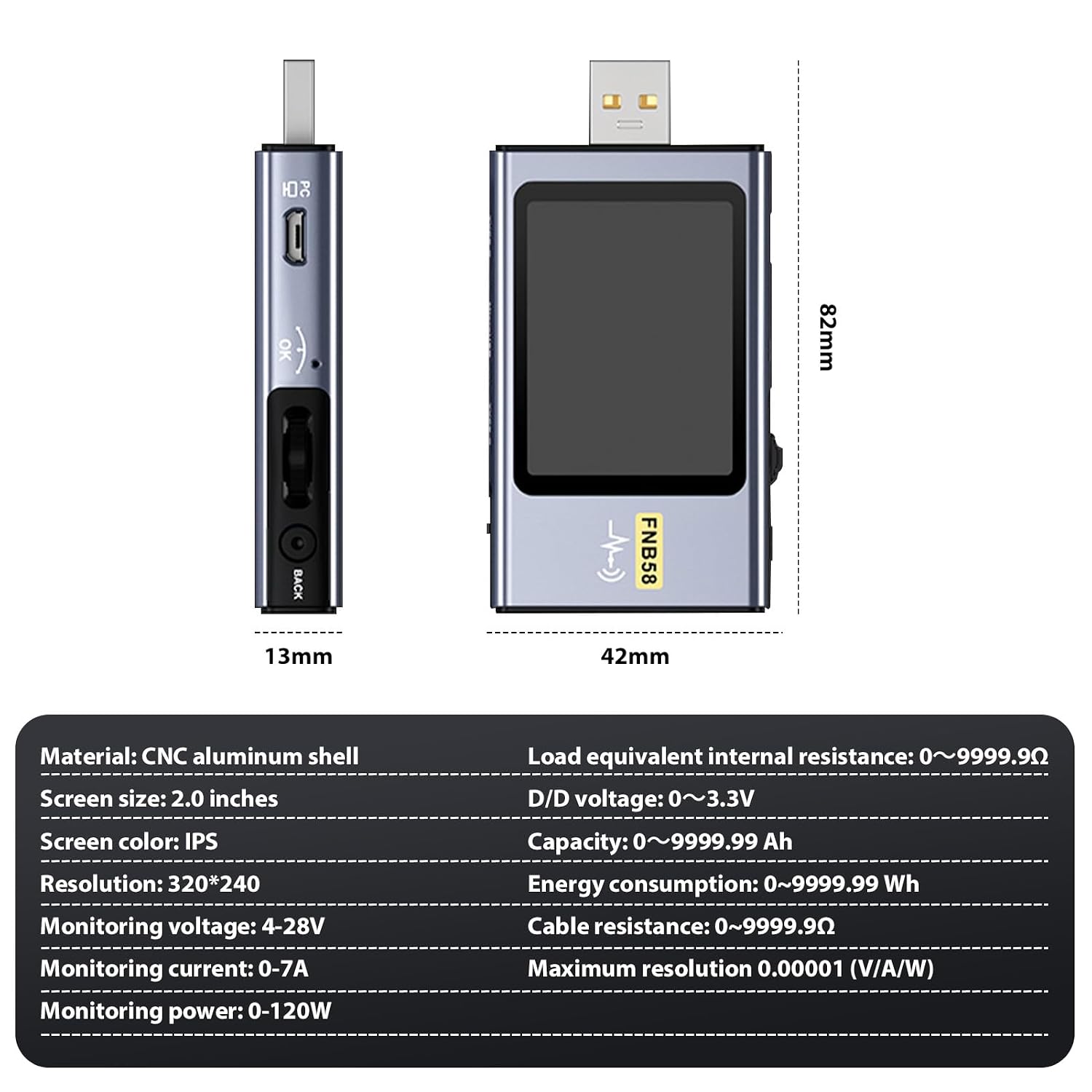
Figure 4.1: FNB58 USB Tester detailed specifications.
| Feature | Specification |
|---|---|
| Material | CNC Aluminum Shell |
| Screen Size | 2.0 inches IPS |
| Resolution | 320*240 |
| Monitoring Voltage | 4-28V |
| Monitoring Current | 0-7A |
| Monitoring Power | 0-120W |
| Load Equivalent Internal Resistance | 0-9999.9Ω |
| D+/D- Voltage | 0-3.3V |
| Capacity | 0-9999.99 Ah |
| Energy Consumption | 0-9999.99 Wh |
| Cable Resistance | 0-9999.9Ω |
| Maximum Resolution | 0.00001 (V/A/W) |
| Product Size (excluding male head) | 7.07 x 4.25 x 1.34 cm |
| Weight | 87 Grams |
5. Setup
To begin using your FNB58 USB Tester, follow these simple steps:
- Connect to Power Source: Plug the USB-A, Micro USB, or Type-C input of the FNB58 tester into a power source (e.g., wall charger, power bank, computer USB port).
- Connect Device Under Test: Plug the device you wish to test (e.g., smartphone, tablet, USB fan) into the corresponding output port (USB-A or Type-C) on the FNB58 tester.
- Power On: The device will automatically power on and display real-time measurement data.
6. Operating Instructions
6.1 Basic Navigation
Use the Function Keys (rocker switch) to navigate through menus and select options. Press the BACK button to return to the previous screen or menu.
6.2 Real-time Data Monitoring

Figure 6.1: Real-time data display on the FNB58 USB Tester.
Upon connection, the main screen will display real-time values for:
- VBUS: Bus Voltage (Volts)
- IBUS: Bus Current (Amperes)
- PBUS: Bus Power (Watts)
- TEMP: Device Temperature (Celsius)
6.3 Fast Charge Protocol Detection

Figure 6.2: Fast charge protocol detection interface.
The FNB58 supports detection of various fast charging protocols. To access this feature:
- Navigate to the "Protocol TST" or similar menu option using the function keys.
- The tester will automatically detect and display supported protocols such as QC2.0/QC3.0, FCP/SCP, AFC, PD2.0/3.0, VOOC/WARP, and Super VOOC 1.0/2.0.
- You can also trigger specific protocols to test charger compatibility.
6.4 Data Recording and Capacity Calculation
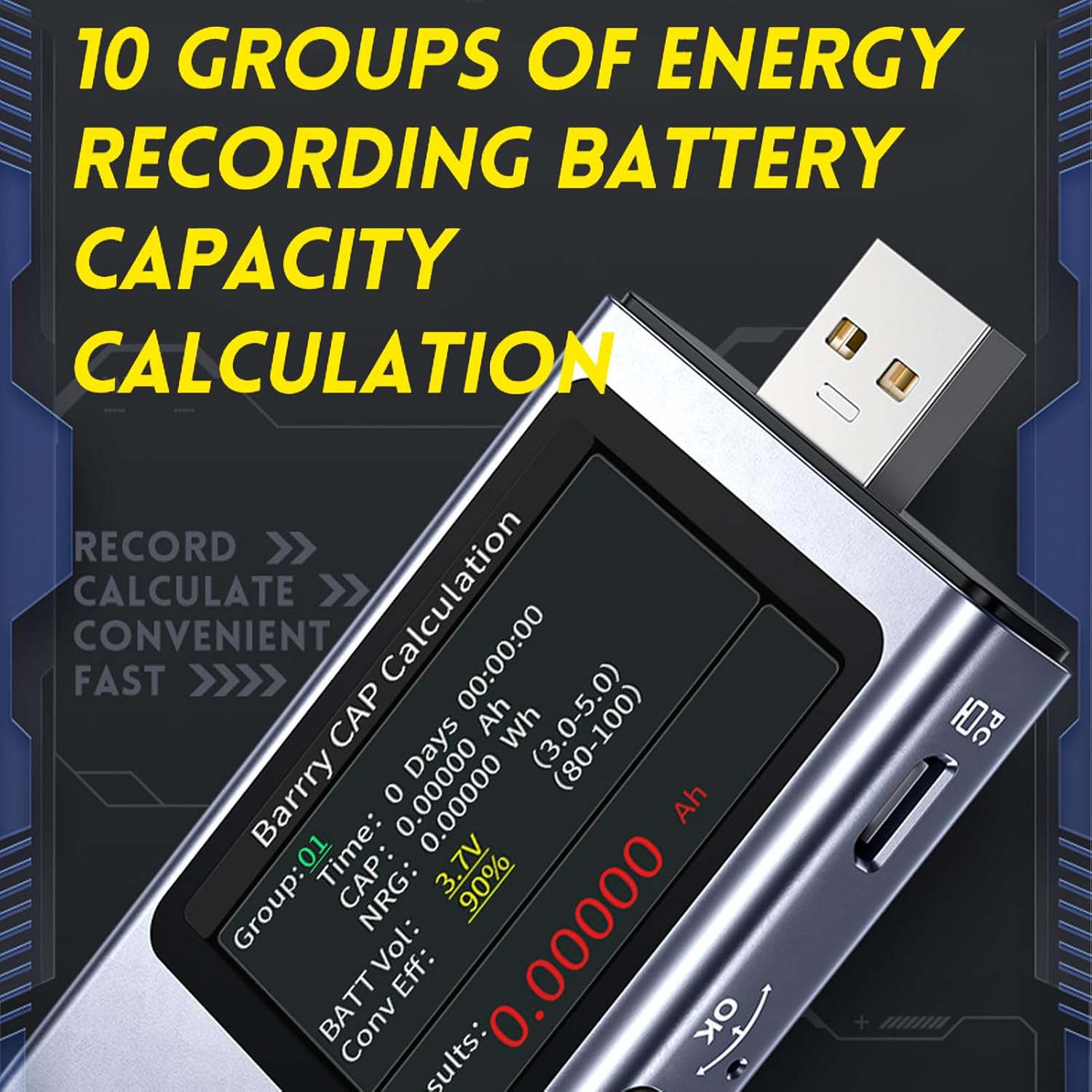
Figure 6.3: Data recording and capacity calculation screen.
The FNB58 can store up to 10 sets of statistical data for capacity, performance, and time. It also provides a set of voltage and current curve records with a maximum recording duration of 9 hours.
- Navigate to the "Data Record" or "Capacity" menu.
- Select an empty data group to start a new recording.
- The device will record cumulative capacity (Ah) and energy consumption (Wh) over time.
- You can switch between the 10 data sets to view different measurement sessions.
6.5 Bluetooth Connectivity and PC Software
The FNB58 supports Bluetooth connectivity for use with a mobile application and PC software. This allows for driver-free installation, data synchronization, and advanced monitoring features, including over-voltage and over-current alarms.
- Download the official DEWIN FNB58 application for your smartphone or PC.
- Enable Bluetooth on your device and pair it with the FNB58 tester.
- Follow the on-screen instructions in the app/software to view real-time data, analyze curves, and configure settings.
6.6 Cable Resistance Measurement
The tester can measure the internal resistance of cables using the differential pressure method. This helps in identifying inefficient or faulty cables that may hinder charging performance.
7. Maintenance
- Cleaning: Use a soft, dry cloth to clean the device. Do not use abrasive cleaners or solvents.
- Storage: Store the device in a cool, dry place away from direct sunlight and extreme temperatures.
- Handling: Handle the device with care to prevent physical damage to the screen or ports.
8. Troubleshooting
| Problem | Possible Cause | Solution |
|---|---|---|
| Device does not power on. | No power input or faulty connection. | Ensure the tester is properly connected to a working power source. Try a different cable or power source. |
| Inaccurate readings. | Poor cable connection, faulty cable, or device malfunction. | Check all connections. Try a different USB cable. Ensure the device is within operating specifications. |
| Fast charge detection fails. | Charger or device does not support the protocol, or connection issue. | Verify that both the charger and the device support the fast charging protocol. Ensure a stable connection. |
| Bluetooth connection issues. | Bluetooth not enabled, device not discoverable, or app issues. | Ensure Bluetooth is enabled on both the tester and your smartphone/PC. Restart the app and the tester. Check app permissions. |
9. Warranty and Support
For warranty information and technical support, please refer to the documentation provided with your purchase or contact DEWIN customer service through their official website or the retailer where the product was purchased. Please have your model number (FNB58) and purchase details ready when contacting support.