
1. Introduction
Thank you for choosing the DELLA 12000 BTU Smart Inverter Window Air Conditioner. This manual provides essential information for the safe operation, installation, maintenance, and troubleshooting of your new appliance. Please read it thoroughly before use and keep it for future reference.

2. Safety Information
Always follow basic safety precautions when using electrical appliances to reduce the risk of fire, electric shock, and injury to persons.
- Ensure the power supply matches the unit's requirements (115V/60Hz).
- Do not operate the unit with a damaged cord or plug.
- Do not block air inlets or outlets.
- Keep children away from the unit.
- This product contains chemicals known to the State of California to cause cancer and birth defects or other reproductive harm.
3. Package Contents
Verify that all items are present in the package:
- Window Air Conditioner Unit
- Remote Control
- Installation Kit (including side panels, mounting hardware)
- User Manual
4. Setup and Installation
The DELLA window AC unit is designed for easy installation. It fits windows from 24 to 36 inches wide, with a minimum height of 14.5 inches. It is strongly recommended to install guide holes in some window frames for secure mounting.

Installation Steps:
- Secure into window frame: Carefully place the unit into the window opening, ensuring it is level and securely seated.
- Mount with four screws: Use the provided screws to firmly attach the unit to the window frame.
- Extend side panels into wall: Pull out the accordion side panels to fill the gaps between the unit and the window frame, then secure them.

5. Operating Instructions
Your DELLA AC unit offers various modes and settings for optimal comfort. All functions can be set via the LED digital display on the unit or the included remote control.
Control Panel and Remote Functions:
- Temperature Setting: Variable range from 61℉ (16℃) to 88℉ (31℃).
- Fan Speeds: 3 settings (Low, Mid, High).
- Modes: Auto, Cool, Fan, Dry (Dehumidify).
- Sleep Mode: Adjusts temperature for comfortable sleep and quiet operation.
- 24-hour Timer: Program the unit to turn on or off automatically.
- ECO Mode: Optimizes energy consumption.

6. Smart Features
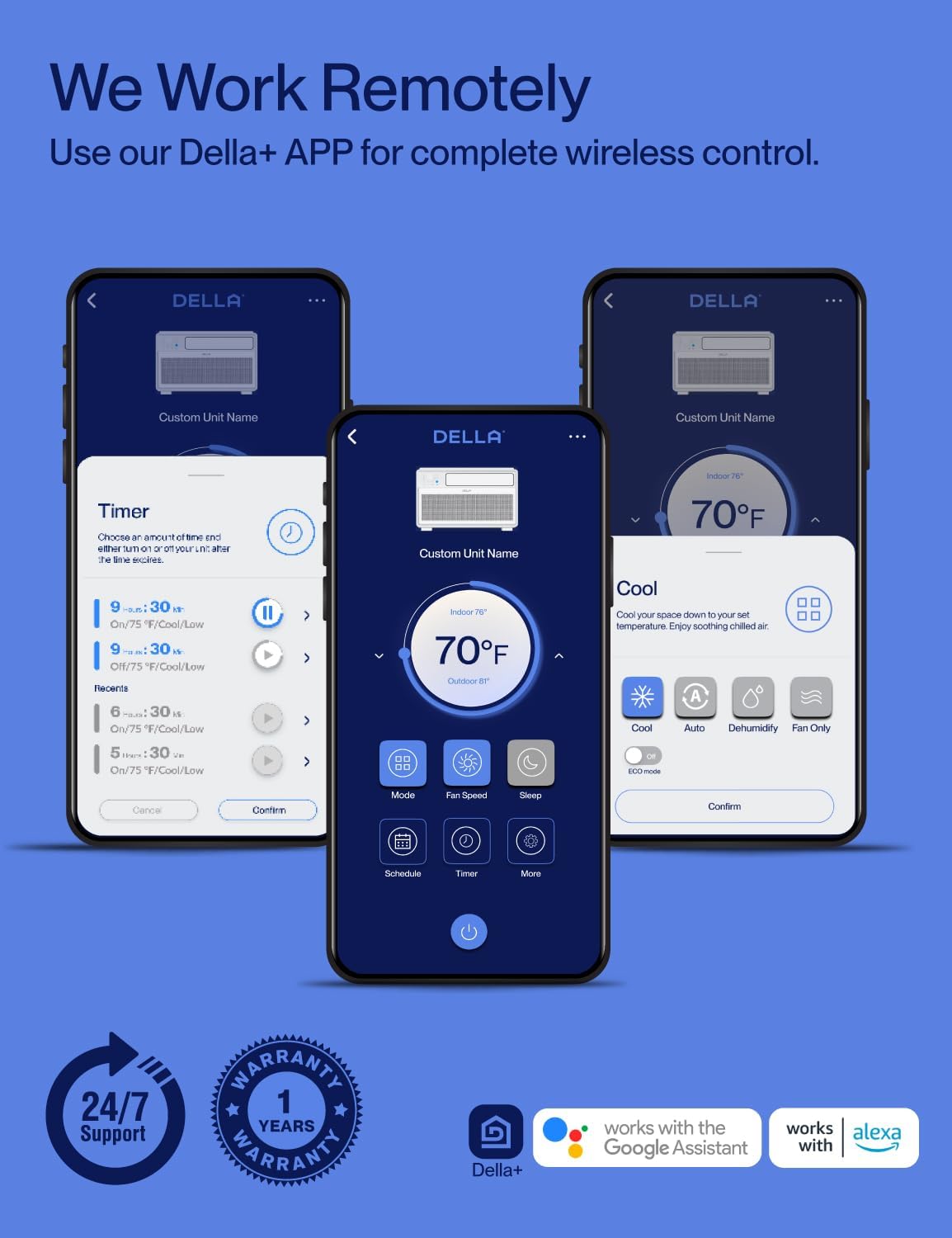
This Wi-Fi enabled unit offers advanced control options through the DELLA+ application and voice assistants.
DELLA+ App Control:
- Download the DELLA+ app for iOS or Android.
- Control all settings from your smartphone, including mode, fan speed, temperature, and timer.
- Manage your unit from anywhere with an internet connection.
GEO Location Feature:
The GEO Location feature allows the unit to automatically turn on or off based on your proximity to home, ensuring your space is comfortable upon arrival without manual intervention.

Voice Control:
The unit is compatible with Alexa and Google Assistant, allowing for hands-free control using voice commands.
7. Energy Saving and Quiet Operation
The DELLA 12000 BTU unit incorporates advanced technology for efficiency and quiet performance.
DC Inverter Technology:
With advanced DC Inverter technology, this unit achieves over 35% energy savings compared to traditional AC units. It provides faster and more efficient cooling, reaching set temperatures quickly and maintaining them with minimal fluctuations.

Ultra-Quiet Operation:
The highly efficient inverter system ensures ultra-low noise levels, as low as 42 dBA, making it ideal for bedrooms and quiet environments. The unit runs at a lower frequency once the set temperature is reached, maintaining comfort without disruptive noise.


8. Maintenance
Regular maintenance ensures optimal performance and longevity of your air conditioner.
Cleaning the Air Filter:
The washable and reusable air filter can be easily slid out for cleaning. Clean it regularly with warm water and dishwashing soap, or use a vacuum cleaner. Ensure the filter is completely dry before reinstalling to maintain best performance.
9. Troubleshooting
If you encounter issues with your DELLA air conditioner, refer to the following common problems and solutions:
| Problem | Possible Cause | Solution |
|---|---|---|
| Unit does not turn on | No power, tripped circuit breaker, loose plug. | Check power connection, reset circuit breaker, ensure plug is fully inserted. |
| Insufficient cooling | Dirty air filter, blocked air vents, room too large, windows/doors open. | Clean air filter, clear obstructions, ensure room size is within capacity, close windows/doors. |
| Noisy operation | Loose installation, foreign object in fan, unit not level. | Re-secure unit, check for obstructions, ensure unit is level. |
| Wi-Fi connection issues | Incorrect Wi-Fi password, router too far, app not updated. | Verify password, move router closer, update DELLA+ app, restart unit and router. |
For further assistance, please contact customer support.
10. Specifications
Key technical specifications for your DELLA 12000 BTU Smart Inverter Window Air Conditioner:
| Feature | Detail |
|---|---|
| Model Number | 048-TL-W12KI_1 |
| BTU Cooling Capacity | 12000 BTU |
| Power Supply | 115V/60Hz |
| Wattage | 1190W |
| Combined Energy Efficiency Ratio (CEER) | 15 (Energy Star Rated) |
| Cooling Area | Up to 520 Sq.Ft |
| Noise Level | 42 dB |
| Refrigerant | R32 |
| Product Dimensions (D x W x H) | 13.39 x 20.67 x 19.25 inches |
| Item Weight | 58.6 pounds |
| Window Compatibility | Width: 24-36 inches, Min. Height: 14.5 inches |
| Special Features | Dehumidifier, Fast Cooling, Inverter Compressor, WiFi Enabled |
11. Warranty and Support
DELLA is committed to providing reliable products and excellent customer service.
Warranty Information:
Your DELLA 12000 BTU Smart Inverter Window Air Conditioner comes with a 1-Year Warranty from the date of purchase, covering defects in materials and workmanship under normal use.

Customer Support:
For any questions, technical assistance, or warranty claims, please contact DELLA customer support. We offer 24/7 support to assist you.

You can also visit the official Della Store for more information and products: Della Store on Amazon


