
OKAI EA10A
OKAI Electric Scooter with Seat User Manual
Model: EA10A
Introduction
Welcome to the user manual for your new OKAI Electric Scooter with Seat. This manual provides essential information for the safe operation, maintenance, and troubleshooting of your scooter. Please read it thoroughly before your first ride to ensure a safe and enjoyable experience.
The OKAI Electric Scooter with Seat (Model EA10A) is designed for urban commuting and recreational riding, offering a comfortable and efficient way to travel. It features a powerful 350-watt motor, 10-inch tubeless pneumatic tires, a convenient detachable battery, and a robust dual braking system for enhanced safety and control.
Safety Guidelines
Your safety is paramount. Always adhere to the following guidelines when operating your electric scooter:
- Always wear a helmet and appropriate safety gear, including knee and elbow pads.
- Familiarize yourself with local traffic laws and regulations regarding electric scooters before riding.
- Do not ride under the influence of alcohol or drugs.
- Avoid riding in heavy rain, on slippery surfaces, or through standing water.
- Ensure all components, including the handlebars, seat, and wheels, are securely fastened before each ride.
- Maintain a safe distance from other vehicles, pedestrians, and obstacles.
- The maximum weight limit for this scooter is 220 pounds (100 kg). Do not exceed this limit.
- Always use both brakes simultaneously for effective stopping.
Product Overview
The OKAI Electric Scooter with Seat combines convenience with performance. Key features include:
- Motor: 350-watt motor with 28N.m of torque, enabling efficient acceleration and hill climbing.
- Speed: Capable of reaching speeds of up to 15.5 MPH (25 km/h).
- Range: Offers an impressive range of up to 25 miles on a single full charge.
- Tires: Equipped with 10-inch tubeless pneumatic tires for a smooth and comfortable ride.
- Braking System: Features a dual braking system with EBS (Electronic Braking System) and a rear-disc brake for reliable stopping power.
- Battery: Comes with a detachable lithium battery, supporting approximately 5.5 hours for a full charge.
- Security: Includes an NFC key system for convenient locking and unlocking.
- Comfort: Designed with a large, comfortable saddle and a wide 10.6-inch deck for ample foot space.
- Additional Features: Bright LED headlights and brake lights for visibility, and a practical front basket for carrying personal items.
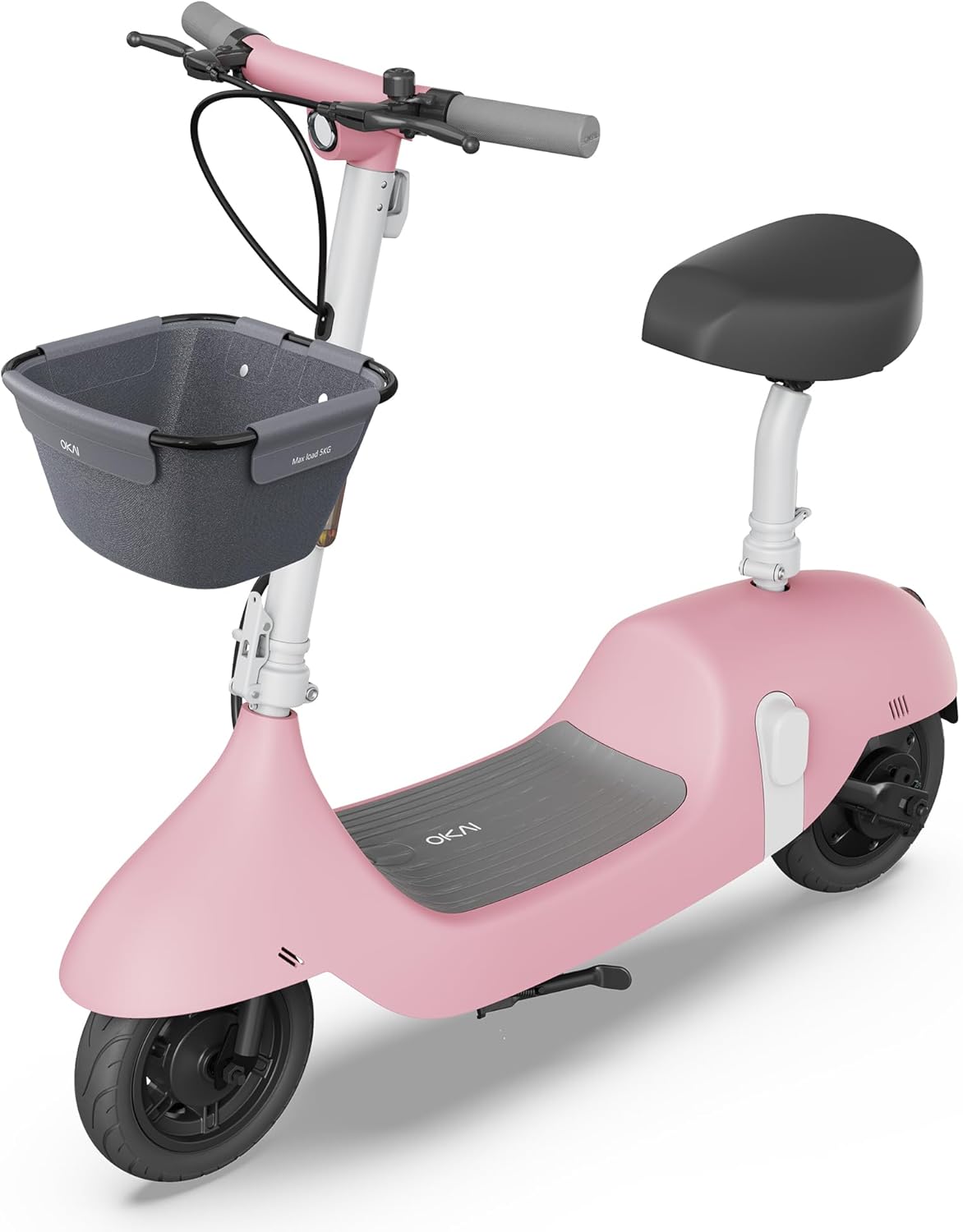
Image: The OKAI Electric Scooter with Seat in pink, showcasing its design with a front basket and comfortable seat.

Image: Detailed view of the 350W power motor and the easily accessible detachable battery compartment.

Image: Illustration highlighting the dual braking system and the practical front-mounted basket.
Setup and Assembly
Your OKAI Electric Scooter requires minimal assembly. Follow these steps to get started:
- Unboxing: Carefully remove all components from the packaging. Verify that all parts listed in the packing list are present and undamaged.
- Handlebar Installation: Attach the handlebar to the scooter's stem. Ensure it is aligned correctly and securely tightened using the provided tools.
- Seat Assembly: Insert the seat post into the designated slot on the scooter's frame. Adjust the seat height to a comfortable riding position and secure it firmly with the quick-release lever.
- Basket Attachment: If your model includes a front basket, attach it to the handlebar or front frame following the separate instructions provided with the basket.
- Initial Charge: Before your first ride, fully charge the battery. Connect the charger to the scooter's charging port or directly to the detachable battery. The charging time is approximately 6 hours. The display will indicate charging status.
- NFC Key Pairing: The NFC key is typically pre-connected. To lock or unlock the scooter, simply tap the NFC key to the designated area on the scooter's display or body.

Image: Illustration showing the two methods of charging the OKAI Electric Scooter: directly via the scooter's port or by removing and charging the detachable battery.
Operating Instructions
Turning On/Off
- To turn on the scooter, press and hold the power button located on the display until it illuminates.
- To turn off, press and hold the power button again until the display shuts down.
- Alternatively, use the NFC key to lock/unlock the scooter, which also controls power.
Riding the Scooter
- Place one foot firmly on the scooter's deck and use your other foot to push off the ground to gain initial momentum.
- Once moving, gently press the throttle lever (usually on the right handlebar) to engage the electric motor.
- Adjust your speed by varying the pressure on the throttle. The scooter may have multiple speed modes, which can often be selected via the display or app.
- To brake, release the throttle and gently squeeze the brake levers (on both handlebars). The scooter features both electronic and mechanical drum brakes for effective stopping.

Image: Close-up of the handlebar showing the digital display, throttle, and brake levers, illustrating the scooter's controls.
Using the OKAI App
Download the official OKAI app from your smartphone's app store (available for iOS and Android). The app enhances your riding experience by allowing you to:
- View real-time riding data, including current speed, battery level, and trip distance.
- Adjust riding modes and customize certain scooter settings.
- Lock and unlock the scooter remotely for added convenience and security.
- Access firmware updates and direct customer support.

Image: A user interacting with the OKAI app on a smartphone, demonstrating how the app provides scooter controls and real-time data.
Maintenance
Regular maintenance is crucial for ensuring the longevity, optimal performance, and safe operation of your OKAI Electric Scooter.
- Cleaning: Wipe down the scooter regularly with a damp cloth. Do not use high-pressure water jets or immerse the scooter in water, as this can damage electronic components.
- Tire Pressure: Although the tires are tubeless, proper inflation is essential for ride quality, range, and tire lifespan. Check tire pressure periodically and inflate to the recommended PSI (usually found on the tire sidewall).
- Brakes: Inspect the brake levers and cables for proper function and signs of wear. Ensure the brakes engage smoothly and effectively. Adjust brake cable tension if the brakes feel loose or ineffective. If brake pads are worn, they should be replaced by a qualified technician.
- Battery Care:
- Avoid fully discharging the battery.
- Charge the battery regularly, ideally keeping it between 20% and 80% for optimal battery health and lifespan.
- Store the scooter in a cool, dry place when not in use for extended periods. If storing for a long time, ensure the battery is charged to about 50-60%.
- Fasteners: Periodically check all screws, bolts, and quick-release mechanisms to ensure they are tight and secure. Loose fasteners can lead to instability and potential hazards.
Troubleshooting
This section provides solutions to common issues you might encounter with your OKAI Electric Scooter.
| Problem | Possible Cause | Solution |
|---|---|---|
| Scooter does not turn on. | Low or depleted battery; Power button not pressed correctly; NFC key not recognized. | Charge the battery fully; Press and hold the power button firmly for a few seconds; Re-tap NFC key or try another key if available. |
| Reduced range or speed. | Low tire pressure; Overloaded (exceeding weight limit); Battery degradation; Frequent uphill riding or aggressive acceleration. | Check and inflate tires to recommended pressure; Ensure rider weight is within specified limits; Consult customer support for battery health checks; Adjust riding style to be more conservative. |
| Brakes feel loose or ineffective. | Brake cable slack; Worn brake pads; Debris in brake mechanism. | Adjust brake cable tension at the lever or caliper; Replace brake pads if worn (consult a professional); Clean any debris from the brake area. |
| Unusual noises during operation. | Loose components (screws, bolts); Debris caught in wheels or motor; Worn bearings. | Check all fasteners and tighten as necessary; Inspect wheels and motor area for obstructions and remove them; If noise persists, contact customer support. |
| Display not working or showing errors. | Loose cable connection; Software glitch; Damage to display unit. | Turn the scooter off and on again; Check connections to the display; If an error code is displayed, refer to the app or contact customer support with the code. |
Specifications
Detailed technical specifications for the OKAI Electric Scooter with Seat, Model EA10A.
| Feature | Detail |
|---|---|
| Brand | OKAI |
| Model Name | EA10A |
| Color | Pink |
| Motor Power | 350-watt (Max 750W) |
| Max Speed | 15.5 MPH (25 km/h) |
| Max Range | 25 Miles |
| Battery Type | Detachable Lithium Battery |
| Charging Time | Approx. 6 Hours (5.5H fast charging) |
| Tire Size | 10 Inches |
| Tire Type | Tubeless Pneumatic |
| Brake Style | Mechanical Drum Brake + Electronic Brake (EBS) |
| Frame Material | Aluminum |
| Product Dimensions (LxWxH) | 45.1"L x 21"W x 41"H |
| Item Weight | 58 Pounds |
| Weight Limit | 220 Pounds |
| Age Range | Adult |
| Special Features | Seat, Lights, Basket, Rechargeable, NFC Key |

Image: Diagram illustrating the key dimensions of the OKAI Electric Scooter: 45.1 inches in length, 21 inches in handlebar width, and 41 inches in height.
Warranty and Support
Warranty Information
The OKAI Electric Scooter comes with a Limited Warranty. Please refer to the warranty card included in your product packaging for specific terms and conditions, including coverage duration, what is covered, and how to make a claim. Retain your proof of purchase for warranty purposes.
Customer Support
For any questions, technical assistance, or warranty claims, please contact OKAI customer support. Our team is ready to assist you with any issues or inquiries.
- Online Support: Visit the official OKAI website for comprehensive FAQs, troubleshooting guides, and support resources.
- Email: Find the customer service email address on your product packaging or the official OKAI website.
- Phone: A customer service phone number may also be available on your product packaging or the official OKAI website.
You can also visit the OKAI Store on Amazon for additional product information and updates.
Related documentsEA10A


Ask a question about this manual
Ask about setup, troubleshooting, compatibility, parts, safety, or missing instructions. Manuals+ will review the question and use this page’s manual context to help answer it.