
Important Safeguards
When using electrical appliances, basic safety precautions should always be followed to reduce the risk of fire, electric shock, and/or injury to persons, including the following:
- Read all instructions.
- To protect against risk of electrical shock, do not immerse cord, plug, or base in water or other liquid.
- Close supervision is necessary when any appliance is used by or near children.
- Unplug from outlet when not in use, before putting on or taking off parts, and before cleaning.
- Avoid contact with moving parts.
- Do not operate any appliance with a damaged cord or plug, or after the appliance malfunctions or has been dropped or damaged in any manner.
- The use of attachments not recommended or sold by the appliance manufacturer may cause fire, electric shock, or injury.
- Do not use outdoors.
- Do not let cord hang over edge of table or counter or touch hot surfaces.
- Do not place on or near a hot gas or electric burner, or in a heated oven.
- Always attach plug to appliance first, then plug cord into the wall outlet. To disconnect, turn any control to 'off', then remove plug from wall outlet.
- Do not use appliance for other than intended use.
- Be extremely careful when handling the sharp processing blades and discs. Always store blades and discs in a safe place.
- Always ensure the lid is securely locked in place before operating the appliance.
Parts and Features
This bundle includes two food processors: a 12-cup model (Component 1) and a 10-cup model with a bowl scraper (Component 2). Both units share many similar parts and functions.
Common Parts:
- Motor Base: Houses the powerful 450-watt motor.
- Work Bowl: Transparent bowl for processing ingredients (12-cup or 10-cup capacity).
- Lid: Secures to the work bowl, featuring a feed tube.
- Feed Tube: Opening in the lid for adding ingredients during operation.
- Pusher: Used to guide food through the feed tube.
- S-Blade: Stainless steel blade for chopping, mixing, and pureeing.
- Reversible Slicing/Shredding Disc: Stainless steel disc with one side for slicing and the other for shredding.
Unique Part (10-Cup Model - Component 2):
- Bowl Scraper: Integrated attachment that scrapes the sides of the bowl during processing for more even results.
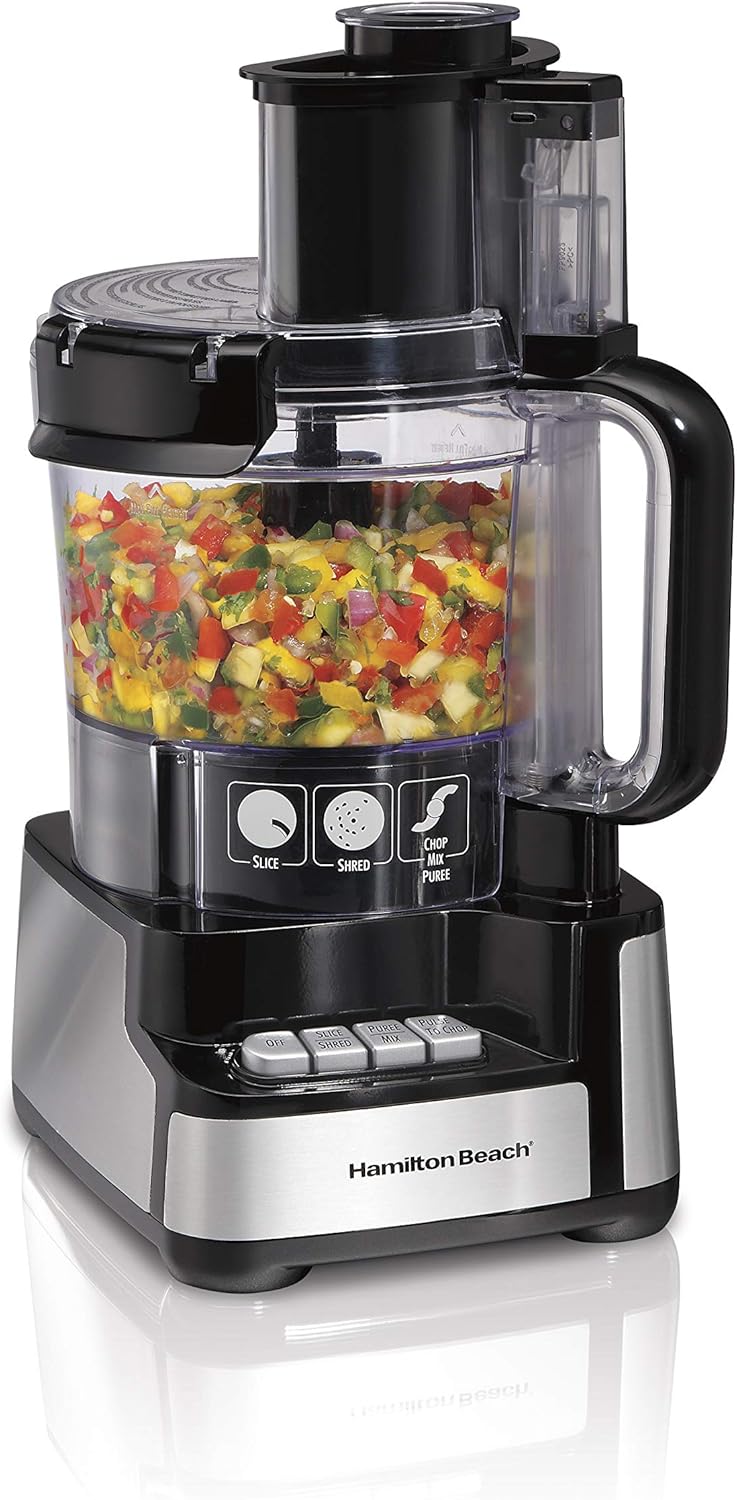
Image: The Hamilton Beach 12-cup food processor, showing the motor base, work bowl, lid, feed tube, and control buttons. The work bowl contains chopped vegetables.
Setup
Before first use, wash all parts except the motor base in warm, soapy water. Rinse thoroughly and dry. The motor base should be wiped clean with a damp cloth.
Assembly (Stack & Snap System - Component 1):
- Place the motor base on a clean, dry, flat surface.
- Carefully place the work bowl onto the motor base. The Stack & Snap design means no difficult twisting or locking is required.
- Insert the desired blade or disc onto the center post of the work bowl. Ensure it is seated properly.
- Place the lid onto the work bowl. It should snap into place easily.
- Insert the pusher into the feed tube.

Image: Illustration demonstrating the easy stack and snap assembly process for the food processor, showing components aligning without twisting.
Assembly (10-Cup Model - Component 2):
- Place the motor base on a clean, dry, flat surface.
- Place the work bowl onto the motor base and twist clockwise to lock it into place.
- Insert the desired blade or disc onto the center post of the work bowl.
- Place the lid onto the work bowl and twist clockwise to lock it into place. Ensure the bowl scraper is properly positioned if using.
- Insert the pusher into the feed tube.
Operating Instructions
Always ensure the food processor is properly assembled and the lid is securely locked before plugging it into an electrical outlet.
Using the S-Blade (Chop, Mix, Puree):
- Place the S-blade onto the center post in the work bowl.
- Add ingredients to the work bowl. Do not fill above the maximum fill line.
- Secure the lid.
- Plug in the appliance.
- Press the appropriate button (e.g., 'Chop/Mix/Puree' or 'Pulse') to begin processing. Use the 'Pulse' function for better control over consistency.
- Process until desired consistency is reached.
- Unplug the appliance before removing the lid and S-blade.
Using the Reversible Slicing/Shredding Disc:
- Place the reversible disc onto the center post with the desired side (Slicing or Shredding) facing up.
- Secure the lid.
- Plug in the appliance.
- Turn on the appliance (e.g., 'Slice' or 'Shred' button, or 'On' switch).
- Place food into the feed tube. Use the pusher to guide food through the tube. Do not force food.
- Process until all ingredients are sliced or shredded.
- Unplug the appliance before removing the lid and disc.

Image: A close-up of the reversible stainless steel disc, clearly labeled for its slicing and shredding sides.
Using the Big Mouth Feed Tube:
The large feed tube allows you to process whole or large pieces of food, reducing the need for pre-cutting. Always use the pusher to guide food through the feed tube while the appliance is running.

Image: A tomato being inserted into the wide 'Big Mouth' feed tube of the food processor, illustrating its capacity for whole foods.
Using the Bowl Scraper (10-Cup Model - Component 2):
The integrated bowl scraper automatically scrapes the sides of the bowl, pushing ingredients towards the blades for more even and thorough processing. This feature minimizes the need to stop and manually scrape the bowl.

Image: A hand operating the bowl scraper mechanism on the 10-cup food processor, showing it scraping processed ingredients from the side of the bowl.
Cleaning and Maintenance
Proper cleaning and maintenance will ensure the longevity and optimal performance of your food processor.
- Always unplug the appliance before cleaning.
- Disassemble all removable parts: lid, pusher, work bowl, S-blade, and reversible disc.
- Wash all removable parts in warm, soapy water. Hand washing is recommended for all components to preserve their sharpness and finish. Rinse thoroughly.
- Use caution when handling the sharp blades and discs.
- Wipe the motor base clean with a damp cloth. Do not immerse the motor base in water or any other liquid.
- Dry all parts completely before reassembling or storing.
- Store the food processor in a dry place.
Troubleshooting
| Problem | Possible Cause | Solution |
|---|---|---|
| Appliance does not turn on. | Not plugged in; Lid or bowl not properly assembled/locked. | Ensure power cord is securely plugged into outlet. Check that the work bowl and lid are correctly assembled and locked into place. |
| Uneven processing. | Overfilling; Ingredients not cut to similar size; Not using pulse function. | Do not overfill the work bowl. Cut ingredients into similar-sized pieces. Use the pulse function for better control and to redistribute ingredients. For the 10-cup model, ensure the bowl scraper is engaged. |
| Food gets stuck in feed tube. | Forcing food; Too large pieces. | Do not force food into the feed tube. Cut larger items into smaller pieces if necessary. Use the pusher gently. |
| Motor sounds strained. | Overloading; Processing too long. | Reduce the amount of food being processed. Allow the motor to rest between batches. Ensure ingredients are not too hard for the appliance. |
Specifications
- Brand: Hamilton Beach
- Model: B0D2D1WQM5 (Bundle)
- Wattage: 450 watts (for both units)
- Material: Stainless Steel (blades/discs), Plastic (bowls/lids)
- Included Components: Chopping Blade, Container (Work Bowl), Lid, Reversible Slicing/Shredding Disc, Pusher, Bowl Scraper (10-cup model only)
- Product Care Instructions: Hand Wash (recommended for all removable parts)
Warranty and Support
For warranty information or product support, please refer to the warranty card included with your purchase or visit the official Hamilton Beach website. You can typically find detailed support resources, FAQs, and contact information there.
Website: www.hamiltonbeach.com


