
Introduction
This manual provides detailed instructions for the installation, operation, and maintenance of your PGST PG103-2GEU-E-T53A WiFi GSM Home Alarm System. Please read this manual thoroughly before using the product to ensure proper functionality and safety. This system is designed to enhance the security of your home or small business by detecting intrusions and alerting you through various methods.
Package Contents
The PGST PG103-2GEU-E-T53A system typically includes the following components:
- Alarm Host (Main Control Panel)
- 2MP Security Camera
- Wireless Siren
- Door/Window Sensors (Multiple units)
- Motion Sensors (Multiple units)
- Keypads (Remote controls)
- RFID Tags
- Power Adapter for Alarm Host
- Mounting Hardware
- User Manual

Image: Overview of the PGST Home Alarm System components.
Product Overview
The PGST PG103-2GEU-E-T53A is a comprehensive wireless home security system featuring both WiFi and GSM connectivity. It supports integration with the Smart Life/Tuya application for remote control and monitoring.
Key Features:
- Dual Network Connectivity: Supports 2.4G WiFi for app control and 2G GSM for SMS and call notifications (SIM card not included).
- 2.4-inch TFT Color Display: Full capacitive touch screen for intuitive operation.
- Multi-language Support: Menu, voice prompts, and SMS notifications available in multiple languages.
- Expandable System: Supports up to 99 wireless defense zones for various sensors.
- Integrated Camera: Includes a 2MP security camera for visual monitoring.
- Scheduled Arm/Disarm: Set specific times for the system to arm or disarm automatically.
- Emergency SOS Function: Dedicated SOS button for immediate alerts.

Image: Alarm host display and smartphone app interaction.

Image: Example placement of security system components in a home.
Setup Instructions
1. Initial Power-Up and Network Connection:
- Connect Power: Plug the alarm host into a power outlet using the provided adapter. The internal battery will also begin charging.
- Insert SIM Card (Optional): If you intend to use GSM features (SMS/call notifications), insert a 2G SIM card into the designated slot on the alarm host. Ensure the SIM card's PIN code is disabled before insertion. Refer to your SIM card provider's instructions for disabling the PIN.
- Download App: Download the "Smart Life" or "Tuya Smart" app from your smartphone's app store.
- Register/Login: Create an account or log in to the app.
- Add Device: In the app, follow the instructions to add a new device. Select "Security & Sensor" and then "Alarm (Wi-Fi)". Follow the on-screen prompts to connect the alarm host to your 2.4GHz Wi-Fi network.
2. Sensor Installation and Pairing:
The system components are pre-programmed at the factory. If additional pairing is needed or for new sensors:
- Door/Window Sensors: Mount the two parts of the sensor on a door or window frame, ensuring they are aligned and within 1cm of each other when the door/window is closed. Use the adhesive pads or screws provided.
- Motion Sensors: Install motion sensors in corners or areas where movement is expected, typically 2-2.2 meters (6.5-7.2 feet) above the floor. Ensure a clear line of sight. These sensors are often pet-immune to reduce false alarms from small animals.
- Security Camera: Follow the camera's specific instructions to connect it to your Wi-Fi network and link it to the Smart Life/Tuya app.
- Pairing (if necessary): Refer to the alarm host's menu for "Add Sensor" or "Zone Management" options. Activate the sensor (e.g., open a door, trigger motion) when prompted by the host to pair it.

Image: Alarm system components and alert mechanisms.
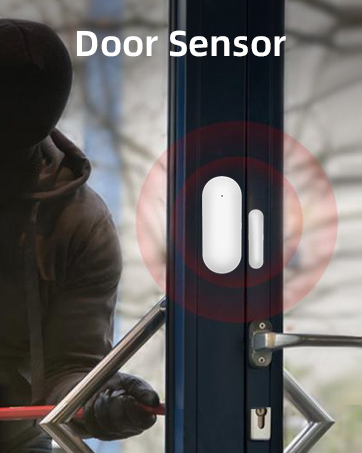

Image: Examples of a door sensor and a motion sensor.
Operating Instructions
Arming and Disarming:
- Arm (Away Mode): Activates all sensors. Use the alarm host keypad, remote control, or the Smart Life/Tuya app.
- Disarm: Deactivates all sensors. Use the alarm host keypad (enter password), remote control, or the Smart Life/Tuya app.
- Home Arm (Stay Mode): Activates perimeter sensors (e.g., door/window sensors) while allowing free movement within the property.
- Scheduled Arm/Disarm: Configure specific times in the app or on the alarm host for automatic arming and disarming.

Image: Example of scheduled arming and disarming for daily routines.
Emergency (SOS) Function:
Press the SOS button on the alarm host or remote control to trigger an immediate alarm and send emergency notifications to pre-configured contacts.
App Control:
The Smart Life/Tuya app allows you to:
- Arm and disarm the system remotely.
- Receive real-time alarm notifications (push, SMS, calls).
- Monitor sensor status.
- View live feed from the 2MP security camera.
- Manage system settings and user permissions.
Maintenance
- Battery Check: The alarm host has an internal backup battery (Lithium-ion, 2.5 hours life). Ensure it is regularly charged. Sensors typically use AAA batteries (2 included) and should be replaced when low battery indicators appear.
- Cleaning: Wipe the alarm host and sensors with a soft, dry cloth. Avoid using abrasive cleaners or solvents.
- Firmware Updates: Periodically check the Smart Life/Tuya app for firmware updates for the alarm host and camera to ensure optimal performance and security.
- Sensor Placement: Ensure sensors remain securely mounted and free from obstructions.
Troubleshooting
- System not connecting to Wi-Fi:
- Ensure your Wi-Fi network is 2.4GHz. Check Wi-Fi password. Move the alarm host closer to the router. Restart the alarm host and router.
- No SMS/Call notifications:
- Verify the 2G SIM card is correctly inserted and has active credit/plan.
- Crucially, ensure the SIM card's PIN code is disabled. Many SIM cards come with a default PIN that must be removed using a mobile phone before inserting into the alarm host.
- Check the signal strength on the alarm host display.
- Confirm emergency contact numbers are correctly configured in the system settings.
- False alarms from motion sensors:
- Adjust sensor sensitivity if available. Ensure sensors are not facing direct sunlight, heat sources, or areas with pets (if not pet-immune). Re-position the sensor if necessary.
- Sensors not responding:
- Check sensor battery levels. Ensure sensors are within range of the alarm host. Re-pair the sensor if necessary.
- Camera not streaming:
- Check camera's power supply and Wi-Fi connection. Ensure the Smart Life/Tuya app is updated. Restart the camera.
Specifications
| Brand | PGST |
| Model Number | PG103-2GEU-E-T53A |
| Connectivity Technology | Wireless (Wi-Fi 2.4GHz, GSM 2G) |
| Power Source | Battery Powered (Alarm Host: Lithium-ion, Sensors: AAA) |
| Alarm Host Battery Life | Approximately 2.5 hours (backup) |
| Compatible Devices | Smart Life App, Tuya App |
| Video Recording Resolution | 1080p (for included camera) |
| Installation Type | Self-adhesive |
| Alert Type | Audio and Motion |
| Control Method | Application, Keypad, Remote Control |
| Package Dimensions | 21.2 x 15.6 x 14.7 cm |
| Item Weight | 1.26 Kilograms |
Warranty and Support
For warranty information and technical support, please refer to the documentation included with your product or visit the official PGST website. You may also contact the seller directly for assistance.


