
1. Introduction
Thank you for choosing the CYMYYDS Overlocker Sewing Machine. This manual provides essential information for the safe and efficient operation, maintenance, and troubleshooting of your new machine. Please read this manual thoroughly before using the machine to ensure proper handling and to maximize its lifespan.
This 250W small household overlocker sewing machine is designed for tailors and seamstresses seeking professional-looking hemlines and finished edges. It offers 3-stitch capability and an adjustable overlock width of 3.0-5.0mm.
2. Safety Instructions
- Always unplug the machine from the power outlet when not in use, before cleaning, or when performing any maintenance.
- Keep fingers away from all moving parts, especially the needle, looper, and cutting blades, during operation.
- Use only the specified power supply and ensure the voltage matches your local power grid.
- Do not operate the machine if the power cord is damaged or if the machine is not functioning correctly. Contact qualified service personnel for repairs.
- Keep the work area well-lit and free from clutter.
- This appliance is not intended for use by persons (including children) with reduced physical, sensory or mental capabilities, or lack of experience and knowledge, unless they have been given supervision or instruction concerning use of the appliance by a person responsible for their safety.
3. Product Overview
Familiarize yourself with the main components of your overlocker sewing machine.

Figure 3.1: Front view of the CYMYYDS Overlocker Sewing Machine. This image shows the overall compact design of the machine, including the main body, work plate, and thread guides.

Figure 3.2: Side view of the CYMYYDS Overlocker Sewing Machine. This perspective highlights the motor housing and the belt drive system on the side of the machine.

Figure 3.3: Close-up view of the needle, presser foot, and feed dogs. This detailed shot shows the critical components involved in stitching and fabric movement.
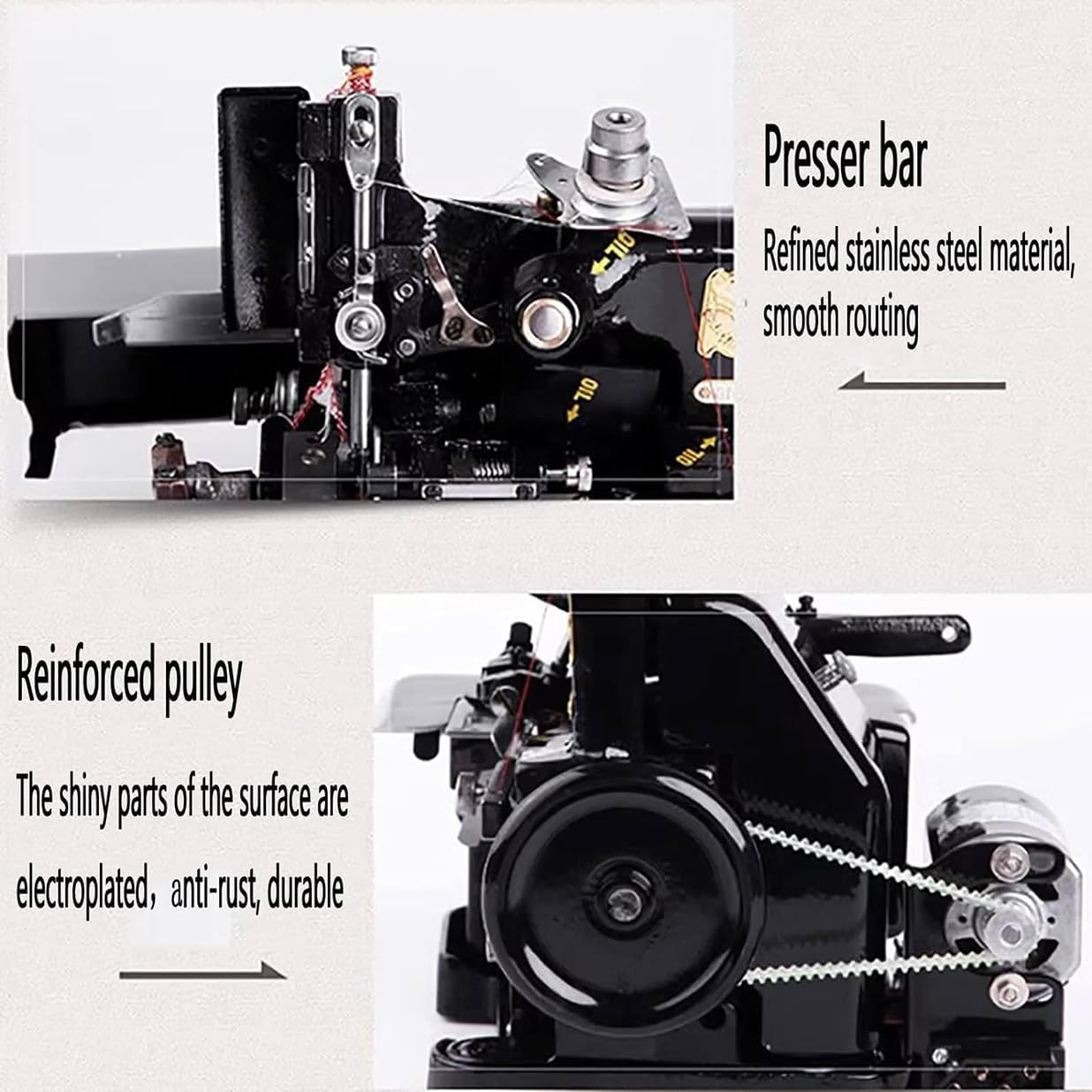
Figure 3.4: Details of the presser bar and reinforced pulley. The image highlights the refined stainless steel presser bar for smooth routing and the electroplated, anti-rust, durable reinforced pulley.

Figure 3.5: Features of automatic cloth cutting and the foot lift wrench. This image illustrates the durable automatic cloth cutting and edge lock mechanism, along with the convenient foot lift wrench for raising the presser foot.
The machine features an iron casting process and surface baking technology, ensuring wear resistance and durability. It is designed for precise and consistent performance.
4. Setup
4.1 Unpacking
- Carefully remove the machine and all accessories from the packaging.
- Check the contents against the packing list to ensure all parts are present. The product includes: 1 * Overlock Machine, 1 * Speed regulator.
- Retain the original packaging for future storage or transport.
4.2 Placement
- Place the machine on a stable, flat surface that can support its weight (approximately 13.5 kg / 29.7 lbs).
- Ensure there is adequate space around the machine for fabric handling and ventilation.
- Keep the machine away from direct sunlight, heat sources, and high humidity.
4.3 Power Connection
- Connect the speed regulator to the machine's power input.
- Plug the speed regulator into a suitable electrical outlet. Ensure the power switch on the machine is in the "OFF" position before plugging in.
4.4 Threading
Proper threading is crucial for optimal stitch quality. Refer to the threading diagram usually found on the machine itself or in a separate quick-start guide. The machine works with 3 threads for various stitch combinations.
- Follow the numbered threading path for each thread (needle, upper looper, lower looper).
- Ensure threads are seated correctly in tension discs.
- Use 40/2 polyester thread for best results.
5. Operating Instructions
5.1 Basic Operation
- Turn on the power switch.
- Lift the presser foot using the foot lift wrench (refer to Figure 3.5).
- Place the fabric under the presser foot, aligning the edge with the cutting blade if trimming is desired.
- Lower the presser foot.
- Gently press the foot pedal (speed regulator) to start sewing. The sewing speed is up to 3000 stitches/min.
- Guide the fabric smoothly through the machine. The machine features automatic fabric trimming and edge locking.
5.2 Adjusting Stitch Settings
- Stitch Length: Adjust the stitch length dial to change between 1.5mm and 3.2mm.
- Hemming Width: The hemming width can be adjusted between 3.0mm and 4.0mm. Adjusting the stitch width allows for flat serged seam finishes.
- Tension Adjustment: Adjust thread tension dials as needed to achieve balanced stitches. Refer to a test swatch for optimal settings.
5.3 Fabric Handling
The machine is designed to handle various fabric types with a sewing thickness of up to 4mm in a free state. Always test on a scrap piece of your fabric before sewing your main project.
6. Maintenance
Regular maintenance ensures the longevity and optimal performance of your overlocker machine.
6.1 Cleaning
- Daily: Use a small brush to remove lint and thread scraps from the needle plate area, feed dogs, and looper area.
- Weekly/Bi-weekly: Open the looper cover and clean out any accumulated lint. Use a soft cloth to wipe down the exterior of the machine.
- Important: Always unplug the machine before cleaning. Do not use harsh chemicals or abrasive cleaners.
6.2 Oiling
- Refer to your machine's specific oiling points, usually marked with red dots or arrows.
- Apply a small drop of high-quality sewing machine oil to these points regularly, especially if the machine is used frequently.
- After oiling, run the machine on a scrap piece of fabric to distribute the oil and absorb any excess.
6.3 Needle Replacement
- Replace the needle (Needle used: 14#) regularly, especially if it becomes bent, dull, or if you experience skipped stitches.
- Ensure the flat side of the needle faces the correct direction as per your machine's design when inserting.
7. Troubleshooting
This section addresses common issues you might encounter and their potential solutions.
| Problem | Possible Cause | Solution |
|---|---|---|
| Skipped Stitches | Incorrect needle, bent needle, improper threading, incorrect tension. | Replace needle (use 14#), re-thread machine, adjust tension. |
| Thread Breakage | Incorrect threading, too much tension, poor quality thread, burrs on thread path. | Re-thread carefully, reduce tension, use quality 40/2 polyester thread, check for rough spots. |
| Uneven Stitches | Incorrect tension, dull needle, improper fabric feeding. | Adjust tension, replace needle, ensure smooth fabric guidance. |
| Machine Not Starting | Not plugged in, power switch off, foot pedal issue. | Check power connection, ensure switch is ON, inspect foot pedal. |
If problems persist after attempting these solutions, please contact customer support.
8. Specifications

Figure 8.1: Dimensions of the Overlocker Sewing Machine. The image indicates approximate dimensions of 25.5cm (width) x 21cm (depth) x 27cm (height).
| Specification | Value |
|---|---|
| Product Name | Overlock Machine |
| Sewing Speed | 3000 stitches/min |
| Track Length (Stitch Length) | 1.5-3.2mm |
| Hemming Width (Overlock Width) | 3.0-4.0mm (Note: Product title states 3.0-5.0mm, using description's 3.0-4.0mm for consistency with detailed specs) |
| Suture Specification | 40/2 polyester thread |
| Sewing Thickness | 4mm in free state |
| Needle Used | 14# |
| Product Weight | 13.5kg (29.7 pounds) |
| Motor Power | 180w/250w |
| Presser Foot Travel | 4mm |
| Dimensions (L*W*H) | 255*210*270mm (approx. 10.04 x 8.27 x 10.63 inches) |
| Manufacturer | CYMYYDS |
| Is Electric | Yes |
9. Warranty and Support
For warranty information and customer support, please refer to the documentation provided with your purchase or contact the manufacturer directly. Keep your proof of purchase for warranty claims.
For any technical assistance or inquiries, please reach out to CYMYYDS customer service.


