
1. Overview
The JBL Clip 5 is an ultra-portable Bluetooth speaker designed for robust sound and outdoor adventures. Its compact size belies its powerful audio output, featuring JBL Pro Sound with punchy bass. The speaker incorporates a redesigned, fully integrated carabiner for easy attachment to various items, enhancing its portability. It offers extended playtime and is built to withstand challenging environments with its waterproof and dustproof design.
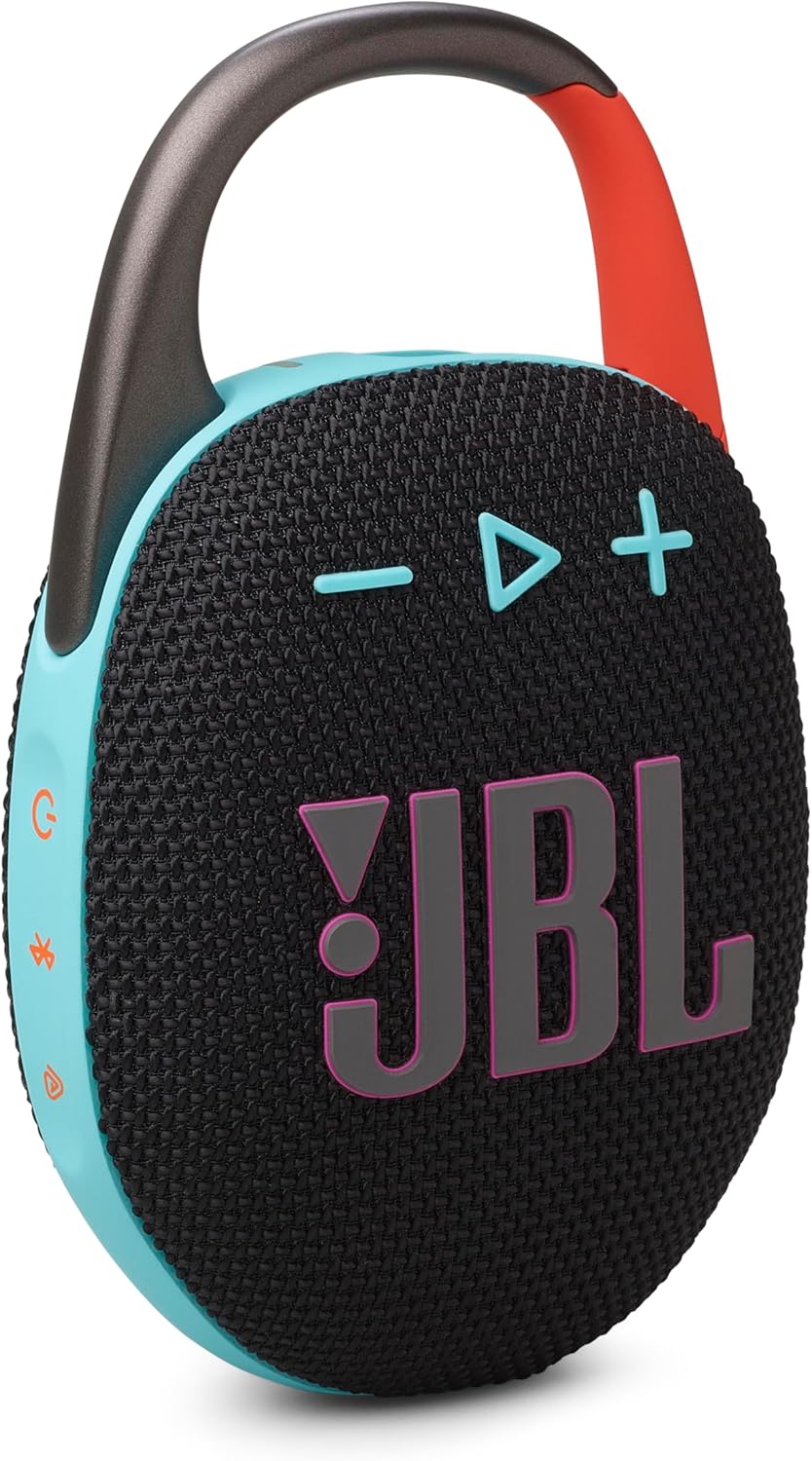
Key Features:
- Ultra-portable JBL Pro Sound: Delivers significant audio output and bass from a small form factor.
- Redesigned Carabiner: Features a wider opening for enhanced portability and attachment options.
- Extended Playtime: Provides up to 12 hours of audio playback on a single charge, with an additional 3 hours using Playtime Boost.
- Waterproof and Dustproof: IP67-certified for protection against water immersion and dust ingress.
- Multi-speaker Connection: Supports Auracast for stereo pairing with another Clip 5 or connecting to multiple JBL Auracast-enabled speakers.

2. What's in the Box
Upon unboxing your JBL Clip 5, verify that all the following components are included:
- 1 x JBL Clip 5 Speaker
- 1 x Type-C to Type-A Charging Cable
- Quick Start Guide
- Safety Sheet
- Warranty Card
3. Setup
3.1 Initial Charging
Before first use, fully charge your JBL Clip 5. Connect the provided Type-C to Type-A charging cable to the speaker's USB-C port and the other end to a compatible USB power adapter (not included). The charging indicator light will show the charging status and turn off once fully charged.
3.2 Bluetooth Pairing
- Power on the JBL Clip 5 by pressing the power button.
- Press the Bluetooth button on the speaker. The Bluetooth indicator light will flash, indicating it is in pairing mode.
- On your device (smartphone, tablet, laptop), enable Bluetooth and search for available devices.
- Select "JBL Clip 5" from the list of devices.
- Once connected, the Bluetooth indicator light will turn solid.
3.3 JBL Portable App
For enhanced features and control, download the JBL Portable App from your device's app store. The app allows you to manage JBL speakers, access more audio options, receive software updates, and connect multiple speakers.

4. Operating Instructions
4.1 Basic Controls
- Power On/Off: Press the power button to turn the speaker on or off.
- Volume Control: Use the '+' button to increase volume and the '-' button to decrease volume.
- Play/Pause: Press the play/pause button once to play or pause audio.
- Skip Track: Double-press the play/pause button to skip to the next track. Triple-press to go to the previous track.
4.2 Playtime Boost
To extend battery life by up to 3 additional hours, activate the Playtime Boost feature. This can be done via the JBL Portable App or by a specific button combination on the speaker (refer to the Quick Start Guide for exact button sequence if not using the app).

4.3 Auracast Multi-speaker Connection
The JBL Clip 5 supports Auracast technology, allowing you to connect multiple compatible speakers for a larger sound experience:
- Stereo Pairing: Pair two JBL Clip 5 speakers together for a stereo sound experience.
- Multi-Speaker Mode: Wirelessly connect multiple JBL Auracast-enabled speakers to create a synchronized audio system across a wider area.
5. Maintenance
5.1 Waterproof and Dustproof Care (IP67)
The JBL Clip 5 is IP67 rated, meaning it is protected against dust ingress and can withstand immersion in water up to 1 meter for 30 minutes. To maintain its waterproof and dustproof integrity:
- Ensure the USB-C port cover is securely closed before exposing the speaker to water or dust.
- Do not expose the speaker to salt water or other liquids besides fresh water.
- After exposure to water, especially chlorinated or salty water, rinse the speaker with fresh water and allow it to air dry completely before charging or using.

5.2 Cleaning
To clean the speaker, use a soft, damp cloth. Avoid using harsh chemicals, abrasive cleaners, or solvents, as these may damage the speaker's finish or components.
5.3 Battery Care
To prolong the life of the speaker's battery:
- Avoid fully discharging the battery frequently.
- Store the speaker in a cool, dry place when not in use for extended periods.
- Charge the speaker at least once every three months to prevent deep discharge.
6. Troubleshooting
If you encounter issues with your JBL Clip 5, refer to the following common problems and solutions:
| Problem | Possible Solution |
|---|---|
| Speaker does not power on. | Ensure the battery is charged. Connect the speaker to a power source using the charging cable. |
| No sound from the speaker. | Check the volume level on both the speaker and your connected device. Ensure the speaker is properly paired via Bluetooth. |
| Bluetooth pairing fails. | Ensure the speaker is in pairing mode (flashing Bluetooth indicator). Turn off and on Bluetooth on your device. Move the speaker closer to your device. Clear previous Bluetooth connections on your device. |
| Poor sound quality. | Move the speaker closer to your device to reduce interference. Ensure there are no obstructions between the speaker and the device. Check the audio source quality. |
| Speaker not responding. | Perform a factory reset (refer to the Quick Start Guide for specific instructions, usually involves holding certain buttons for a few seconds). |
If the issue persists after trying these solutions, please contact JBL customer support for further assistance.
7. Specifications
| Feature | Detail |
|---|---|
| Model Name | Clip 5 |
| Manufacturer | JBL |
| Color | Black & Orange |
| Material | Plastic |
| Mounting Type | Built-in Carabiner |
| Product Dimensions (H x W x D) | 5.3" x 1.8" x 3.4" (13.46 cm x 4.57 cm x 8.64 cm) |
| Item Weight | 0.39 Kilograms (13.7 ounces) |
| Speaker Type | Multimedia |
| Audio Output Mode | Stereo |
| Speaker Maximum Output Power | 7 Watts |
| Frequency Response | 20 KHz (Upper limit; full range not specified) |
| Signal-to-Noise Ratio | 85 dB |
| Audio Driver Type | Dynamic Driver |
| Power Source | Battery Powered |
| Wireless Communication Technology | Bluetooth |
| Bluetooth Range | 10 Meters (33 feet) |
| Control Method | App |
| Special Features | Bass Boost, Dustproof, Multi Room Audio (Auracast), Portable, Waterproof |
| Recommended Uses | For Music Players, Portable and outdoor audio setup |
| Compatible Devices | JBL Auracast-enabled Speakers, Smartphone, Tablet, Laptop |
| Waterproof Rating | IP67 |
| UPC | 050036400145 |

8. Warranty and Support
8.1 Limited Warranty
The JBL Clip 5 comes with a limited warranty. Please refer to the Warranty Card included in your product packaging for detailed terms and conditions, including coverage period and limitations. Retain your proof of purchase for warranty claims.
8.2 Customer Support
For technical support, troubleshooting assistance, or warranty inquiries, please visit the official JBL website or contact their customer service department. You can find contact information and support resources at the JBL Store on Amazon or the main JBL support portal.


