
1. Introduction
This manual provides detailed instructions for the installation, operation, and maintenance of your Temank 80A MPPT Solar Charge Controller. Please read this manual thoroughly before installation and use to ensure proper function and safety. This controller is designed to efficiently manage power flow from solar panels to batteries in 12V, 24V, or 48V systems, supporting both lead-acid and lithium battery types.
2. Product Overview
The Temank 80A MPPT Solar Charge Controller utilizes Maximum Power Point Tracking (MPPT) technology to optimize solar power harvesting. It features robust construction and advanced cooling for reliable performance.
Key Features:
- 80A Charging Current: Capable of handling significant solar input.
- Automatic System Voltage Detection: Compatible with 12V, 24V, and 48V battery systems.
- Parallel Operation Support: Up to 12 units can be connected in parallel to increase system capacity.
- Dual Cooling System: Features a die-cast aluminum heat sink and a turbofan for efficient heat dissipation.
- Wide Battery Compatibility: Supports Sealed, Gel, Flooded, LiFePO4, and Lithium-Ion batteries, with user-customizable parameters.
- High PV Input Support: Accepts solar voltage up to 160V.
- Comprehensive Protection: Includes overcurrent, short circuit, reversed polarity, overvoltage, over-discharge, and over-temperature protection.
- 99% Tracking Efficiency: Advanced MPPT technology ensures maximum power extraction from solar panels.

Image 2.1: Temank 80A MPPT Solar Charge Controller and its components, including the controller unit, terminal block, mounting screws, and temperature sensor cable.

Image 2.2: Overview of the 80A MPPT Solar Charge Controller, detailing its 80A charging current, 160V maximum PV input voltage, 3840W maximum PV input power, and 8A maximum DC output current.
3. Specifications
| Feature | Specification |
|---|---|
| Model | MPPT 80A |
| System Voltage | 12V/24V/36V/48V Auto |
| Max. Charging Current | 80A |
| Max. PV Input Voltage | 160V |
| Max. PV Input Power (12V System) | 960W |
| Max. PV Input Power (24V System) | 1920W |
| Max. PV Input Power (36V System) | 2880W |
| Max. PV Input Power (48V System) | 3840W |
| Battery Compatibility | Sealed, Gel, Flooded, LiFePO4, Lithium-Ion (User Customize) |
| Display Type | LCD |
| Operating Temperature | Up to 45°C (Fan activates >45°C, turns off <40°C) |
| Dimensions (with mounting part) | 10.24 x 7.1 x 2.95 inches (260 x 180 x 75 mm) |
| Net Weight | 4.4 lbs (2 kg) |
| Manufacturer | Temank |
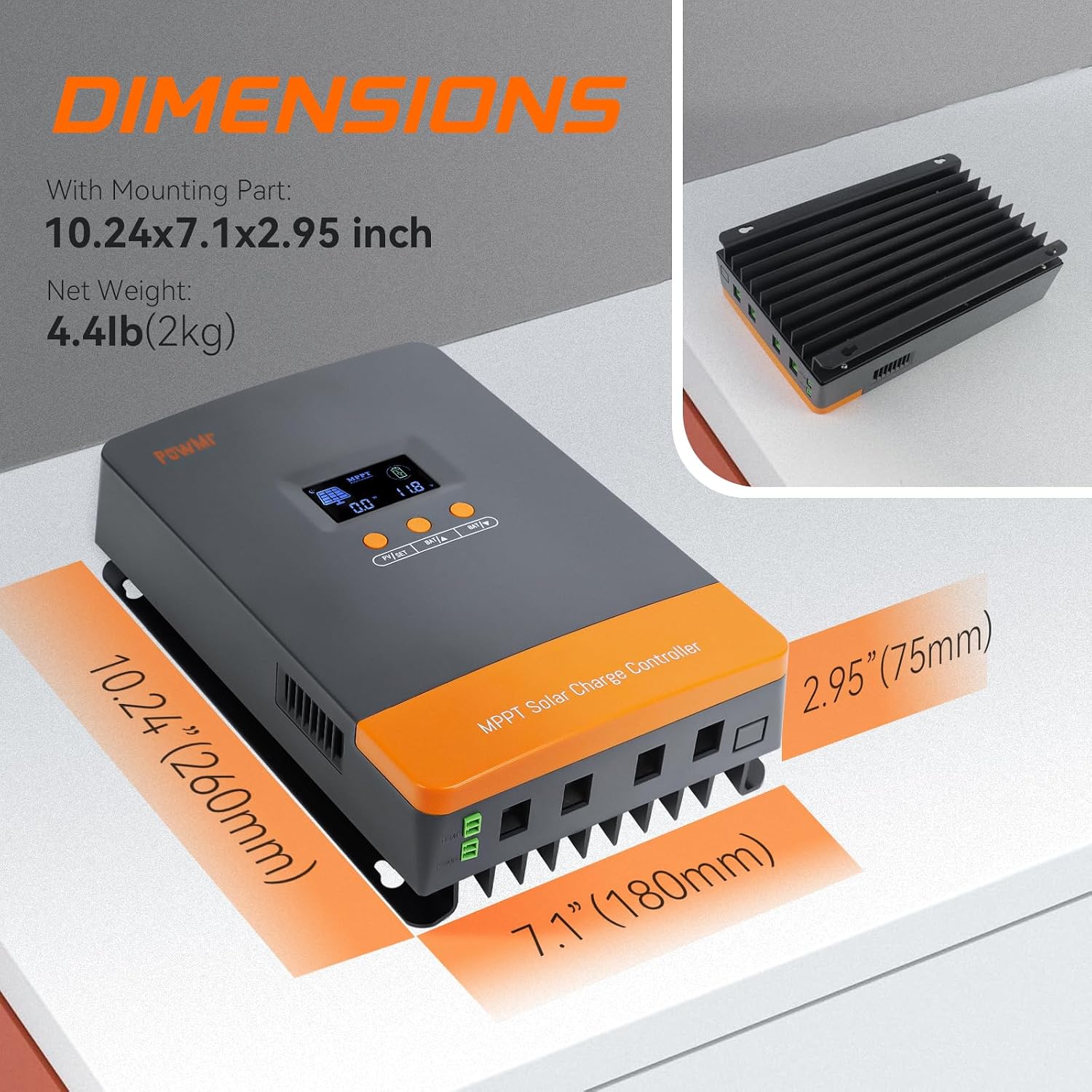
Image 3.1: Physical dimensions of the controller, showing measurements of 10.24 inches (260mm) in height, 7.1 inches (180mm) in width, and 2.95 inches (75mm) in depth.
4. Safety Information
- Always disconnect solar panels and battery power before installing or servicing the controller.
- Ensure proper polarity for all connections. Incorrect wiring can damage the controller and other components.
- Install the controller in a well-ventilated area, away from flammable materials and direct sunlight.
- Use appropriate circuit breakers or fuses for both solar panel and battery circuits.
- Do not charge lithium batteries when the temperature is below 0°C (32°F) to prevent damage.
- Ensure all connections are tight to prevent loose connections and overheating.
5. Setup and Installation
Follow these steps for safe and correct installation of your solar charge controller.
5.1 Wiring Sequence
- Connect Battery: First, connect the battery to the controller's battery terminals. Ensure correct polarity. The controller will automatically detect the system voltage (12V/24V/36V/48V).
- Connect Solar Panels: Next, connect the solar panels to the controller's PV input terminals. Ensure correct polarity.
- Connect Load (Optional): If using the load output, connect your DC load to the load terminals.
Important: Always connect the battery first and disconnect the solar panels first when disassembling the system.

Image 5.1: A detailed solar connection diagram showing the MPPT controller connected to solar panels, a battery bank, and an inverter for AC loads. It illustrates the correct wiring order and components.
5.2 Parallel Operation
The Temank 80A MPPT controller supports parallel connection of up to 12 units to expand your solar system's capacity. When operating in parallel:
- Each controller must be connected to a separate solar array.
- All parallel controllers are connected to the same battery bank.
- Communication between controllers is achieved through dedicated communication lines.

Image 5.2: Schematic illustrating how multiple MPPT controllers are connected in parallel to a single battery bank, each with its own solar array, and interconnected via communication cables.

Image 5.3: Visual comparison demonstrating the benefits of parallel operation with two MPPT controllers for solar arrays with partial shading, showing increased power generation compared to a single MPPT setup.
6. Operating Instructions
6.1 LCD Display and Navigation
The controller features an LCD display for monitoring system status and adjusting parameters. Use the buttons (PV/SET, BAT/▲, BAT/▼) to navigate through the display interfaces and modify settings.

Image 6.1: The LCD display interface, showing various screens for current battery voltage, charging current, device temperature, battery type, parallel communication code, calibrated battery voltage, boost charging voltage, float charging voltage, and MPPT tracking return voltage.
6.2 Battery Type Selection and Customization
The controller is compatible with various battery types. You can select a preset type or customize charging parameters.

Image 6.2: A chart detailing compatible battery types including AGM, GEL, Flooded, LiFePO4, and Sealed Lead-acid, along with their corresponding display codes and descriptions.
To select or customize battery parameters:
- Navigate to the battery type setting on the LCD.
- Choose from preset options (Sealed, Gel, Flooded, LiFePO4, Lithium-Ion).
- For custom settings, select 'User' and adjust parameters such as Absorption Voltage, Float Voltage, Low Voltage Cutoff, and Load Timer according to your battery manufacturer's specifications.
6.3 Lithium Battery Activation
The controller can activate lithium batteries using solar panel energy. Ensure proper settings are configured for lithium batteries. Avoid charging lithium batteries below 0°C (32°F).
7. Maintenance
Regular maintenance ensures optimal performance and longevity of your solar charge controller.
- Cleaning: Periodically clean the controller's exterior to prevent dust buildup, especially around ventilation openings.
- Connection Checks: Annually inspect all wiring connections for tightness and corrosion.
- Ventilation: Ensure the installation area remains well-ventilated. The internal turbofan activates automatically when the temperature exceeds 45°C and turns off below 40°C to maintain optimal operating temperature.

Image 7.1: Illustration of the controller's dual cooling system, featuring a robust die-cast aluminum heat sink and an intelligent bladeless turbofan for efficient heat dissipation.
8. Troubleshooting
If you encounter issues with your Temank 80A MPPT Solar Charge Controller, refer to the following common problems and solutions.
- No Display/No Power:
- Check battery connections and ensure they are secure and correctly polarized.
- Verify battery voltage is within the controller's operating range.
- Not Charging/Low Charging Current:
- Ensure solar panel connections are secure and correctly polarized.
- Check solar panel voltage and current.
- Verify that the solar panels are not shaded.
- Confirm battery type settings match the connected battery.
- Overvoltage Warning/Error Codes:
- Review battery charging parameters (Absorption Voltage, Float Voltage) to ensure they are appropriate for your battery type.
- For lithium batteries, ensure settings prevent overcharging.
- Over-temperature Protection:
- Ensure adequate ventilation around the controller.
- Clear any obstructions from the fan or heat sink.
For persistent issues or error codes not listed, please contact Temank customer support.
9. Warranty and Support
For warranty information, technical support, or service inquiries, please contact Temank directly through their official channels or the seller from whom the product was purchased. Keep your purchase receipt as proof of purchase.


