
Yamnweo GH7 7Channel
Yamnweo GH7 Professional 7-Channel Mixer User Manual
Model: GH7 7Channel
1. Introduction
The Yamnweo GH7 Professional Mixer is a versatile 7-channel audio mixing console designed for a wide range of applications including recording, DJ performances, stage events, and karaoke. It features multiple input options, advanced sound shaping controls, and modern connectivity for an enhanced audio experience.
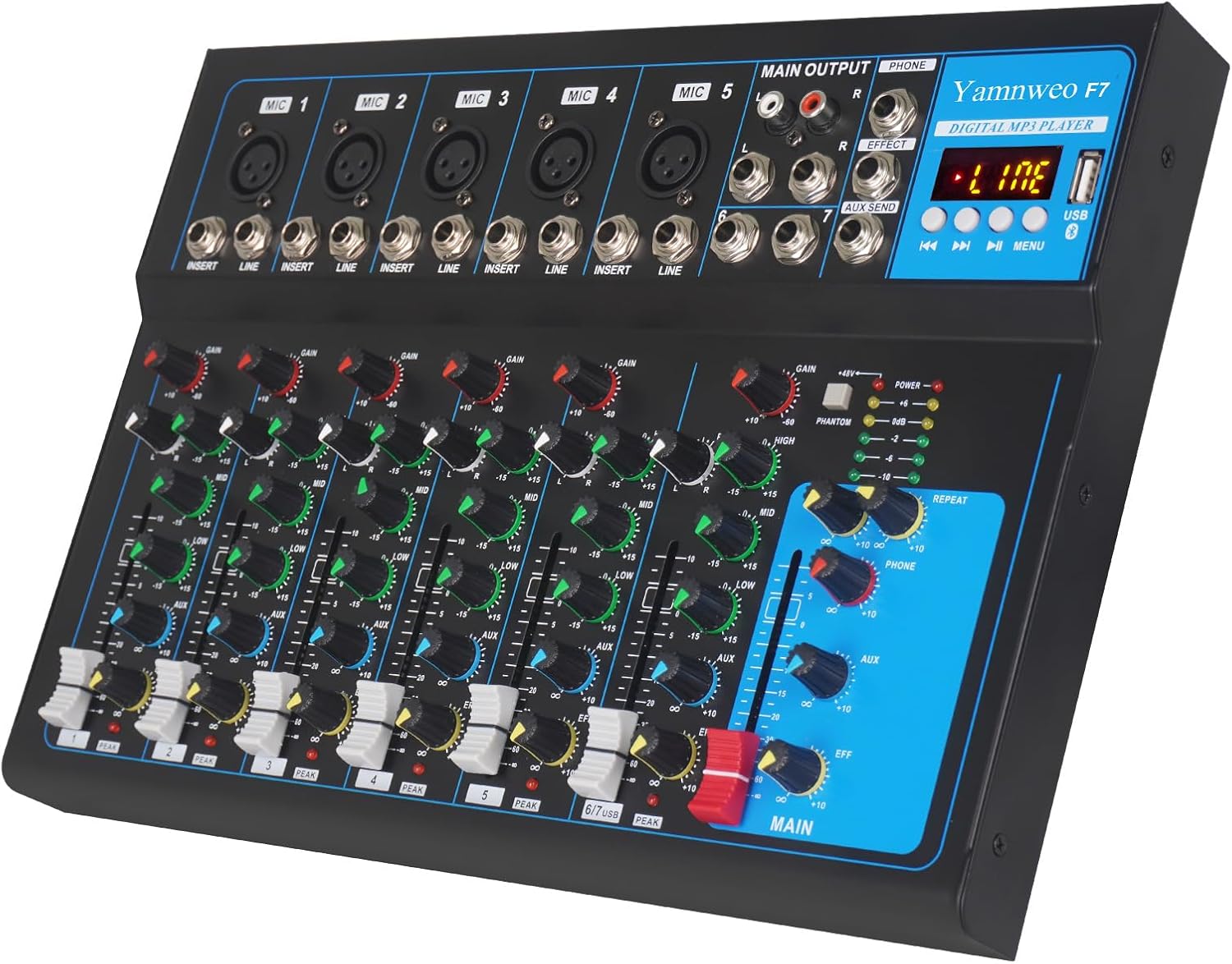
Figure 1: Yamnweo GH7 Professional 7-Channel Mixer overview.
2. Setup
2.1 Unboxing and Initial Inspection
Carefully remove the mixer and all accessories from the packaging. Inspect for any signs of damage. Ensure all components listed below are present:
- Yamnweo GH7 Mixer Unit
- Power Adapter
- User Manual (this document)
Video 1: Unboxing and overview of the Yamnweo GH7 Mixer and its components.
2.2 Power Connection
Connect the provided power adapter to the "AC IN" port on the rear of the mixer. Plug the other end of the power adapter into a standard 110V AC power outlet. Ensure the power switch is in the OFF position before connecting. Once connected, you can switch the power ON.

Figure 2: Rear panel showing power input and other connections.
2.3 Connecting Audio Devices
The GH7 mixer offers various input and output options:
- Microphone Inputs (MIC 1-7): Use XLR or 1/4" TRS cables for microphones.
- Line Inputs (LINE): Use 1/4" TRS cables for instruments or other line-level devices.
- Stereo Input (MIC 8 / LINE): For stereo sources.
- Main Output (MAIN OUTPUT L/R): Connect to amplifiers or powered speakers using RCA or 1/4" cables.
- Headphone Jack (PHONE): For monitoring audio.
- USB Interface: Connect to a computer for recording or playback, or insert a USB drive for MP3 playback.

Figure 3: Detailed panel instructions for the GH7 mixer, highlighting various inputs and controls.
3. Operating Instructions
3.1 Channel Controls
Each channel (1-7) on the GH7 mixer features individual controls for precise audio shaping:
- GAIN Knob: Adjusts the input sensitivity for each microphone or line input.
- HIGH, MID, LOW Knobs: Three-band equalizer for adjusting treble, midrange, and bass frequencies.
- AUX Knob: Controls the level sent to the auxiliary output for external effects or monitoring.
- EFF Knob: Adjusts the level of the built-in reverb/delay effect applied to the channel.
- PAN Knob: Pans the audio signal between the left and right stereo channels.
- Volume Slider: Controls the overall output level of the individual channel.

Figure 4: Close-up view of the 7-band EQ controls on the mixer.
3.2 Master Controls and Effects
- 48V Phantom Power: Activate the +48V phantom power switch to use condenser microphones. Ensure microphones are connected before activating.
- Delay/Repeat Knobs: Adjust the parameters of the built-in reverb and delay effects.
- Phone Volume Knob: Controls the volume of the headphone output.
- AUX Volume Knob: Controls the overall level of the auxiliary output.
- Reverberation Total Control Knob: Adjusts the master level of the reverb effect.
- Total Volume Slider (MAIN): Controls the overall output volume of the mixer.
3.3 Bluetooth Connectivity
To connect a Bluetooth device (e.g., smartphone, tablet):
- Ensure the mixer is powered on.
- Press the "MODE" button on the digital MP3 player section until "BLUE" appears on the display.
- On your Bluetooth device, search for "Yamnweo" or a similar device name and pair.
- Once connected, you can play audio from your device through the mixer.

Figure 5: Illustrates Bluetooth connectivity with a smartphone.
3.4 USB Playback and Recording
The USB interface allows for MP3 playback from a USB drive or direct connection to a computer for recording and playback.
- USB Drive Playback: Insert a USB flash drive containing MP3 files into the USB port. Use the built-in controls (play/pause, skip tracks) on the digital MP3 player to manage playback.
- PC Connection: Connect the mixer to your computer via a USB cable. The mixer will be recognized as an audio device, allowing you to record audio from the mixer to your computer or play audio from your computer through the mixer.

Figure 6: The GH7 mixer connected to a laptop for recording or playback.
4. Maintenance
Proper maintenance ensures the longevity and optimal performance of your Yamnweo GH7 mixer.
- Cleaning: Use a soft, dry cloth to wipe down the surface of the mixer. For stubborn dirt, a slightly damp cloth can be used, followed by a dry cloth. Avoid abrasive cleaners or solvents.
- Dust Protection: When not in use, cover the mixer to prevent dust accumulation, especially on the faders and knobs.
- Storage: Store the mixer in a cool, dry place away from direct sunlight, extreme temperatures, and high humidity.
- Cable Management: Avoid bending or kinking cables excessively, as this can damage internal wiring.
5. Troubleshooting
If you encounter issues with your Yamnweo GH7 mixer, refer to the following common problems and solutions:
| Problem | Possible Cause | Solution |
|---|---|---|
| No sound output |
|
|
| No sound from microphone |
|
|
| Bluetooth connection issues |
|
|
6. Specifications
| Feature | Detail |
|---|---|
| Model | GH7 7Channel |
| Brand | Yamnweo |
| Number of Channels | 7 (MIC/LINE mono inputs + 1 stereo input) |
| Phantom Power | +48V |
| Connectivity Technology | Bluetooth, USB |
| Effects | Reverb, Delay |
| Item Weight | 5.85 pounds |
| Product Dimensions | 13 x 8.97 x 1.61 inches (33.02 x 22.78 x 4.09 cm) |
| Power Source | Corded Electric |
| Voltage | 110 Volts |
7. Warranty and Support
For information regarding product warranty, returns, or technical support, please refer to the purchase platform or contact Yamnweo customer service directly. Protection plans may also be available for extended coverage.
Available Protection Plans (as of purchase date):
- 2-Year Protection Plan: $5.99
- 3-Year Protection Plan: $7.99
- Complete Protect: $16.99/month (covers all eligible past and future purchases)
Note: Protection plan availability and terms are subject to change. Please verify details at the time of purchase.
Ask a question about this manual
Ask about setup, troubleshooting, compatibility, parts, safety, or missing instructions. Manuals+ will review the question and use this page’s manual context to help answer it.