
Introduction
This manual provides essential information for the safe and efficient use of your Indesit YTN M11 92K RX SPT Heat Pump Tumble Dryer. Please read these instructions carefully before installation, operation, or maintenance. Keep this manual for future reference.
Safety Information
Always follow basic safety precautions when using electrical appliances to reduce the risk of fire, electric shock, or injury.
- Ensure the appliance is properly grounded.
- Do not allow children to play with or operate the dryer.
- Never block the ventilation openings of the dryer.
- Do not dry unwashed items in the tumble dryer.
- Remove all objects from pockets, such as lighters and matches.
- Clean the lint filter after every cycle.
Setup and Installation
Proper installation is crucial for the dryer's performance and safety.
- Unpacking: Carefully remove all packaging materials. Inspect the dryer for any damage.
- Location: Place the dryer on a firm, level floor. Ensure adequate ventilation around the appliance. Do not install in areas where temperatures may fall below 5°C.
- Leveling: Adjust the dryer's feet to ensure it is perfectly level. This prevents vibrations and excessive noise during operation.
- Electrical Connection: Connect the dryer to a properly grounded electrical outlet. Ensure the voltage and frequency match the specifications on the rating plate. Do not use extension cords or multiple adapters.
- Drainage: The dryer collects water in a condenser tank. For continuous drainage, connect the supplied drain hose to a suitable drain point. Refer to the diagram below for the rear connections.

Figure 1: Rear view of the dryer, illustrating the power cord and drainage hose connections. The green cable is the power cord, and the white corrugated hose is for water drainage.
Operating Instructions
Familiarize yourself with the control panel and drying programs.
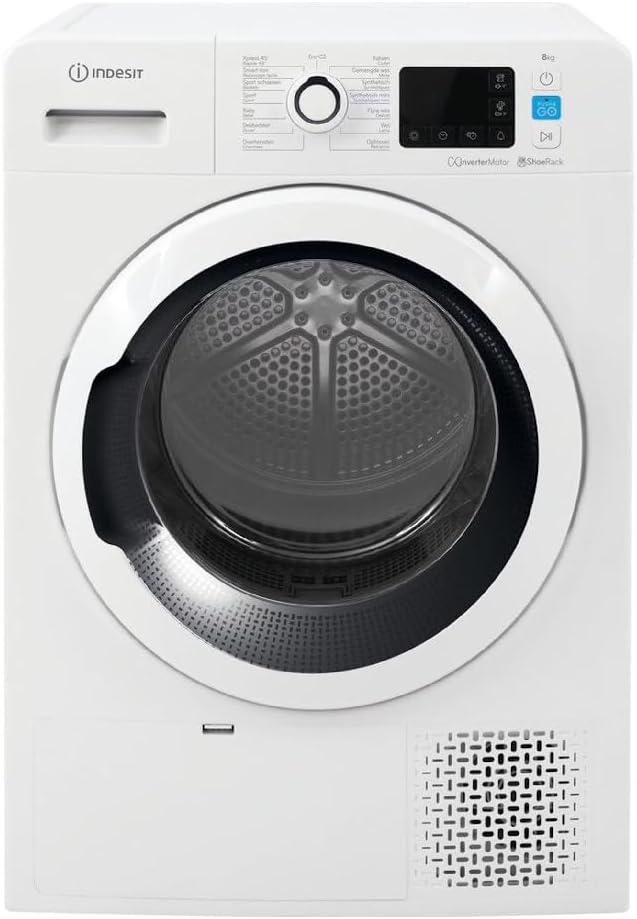
Figure 2: Front view of the Indesit YTN M11 92K RX SPT dryer, highlighting the control panel with its central dial and digital display.
- Loading the Dryer: Open the door and load laundry into the drum. Do not overload the dryer; ensure items can tumble freely. Close the door firmly.
- Selecting a Program: Turn the program selector dial to choose the desired drying program (e.g., Cotton, Synthetics, Delicates, Eco). The digital display will show the estimated drying time.
- Adjusting Settings: Use the option buttons to modify settings such as drying level, anti-crease, or delayed start, if available for the selected program.
- Starting the Cycle: Press the 'Start/Pause' button to begin the drying cycle.
- End of Cycle: The dryer will signal when the cycle is complete. Remove laundry promptly to minimize creasing.
- Emptying the Water Tank: After each cycle, or when indicated, pull out and empty the water collection tank. Reinsert it securely.

Figure 3: A close-up view of the dryer drum interior, showing the textured surface designed for efficient tumbling and drying of clothes.
Maintenance
Regular maintenance ensures optimal performance and extends the life of your dryer.
- Cleaning the Lint Filter: The lint filter is located inside the door opening. Clean it after every cycle by removing accumulated lint. This prevents reduced airflow and longer drying times.
- Emptying the Water Tank: As a heat pump dryer, water extracted from clothes is collected in a tank. Empty this tank after each use. If the tank is full, the dryer will stop.
- Cleaning the Condenser: Periodically clean the condenser unit, typically located behind a lower panel. Follow the instructions in the full manual for safe removal and cleaning. This is vital for energy efficiency.
- Cleaning the Exterior: Wipe the exterior surfaces with a soft, damp cloth. Do not use abrasive cleaners or solvents.
Troubleshooting
Before contacting customer service, refer to the following common issues and solutions:
| Problem | Possible Cause | Solution |
|---|---|---|
| Dryer does not start | No power; Door not closed; Program not selected | Check power supply; Close door firmly; Select a program and press Start |
| Clothes not drying properly | Lint filter blocked; Overloaded; Incorrect program | Clean lint filter; Reduce load size; Select appropriate program |
| Water tank full indicator on | Water tank needs emptying | Empty the water collection tank |
| Excessive noise/vibration | Dryer not level; Foreign objects in drum | Adjust leveling feet; Check drum for objects |
Specifications
- Model: Indesit YTN M11 92K RX SPT
- Model Number: YTNM1192KRXSPT
- Capacity: 9 Kilograms
- Dimensions (H x W x D): 90 x 70 x 65 cm
- Weight: 46.5 Kilograms
- Energy Class: A+++ (Heat Pump Technology)
Warranty and Support
Your Indesit appliance is covered by a manufacturer's warranty. For detailed warranty terms and conditions, please refer to the warranty card included with your product or visit the official Indesit website. For technical assistance, spare parts, or to schedule a service appointment, please contact Indesit customer support.
You can typically find contact information on the Indesit website or in the documentation provided with your purchase.


