
1. Introduction
This manual provides comprehensive instructions for the safe and effective use of your Yamnweo PMX-602 6-Channel Professional Powered Mixer Amplifier. Please read this manual thoroughly before operating the device to ensure proper setup and functionality. Retain this manual for future reference.
The PMX-602 is a versatile 6-channel input mixer designed for various audio applications, including live performances, studio recording, and events. It features built-in Bluetooth connectivity, 16 DSP reverb effects, individual channel equalization, a 5-band main equalizer, and USB disk playback capabilities.
2. Safety Instructions
- Power Supply: Connect the mixer only to the specified power source (110 Volts, Corded Electric). Ensure the power cable is not damaged or pinched.
- Ventilation: Do not block ventilation openings. Ensure adequate airflow around the unit to prevent overheating.
- Moisture: Do not expose the mixer to rain, moisture, or excessive humidity. Avoid placing liquid-filled objects on the unit.
- Cleaning: Disconnect power before cleaning. Use a dry, soft cloth. Do not use liquid cleaners or aerosols.
- Servicing: Do not attempt to service this product yourself. Refer all servicing to qualified service personnel.
- Placement: Place the mixer on a stable, level surface. Avoid extreme temperatures or direct sunlight.
- Hearing Protection: Prolonged exposure to high volume levels can cause permanent hearing damage. Use caution when adjusting volume.
3. Product Overview and Features
The Yamnweo PMX-602 offers a comprehensive set of features for professional audio mixing:
- 6-Channel Input: Supports various inputs including microphones (XLR), instruments, and line-level devices (1/4" TRS/TS).
- 48V Phantom Power: Available for condenser microphones.
- 16 DSP Effects: Built-in digital signal processing with various reverb and delay effects.
- USB Playback: Digital display USB disk player for direct audio playback from a U disk.
- Bluetooth Connectivity: Wireless connection for streaming audio from smartphones and other smart devices.
- Equalization: 3-band equalization per channel (HI, MID, LOW) and a 5-band graphic equalizer for the main output.
- Monitoring: Headphone output for real-time monitoring.

Figure 1: Front panel view of the Yamnweo PMX-602 mixer, showing all input channels, controls, DSP section, graphic equalizer, and main output controls.
4. Setup
4.1 Power Connection
- Ensure the mixer's power switch is in the OFF position.
- Connect the provided power cable to the mixer's power input.
- Plug the other end of the power cable into a standard 110V AC power outlet.
- Turn the power switch ON. The power indicator light will illuminate.
4.2 Input Connections
The PMX-602 features 6 input channels, each with an XLR microphone input and a 1/4" line input.
- Microphones: Connect dynamic or condenser microphones to the XLR inputs (CH1-CH6). For condenser microphones requiring phantom power, ensure the +48V PHANTOM POWER button is engaged (located near the main section).
- Instruments/Line Devices: Connect instruments (e.g., keyboards, guitars with a DI box) or line-level devices (e.g., CD players, media players) to the 1/4" LINE inputs (CH1-CH6).
- Auxiliary Input: Use the AUX IN (RCA or 1/4" jacks) for additional stereo line-level sources.
4.3 Output Connections
- Main Output: Connect your main speakers or power amplifier to the MAIN OUT (XLR or 1/4" jacks).
- Send/Return: Use the SEND/EFF output to connect to external effects processors, and the RETURN input for the processed signal.
- Headphones: Connect headphones to the PHONES jack for monitoring.
4.4 USB Disk Playback

Figure 2: Illustrates connecting a USB disk to the dedicated USB slot on the mixer for direct audio playback.
To play audio from a USB disk:
- Insert a USB disk containing audio files into the USB slot on the mixer's control panel.
- The digital display will show 'USB' or 'NO DEVICE' if no disk is detected.
- Use the playback controls (Play/Pause, Next/Previous, Mode) to navigate and play tracks.
4.5 Bluetooth Connection

Figure 3: Depicts a smartphone connecting wirelessly to the mixer via Bluetooth, enabling remote playback.
To connect a Bluetooth device:
- Press the MODE button on the mixer's digital display section until 'BT' (Bluetooth) is shown.
- On your smart device (phone, tablet), enable Bluetooth and search for available devices.
- Select 'Yamnweo PMX-602' (or similar name) from the list to pair.
- Once paired, you can stream audio from your device to the mixer. Use the mixer's playback controls or your device's controls to manage audio.
5. Operating Instructions
5.1 Channel Controls (CH1-CH6)
- TRIM: Adjusts the input gain for the channel. Set this to achieve a strong signal without clipping (indicated by the PEAK LED).
- HI, MID, LOW: 3-band equalizer for adjusting the treble, midrange, and bass frequencies of the channel.
- SEND EFF: Controls the amount of signal sent from this channel to the internal DSP effects processor.
- PAN: Adjusts the stereo position (left/right) of the channel's signal in the main mix.
- PFL (Pre-Fader Listen): Activates monitoring of this channel's signal through headphones, independent of the channel fader.
- Channel Fader: Controls the output level of the individual channel to the main mix.
5.2 Main Section Controls
- DSP Digital Multi Effects: Use the 'DOWN' and 'UP' buttons to select one of the 16 built-in DSP effects. The 'REPEAT' knob adjusts the effect parameter (e.g., delay time, reverb decay).
- Graphic Equalizer: A 5-band equalizer to fine-tune the overall frequency response of the main mix. Adjust sliders for 70Hz, 200Hz, 1KHz, 5KHz, and 12KHz.
- MAIN Fader: Controls the overall output volume of the mixer to the main speakers.
- PHONES Level: Adjusts the volume of the headphone output.
- MP3/AUX VOL: Controls the volume level for USB disk playback and auxiliary inputs.
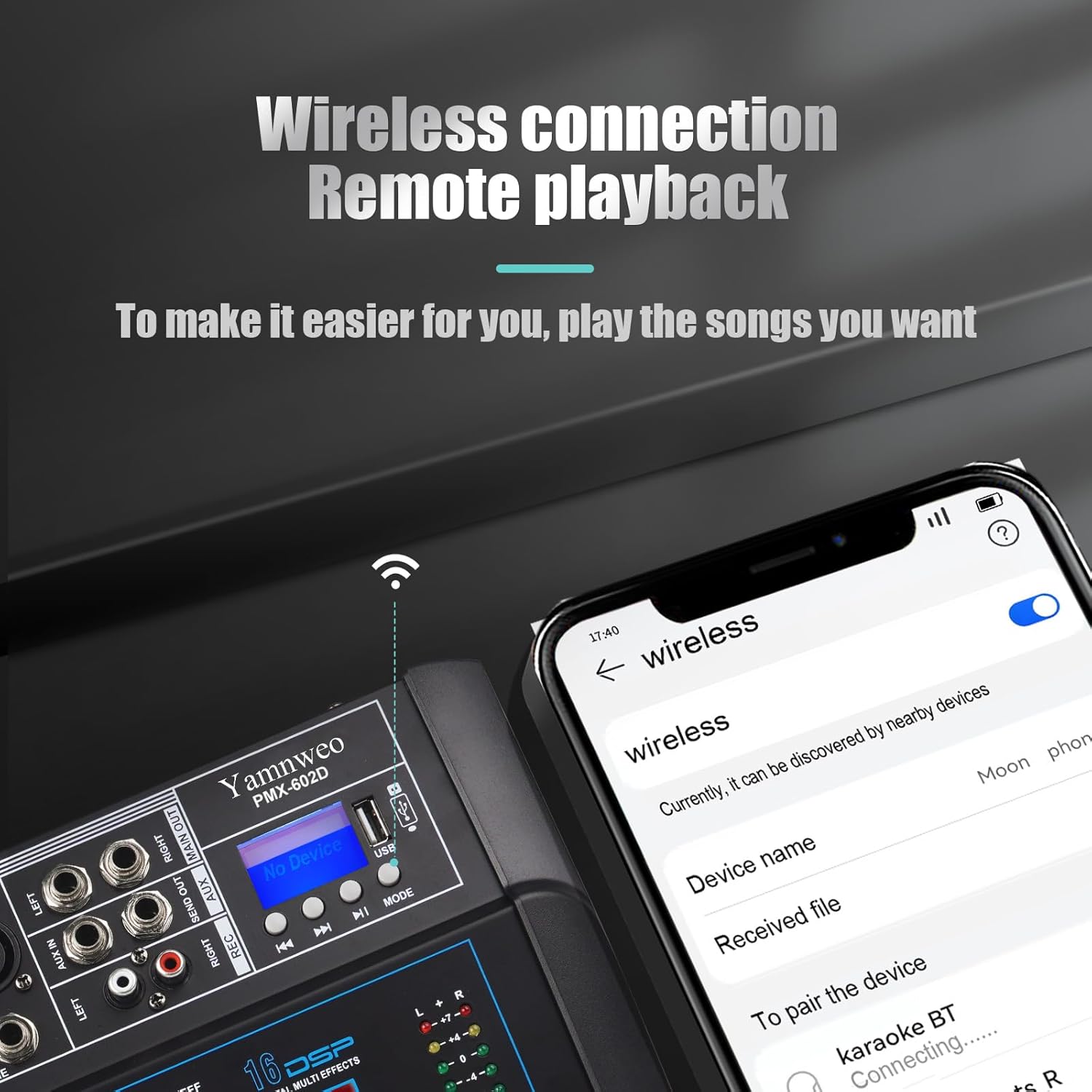
Figure 4: Demonstrates connecting a monitor headset for real-time audio monitoring, allowing for accurate adjustments during operation.
6. Maintenance
- Cleaning: Regularly wipe the mixer's surface with a soft, dry cloth. Avoid using abrasive cleaners or solvents.
- Storage: When not in use, store the mixer in a clean, dry environment away from direct sunlight and extreme temperatures.
- Cable Management: Ensure all cables are neatly organized and not under strain to prevent damage to connectors and ports.
7. Troubleshooting
- No Power: Check if the power cable is securely connected to both the mixer and the power outlet. Ensure the power switch is ON.
- No Sound Output:
- Verify that the MAIN fader is up.
- Check individual channel faders and TRIM controls.
- Ensure speakers/amplifiers are connected correctly and powered on.
- Check all cable connections.
- Distorted Sound:
- Reduce the TRIM control on the input channel.
- Lower the channel fader or MAIN fader.
- Check for damaged cables or faulty microphones/instruments.
- USB Playback Not Working:
- Ensure the USB disk is properly inserted.
- Check if the audio files are in a supported format.
- Verify the MP3/AUX VOL is turned up.
- Bluetooth Connection Issues:
- Ensure the mixer is in Bluetooth mode ('BT' on display).
- Make sure Bluetooth is enabled on your smart device.
- Unpair and re-pair the device if connection fails.
- Ensure your device is within range.
8. Specifications
- Model: PMX-602
- Brand: Yamnweo
- Number of Channels: 6
- Connectivity Technology: Bluetooth, USB
- Power Source: Corded Electric
- Voltage: 110 Volts
- Item Weight: 13.53 pounds (6.14 kg)
- Product Dimensions: 12.51"D x 13.97"W x 4.4"H (31.78 cm x 35.48 cm x 11.18 cm)
- DSP Effects: 16 built-in effects
- Equalization: 3-band per channel, 5-band graphic main equalizer
9. Warranty and Support
For any questions regarding the Yamnweo PMX-602 mixer, please contact your retailer or the manufacturer's customer support. Please refer to your purchase documentation for specific warranty terms and conditions.


