
1. Introduction
Thank you for choosing the Driftalia Full Size Bed Frame. This bed frame is designed to provide both comfort and functionality, featuring an upholstered headboard with integrated LED lighting, a convenient charging station, and four spacious storage drawers. This manual provides detailed instructions for assembly, operation, maintenance, and troubleshooting to ensure a safe and enjoyable experience with your new bed frame.

Image 1.1: Overview of the Driftalia Full Size Bed Frame with LED headboard, charging station, and storage drawers.
2. Safety Information
- Read all instructions carefully before assembly and use.
- Keep all small parts and packaging materials away from children and pets to prevent choking hazards.
- Ensure all connections are securely fastened before use. Periodically check and retighten fasteners.
- Do not exceed the maximum weight capacity of 1000 lbs (453 kg).
- Use only the provided components. Do not substitute parts.
- Place the bed frame on a level surface.
- Avoid exposing the electrical components (LED lights, charging station) to moisture.
- Unplug the bed frame from the power outlet before cleaning or performing any maintenance.
Important: Always follow assembly instructions for safe and stable use.
3. Package Contents
Before beginning assembly, verify that all components listed below are present and undamaged. If any parts are missing or damaged, please contact customer support.
| Part | Description | Quantity |
|---|---|---|
| A | Upholstered Headboard with LED & Charging Station | 1 |
| B | Side Rails (Left & Right) | 2 |
| C | Footboard | 1 |
| D | Metal Slat Frame | 1 set (12 slats, 3 thickened beams) |
| E | Storage Drawers | 4 |
| F | Support Legs | 10 |
| G | Hardware Pack (bolts, screws, Allen wrench, etc.) | 1 |
| H | LED Remote Control | 1 |
4. Setup and Assembly Instructions
Assembly typically requires two people and takes approximately 50 minutes. All parts are labeled for easy identification. Please follow these steps carefully.
Step 4.1: Prepare the Headboard and Side Rails
- Unpack all components and lay them out on a clean, soft surface to prevent scratches.
- Attach the side rails (B) to the upholstered headboard (A) using the provided bolts and Allen wrench. Ensure connections are firm.

Image 4.1: Detail of slat connection mechanism.
Step 4.2: Attach the Footboard
- Connect the footboard (C) to the assembled side rails (B), securing it with the appropriate hardware.
Step 4.3: Install Support Legs and Slat Frame
- Attach the 10 support legs (F) to the designated points on the metal slat frame (D).
- Place the metal slat frame (D) inside the bed frame structure. Secure the slats to the side rails using the provided screws. Ensure all slats are evenly spaced and firmly attached.

Image 4.2: Detail of leg connection to the frame.

Image 4.3: Detail of securing slats with screws.
Step 4.4: Assemble and Insert Storage Drawers
- Assemble the four storage drawers (E) according to the separate instructions provided in the hardware pack.
- Once assembled, slide the drawers into their designated spaces under the bed frame.

Image 4.4: View of the four storage drawers in place under the bed frame.
Step 4.5: Connect Power for LED and Charging Station
- Locate the power cord for the LED lights and charging station on the headboard.
- Plug the power cord into a standard wall outlet.
After completing all steps, ensure the bed frame is stable and all connections are secure before placing your mattress on it.
5. Operating Instructions
5.1 LED Lights Operation
The integrated LED lights in the headboard can be controlled using the included remote control (H).
- Power On/Off: Press the power button on the remote.
- Color Selection: Choose from 25 available colors using the color palette on the remote.
- Brightness Adjustment: Select from 3 brightness modes to suit your preference.
- Flashing Modes: Access 10 different flashing modes for dynamic lighting effects.
- Music Sync: The lights can synchronize with music, creating an immersive atmosphere. Refer to the remote control's specific instructions for music sync activation.

Image 5.1: Headboard LED lights in operation, showing remote control for various settings.
5.2 Charging Station Usage
The headboard features a built-in charging station for your electronic devices.
- USB Ports: Two USB ports are available, including one USB-A (5V/3A) and one USB-C (5V/3A). These provide up to 5V/4A max for efficient charging.
- AC Outlets: Two standard 110V/12A AC outlets are provided for powering other devices.
- Ensure the bed frame's power cord is plugged into a live wall outlet for the charging station to function.

Image 5.2: Detail of the charging station with USB-A, USB-C, and AC outlets.
5.3 Storage Drawers
The four storage drawers (E) are designed for easy access and organization.
- Each drawer measures 29.3"L x 15.4"W x 4.7"H, suitable for blankets, clothing, or other personal items.
- The drawers are on wheels for smooth operation.
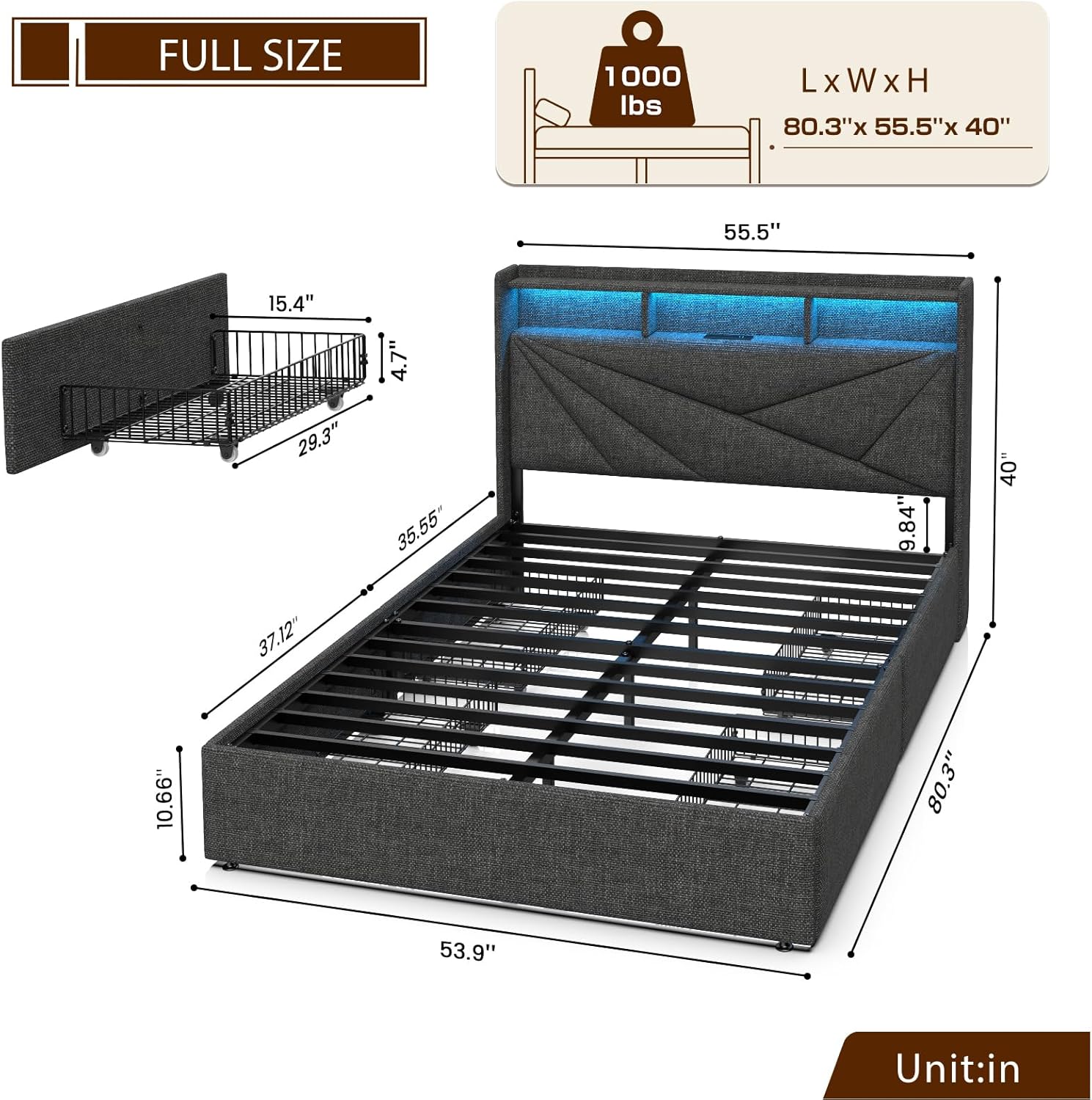
Image 5.3: Dimensional view of the bed frame, including drawer measurements.
6. Maintenance
- Cleaning: For the upholstered parts, use a soft, damp cloth and mild soap. Avoid harsh chemicals. For metal parts, wipe with a dry cloth.
- Electrical Components: Keep the LED lights and charging station free from dust. Do not spray liquids directly onto electrical parts.
- Fasteners: Periodically check all bolts and screws to ensure they remain tight. Retighten as necessary to maintain stability and prevent squeaks.
- Drawers: Keep the drawer wheels clean to ensure smooth operation.
7. Troubleshooting
| Problem | Possible Cause | Solution |
|---|---|---|
| LED lights not working | Power cord unplugged; remote control battery low; LED strip damaged. | Ensure power cord is securely plugged in. Replace remote control battery. Contact customer support if LED strip is damaged. |
| Charging station not working | Power cord unplugged; wall outlet not functioning. | Verify power cord connection. Test wall outlet with another device. |
| Bed frame squeaks | Loose bolts or connections. | Check and tighten all assembly bolts and screws, especially those connecting the slats and frame components. |
| Drawers are difficult to open/close | Obstruction; dirty wheels; misaligned. | Check for items blocking the drawers. Clean drawer wheels. Ensure drawers are correctly aligned in their tracks. |
8. Specifications
- Model: JIF240007
- Size: Full
- Color: Dark Grey
- Product Dimensions (L x W x H): 80.31" x 55.51" x 45.28"
- Weight Capacity: 1000 lbs
- Item Weight: 85 pounds
- Material: Upholstered fabric, metal frame
- Charging Station: 2 USB Ports (1 Type-C, 1 Type-A, 5V/4A max), 2 AC Outlets (110V/12A), 6.5-foot power cord
- LED Lights: 25 colors, 3 brightness modes, 10 flashing modes, music sync function
- Storage Drawers: 4 drawers, each 29.3"L x 15.4"W x 4.7"H
- Assembly Required: Yes
9. Warranty and Support
Driftalia products are designed for quality and durability. This product is covered by a standard 30-day return policy from the date of purchase. For specific warranty details, please refer to the terms and conditions provided at the time of purchase or contact your retailer.
For technical assistance, missing parts, or any other inquiries, please contact Driftalia customer support through the retailer's platform or visit the official Driftalia store page: Driftalia Store.