
Introduction
This manual provides essential information for the safe and efficient operation of your Klarstein 1200W Infrared Electric Heater. Please read these instructions carefully before installation and use, and retain them for future reference.
The Klarstein infrared electric heater is designed for energy-efficient heating, utilizing infrared technology to provide warmth without CO2 emissions, making it suitable for various indoor environments, including those with allergy sufferers.
Safety Instructions
Always observe the following safety precautions to prevent electric shock, fire, injury, or damage to the product.
- Ensure the power supply voltage matches the rating on the appliance.
- Do not operate the heater with a damaged cord or plug.
- Keep flammable materials at least 1 meter (3 feet) away from the heater.
- Do not cover the heater. Overheating can occur.
- This appliance is protected against dust and splashing water (IP24) and is suitable for use in bathrooms, but must not be immersed in water.
- Do not insert objects into the heater's openings.
- Supervise children and individuals with reduced physical, sensory, or mental capabilities when near the appliance.
- Disconnect from power before cleaning or maintenance.
- Only use the heater for its intended purpose as described in this manual.
Package Contents
Carefully unpack your Klarstein Infrared Electric Heater and check that all items are present and undamaged. If any items are missing or damaged, contact customer support.
- 1 x Klarstein Infrared Electric Heater
- 1 x Mounting Material (for wall installation)
- 1 x Remote Control
- 1 x User Manual (Multilingual)
- Optional: Feet with castors for freestanding use (if included with your model)
Setup
1. Placement Options
Your Klarstein heater can be installed in two ways: wall-mounted or freestanding with optional feet.

Image: Heater dimensions and installation options. The diagram illustrates the heater's height (128.5 cm with feet, 120 cm without), width (60 cm), and depth (37 cm with feet, 5 cm without). It also highlights wall mounting points and indicates that feet are included.
Wall Mounting:
- Choose a suitable wall location, ensuring sufficient clearance from flammable materials and power outlets.
- Use the provided mounting material (screws, anchors) to securely attach the heater to the wall. Refer to the detailed diagram in the multilingual user manual for precise measurements and drilling points.
- Ensure the heater is level and firmly fixed. The design allows for the power cable to be discreetly hidden behind the unit.
Freestanding (if applicable):
- Attach the provided feet with castors to the bottom of the heater according to the instructions in the multilingual user manual.
- Place the heater on a stable, level surface.
2. Initial Power-on
- Plug the heater into a grounded electrical outlet.
- Press the power button on the heater or remote control to turn it on. The LED display will illuminate.
3. App and WiFi Connection
The heater features App control via WiFi for convenient remote operation.

Image: Klarstein Smart app interface. The image displays a smartphone screen with the app open, showing current temperature (22°C), set temperature (25°C), power, ECO mode, lock functions, and mode selection (Low/High).
- Download the "Klarstein Smart" app from the App Store (iOS) or Google Play Store (Android).
- Register an account or log in if you already have one.
- Follow the in-app instructions to add your device. This typically involves putting the heater into pairing mode (refer to your multilingual manual for specific button combinations) and connecting it to your home WiFi network.
- Once connected, you can control the heater remotely via the app, including setting temperature, timers, and activating features like open window detection. The app is compatible with Amazon Alexa and Google Home.
Operating Instructions
1. Control Panel Overview
The heater features an integrated LED display and touch controls for direct operation.
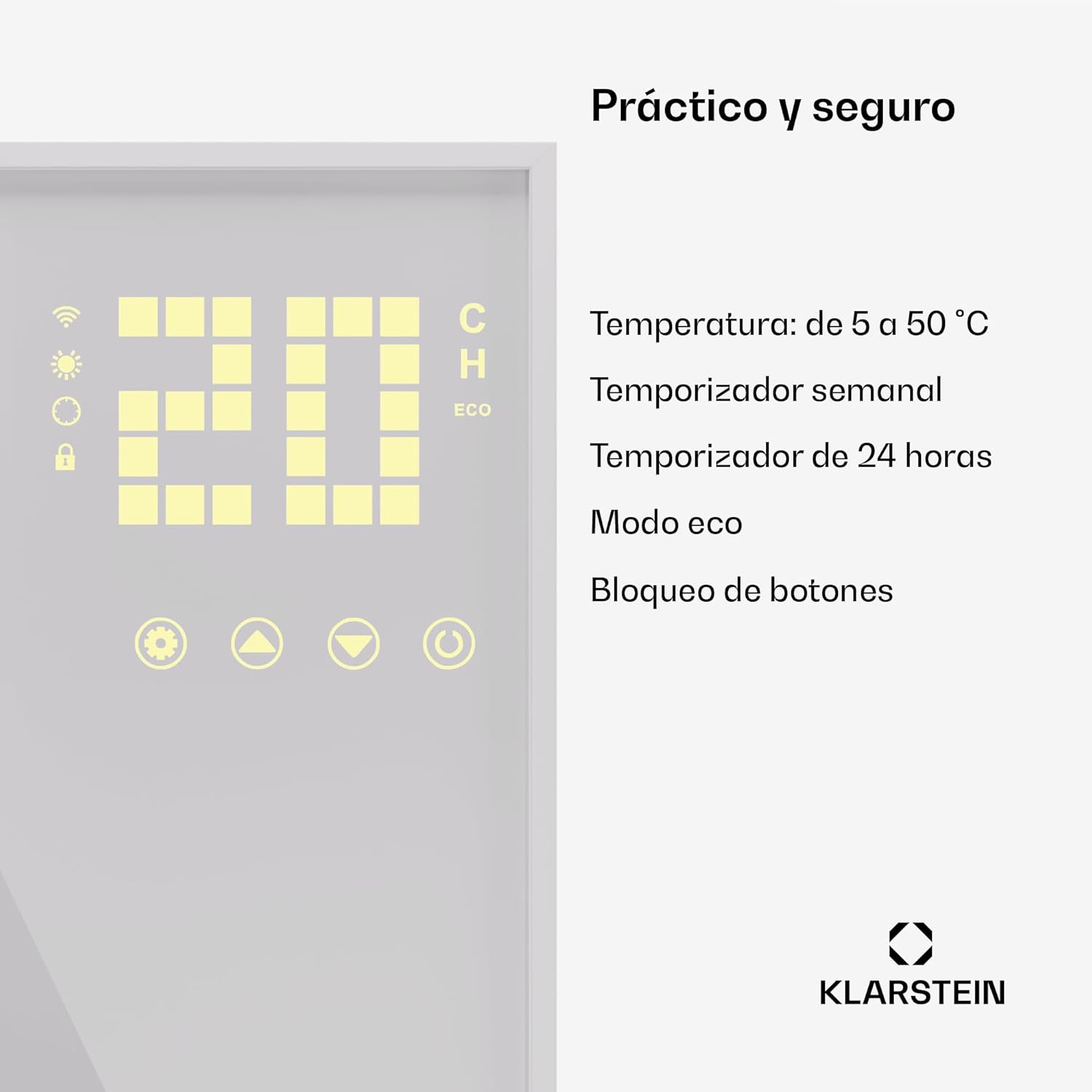
Image: Heater control panel. The image shows a digital display indicating "20" (likely temperature) and icons for WiFi, sun (heating), lock, and ECO mode. Below the display are touch buttons for settings, up, down, and power.
- LED Display: Shows current temperature, WiFi status, timer, and active modes (e.g., ECO).
- Power Button: Turns the heater on/off.
- Temperature Adjustment Buttons (+/-): Increases or decreases the desired temperature.
- Mode Button: Cycles through available heating modes (e.g., ECO).
- Timer Button: Sets the operating timer.
- Child Lock Button: Activates/deactivates the child lock to prevent accidental changes.
2. Remote Control Usage
The included remote control provides convenient access to all heater functions from a distance.
- Power: Turns the heater on/off.
- SET: Accesses settings or confirms selections.
- +/-: Adjusts temperature or timer values.
- TIME: Sets the timer function.
- TEMP: Displays or adjusts the target temperature.
- ECO: Activates the energy-saving ECO mode.
3. App Control Features
Using the Klarstein Smart app, you can access advanced features:
- Remote On/Off: Turn the heater on or off from anywhere.
- Temperature Setting: Precisely set your desired room temperature (range: 5°C to 50°C).
- Weekly & 24-Hour Timer: Program heating schedules to suit your routine.
- Open Window Detection: The heater automatically pauses heating if a sudden drop in temperature (indicating an open window) is detected, saving energy.
- ECO Mode: Optimize energy consumption.
- Child Lock: Prevent unauthorized changes to settings.
- Integration: Compatible with Amazon Alexa and Google Home for voice control.
Maintenance
Regular maintenance ensures optimal performance and longevity of your heater.
Cleaning:
- Always unplug the heater and allow it to cool completely before cleaning.
- Wipe the exterior surfaces with a soft, damp cloth. Do not use abrasive cleaners or solvents.
- Ensure no water enters the internal components.
Storage:
If storing the heater for an extended period, clean it thoroughly and store it in a cool, dry place, preferably in its original packaging.
Troubleshooting
| Problem | Possible Cause | Solution |
|---|---|---|
| Heater does not turn on. | No power supply; power button not pressed; child lock active. | Check power connection; press power button; deactivate child lock. |
| Heater not heating effectively. | Temperature setting too low; open window detection active; room size too large for wattage. | Increase target temperature; close windows/doors; consider heater placement or additional heating for larger rooms. |
| WiFi connection fails. | Incorrect WiFi password; heater too far from router; router issues. | Verify WiFi password; move heater closer to router; restart router; re-attempt pairing process. |
| Remote control not working. | Batteries depleted; obstruction between remote and heater. | Replace batteries; ensure clear line of sight to the heater's receiver. |
If the problem persists after trying these solutions, please contact Klarstein customer support.
Specifications
| Brand | KLARSTEIN |
| Model Number | ACO14_IR_WWBrn_1200V |
| Power Output | 1200 W |
| Color | White Vertical |
| Dimensions (Heater) | 11 x 60 x 120 cm (Depth x Width x Height) |
| Dimensions (with feet) | 37 x 60 x 128.5 cm (Depth x Width x Height) |
| Product Weight | 6.2 kg |
| Special Features | APP Control, WiFi, Open Window Detection, Thermostat, Timer, ECO Mode |
| Protection Rating | IP24 (Dust and Splash Water Protected) |
| Heating Method | Radiant (Infrared) |
| Mounting Type | Wall Mount (Freestanding with optional feet) |
| Recommended Use | Indoor (Kitchen, Living Room, Office, Children's Room, Bathroom) |
Product Overview Video
Video: Klarstein Wonderwall Infrared Heating Panel. This video provides a visual overview of the Klarstein infrared heating panel, demonstrating its design, wall-mounting capabilities, and general appearance in a home setting. It highlights the sleek, minimalist aesthetic and how it integrates into various rooms.
Warranty and Support
Your Klarstein Infrared Electric Heater comes with a standard manufacturer's warranty. Please refer to the warranty card included in your package or visit the official Klarstein website for detailed warranty terms and conditions.
For technical support, troubleshooting assistance, or spare parts, please contact Klarstein customer service. Contact information can typically be found in your multilingual user manual or on the official Klarstein website.
When contacting support, please have your model number (ACO14_IR_WWBrn_1200V) and purchase date ready.


