
A Dece Oasis Air 20pro
ADO Air20Pro Electric Bike User Manual
Model: Air 20pro | Brand: A Dece Oasis
1. Introduction
This manual provides essential information for the safe and efficient operation, maintenance, and troubleshooting of your ADO Air20Pro Electric Bike. Please read this manual thoroughly before your first ride and keep it for future reference.

Figure 1.1: ADO Air20Pro Electric Bike Overview.
The ADO Air20Pro is a folding electric bicycle designed for urban commuting and leisure, featuring a lightweight aluminum alloy frame, a powerful BAFANG 250W brushless motor, and a maintenance-free belt drive system. It offers both ECO and SPORT modes for varied riding experiences and is equipped with advanced safety features like hydraulic disc brakes and integrated lighting.
2. Safety Information
Always prioritize safety. Wear a helmet, obey traffic laws, and perform pre-ride checks. Do not ride under the influence of alcohol or drugs. Ensure all components are securely fastened before each use.
- Always wear a certified helmet.
- Familiarize yourself with local traffic laws and regulations.
- Perform a pre-ride inspection before each use (brakes, tires, battery, lights).
- Do not exceed the maximum load capacity of 120 kg.
- Avoid riding in adverse weather conditions (heavy rain, snow, ice).
3. Setup and Assembly
Your ADO Air20Pro electric bike comes largely pre-assembled. Minor assembly is required before your first ride.
3.1 Unboxing and Initial Inspection
Carefully remove the bike from its packaging. Inspect for any signs of damage during transit. Ensure all included components, such as the tool kit, are present.
3.2 Handlebar and Pedal Installation
Attach the front stem and handlebars, ensuring they are securely tightened. Install the pedals, noting that they are typically marked 'L' for left and 'R' for right, and thread in opposite directions.
3.3 Folding and Unfolding
The ADO Air20Pro features a convenient folding mechanism for easy storage and transport. Refer to the diagrams below for proper folding and unfolding procedures.
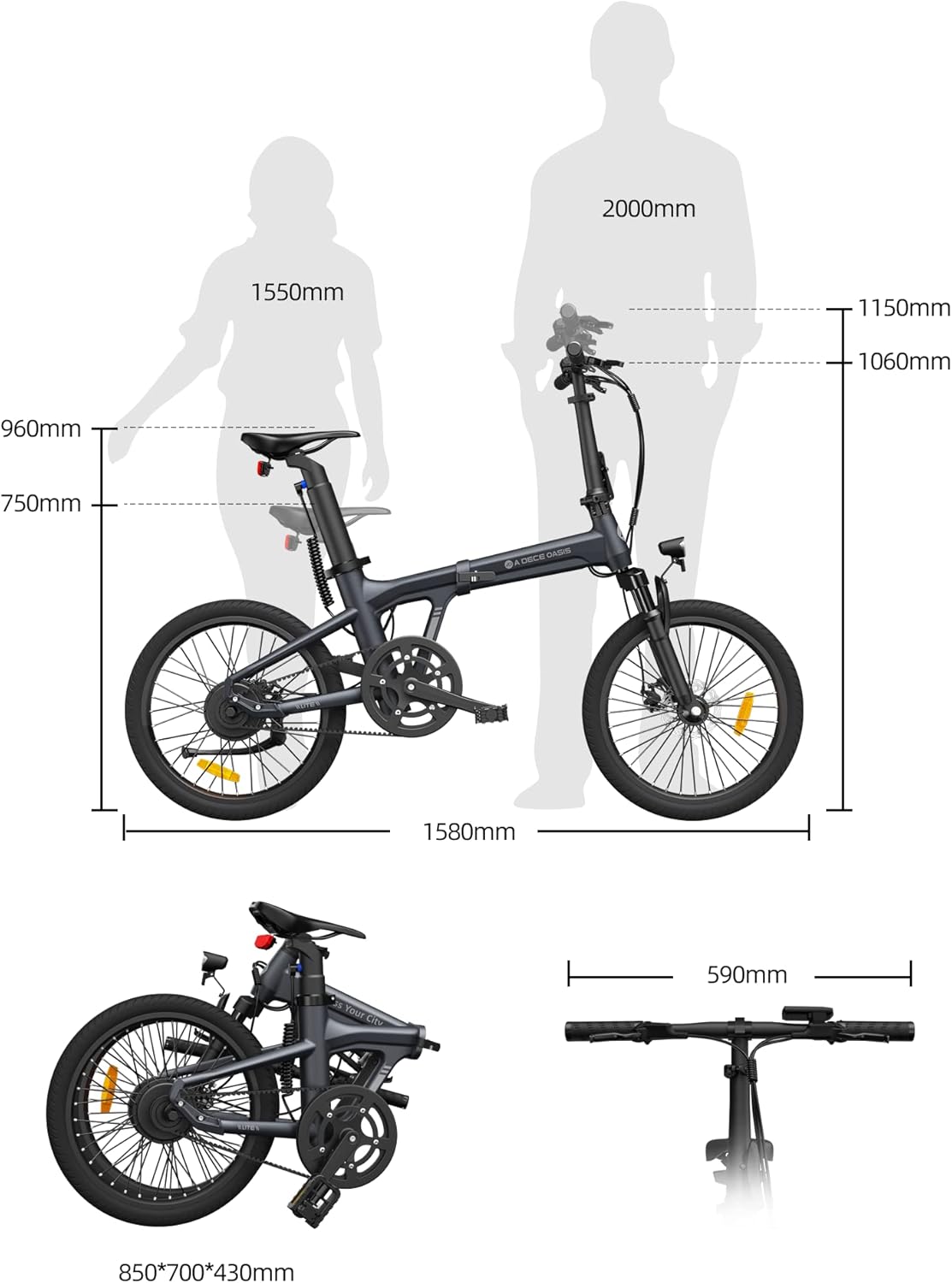
Figure 3.1: Unfolded and Folded Dimensions.

Figure 3.2: Detailed Dimensions and Folding.
3.4 Adjustments
Adjust the seat height and handlebar position to ensure a comfortable and ergonomic riding posture. Ensure all quick-release levers are securely fastened after adjustment.
3.5 Battery Charging
Fully charge the 36V9.6Ah removable battery before first use. Connect the charger to the bike's charging port and then to a power outlet. The charging indicator will show the charging status.
4. Operating Instructions
4.1 Powering On/Off
Press and hold the power button on the display to turn the bike on or off. The LCD display will illuminate, showing current speed, battery level, and other riding data.

Figure 4.1: LCD Display Interface.
4.2 Riding Modes
The bike features two riding modes: ECO and SPORT. Switch between modes using the controls on the handlebar display.
- ECO Mode: Provides greater energy efficiency, extending battery range.
- SPORT Mode: Delivers 30% more power for enhanced performance and acceleration.

Figure 4.2: Dual Mode Switching.
4.3 Pedal Assist System (PAS)
The BAFANG 250W brushless motor provides pedal assistance, automatically switching to 2nd gear to maintain a reasonable high-speed running speed. The bike can reach a top speed of 25km/h (15.5 mph).

Figure 4.3: BAFANG Motor System.

Figure 4.4: BAFANG Automatic Internal Gear Hub.
4.4 Braking System
The ADO Air20Pro is equipped with hydraulic disc brakes on both front and rear wheels for superior stopping power and control. Always apply both brakes simultaneously for effective and safe braking.

Figure 4.5: Hydraulic Disc Brake System.
4.5 Lighting and Signals
The bike features an integrated front light with a photosensitive sensor that automatically adjusts brightness based on ambient light. It also includes an integrated rear turn signal for improved safety and communication.

Figure 4.6: Front Light.

Figure 4.7: Rear Turn Signal.
4.6 ADO Smart APP Connectivity
Connect your ADO Air20Pro to the ADO Smart APP via Bluetooth to monitor driving status, view fault maintenance records, and access customer service. The app provides a 360° interactive panoramic platform for an enhanced user experience.

Figure 4.8: ADO Smart APP Interface.

Figure 4.9: Using the ADO Smart APP.
5. Maintenance
Regular maintenance ensures the longevity and safe operation of your electric bike.
5.1 General Cleaning
Clean the bike regularly with a damp cloth. Avoid using high-pressure washers directly on electrical components.
5.2 Belt Drive System
The belt drive system is designed to be maintenance-free, rust-free, and grease-free, offering smoother and quieter transmission compared to traditional chains. No lubrication is required.

Figure 5.1: Belt Drive System Benefits.
5.3 Brake System Check
Regularly inspect the hydraulic disc brakes for wear on the pads and rotors. Ensure brake levers provide firm and consistent pressure. If you notice any issues, consult a qualified bicycle technician.
5.4 Tire Pressure
Check tire pressure before each ride. Maintain the recommended pressure (usually indicated on the tire sidewall) for optimal performance and safety.
5.5 Battery Care
Store the battery in a cool, dry place. If storing for extended periods, charge the battery to approximately 50-70% every 1-2 months to preserve its lifespan.
6. Troubleshooting
This section addresses common issues you might encounter. For more complex problems, refer to the ADO Smart APP for fault maintenance records or contact customer support.
| Problem | Possible Cause | Solution |
|---|---|---|
| Bike does not power on. | Low battery, loose battery connection, power button issue. | Charge battery, ensure battery is properly seated, press power button firmly. |
| Motor not assisting. | PAS system off, low battery, sensor issue. | Check display settings, charge battery, inspect pedal assist sensor. |
| Brakes feel weak. | Worn brake pads, air in hydraulic line, misaligned caliper. | Inspect and replace brake pads, bleed hydraulic system (professional recommended), adjust caliper. |
| Unusual noises from belt drive. | Debris in belt, tension issue. | Inspect belt for foreign objects, check belt tension (professional recommended). |
7. Specifications
| Feature | Detail |
|---|---|
| Brand | A Dece Oasis |
| Model | Air 20pro |
| Bike Type | Electric Bike, Folding |
| Motor | BAFANG 250W Brushless Motor |
| Battery | 36V9.6Ah Removable Built-in Battery |
| Max Range | Up to 100KM (62.2 Miles) |
| Top Speed | 25km/h (15.5 mph) |
| Wheel Size | 20 Inches |
| Brake Type | Hydraulic Disc Brakes (Front & Rear) |
| Frame Material | Aluminum Alloy |
| Suspension | Front Fork with Shock Absorption |
| Transmission | Belt Drive System |
| Number of Speeds | 2 (Internal Gear System) |
| Item Weight | 21 kg |
| Max Load Capacity | 120 kg |
| Unfolded Dimensions | 161 x 59 x 115 cm (Length x Width x Height) |
| Folded Dimensions | 85 x 70 x 43 cm (Length x Height x Width) |
| Special Features | Digital Display, Adjustable Handlebars, Odometer, Adjustable Seat, Photosensitive Front Light, Integrated Rear Turn Signal, ADO Smart APP Connectivity. |
8. Warranty and Support
For warranty information, please refer to the documentation provided with your purchase or contact the seller directly. For technical support, fault maintenance records, and customer service, utilize the multi-channel customer service window available through the ADO Smart APP.
Manufacturer: A Dece Oasis
Model Number: Air 20pro
Ask a question about this manual
Ask about setup, troubleshooting, compatibility, parts, safety, or missing instructions. Manuals+ will review the question and use this page’s manual context to help answer it.