
1. Safety Information
Please read and understand all safety instructions before using the Donner HUSH-I PRO Travel Guitar. Keep this manual for future reference.
- Power Source: Use only the specified USB-C charging cable and a compatible power adapter (5V/2A recommended). Do not use damaged cables or adapters.
- Battery Care: The guitar contains a built-in rechargeable battery. Do not expose to extreme temperatures, direct sunlight, or fire. Do not disassemble or puncture the battery.
- Moisture: Keep the guitar away from water, moisture, and high humidity. Do not operate with wet hands.
- Cleaning: Clean the guitar with a soft, dry cloth. Do not use abrasive cleaners or solvents.
- Handling: Handle the guitar with care. Avoid dropping or subjecting it to strong impacts.
- Ventilation: Ensure proper ventilation around the guitar during use and charging.
- Hearing Protection: When using headphones, set the volume to a comfortable level to prevent hearing damage.
2. Product Overview
The Donner HUSH-I PRO is an innovative headless travel guitar designed for portability and versatile sound. It integrates a powerful H1 multi-effects preamp system, allowing for silent practice and a wide range of tonal possibilities.
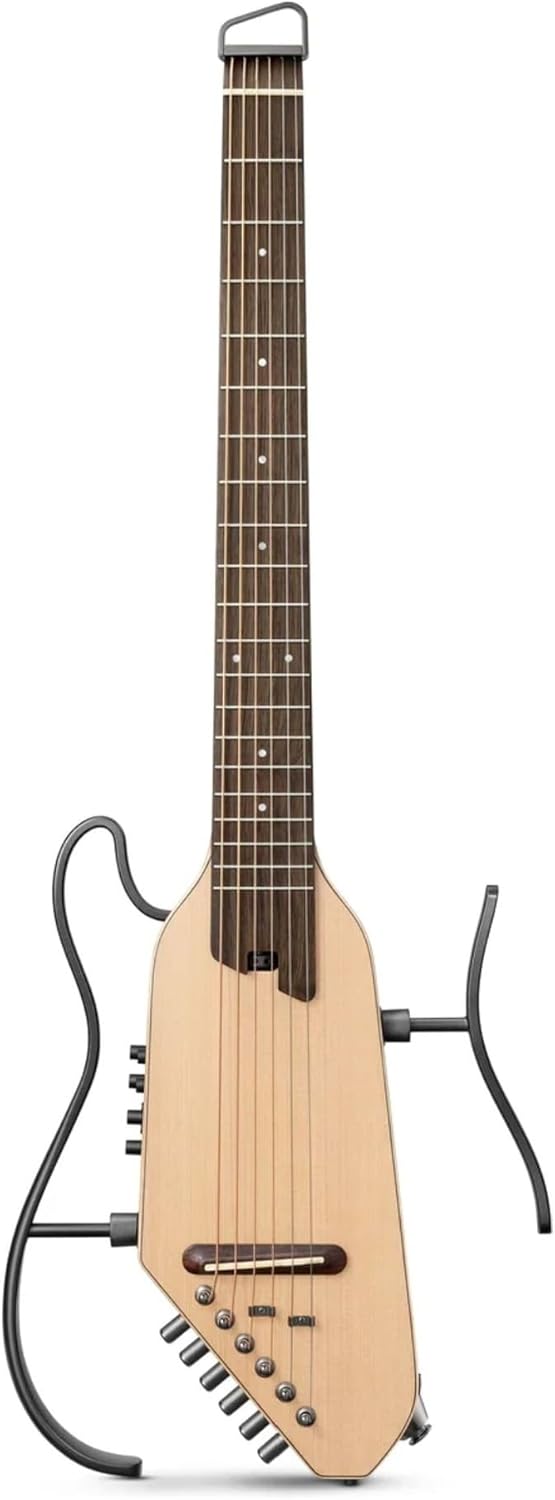
Figure 2.1: Front view of the Donner HUSH-I PRO Travel Guitar in Natural finish.
Key Features:
- Integrated H1 Multi-Effects Preamp System: Features 18 effects (5 modulation, 5 delay, 5 reverb, overdrive, compressor, booster) and 8 classic guitar body simulations.
- 20 IR Slots: Allows for extensive tone customization and loading of impulse responses.
- Silent Practice: Headless design with no resonant chamber and low strumming sound for quiet playing. Supports headphone practice.
- Portability: Lightweight at approximately 2.1kg (4.6 lbs) with a quick-disconnect zinc alloy bracket for easy assembly and disassembly.
- Long Battery Life: Up to 8 hours of continuous play on a single charge, with USB-C fast charging.
- Connectivity: Supports wireless BGM accompaniment via Bluetooth and direct audio device connection.
- Ergonomic Design: Comfortable neck profile for extended playing sessions.

Figure 2.2: The HUSH-I PRO's ultra-portable design, weighing approximately 2.1kg, making it easy to carry.
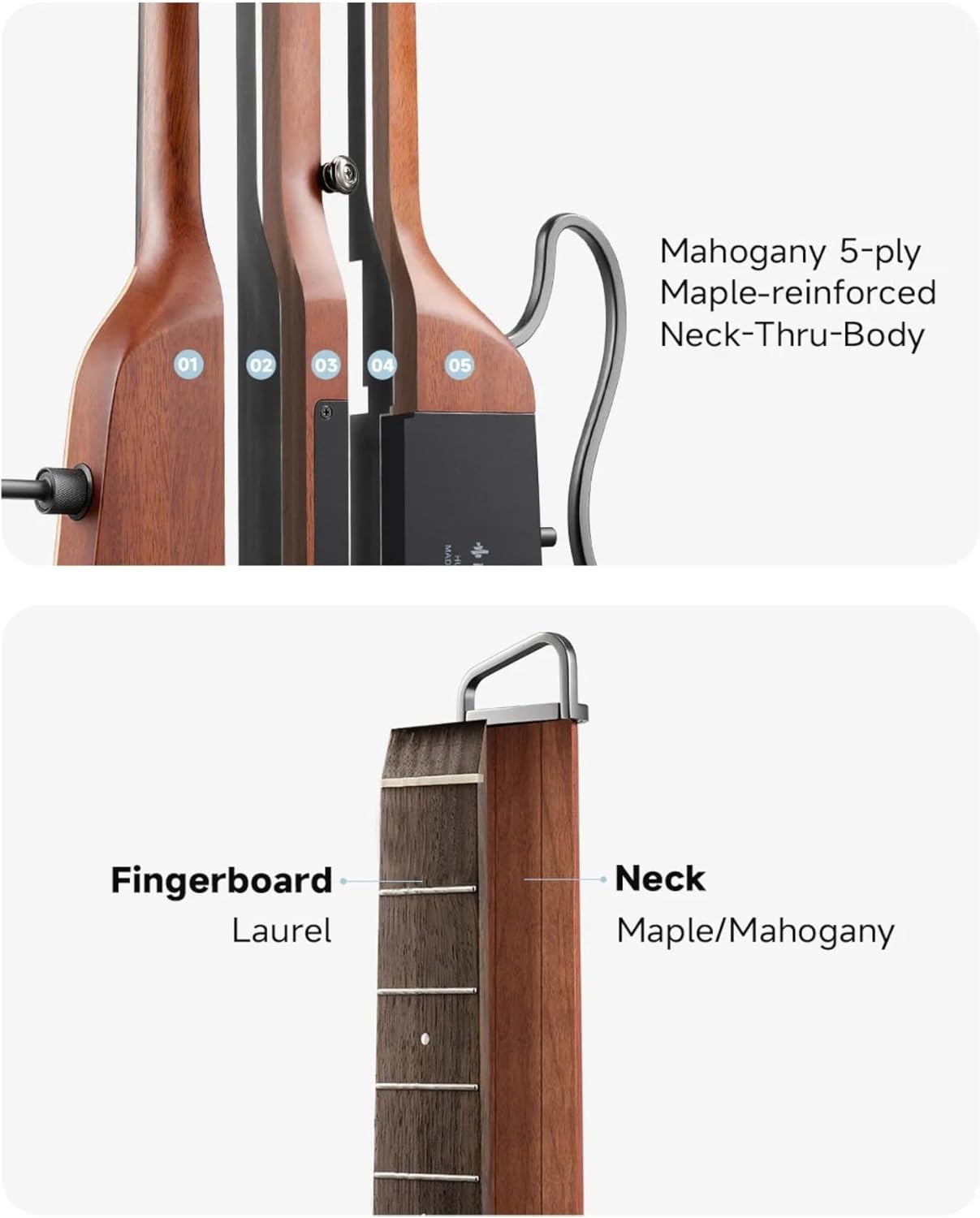
Figure 2.3: Detail of the Mahogany 5-ply Maple-reinforced Neck-Thru-Body construction for enhanced stability and sustain.

Figure 2.4: Close-up showing the Laurel fingerboard and Maple/Mahogany neck materials.
3. Setup
3.1 Unpacking and Inspection
Carefully remove all components from the packaging. Verify that all items listed below are present and undamaged:
- Donner HUSH-I PRO Travel Guitar
- Portable Bag
- Headphones
- USB-C Charging Cable
- 6.35mm Audio Cable
- Guitar Strap
- Truss Rod Wrench
- Guitar Picks
- Polishing Cloth
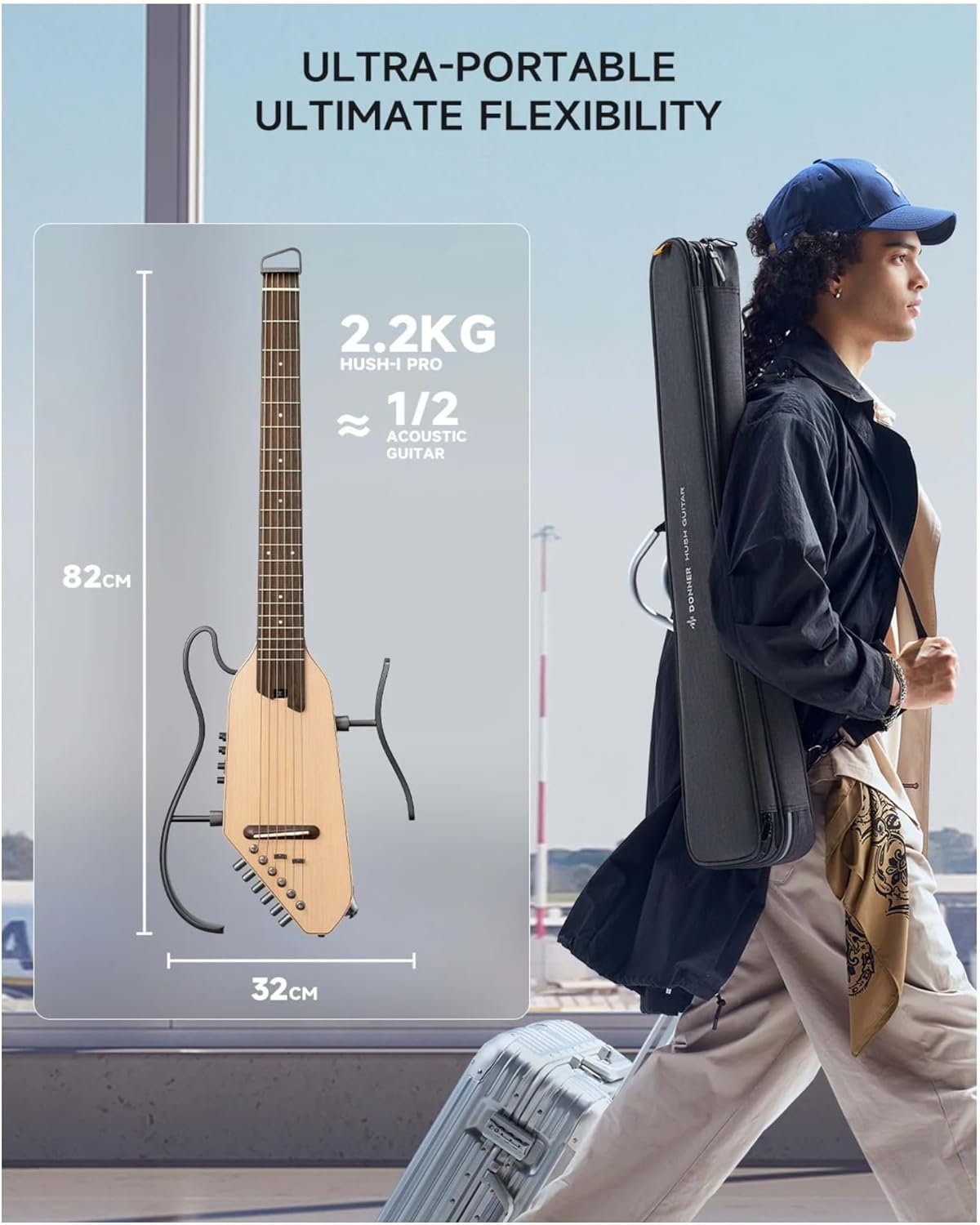
Figure 3.1: All accessories included with the HUSH-I PRO guitar.
3.2 Assembling the Detachable Frame
The HUSH-I PRO features a detachable zinc alloy frame for compact storage and transport. To assemble:
- Identify the main guitar body and the two frame pieces.
- Align the connectors on the frame pieces with the corresponding slots on the guitar body.
- Gently push and click the frame pieces into place until they are securely fastened. The quick-disconnect mechanism ensures a firm connection.
3.3 Initial Charging
Before first use, fully charge the guitar's internal battery.
- Connect the provided USB-C charging cable to the guitar's USB-C port.
- Connect the other end of the cable to a compatible USB power adapter (not included, 5V/2A recommended) or a computer USB port.
- The charging indicator light will illuminate. Once fully charged, the light may change color or turn off (refer to the guitar's specific LED indicator behavior).
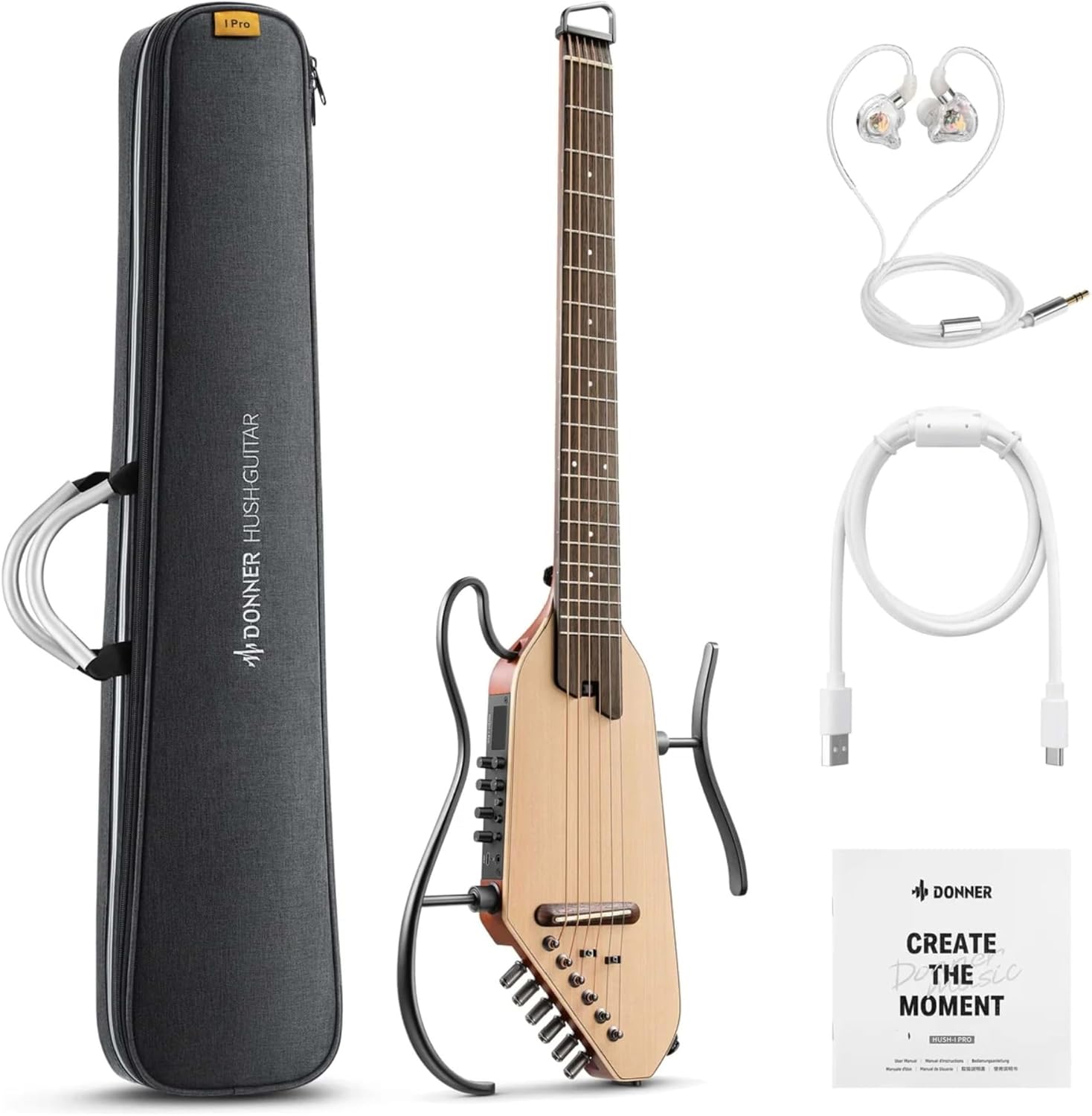
Figure 3.2: USB-C charging port and internal battery compartment, providing approximately 8 hours of extended battery life.
4. Operating Instructions
4.1 Powering On/Off
- Power On: Press and hold the Power button (usually located near the control panel) for a few seconds until the indicator lights illuminate.
- Power Off: Press and hold the Power button again until the indicator lights turn off.
4.2 Connecting Audio Devices
- Headphones: Connect the provided headphones (or your own 3.5mm headphones) to the headphone jack on the guitar's control panel.
- External Amplifier/Audio Interface: Use the provided 6.35mm audio cable to connect the guitar's output jack to an amplifier, audio interface, or mixer.
4.3 Using the H1 Multi-Effects Preamp System
The H1 system offers a wide array of effects and tone shaping options. Refer to the control panel layout for specific knob and button functions.

Figure 4.1: Close-up of the H1 Multi-effects Preamp System control panel, showing knobs for Air Boost, Tone Boost, Save, and Volume, along with Edit and Select buttons.

Figure 4.2: Visual representation of the 18 presets, 8 acoustic guitar body styles, and 20 IR slots available for immersive tone discovery.
- Selecting Presets: Use the 'SELECT' button or rotary knob to cycle through the 18 built-in presets. Each preset combines various effects and IRs for a unique sound.
- Customizing Tones: Use the 'EDIT' button to enter edit mode. Adjust parameters like 'AIR BOOST' and 'TONE BOOST' to fine-tune your sound. The display will show current settings.
- Effects Modules: The H1 system includes 5 modulation effects, 5 delay effects, 5 reverb effects, overdrive, compressor, and booster. These can be combined and adjusted within presets.
- IR Slots: The 20 IR slots allow for loading custom impulse responses to simulate different amplifier cabinets or acoustic guitar bodies. Refer to the full digital manual for detailed instructions on loading IRs.
- Saving Presets: After customizing a tone, press the 'SAVE' button to store your settings to a user preset slot.
4.4 Tuning the Guitar
The HUSH-I PRO features a unique headless tuning mechanism. The tuning pegs are located at the bottom of the guitar body.
- Built-in Tuner: Activate the built-in tuner function via the control panel (usually by pressing a dedicated button or holding 'SELECT'). The display will show the note being played and indicate if it's sharp or flat.
- Tuning Pegs: Use the included truss rod wrench (or your fingers if strong enough) to turn the tuning pegs. Rotate clockwise to tighten the string (raise pitch) and counter-clockwise to loosen (lower pitch).
4.5 Bluetooth Connectivity (BGM Accompaniment)
The guitar supports Bluetooth for playing background music from your device.
- Ensure the guitar is powered on.
- Activate Bluetooth on your smartphone or audio device.
- Search for available devices and select "Donner HUSH-I PRO" (or similar name).
- Once connected, you can play music through the guitar's headphone output, allowing you to play along.
5. Maintenance
5.1 Cleaning
- Use the provided polishing cloth or a soft, dry, lint-free cloth to wipe down the guitar body and neck after each use.
- For strings, use a string cleaner solution and a clean cloth to remove dirt and oil, which can extend string life.
- Avoid spraying cleaners directly onto the guitar, especially near electronic components. Apply cleaner to the cloth first.
5.2 String Replacement
The HUSH-I PRO uses standard guitar strings. Due to its headless design, string replacement involves a specific procedure:
- Loosen the old string completely using the tuning peg.
- Remove the string from the bridge and the string lock at the headstock end.
- Insert the new string through the bridge.
- Secure the string at the headstock end using the string lock mechanism.
- Wind the string onto the tuning peg and tune to pitch.
It is recommended to replace strings one at a time to maintain neck tension.
5.3 Battery Care and Storage
- For long-term storage, charge the battery to approximately 50-70% to preserve its lifespan.
- Recharge the battery every few months if not in use to prevent deep discharge.
- Store the guitar in a cool, dry place, away from direct sunlight and extreme temperatures.
5.4 Truss Rod Adjustment
The truss rod allows for adjustment of the neck relief. If you experience buzzing or high action, the neck may need adjustment. Use the included truss rod wrench for minor adjustments. If unsure, consult a qualified guitar technician.
6. Troubleshooting
If you encounter issues with your Donner HUSH-I PRO, refer to the following common problems and solutions:
| Problem | Possible Cause | Solution |
|---|---|---|
| No sound from headphones/amp. | Guitar not powered on; volume too low; cable issues; headphones/amp not connected properly. | Ensure guitar is on; increase volume; check cable connections; test with different headphones/amp. |
| Guitar not charging. | Faulty USB-C cable/adapter; port issue; battery fully charged. | Try a different USB-C cable and power adapter; ensure port is clean; check if battery is already full. |
| Effects not working or sound distorted. | Incorrect preset selected; effect parameters set incorrectly; low battery. | Cycle through presets; adjust effect parameters; charge the guitar. |
| Bluetooth connection issues. | Guitar not in pairing mode; device too far; interference. | Ensure guitar's Bluetooth is active; move device closer; restart both devices. |
| Buzzing sound or high action. | Neck relief issue; worn frets; improper string gauge. | Adjust truss rod (if comfortable); consult a guitar technician for fret issues. |
If the problem persists after trying these solutions, please contact Donner customer support.
7. Specifications
| Feature | Specification |
|---|---|
| Model Number | EC6866 |
| Body Material | Mahogany |
| Back Material | Mahogany Wood |
| Neck Material | Maple/Mahogany (5-ply Maple-reinforced Neck-Thru-Body) |
| Fingerboard Material | Laurel |
| Color | Natural |
| Pickup Type | Piezo |
| String Material | Metal |
| Number of Strings | 6 |
| Bridge Type | Tremolo |
| Battery Type | Zinc Carbon (Internal Rechargeable) |
| Battery Life | Approx. 8 hours |
| Charging Port | USB-C |
| Weight | Approx. 2.1 kg (4.6 lbs) |
| Dimensions (Approx.) | 82cm (Length) x 32cm (Width) |
8. Warranty and Support
Donner provides a warranty for the HUSH-I PRO Travel Guitar against defects in materials and workmanship under normal use. The specific terms and duration of the warranty may vary by region and purchase location. Please retain your proof of purchase.
Customer Support:
For technical assistance, warranty claims, or general inquiries, please visit the official Donner website or contact their customer support team:
- Donner Official Website: www.donnerdeal.com
- Donner Amazon Store: Donner Store on Amazon.co.jp
Please have your model number (EC6866) and purchase date ready when contacting support.


