
BAOFENG K5 Plus
BAOFENG K5 Plus Six-Band Ham Radio User Manual
Model: K5 Plus
Introduction
The BAOFENG K5 Plus is a versatile and powerful six-band ham radio designed for reliable communication. Featuring a 1.77-inch LCD display and a full keyboard, it offers extensive functionality for various applications, from outdoor adventures to professional use. This manual provides detailed instructions for operating and maintaining your K5 Plus radio.
What's in the Box
Upon unboxing your BAOFENG K5 Plus, please ensure all the following items are present:
- 1x Portable Radio (BAOFENG K5 Plus)
- 1x Original High Gain Antenna
- 1x Type-C Charger Cable
- 1x 2500mAh Li-ion Battery
- 1x Belt Clip
- 1x Sling
- 1x Charger (Charging Dock)
- 1x User's Manual

Figure 1: Contents of the BAOFENG K5 Plus package, including the radio, antenna, charging accessories, and carrying attachments.
Setup
1. Battery Installation and Charging
- Ensure the radio is powered off.
- Align the 2500mAh Li-ion battery with the battery compartment on the back of the radio.
- Gently slide the battery into place until it clicks securely.
- To charge, connect the Type-C charger cable to the radio's USB-C port or place the radio in the charging dock.
- Connect the charger to a power source. The charging indicator light will show the charging status.
- Allow the battery to fully charge before first use (approximately 4-5 hours).
2. Antenna Attachment
- Locate the antenna connector on the top of the radio.
- Screw the original high gain antenna clockwise onto the connector until it is finger-tight. Do not overtighten.
3. Initial Power On
- Rotate the power/volume knob clockwise to turn on the radio.
- Adjust the knob to set the desired volume level.
- The 1.77-inch LCD display will illuminate, showing the current frequency or channel.
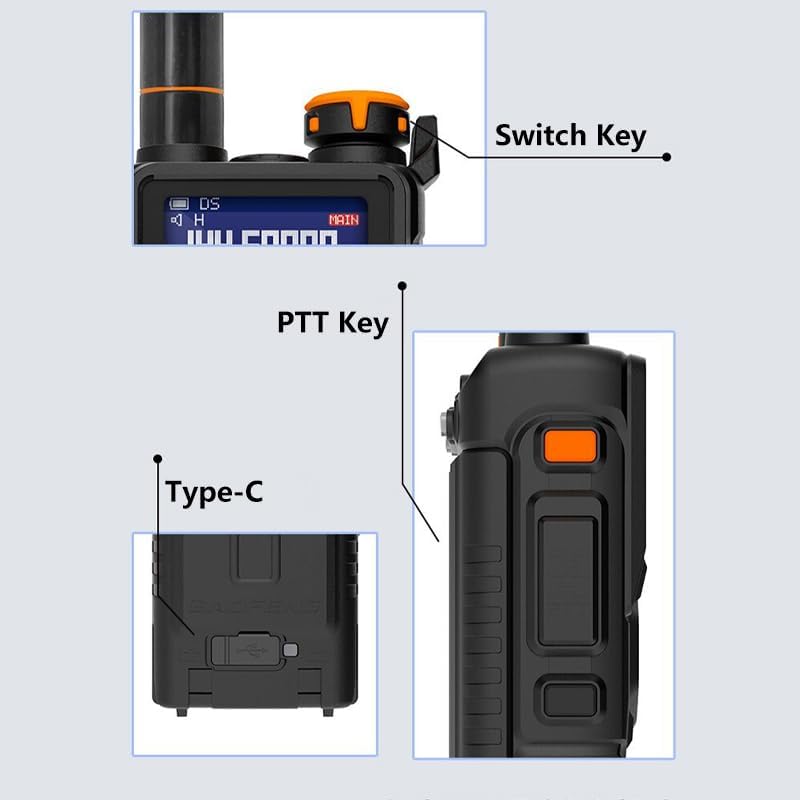
Figure 2: Key physical features of the BAOFENG K5 Plus, including the power/switch key, Push-to-Talk (PTT) button, and USB Type-C charging port.
Operating Instructions
Basic Operation
- Power On/Off and Volume: Use the top rotary knob to power on/off and adjust volume.
- PTT Key: Press and hold the Push-to-Talk (PTT) key on the side to transmit. Release to receive.
- A/B Button: Switches between the upper (A) and lower (B) frequency displays for dual watch operation.
- BAND Button: Cycles through frequency bands (FM, AM, VHF, UHF, Police).
- V/M Button: Toggles between Frequency (VFO) mode and Channel (Memory) mode.
- MENU Button: Accesses the radio's main menu for configuration.
- EXIT Button: Exits current menu or function.
- Keypad: Used for direct frequency input, channel selection, and menu navigation.

Figure 3: The BAOFENG K5 Plus LCD display and key features, highlighting its 1.77-inch screen, 999 channel capacity, frequency copy function, and NOAA weather alert capability.
Advanced Features
- Frequency Range: Supports FM, AM, Police, VHF (144-146MHz), and UHF (420-450MHz).
- One-Touch Search Frequency: Simplifies pairing and grouping by copying channel configuration parameters.
- Frequency Step: Selectable steps including 2.5K, 5.0K, 6.25K, 10.0K, 12.5K, 20.0K, 25.0K, 50.0K.
- Frequency Hopping & Scramble: Enhances call privacy.
- Channel Scan & Frequency Scan: The radio supports channel scanning, frequency scanning, and three scan recovery methods: TO (Time Operation), CO (Carrier Operation), and SE (Search Operation).
- 999 Memory Channels: Store a large number of frequencies and settings.
- Broadcast FM Radio Receiver: Listen to standard FM radio broadcasts.
- Dual Watch / Dual Reception: Monitor two frequencies simultaneously.
- Stopwatch Function: Integrated timer for various uses.
- Power-on Password Management: Secure your radio with a power-on password.
- DTMF Encoder & Manual Dial: For advanced signaling and control.
- VOX (Voice Activated Transmit): Allows hands-free transmission.
- Alarm Function: For emergency signaling.
- Display Illumination: Programmable via keypad for optimal visibility.
- High/Mid/Low Power Selectable: Adjust transmit power to conserve battery or extend range.
- Programmable Repeater Offset: Configure for repeater use.
- Battery Save Function: Extends battery life.
- Transmission Time-Out Timer (TOT): Prevents accidental continuous transmission.
- Busy Channel Lock Out (BCLO): Prevents transmission on an occupied channel.
- LED Flashlight: Built-in light for convenience.
- Squelch Adjustment: Ten (10) levels to filter out weak signals or noise.
- Roger Beep: Tone indicating end of transmission.
- Kenwood Accessory Port: Two (2) pins for compatible accessories.
- NOAA Weather Reception: Receive NOAA weather alerts.

Figure 4: The BAOFENG K5 Plus supports various scanning methods, including subtone scanning for specific tones and channel scanning to monitor active channels.
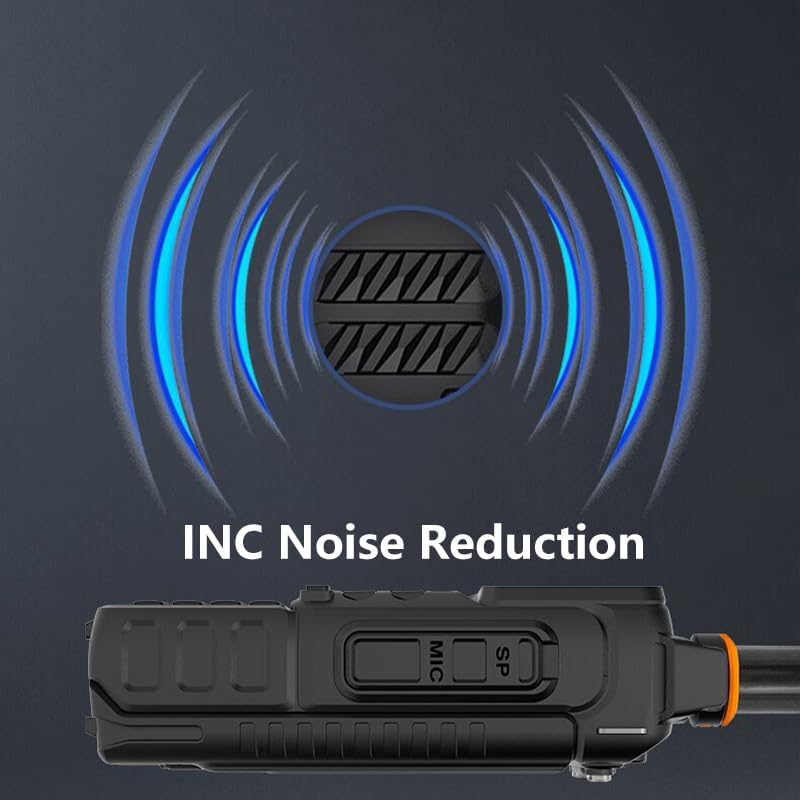
Figure 5: The BAOFENG K5 Plus features Integrated Noise Cancellation (INC) for clearer audio transmission and reception.

Figure 6: The BAOFENG K5 Plus supports DTMF (Dual-Tone Multi-Frequency) signaling, enabling advanced control and communication features.
Maintenance
- Cleaning: Use a soft, damp cloth to clean the radio's exterior. Do not use harsh chemicals or abrasive cleaners.
- Battery Care: To prolong battery life, avoid overcharging and fully discharging the battery frequently. Store the radio and battery in a cool, dry place when not in use for extended periods.
- Antenna Care: Ensure the antenna is securely attached but do not overtighten. Avoid bending or stressing the antenna.
- Storage: Store the radio in a dry environment, away from direct sunlight and extreme temperatures.
- Water Resistance: Note that this product is Not Water Resistant. Avoid exposure to water or high humidity.
Troubleshooting
| Problem | Possible Cause | Solution |
|---|---|---|
| Radio does not power on. | Battery is low or not installed correctly. | Charge the battery fully. Reinstall the battery, ensuring it clicks into place. |
| Cannot transmit or receive. | Incorrect frequency/channel, antenna not connected, or low battery. | Verify frequency/channel settings. Ensure antenna is securely attached. Charge battery. |
| Poor audio quality or static. | Weak signal, high squelch level, or interference. | Adjust squelch level (lower it). Move to an area with better signal. Check for local interference sources. |
| Keypad unresponsive. | Keypad lock enabled. | Refer to the operating instructions to disable keypad lock. |
Specifications
| Feature | Detail |
|---|---|
| Model Number | K5 Plus |
| Item Weight | 1.37 pounds |
| Product Dimensions (D x W x H) | 1.57 x 2.55 x 4.92 inches |
| Country of Origin | China |
| Battery Type | 1 Lithium Ion battery required (2500mAh) |
| Number of Channels | 999 |
| Frequency Range | UHF: 420MHz-450MHz, FM, VHF: 144MHz-146MHz, AM |
| Talking Range Maximum | 6.1 Mile |
| Tuner Technology | UHF/VHF |
| Voltage | 3.7 Volts |
| Water Resistance Level | Not Water Resistant |
| Display | 1.77 inch LCD Display |
| Charging | USB (TYPE C) charging |
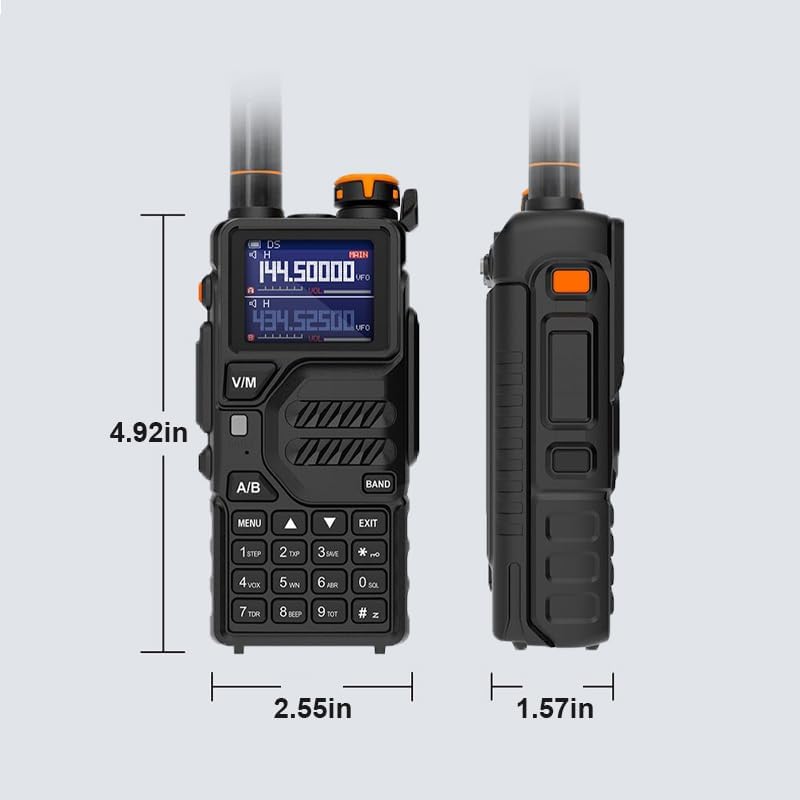
Figure 7: Physical dimensions of the BAOFENG K5 Plus radio.
Warranty Information
The BAOFENG K5 Plus comes with a 1-year warranty. This warranty is provided exclusively through "Shiqun Electronics Co., Ltd". Please retain your proof of purchase for warranty claims.
Support
For further assistance, technical support, or warranty inquiries, please contact the seller, "Shiqun Electronics Co., Ltd", directly through the platform where the product was purchased. Refer to your purchase documentation for specific contact details.
Related documentsK5 Plus


Ask a question about this manual
Ask about setup, troubleshooting, compatibility, parts, safety, or missing instructions. Manuals+ will review the question and use this page’s manual context to help answer it.