
1. Introduction
Thank you for choosing the VTimes VT507 Baby Monitor. This device is designed to provide secure and reliable monitoring of your baby, elderly family members, or pets. Featuring a 5.5-inch 720P HD screen, pan-tilt-zoom camera, night vision, and various smart functions, it offers peace of mind without relying on Wi-Fi connectivity. Please read this manual thoroughly before use to ensure proper operation and safety.

Image 1.1: VTimes VT507 Baby Monitor Parent Unit and Camera Unit. The image displays the white parent unit with a 5.5-inch screen showing a baby, and the white camera unit with a black lens and a yellow 'vtimes' logo.
2. Package Contents
Ensure all items are present in the package:
- User manual x 1
- Power adapter x 2
- Parent unit x 1
- Wall-mounting kit x 1
- Camera unit x 1
3. Product Overview
3.1 Parent Unit
The parent unit features a 5.5-inch 720P HD display for clear viewing. It includes control buttons for various functions such as two-way talk, zoom, volume, brightness, and menu navigation.

Image 3.1: The 5.5-inch large screen of the parent unit, showing a comparison of screen dimensions.

Image 3.2: Comparison illustrating the clarity of the VTimes 720P HD screen versus a standard 480P display.
3.2 Camera Unit
The camera unit is equipped with pan-tilt-zoom capabilities, night vision, a built-in night light, and a microphone/speaker for two-way communication. It operates using 2.4GHz FHSS technology for a secure, private connection.
4. Setup
4.1 Charging the Parent Unit
- Connect one power adapter to the parent unit and plug it into a power outlet.
- Charge the parent unit for at least 4 hours before initial use to ensure optimal battery life. The battery icon on the screen will indicate charging status.
4.2 Powering the Camera Unit
- Connect the second power adapter to the camera unit and plug it into a power outlet.
- The camera unit will automatically power on.
4.3 Positioning the Camera Unit
Place the camera unit in a location that provides a clear view of the monitoring area. Ensure it is out of reach of children and pets. The monitor uses 2.4GHz FHSS technology, providing a stable and secure connection up to 1000 feet in open areas. Signal strength may be reduced by solid structures like walls.
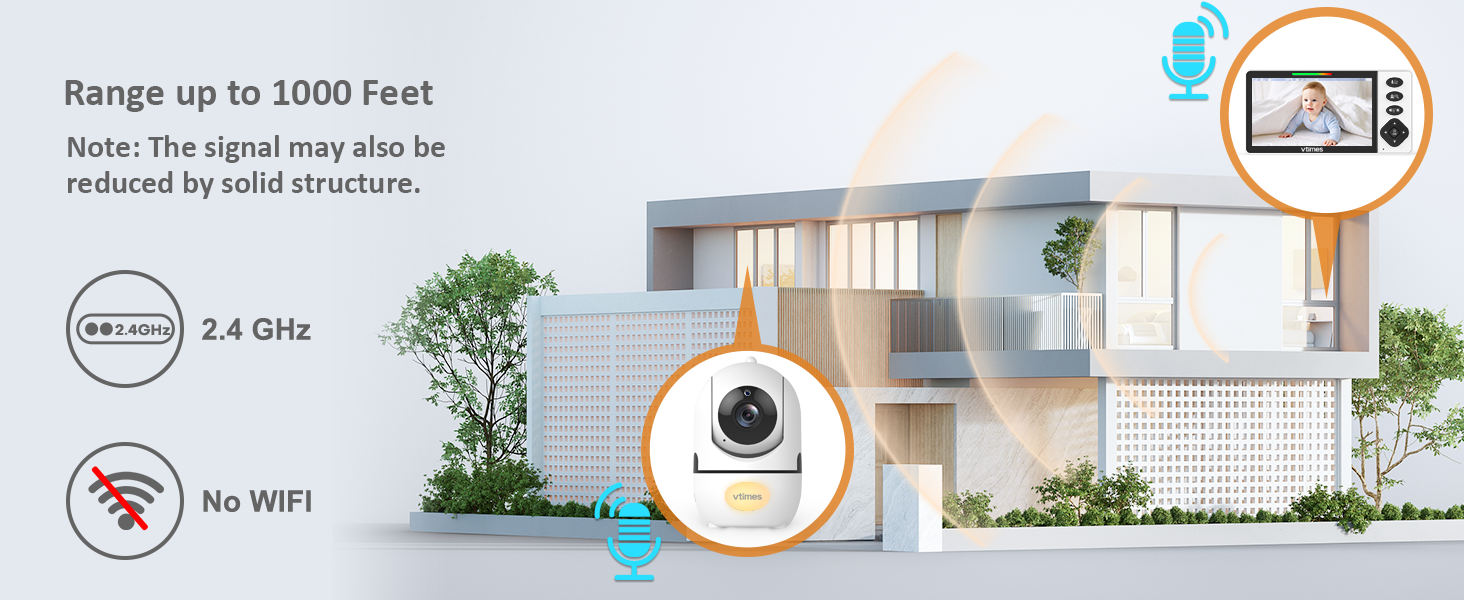
Image 4.1: Illustration of the 1000-foot range connectivity between the camera and parent unit, highlighting potential signal reduction by solid structures.
5. Operating Instructions
5.1 Power On/Off
- To power on the parent unit, press and hold the power button until the screen illuminates.
- To power off, press and hold the power button again.
5.2 Pan-Tilt-Zoom (PTZ)
Use the directional buttons on the parent unit to remotely adjust the camera's view.
- Pan: Move the camera horizontally (left/right).
- Tilt: Move the camera vertically (up/down).
- Zoom: Press the dedicated zoom button to magnify the image.
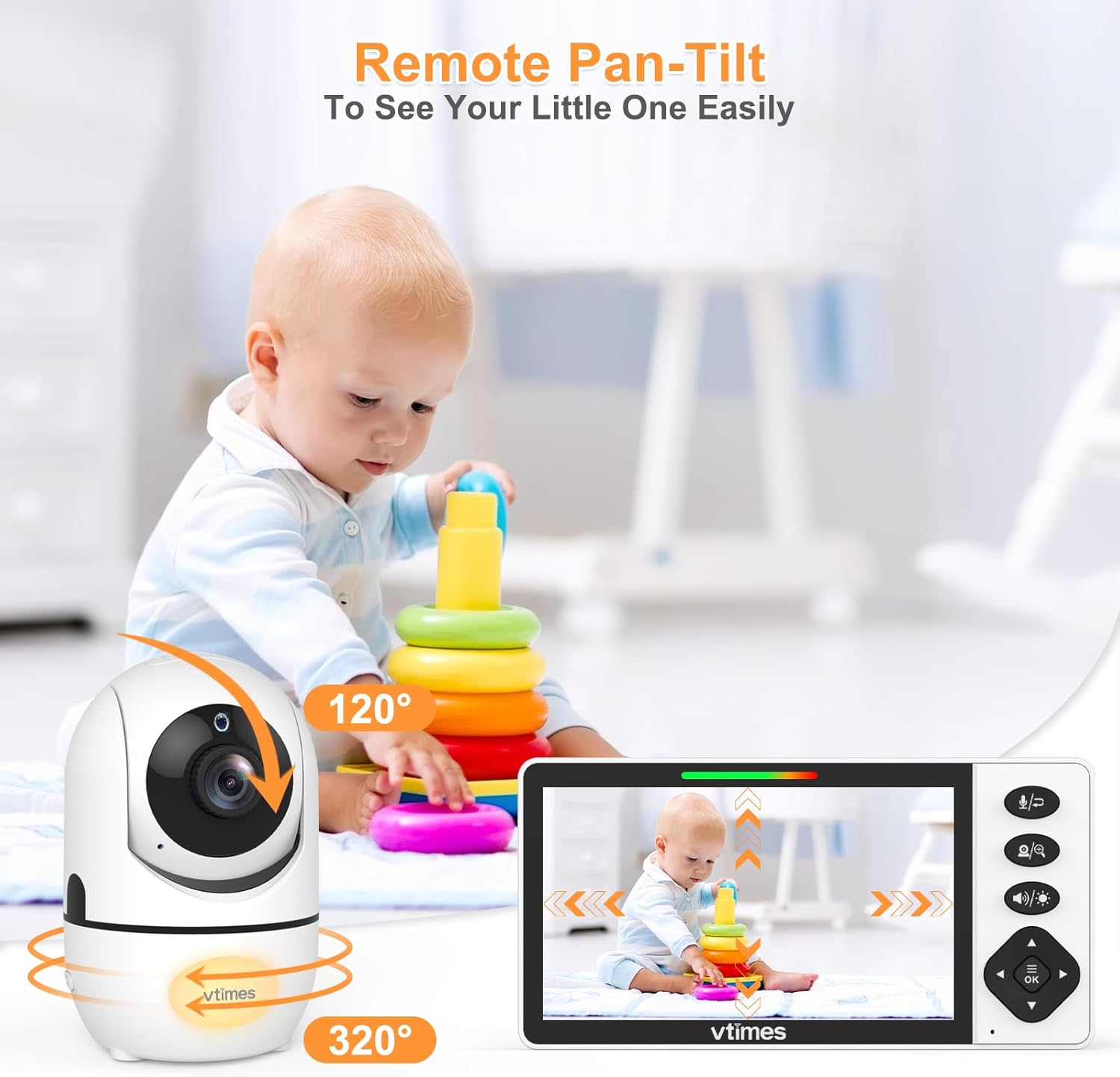
Image 5.1: The remote pan-tilt function of the camera unit, showing its 320-degree horizontal and 120-degree vertical rotation capabilities.
5.3 VOX (Voice Operated eXchange) / ECO Mode
The ECO mode conserves battery by putting the monitor to sleep when the environment is quiet. The screen and audio will activate instantly upon detection of sound.
- To activate/deactivate ECO mode, navigate to the menu and select the ECO option.
- Adjust sensitivity levels within the ECO settings if needed.
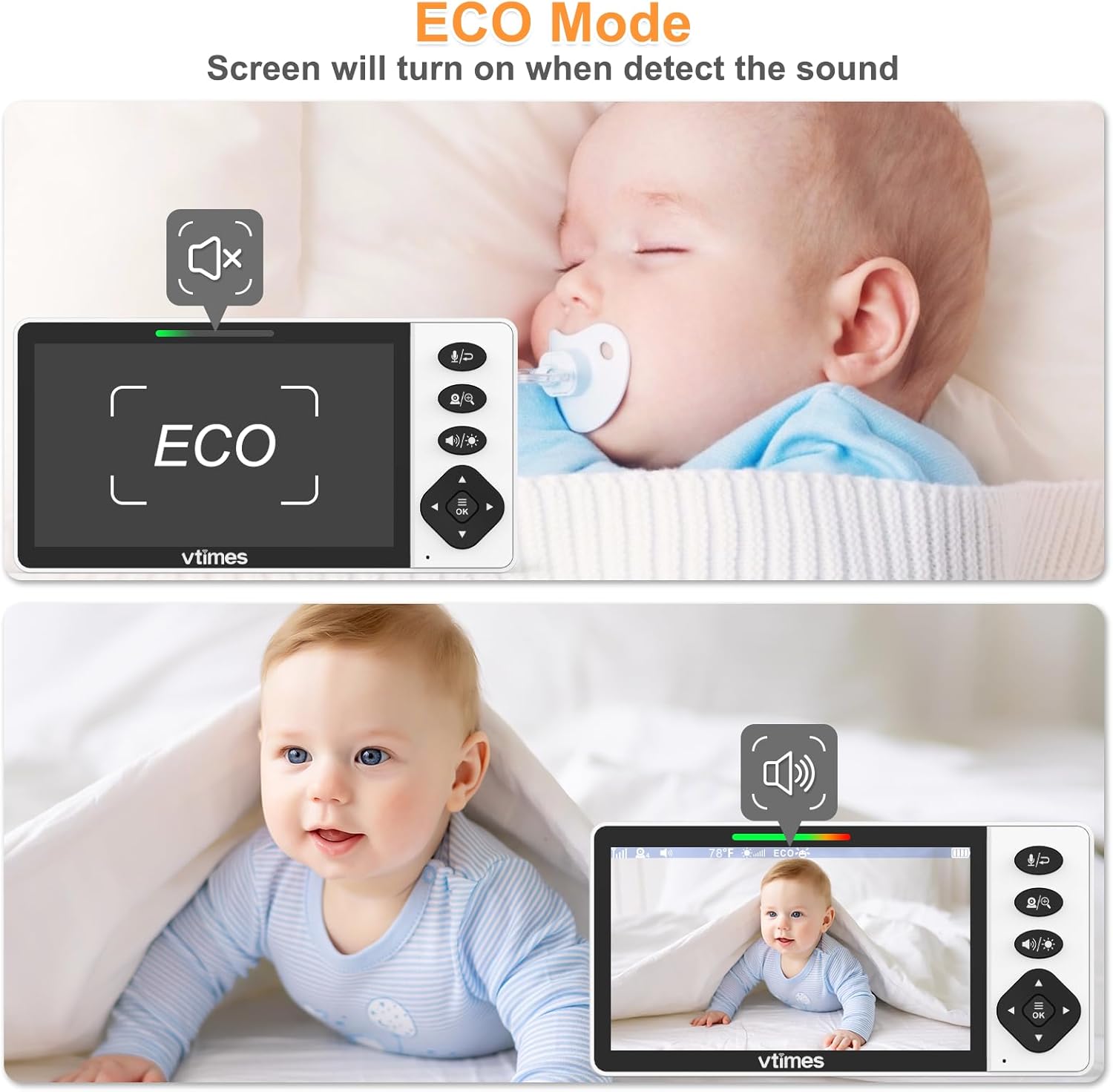
Image 5.2: The ECO mode feature, showing the monitor screen turning on when sound is detected.
5.4 Night Light
The camera unit includes a built-in night light with eight color options to provide a comforting glow.
- Access the night light settings through the parent unit's menu.
- Select a specific color or choose the option to cycle through all eight colors automatically.

Image 5.3: The camera unit with its colorful night light feature, displaying eight different color options.
5.5 Lullabies
The camera unit can play lullabies to soothe your baby.
- Select the Lullaby option from the parent unit's menu.
- Choose from available melodies.
5.6 Temperature Monitoring
The parent unit displays the room temperature detected by the camera unit, helping you ensure a comfortable environment.

Image 5.4: The camera unit playing lullabies while the parent unit displays the room temperature.
5.7 Feeding Reminder
Set alarms on the parent unit to remind you of feeding times or diaper changes.
- Navigate to the Timer/Alarm settings in the menu.
- Set desired intervals or specific times for reminders.

Image 5.5: The parent unit displaying a feeding reminder alarm.
5.8 Two-Way Talk
Press and hold the microphone button on the parent unit to speak through the camera unit's speaker.
6. Wall Mounting
The camera unit can be wall-mounted using the included kit. The flip-screen feature allows for inverted display capability, ensuring the image orientation is correct regardless of mounting position.
- Use the wall-mounting kit to securely attach the camera unit to a desired wall location.
- If mounted upside down, access the menu on the parent unit and select the 'Flip Screen' option to correct the image orientation.
7. Maintenance
- Cleaning: Use a soft, dry cloth to clean the surfaces of the parent and camera units. Do not use abrasive cleaners or solvents.
- Battery Care: To prolong the parent unit's battery life, avoid fully discharging it frequently. Recharge when the low battery indicator appears.
- Storage: If storing the monitor for an extended period, ensure both units are powered off and stored in a cool, dry place.
8. Troubleshooting
If you encounter issues, refer to the following common solutions:
| Problem | Possible Solution |
|---|---|
| No image/sound on parent unit | Ensure both units are powered on and within range. Check power connections. Recharge parent unit battery. |
| Poor image quality | Adjust camera position. Ensure no obstructions between units. Check for interference from other 2.4GHz devices. |
| Sound issues (static, no audio) | Adjust volume on parent unit. Move units closer to reduce interference. |
| Parent unit battery drains quickly | Activate ECO mode. Reduce screen brightness. Ensure battery is fully charged. |
| Camera not responding to PTZ controls | Ensure camera unit is powered on and connected. Restart both units. |
9. Specifications
- Model Name: VT507
- Screen Size: 5.5 inches
- Video Capture Resolution: 720p HD
- Connectivity Technology: Wireless (2.4GHz FHSS)
- Range: Up to 1000 feet (open area)
- Pan Angle: 320 degrees
- Tilt Angle: 120 degrees
- Special Features: VOX Mode, Night Vision, Night Light (8 colors), Lullabies, Temperature Monitoring, Two-Way Talk, Feeding Reminder, Flip-Screen
- Power Source: Corded Electric
- Indoor/Outdoor Usage: Indoor
- Product Dimensions: 5 x 1 x 1.5 inches
- Item Weight: 1.41 pounds
- UPC: 792105164342
10. Safety Information
- Strangulation Hazard: Keep all cords and cables out of reach of children (at least 3 feet / 1 meter away). Never place the camera or cords within a crib or playpen.
- Choking Hazard: This product contains small parts. Keep them away from children.
- Heat Exposure: Do not place the monitor or camera near heat sources such as radiators, heat registers, stoves, or other heat-producing appliances.
- Water and Moisture: Do not expose the units to water or moisture. This product is not water-resistant.
- Power Adapters: Use only the provided power adapters. Using unauthorized adapters may damage the product and void the warranty.
- Interference: The 2.4GHz FHSS technology provides a secure connection, but other wireless devices operating on the same frequency may cause interference.
11. Warranty and Support
For warranty information or technical support, please refer to the contact details provided with your purchase or visit the official VTimes website. Keep your purchase receipt as proof of purchase.
