
TOPTECH STAR-115
STAR-115 15'' Woofer Portable Bluetooth Speaker
User Instruction Manual
1. Introduction
Thank you for purchasing the TOPTECH STAR-115 Portable Bluetooth Speaker. This powerful speaker is designed to deliver blazing sound with a vibrant flame light show, perfect for home use, outdoor gatherings, and parties. Please read this manual carefully before operating the device to ensure proper use and to maximize its performance and lifespan.
2. Safety Information
- Do not expose the speaker to water or excessive moisture. This product is not waterproof.
- Avoid placing the speaker near heat sources such as radiators, heat registers, stoves, or other apparatus (including amplifiers) that produce heat.
- Use only attachments/accessories specified by the manufacturer.
- Unplug the speaker during lightning storms or when unused for long periods.
- Do not block any ventilation openings. Install in accordance with the manufacturer's instructions.
- Protect the power cord from being walked on or pinched, particularly at plugs, convenience receptacles, and the point where they exit from the apparatus.
- Refer all servicing to qualified service personnel. Servicing is required when the apparatus has been damaged in any way, such as power-supply cord or plug is damaged, liquid has been spilled or objects have fallen into the apparatus, the apparatus has been exposed to rain or moisture, does not operate normally, or has been dropped.
3. Package Contents
Please check the box for the following items:
- STAR-115 Portable Bluetooth Speaker
- Remote Control
- Wired Microphone
- Power Adapter
- User Manual (this document)
- Warranty Card
4. Product Overview
Familiarize yourself with the various parts of your STAR-115 speaker.

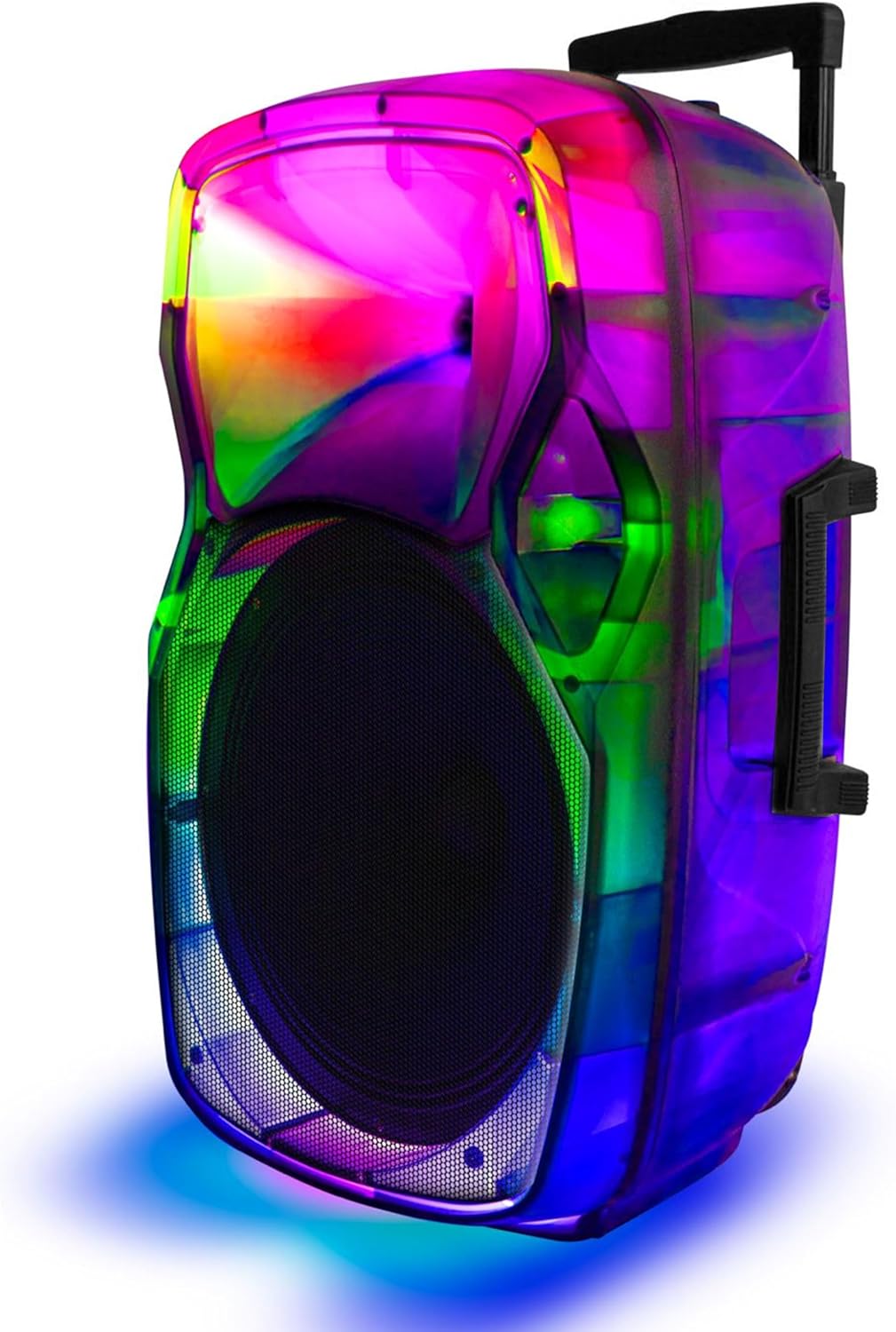
Front view of the STAR-115 speaker, showcasing its 15-inch woofer and vibrant multi-color flame light display.
Side view of the STAR-115 speaker, highlighting its integrated handle and wheels for easy portability.
Control Panel (Top/Rear)
- Power Button: Turns the speaker on/off.
- Mode Button: Switches between Bluetooth, FM Radio, AUX, USB, and TF Card modes.
- Volume Control: Adjusts the master volume.
- Microphone Input: For connecting the wired microphone.
- USB Port: For USB flash drives.
- TF Card Slot: For TF (MicroSD) cards.
- AUX Input: For connecting external audio devices via a 3.5mm cable.
- Light Mode Button: Controls the flame light effects.
- Previous/Next Track Buttons: Navigates through tracks in media playback modes.
- Play/Pause Button: Controls playback.
5. Setup
5.1 Charging the Speaker
Before first use, fully charge the speaker. Connect the provided power adapter to the speaker's charging port and plug it into a standard wall outlet. The charging indicator light will show the charging status (e.g., red for charging, off or green for fully charged).

The speaker features a reliable battery for extended playback. Ensure it is fully charged before use.
A full charge provides approximately 6 hours of battery life, depending on usage and volume levels.
5.2 Powering On/Off
Press and hold the Power Button on the control panel to turn the speaker on or off.
6. Operating Instructions
6.1 Bluetooth Connection
The STAR-115 speaker is compatible with Bluetooth-enabled devices for wireless audio streaming.
- Turn on the speaker. It will automatically enter Bluetooth pairing mode, indicated by a flashing LED light.
- On your mobile device (smartphone, tablet, etc.), enable Bluetooth and search for available devices.
- Select "STAR-115" from the list of devices.
- Once connected, the speaker will emit a confirmation sound, and the LED light will stop flashing.

Quick and easy connection via Bluetooth, USB, TF card, AUX, or FM Radio.
6.2 USB/TF Card Playback
Insert a USB flash drive or TF (MicroSD) card into the respective port. The speaker will automatically switch to USB/TF mode and begin playing audio files (MP3, WAV, etc.) from the storage device.
- Use the Previous/Next Track buttons to navigate.
- Press the Play/Pause button to control playback.
6.3 AUX Input
Connect an external audio device (e.g., MP3 player, laptop) to the speaker's AUX input using a 3.5mm audio cable. The speaker will automatically switch to AUX mode. Control playback from your connected device.
6.4 FM Radio
Press the Mode Button to switch to FM Radio mode. The speaker will automatically scan and save available radio stations. Use the Previous/Next Track buttons to switch between saved stations.
6.5 Microphone Usage
Connect the wired microphone to the Microphone Input port. Adjust the microphone volume using the dedicated knob on the control panel (if available) or the master volume.
6.6 Flame Light Operation
The STAR-115 features a multi-color flame light show. Press the Light Mode Button to activate or change the lighting effects. Press again to cycle through different patterns or turn off the lights.

One click activation of multi-color disco lights adds extra excitement to your gathering.
6.7 True Wireless Stereo (TWS) Pairing
For an unparalleled stereo sound experience, you can pair two STAR-115 speakers together.
- Ensure both speakers are powered on and not connected to any Bluetooth device.
- On one speaker (this will be the primary speaker), press and hold the TWS button (refer to control panel diagram if available, or try the Mode button for 3 seconds if no dedicated TWS button).
- The primary speaker will search for the secondary speaker. Once connected, both speakers will emit a confirmation sound.
- Now, connect your mobile device to the primary speaker via Bluetooth as described in section 6.1. Audio will play through both speakers in stereo.

Pair two speakers to get true wireless stereo sound, creating a harmonious and immersive sound environment.
6.8 Remote Control Usage
The included remote control allows for convenient operation from a distance. Functions include power on/off, mode selection, volume control, track navigation, play/pause, and light control.
7. Maintenance
7.1 Cleaning
Wipe the speaker's exterior with a soft, dry cloth. Do not use abrasive cleaners, waxes, or solvents as they may damage the finish. Avoid spraying liquids directly onto the speaker.
7.2 Storage
When not in use for extended periods, store the speaker in a cool, dry place away from direct sunlight and extreme temperatures. It is recommended to charge the battery periodically (e.g., every 3 months) to maintain its health.
8. Troubleshooting
| Problem | Possible Cause | Solution |
|---|---|---|
| Speaker does not turn on. | Battery is depleted. | Connect the speaker to the power adapter and charge it. |
| No sound. | Volume is too low or muted. | Increase the volume on the speaker and your connected device. |
| Bluetooth connection fails. | Speaker is not in pairing mode; device is too far; interference. | Ensure speaker is in pairing mode. Move device closer. Disconnect other Bluetooth devices. Try restarting both speaker and device. |
| USB/TF card not playing. | Incorrect file format; card/drive not inserted correctly; corrupted files. | Ensure files are in supported format (MP3, WAV). Reinsert the card/drive. Try a different card/drive. |
| Microphone not working. | Microphone not connected properly; microphone volume too low. | Ensure microphone is fully plugged in. Adjust microphone volume. |
| TWS pairing fails. | Speakers already connected to other devices; too far apart. | Ensure both speakers are disconnected from other Bluetooth devices. Place them close together during pairing. |
9. Specifications
| Feature | Detail |
|---|---|
| Model Name | STAR-115 |
| Speaker Type | Woofer |
| Woofer Diameter | 15 Inches |
| Connectivity Technology | Bluetooth |
| Wireless Communication Technology | Bluetooth |
| Bluetooth Range | 33 Feet (10 Meters) |
| Power Source | Battery Powered |
| Battery Life | 6 Hours |
| Speaker Maximum Output Power | 150 Watts |
| Audio Output Mode | Stereo |
| Included Components | Remote control, wired microphone, adapter, user manual, warranty card |
| Product Dimensions | 1"D x 1"W x 1"H (Note: This appears to be a placeholder, actual dimensions may vary) |
| Color | Black |
| Is Waterproof | FALSE |
| Manufacturer | Top Tech Audio |
| UPC | 755824425859 |
10. Warranty and Support
10.1 Warranty Information
This product comes with a Limited Warranty. Please refer to the included Warranty Card for detailed terms and conditions, including coverage period and what is covered. Keep your purchase receipt as proof of purchase for warranty claims.
10.2 Customer Support
If you encounter any issues not covered in this manual or require further assistance, please contact TOPTECH customer support. Contact information can typically be found on the product packaging, warranty card, or the official TOPTECH website.
For more information, you may visit the TOPTECH Store on Amazon.
Ask a question about this manual
Ask about setup, troubleshooting, compatibility, parts, safety, or missing instructions. Manuals+ will review the question and use this page’s manual context to help answer it.