
Introduction
This manual provides essential information for the safe and effective use of your BOSS VE-22 Vocal Performer Pedal. Please read this manual thoroughly before using the unit and retain it for future reference. The VE-22 is a portable multi-effects unit designed for vocalists, offering high-quality processing, real-time harmonies, and creative effects.
Package Contents
Verify that all items listed below are included in your package. If any items are missing or damaged, please contact your retailer.
- BOSS VE-22 Vocal Performer Pedal
- Power Supply
- Instrument Cable (10ft)
- Patch Cable
- Guitar Picks
- Austin Bazaar Polishing Cloth
- Instruction Manual (this document)

Image: The BOSS VE-22 Vocal Performer Pedal shown with its bundled accessories, including a power supply, various cables, guitar picks, and a polishing cloth.
Setup
Powering the Unit
The VE-22 can be powered using the included AC adapter or by four AA batteries.
- AC Adapter: Connect the included power supply to the DC IN jack on the rear panel of the VE-22 and then to a standard AC outlet. Ensure the power switch is in the OFF position before connecting.
- Batteries: Open the battery compartment on the bottom of the unit. Insert four AA batteries, observing the correct polarity (+/-). Close the compartment securely.

Image: A user installing four AA batteries into the battery compartment located on the underside of the BOSS VE-22 pedal.
Connecting Your Microphone and Outputs
The VE-22 offers flexible connectivity for various setups.
- Microphone Input: Connect your microphone to the XLR input jack on the rear panel. If using a condenser microphone, ensure the Phantom Power switch is set to ON. Adjust the MIC SENS knob to an appropriate level.
- Outputs:
- Connect the dual XLR outputs (L/MONO, R) to a mixer, PA system, or audio interface.
- Use the PHONES/LINE OUT jack for headphones or a line-level connection to other devices.
- AUX Input: Connect an external audio player (e.g., smartphone, music player) to the AUX IN jack for practice or backing tracks.
- USB-C: Connect the USB-C port to a computer or mobile device for audio recording or playback.
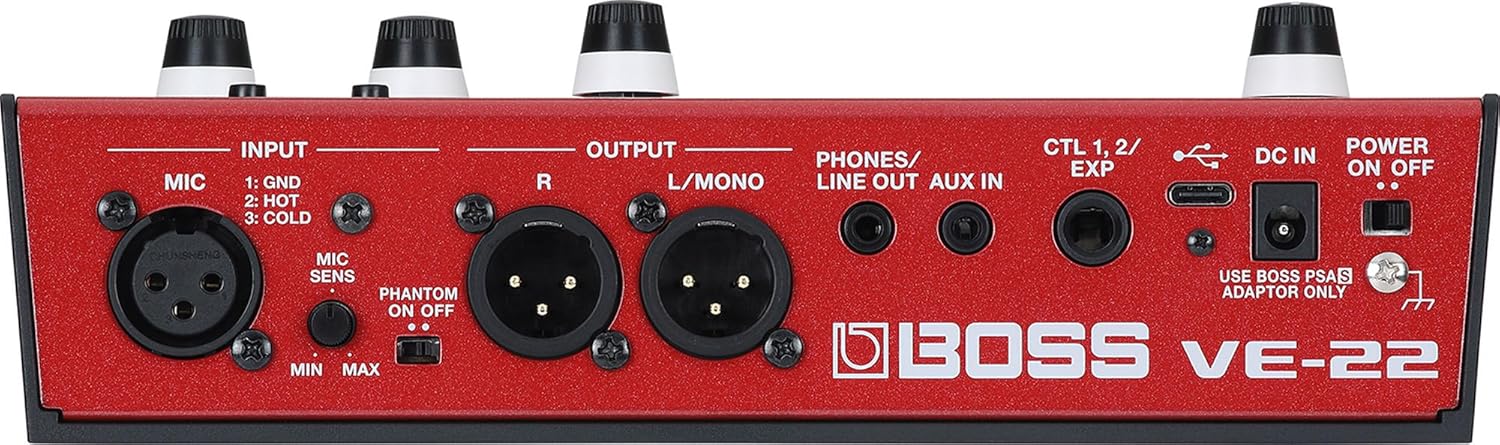
Image: A detailed view of the rear panel of the BOSS VE-22, showing the XLR input, XLR outputs, PHONES/LINE OUT, AUX IN, CTL 1, 2/EXP, DC IN, and POWER ON/OFF switch.
Operating Instructions
Basic Controls and Interface
The VE-22 features a bright color LCD and multi-function knobs for intuitive control.

Image: A direct overhead view of the BOSS VE-22's front panel, highlighting the LCD screen, control knobs for Harmony, Effect, and Echo, and various buttons.
- LCD Display: Provides visual feedback on current settings, effects, and parameters.
- Harmony Knob: Adjusts harmony settings and parameters.
- Effect Knob: Controls various vocal effects.
- Echo Knob: Manages delay and reverb effects.
- Memory/Manual Switch: Toggles between memory presets and manual mode.
- Footswitches: Used for activating/deactivating effects, harmonies, and other functions during performance.
Vocal Processing and Harmonies
The VE-22 allows for real-time vocal processing and harmony generation.
- Harmony Creation: Select harmony types and set the song key to generate harmonies. Adjust voicing and levels using the dedicated panel knobs. Harmonies can be toggled on/off via an onboard switch.
- Effect Customization: Utilize the multi-function knobs and the vivid color display to fine-tune effects such as auto-pitch, distortion, and modulation.
- Presets and User Memories: The unit comes with 50 factory presets and allows saving up to 99 user-defined custom sounds.

Image: A close-up view of the BOSS VE-22's LCD screen, showing "HARMONY" selected, with parameters like "KEY C/Am", "CHORUS DEPTH 25", and "HALL LEVEL 50" displayed.

Image: A close-up of the main control knobs on the BOSS VE-22, labeled "HARMONY", "EFFECT", and "ECHO", with their corresponding bypass and loop functions indicated.
Maintenance
Proper maintenance ensures the longevity and optimal performance of your VE-22.
- Cleaning: Use the included Austin Bazaar polishing cloth or a soft, dry cloth to wipe down the unit. Avoid abrasive cleaners or solvents.
- Storage: When not in use, store the unit in a dry, cool place away from direct sunlight and extreme temperatures.
- Battery Replacement: If using batteries, replace them when the low battery indicator appears or when performance degrades. Remove batteries if the unit will not be used for an extended period to prevent leakage.
- Cable Care: Handle cables carefully. Avoid sharp bends or excessive pulling to prevent damage.
Troubleshooting
If you encounter issues with your VE-22, refer to the following common troubleshooting steps.
| Problem | Possible Cause / Solution |
|---|---|
| No power |
|
| No sound output |
|
| Poor sound quality / Noise |
|
| Harmonies not tracking correctly |
|
For more detailed troubleshooting or issues not covered here, please refer to the official BOSS support resources or contact customer service.
Specifications
Key technical specifications for the BOSS VE-22 Vocal Performer Pedal.
| Feature | Detail |
|---|---|
| Model | VE-22 |
| Sample Rate | 48 kHz |
| DA Conversion | 32 bits |
| Processing | 32-bit floating point |
| Effects Types | 39 types |
| Memories | 99 (User) + 50 (Preset) |
| Phrase Loop | 37 seconds |
| Display | Graphic color LCD (320 x 240 dots) |
| Item Weight | 2.2 pounds |
| Product Dimensions | 6 x 9 x 3 inches (6"L x 9"W x 3"H) |
| UPC | 840262257732 |
Warranty and Support
For warranty information, product registration, and customer support, please refer to the official BOSS website or contact your local distributor.
You can also visit the official BOSS Store for additional resources and product information: BOSS Store on Amazon.


