
HoMedics SC-531N
HoMedics 531 Bodyanalyzer HealthStation User Manual
Model: SC-531N
Introduction and Overview
The HoMedics 531 Bodyanalyzer HealthStation is a digital body composition scale designed to provide comprehensive health metrics. Utilizing advanced technology, it estimates body fat, body water, and daily caloric needs, in addition to calculating your Body Mass Index (BMI).
This scale features a sleek, modern design with a matte silver body and contrasting measurement disks. It is equipped with a 2.3-inch, 2-line LCD display with blue backlight for clear readability. The durable platform measures 12.25 inches by 12.25 inches and has a maximum weight capacity of 400 pounds (180 kg).
Key Features:
- Measures body fat, body water, and BMI.
- Predicts daily caloric intake.
- Offers both normal and athlete modes for accurate readings based on activity level.
- Includes 8 user memory settings for multiple individuals.
- Supports a maximum weight capacity of 400 pounds (180 kg).
- Features a generously sized 12.25" L x 12.25" W durable platform.

Figure 1: Top-down view of the HoMedics 531 Bodyanalyzer HealthStation, highlighting its display and electrode placement.
Setup
- Unpacking: Carefully remove the scale from its packaging. Retain packaging for future storage or transport.
- Battery Installation: The scale requires 2 AAA batteries (included). Locate the battery compartment on the underside of the scale. Open the cover, insert the batteries according to the polarity indicators (+/-), and close the cover securely.
- Placement: Place the scale on a hard, flat, and stable surface. Avoid carpets or uneven flooring, as this can affect accuracy. Ensure the scale is not near strong electromagnetic fields.
- Initial Calibration: Before first use, or if the scale has been moved, gently tap the center of the platform with your foot to turn it on. Wait for the display to show "0.0" or "CAL" and then turn off. This calibrates the scale.
- User Profile Setup:
- Press the "SET" button to begin setting up a user profile (P1-P8).
- Use the "UP" or "DOWN" arrows to select a user number (P1-P8). Press "SET" to confirm.
- Enter your gender, height, and age using the arrow buttons and "SET" to confirm each entry.
- Select "Normal" or "Athlete" mode. Athlete mode is for individuals who engage in intense physical activity regularly.
- The scale will save your profile. Repeat for up to 8 users.
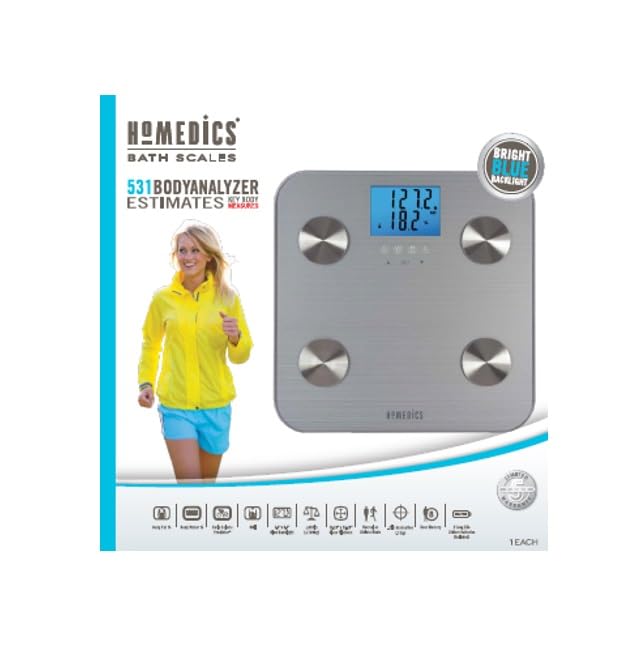
Figure 2: HoMedics 531 Bodyanalyzer HealthStation product packaging, illustrating key features and design.
Operating Instructions
- Taking a Measurement:
- Ensure the scale is on a flat, hard surface.
- If you have set up a user profile, press the "UP" or "DOWN" arrow to select your user number (P1-P8).
- Step onto the scale barefoot, ensuring your feet are positioned on the four metal electrodes. Stand still.
- The display will first show your weight, then cycle through body fat percentage, body water percentage, BMI, and estimated daily calories.
- Step off the scale once all readings have been displayed. The scale will automatically turn off after a few seconds.
- Weight-Only Measurement:
- If you do not wish to use the body composition analysis, you can step on the scale with socks or shoes on. The scale will only display your weight.
- Changing Weight Units:
- On the underside of the scale, locate the unit switch (usually near the battery compartment).
- Toggle the switch to select between pounds (LB) and kilograms (KG).
Maintenance
- Cleaning: Clean the scale with a soft, damp cloth. Do not use abrasive cleaners or immerse the scale in water.
- Storage: Store the scale in a cool, dry place. Avoid extreme temperatures or high humidity. Do not store anything on top of the scale when not in use.
- Battery Replacement: When the display shows "Lo" or becomes dim, replace the batteries. Always replace all batteries at the same time with new ones of the same type.
Troubleshooting
| Problem | Possible Cause | Solution |
|---|---|---|
| "Lo" displayed | Low battery power. | Replace the 2 AAA batteries. |
| "Err" displayed | Weight exceeds maximum capacity (400 lbs / 180 kg). | Reduce weight on the scale. |
| Inaccurate readings | Scale not on a hard, flat surface; scale moved; user not standing still; feet not properly on electrodes (for body composition). | Ensure scale is on a stable, flat surface. Recalibrate by tapping the scale and waiting for "0.0". Stand still with bare feet centered on electrodes. |
| No display | Batteries incorrectly installed or dead. | Check battery polarity or replace batteries. |
Specifications
- Model: SC-531N
- Brand: HoMedics
- Colour: Silver
- Weight Capacity: 400 Pounds (180 kg)
- Display: 2.3" 2-line LCD with blue backlight
- Platform Dimensions: 12.25" L x 12.25" W
- Power Source: 2 x AAA Batteries (included)
- Manufacturer: Lifetime Brands Inc.
- UPC: 077784019740
- ASIN: B0CYTGHQL5
- Parcel Dimensions: 34.01 x 33.91 x 4.8 cm; 2.21 kg
Warranty and Support
The HoMedics 531 Bodyanalyzer HealthStation comes with a 5-year limited warranty from the date of purchase. This warranty covers defects in material and workmanship under normal use.
For warranty service or technical support, please refer to the contact information provided in your product packaging or visit the official HoMedics website. Please have your model number (SC-531N) and proof of purchase available when contacting support.
Manufacturer: Lifetime Brands Inc.
Related documentsSC-531N


Ask a question about this manual
Ask about setup, troubleshooting, compatibility, parts, safety, or missing instructions. Manuals+ will review the question and use this page’s manual context to help answer it.