
DACOM Q10
DACOM Q10 Neckband Headphones User Manual
Model: Q10 | Brand: DACOM
1. Introduction
Thank you for choosing the DACOM Q10 Neckband Headphones. These open-ear earbuds are designed for comfort, durability, and high-quality audio, perfect for active lifestyles. This manual provides detailed instructions to help you get the most out of your new headphones.

Image 1.1: DACOM Q10 Neckband Headphones and Charging Case. The headphones are shown in their open charging case, highlighting their sleek black design and compact form factor.
2. Key Features
- Open Ear Design: Provides a breathable listening experience, allowing for better awareness of surroundings.
- Ergonomic Fit: Liquid silicone ear hooks ensure a secure and comfortable fit, ideal for sports and active use.
- IPX7 Waterproof Rating: Offers robust protection against sweat and water, making them suitable for various environments.
- Long Playtime: Up to 12 hours of continuous playback on a single charge, with extended playtime using the charging case.
- Lightweight: Each earbud weighs approximately 10.6g, ensuring minimal discomfort during prolonged wear.
- Wireless Bluetooth Connectivity: Stable and reliable connection for seamless audio streaming.
- Touch Control: Intuitive touch controls for media playback and call management.

Image 2.1: Open Ear Design for Situational Awareness. A man is shown wearing the DACOM Q10 headphones, illustrating how the open-ear design allows for better awareness of ambient sounds.

Image 2.2: Extended Playtime Capabilities. This image displays the headphones and charging case, highlighting the 10-12 hours of single charge playtime and up to 36 hours with the charging case.

Image 2.3: Comfortable and Lightweight Wearing. A woman is shown relaxing while wearing the headphones, emphasizing their ergonomic design, ear-free comfort, and lightweight nature.
3. What's in the Box
Upon opening your DACOM Q10 package, you should find the following items:
- DACOM Q10 Neckband Headphones (Left and Right Earbuds)
- Charging Case
- USB Charging Cable
- User Manual
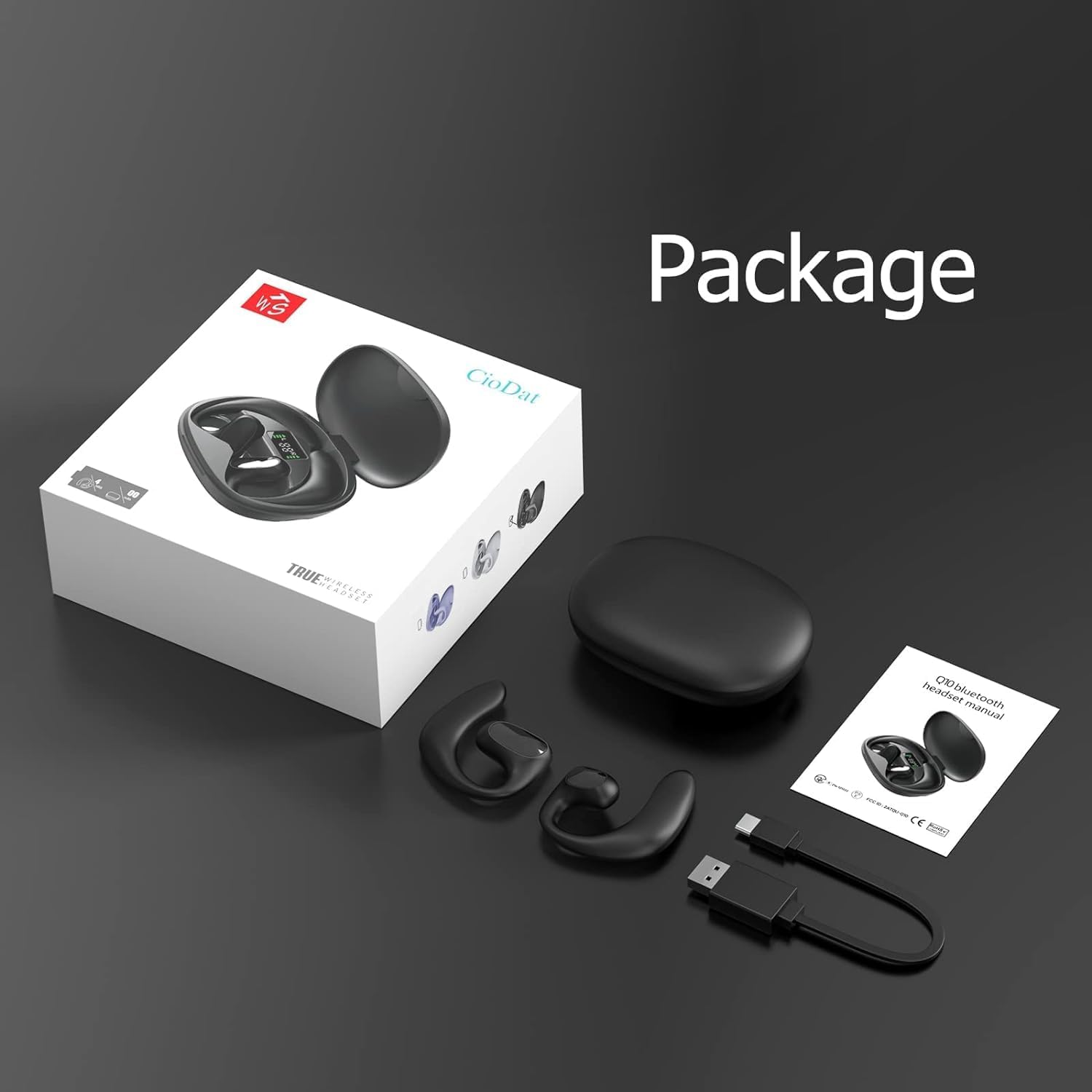
Image 3.1: Package Contents. This image displays all items included in the DACOM Q10 retail package: the headphones, charging case, USB cable, and user manual.
4. Setup
4.1 Charging the Headphones and Case
- Initial Charge: Before first use, fully charge both the headphones and the charging case.
- Connect: Plug the USB charging cable into the charging port on the case and connect the other end to a USB power source (e.g., computer, wall adapter).
- Indicators: The LED indicators on the charging case will show the charging status. Once fully charged, the indicators will typically turn solid or turn off.
4.2 Pairing with a Bluetooth Device
- Power On: Open the charging case or take out the earbuds. They will automatically enter pairing mode (indicated by flashing LED lights on the earbuds).
- Enable Bluetooth: On your device (smartphone, tablet, computer), go to the Bluetooth settings and ensure Bluetooth is enabled.
- Select Device: In the list of available Bluetooth devices, select "DACOM Q10" (or similar name).
- Confirm Connection: Once connected, the earbud LEDs will stop flashing, and you may hear a confirmation tone.
- Reconnect: The headphones will automatically reconnect to the last paired device when taken out of the case, if Bluetooth is enabled on the device.
5. Operating Instructions
The DACOM Q10 headphones feature intuitive touch controls for easy management of your audio and calls.

Image 5.1: Earbud Control Points. This diagram illustrates the LED/MIC, Trumpet (speaker), and MFB (Multi-Function Button) areas on the DACOM Q10 earbud, indicating where touch controls are located.
5.1 Music Playback
- Play/Pause: Single tap on either earbud's MFB.
- Next Track: Double tap on the right earbud's MFB.
- Previous Track: Double tap on the left earbud's MFB.
- Volume Up: Triple tap on the right earbud's MFB.
- Volume Down: Triple tap on the left earbud's MFB.
5.2 Call Management
- Answer/End Call: Single tap on either earbud's MFB.
- Reject Call: Press and hold either earbud's MFB for 2 seconds.
5.3 Voice Assistant
- Activate Voice Assistant: Press and hold either earbud's MFB for 3 seconds.
6. Maintenance
6.1 Cleaning
- Regularly wipe the earbuds and charging case with a soft, dry, lint-free cloth.
- Do not use abrasive cleaners, alcohol, or chemical solvents.
- Ensure charging contacts are clean and free of debris.
6.2 Storage
- Store the headphones in their charging case when not in use to protect them and keep them charged.
- Avoid storing in extreme temperatures (hot or cold) or high humidity.
6.3 Battery Care
- To prolong battery life, avoid fully discharging the headphones frequently.
- Charge the case and earbuds regularly, even if not used for extended periods.
7. Troubleshooting
| Problem | Possible Cause | Solution |
|---|---|---|
| Headphones won't turn on. | Low battery. | Charge the headphones and charging case fully. |
| Cannot pair with device. | Bluetooth is off; headphones not in pairing mode; device list cluttered. | Ensure Bluetooth is on. Place headphones in pairing mode. Forget "DACOM Q10" from device's Bluetooth list and try pairing again. |
| No sound or low volume. | Volume too low; not connected; media paused. | Increase volume on both headphones and device. Ensure headphones are connected. Check if media is paused. |
| Intermittent connection. | Too far from device; interference. | Move closer to your device. Avoid strong Wi-Fi signals or other Bluetooth devices. |
8. Specifications
| Feature | Detail |
|---|---|
| Model Name | Q10 |
| Brand | DACOM |
| Connectivity Technology | Wireless (Bluetooth) |
| Ear Placement | Open Ear |
| Control Type | Media Control, Touch |
| Waterproof Rating | IPX7 |
| Playtime (Single Charge) | Up to 12 Hours |
| Earbud Weight | Approx. 10.6g (0.37 oz) per earbud |
| Item Weight (Total) | 4.2 ounces |
| Color | Black |
| Included Components | Charging Station, USB Cable |
9. Official Product Video
Video 9.1: DACOM Q10 Neckband Headphones Overview. This official product video provides a visual overview of the DACOM Q10 headphones, showcasing their key features, design, and benefits for active users.
10. Warranty and Support
For warranty information and customer support, please refer to the official DACOM website or contact their customer service directly. Keep your purchase receipt as proof of purchase for any warranty claims.
For further assistance, you may also visit the product's detail page on Amazon.com: DACOM Q10 on Amazon
Ask a question about this manual
Ask about setup, troubleshooting, compatibility, parts, safety, or missing instructions. Manuals+ will review the question and use this page’s manual context to help answer it.