
1. Introduction
Thank you for purchasing the FYDEE A7 Vinyl Turntable. This record player combines vintage aesthetics with modern functionality, offering a rich audio experience. It features built-in stereo speakers, 3-speed playback, two-way Bluetooth connectivity, RCA output, and AUX input. This manual provides essential information for safe operation, setup, and maintenance of your turntable.
2. Safety Instructions
- Power Source: Use only the provided power adapter (5V 1A DC). Ensure the voltage matches before connecting.
- Water and Moisture: Do not expose the unit to rain, moisture, or liquids. Do not place objects filled with liquids, such as vases, on the unit.
- Heat: Keep the unit away from heat sources such as radiators, heat registers, stoves, or other apparatus (including amplifiers) that produce heat.
- Ventilation: Ensure proper ventilation. Do not block any ventilation openings.
- Cleaning: Unplug the unit from the power outlet before cleaning. Use a soft, dry cloth. Do not use liquid cleaners or aerosol cleaners.
- Servicing: Do not attempt to service the unit yourself. Refer all servicing to qualified service personnel.
- Placement: Place the unit on a stable, flat surface to prevent damage from falling.
3. Package Contents
Please check that all items listed below are included in your package:
- FYDEE A7 Vinyl Turntable
- Power Adapter (5V 1A)
- RCA Cable
- Dust Cover
- 45 RPM Adapter
- User Manual
4. Product Overview (Components)
Familiarize yourself with the various parts of your FYDEE A7 Turntable.

Image 4.1: Turntable Top View. This image shows the top of the turntable with key components labeled, including the 45 RPM Adapter, Lift Lever, Tone Arm, Auto-stop switch, Speed selector, and Stylus.
- Platter: The rotating platform where records are placed.
- Spindle: The central pin on the platter for placing records.
- 45 RPM Adapter: Used for playing 7-inch records with a large center hole.
- Lift Lever: Raises and lowers the tonearm.
- Tone Arm: Holds the cartridge and stylus.
- Stylus (Needle): The part that reads the grooves of the record.
- Auto-stop Switch: Enables or disables the automatic stop function at the end of a record.
- Speed Selector: Allows selection of 33, 45, or 78 RPM playback speeds.
- Counterweight: Adjusts the tracking force of the tonearm.

Image 4.2: Turntable Front and Rear Panels. This image highlights the Indicator Light, Mode/Power knob, Volume knob on the front, and the RCA Output and AUX In ports on the rear.
- Mode/Power Knob: Turns the unit on/off and selects the audio source (LP, Bluetooth, AUX).
- Volume Knob: Adjusts the playback volume.
- Indicator Light: Shows the current status or mode.
- RCA Output: Connects the turntable to external amplifiers or powered speakers.
- AUX In: Connects external audio devices (e.g., MP3 player, smartphone) to play through the turntable's speakers.
- Headphone Jack (3.5mm): For private listening with headphones.
5. Setup
- Unpacking: Carefully remove the turntable and all accessories from the packaging. Retain the packaging for future transport or storage.
- Placement: Place the turntable on a stable, level surface away from direct sunlight, heat sources, and excessive dust or vibrations.
- Dust Cover: Install the removable dust cover by aligning its hinges with the slots on the back of the turntable. The dust cover protects the platter and tonearm assembly when not in use.
- Stylus Protection: Remove the clear plastic stylus protector from the stylus assembly. Be careful not to touch the stylus itself.
- Counterweight Adjustment: The counterweight helps reduce needle skipping. Gently slide the counterweight onto the rear of the tonearm. Rotate it until the tonearm is balanced horizontally. Then, rotate the counterweight to apply the recommended tracking force (refer to cartridge specifications if available, otherwise a light, even pressure is suitable).
- Power Connection: Connect the power adapter to the DC IN port on the back of the turntable, then plug the adapter into a wall outlet.
6. Operating Instructions
6.1. Playing Vinyl Records
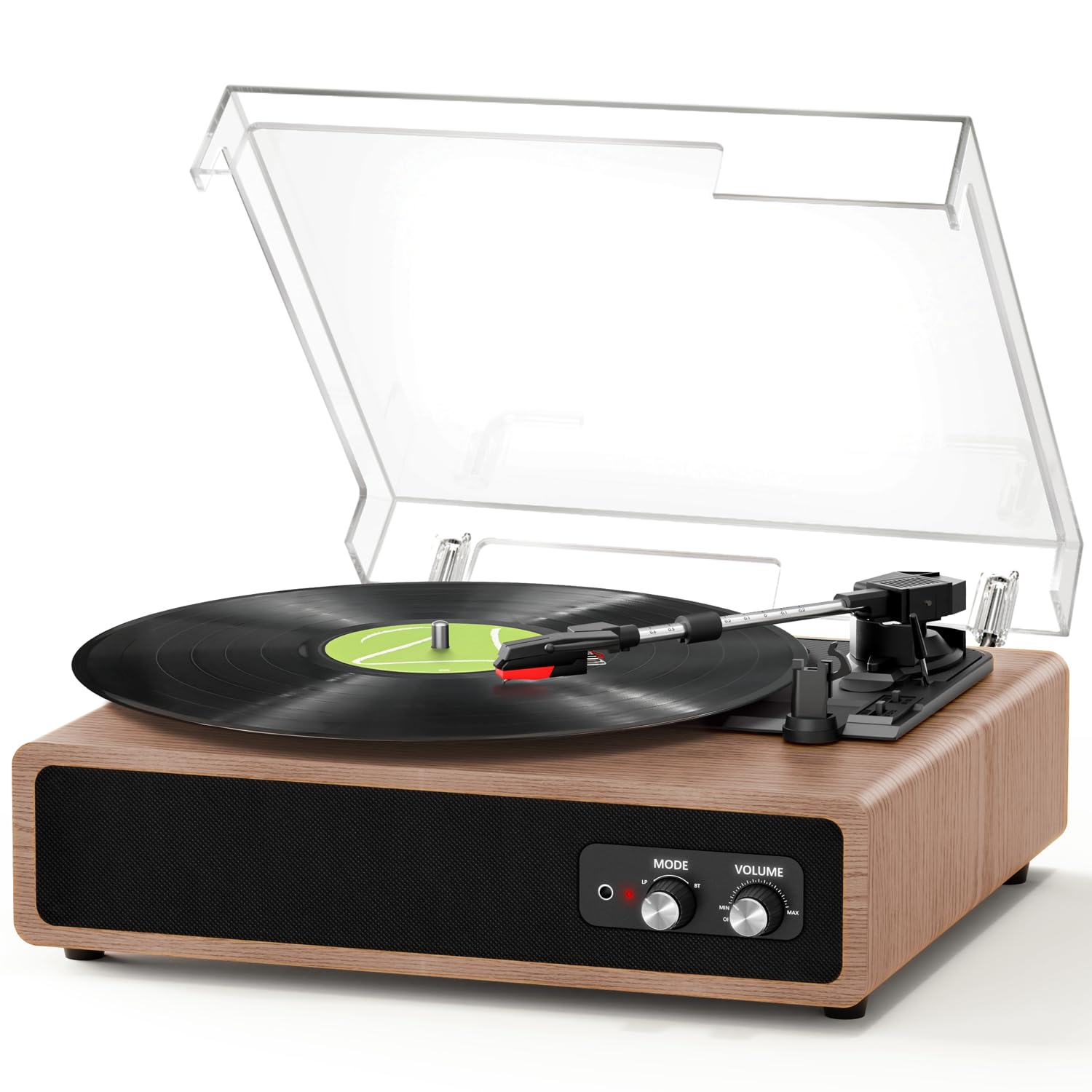
Image 6.1: Record Size Compatibility. The turntable supports 7-inch, 10-inch, and 12-inch vinyl records, with a 45 RPM adapter included for smaller records with larger center holes.
- Power On: Turn the Mode/Power knob clockwise to power on the unit.
- Select LP Mode: Rotate the Mode/Power knob to the 'LP' position.
- Place Record: Place a vinyl record on the platter. If playing a 7-inch record with a large center hole, place the 45 RPM adapter on the spindle first.
- Select Speed: Set the Speed selector switch to the appropriate speed (33, 45, or 78 RPM) for your record.
- Auto-stop: Set the Auto-stop switch to ON if you want the platter to stop automatically at the end of the record. Set to OFF for continuous play or for some records that may trigger auto-stop prematurely.
- Start Playback: Gently push the Lift Lever up to raise the tonearm. Manually move the tonearm over the desired starting groove of the record. Slowly push the Lift Lever down to lower the tonearm onto the record.
- Adjust Volume: Rotate the Volume knob to your desired listening level.
- End Playback: When the record finishes (or if auto-stop is ON), gently lift the tonearm using the Lift Lever and return it to its rest.
6.2. Bluetooth Reception (Playing Music from a Mobile Device)

Image 6.2: Two-Way Bluetooth Connectivity. This image illustrates the turntable's ability to receive Bluetooth audio from a smartphone and transmit Bluetooth audio to an external speaker.
- Power On: Turn the Mode/Power knob clockwise to power on the unit.
- Select BT Mode: Rotate the Mode/Power knob to the 'BT' position. The indicator light will flash, indicating it's in pairing mode.
- Pair Device: On your mobile device (smartphone, tablet), enable Bluetooth and search for 'FYDEE A7' (or similar). Select it to pair.
- Play Music: Once paired, the indicator light will stop flashing. You can now play music from your mobile device through the turntable's built-in speakers.
- Adjust Volume: Control volume using both your mobile device and the turntable's Volume knob.
6.3. Bluetooth Transmission (Playing Turntable Audio to an External Bluetooth Speaker)

Image 6.3: Bluetooth Streaming. The turntable can stream audio from records or AUX input to a Bluetooth-enabled speaker, offering flexible listening options.
- Power On: Turn the Mode/Power knob clockwise to power on the unit.
- Prepare External Speaker: Put your external Bluetooth speaker into pairing mode.
- Initiate Transmission: While in LP or AUX mode, the turntable will automatically search for nearby Bluetooth speakers. The indicator light will flash during search.
- Connect: Once connected, the indicator light will stop flashing. Audio from the turntable will now play through the external Bluetooth speaker.
- Adjust Volume: Control volume primarily on your external Bluetooth speaker.
6.4. AUX Input
Connect an external audio device (e.g., MP3 player, smartphone) to the turntable using a 3.5mm audio cable (not included).
- Connect Cable: Plug one end of the 3.5mm audio cable into the AUX IN port on the turntable and the other end into the headphone jack or audio output of your external device.
- Select AUX Mode: Rotate the Mode/Power knob to the 'AUX' position.
- Play Music: Start playback on your external device. Audio will play through the turntable's speakers.
- Adjust Volume: Control volume using both your external device and the turntable's Volume knob.
6.5. RCA Output
Connect the turntable to an external amplifier or powered speakers for enhanced sound.
- Connect RCA Cable: Plug the RCA cable (included) into the RCA OUT ports on the back of the turntable (Red to Red, White to White).
- Connect to Amplifier: Connect the other end of the RCA cable to the corresponding audio input on your amplifier or powered speakers.
- Select Input: Select the correct input on your amplifier/speakers.
- Play Audio: Play a record or use AUX/Bluetooth reception on the turntable. Audio will be routed through your external system.
- Adjust Volume: Control volume primarily on your external amplifier or powered speakers.
6.6. Headphone Output
For private listening, connect headphones to the 3.5mm headphone jack on the front of the unit.
- Connect Headphones: Plug your 3.5mm headphones into the headphone jack.
- Adjust Volume: Use the turntable's Volume knob to adjust the headphone volume.
7. Maintenance
- Cleaning the Stylus: Use a soft brush (not included) to gently clean the stylus. Always brush from the back to the front of the stylus. Do not use liquid cleaners on the stylus.
- Cleaning the Unit: Wipe the turntable's surface with a soft, dry, lint-free cloth. Do not use abrasive cleaners, waxes, or solvents.
- Dust Cover Care: The dust cover can be wiped with a soft, damp cloth. Avoid harsh chemicals that may scratch or cloud the plastic.
- Record Care: Keep your records clean and free of dust to ensure optimal sound quality and prolong stylus life. Store records vertically in their sleeves.
8. Troubleshooting
| Problem | Possible Cause | Solution |
|---|---|---|
| No power | Power adapter not connected or faulty. | Ensure power adapter is securely connected to the unit and a working power outlet. |
| No sound from speakers | Volume too low; incorrect mode selected; external speakers connected via RCA. | Increase volume. Ensure correct mode (LP, BT, AUX) is selected. If RCA is connected, sound will output through external speakers. |
| Skipping or distorted sound | Record is dirty or damaged; stylus is dirty or worn; tracking force incorrect; turntable not level. | Clean the record. Clean or replace the stylus. Adjust the counterweight. Place the turntable on a level surface. |
| Bluetooth pairing failed | Turntable not in pairing mode; device too far; interference. | Ensure turntable is in BT mode (flashing indicator). Move device closer. Turn off other Bluetooth devices. |
| Auto-stop not working correctly | Auto-stop switch is OFF; specific record type. | Ensure Auto-stop switch is ON. Some records, especially older or very light ones, may not trigger auto-stop reliably. |
9. Specifications
| Feature | Specification |
|---|---|
| Model Number | A7 |
| Brand | FYDEE |
| Playback Speeds | 33 1/3, 45, 78 RPM |
| Motor Type | Belt-driven |
| Connectivity | Bluetooth (Reception & Transmission), AUX In, RCA Out |
| Built-in Speakers | Yes (2 x 3W stereo speakers) |
| Headphone Output | 3.5mm Jack |
| Power Source | DC 5V 1A Power Adapter |
| Material | Wood, ABS |
| Item Weight | 2.67 Kilograms |
| Dimensions (L x W x H) | 37.4 x 33.3 x 18.1 cm |
| Special Features | Auto-stop function, Removable Dust Cover, Counterweight, Portable, Retro Design |
10. Warranty and Support
This product comes with a standard manufacturer's warranty. For specific warranty details, please refer to the documentation provided at the time of purchase or contact your retailer. If you encounter any issues or require technical assistance, please contact FYDEE customer support through your purchase platform or the official FYDEE website.

