
Introduction
Thank you for choosing the OLEVS Men's Luminous Chronograph Watch, Model XLYDE-S-G2872PZ-GL. This watch combines classic design with modern functionality, featuring a multi-chronograph, date display, and luminous hands for enhanced visibility. Please read this manual carefully to understand how to properly use and care for your watch.
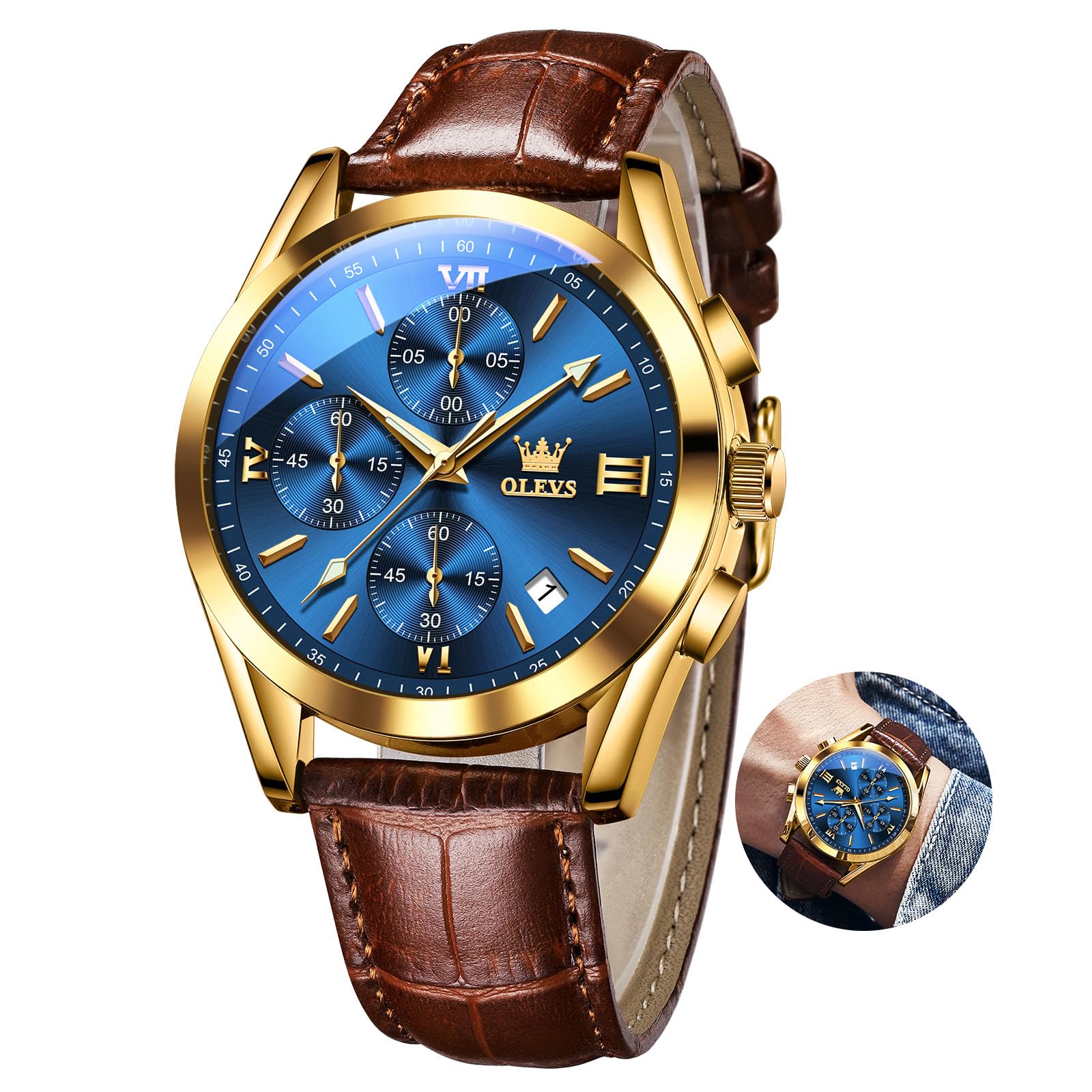
The OLEVS Men's Luminous Chronograph Watch, Model XLYDE-S-G2872PZ-GL, featuring a blue dial and brown leather strap.
Setup Instructions
Before first use, ensure the crown is fully pushed in. If the watch is not running, it may need to be set and activated.
1. Setting the Time
- Pull the crown out to position 2.
- Rotate the crown to move the hour and minute hands to the desired time.
- Push the crown back into position 0 to start the watch.
2. Setting the Date
- Pull the crown out to position 1.
- Rotate the crown clockwise or counter-clockwise (depending on the model) until the correct date appears in the date window.
- Push the crown back into position 0.
Note: Avoid setting the date between 9 PM and 3 AM, as this can interfere with the automatic date change mechanism.
3. Chronograph Hand Alignment (if necessary)
If the chronograph hands (sub-dials) are not aligned to the zero position, follow these steps:
- Pull the crown out to position 2.
- Press the top pusher (A) repeatedly to adjust the 1/10 second hand to zero.
- Press the bottom pusher (B) repeatedly to adjust the chronograph second hand and chronograph minute hand to zero.
- Once all chronograph hands are aligned to zero, push the crown back into position 0.

Illustration of the watch's multi-function chronograph and setting points.
Operating Instructions
1. Basic Time Reading
The watch displays time using traditional hour, minute, and second hands on the main dial.
2. Using the Chronograph (Stopwatch)
- To start the chronograph, press the top pusher (A). The chronograph second hand will begin to move.
- To stop the chronograph, press the top pusher (A) again. The chronograph hands will stop, indicating the elapsed time.
- To reset the chronograph to zero, press the bottom pusher (B) while the chronograph is stopped.
3. Date Display
The current date is displayed in the small window on the dial, typically at the 3 o'clock position.
4. Luminous Function
The watch hands and hour markers are coated with a luminous material. After exposure to light, they will glow in dark conditions, providing visibility.
5. Water Resistance
This watch is rated for 30 meters (3 ATM) water resistance. This means it is suitable for daily use, such as splashes, rain, or brief immersion in water. It is not suitable for swimming, diving, showering with hot water, or any activities involving prolonged water exposure or high-pressure water jets. Always ensure the crown is fully pushed in before any contact with water.

The watch features 30M water resistance and luminous elements for visibility in low light.
Maintenance
1. Cleaning
Wipe the watch case and strap regularly with a soft, dry cloth. For the leather strap, avoid excessive moisture and harsh cleaning agents, which can damage the material.
2. Water Resistance Precautions
- Do not operate the crown or pushers when the watch is wet or submerged in water.
- Avoid exposing the watch to extreme temperature changes, such as moving from a hot sauna to cold water, as this can compromise the water seals.
- If condensation appears inside the watch, it indicates a breach in the water resistance. Seek professional service immediately.
3. Battery Replacement
This watch is powered by a quartz movement and requires a battery (1 LR44, included). The typical battery life is 1-2 years. When the watch stops or the second hand starts skipping, it's time for a battery replacement. We recommend having the battery replaced by a qualified watch technician to ensure proper sealing and maintain water resistance.
4. Storage
When not wearing your watch, store it in a dry place, away from direct sunlight and strong magnetic fields (e.g., speakers, refrigerators), which can affect its accuracy.

Detailed view of the watch's stainless steel case, scratch-resistant mineral glass, and comfortable leather strap.
Troubleshooting
| Problem | Possible Cause | Solution |
|---|---|---|
| Watch not running | Crown not pushed in; depleted battery. | Ensure crown is fully pushed to position 0. If still not running, battery may need replacement. |
| Time/Date incorrect | Needs adjustment. | Refer to 'Setting the Time' and 'Setting the Date' sections. |
| Chronograph hands not resetting to zero | Misalignment. | Refer to 'Chronograph Hand Alignment' section. |
| Condensation inside watch | Water ingress. | Seek professional watch repair immediately to prevent further damage. |
Specifications
| Feature | Detail |
|---|---|
| Model Number | XLYDE-S-G2872PZ-GL |
| Movement Type | Quartz |
| Display Type | Analog |
| Case Material | Stainless Steel |
| Dial Window Material | Mineral Glass |
| Band Material | Leather |
| Case Diameter | 40 Millimeters |
| Case Thickness | 12 Millimeters |
| Band Width | 20 Millimeters |
| Band Length | 240 Millimeters |
| Item Weight | 125 Grams |
| Water Resistance Depth | 30 Meters (3 ATM) |
| Special Features | Analog, Chronograph, Date, Luminous, Water Resistant |
| Battery | 1 LR44 (included) |

Key dimensions and weight of the OLEVS watch.
Warranty Information
Your OLEVS watch comes with a 12-month warranty from the date of purchase, covering manufacturing defects. Additionally, a 30-day return policy is available for eligible purchases. This warranty does not cover damage resulting from improper use, accidents, unauthorized repairs, or normal wear and tear.
Customer Support
If you have any questions, require assistance with your watch, or need to make a warranty claim, please contact the seller directly through your purchase platform. They will be able to provide further support and guidance.


