
AFMAT PSX5BKEW
AFMAT Electric Pencil Sharpener User Manual
Model: PSX5BKEW
Introduction
Thank you for choosing the AFMAT Electric Pencil Sharpener. This fully automatic, rechargeable sharpener is designed for convenience and efficiency, suitable for various pencil sizes and shapes. Please read this manual carefully before use to ensure proper operation and maintenance.
Safety Information
- Keep out of reach of small children.
- Do not insert fingers or foreign objects into the sharpening hole.
- Do not disassemble the sharpener. Refer to qualified personnel for repairs.
- Use only the recommended 5V 2A adapter for charging.
- Avoid contact with water or excessive moisture.
- Empty the shaving box regularly to prevent jamming.
Package Contents
- 1 x AFMAT Electric Pencil Sharpener (Model: PSX5BKEW)
- 1 x USB-C Charging Cable (Adapter not included)
- 1 x User Manual

Image: The AFMAT Electric Pencil Sharpener shown alongside its retail packaging, highlighting the product's design and included USB-C cable.
Product Overview
Familiarize yourself with the main components of your AFMAT Electric Pencil Sharpener:
- Pencil Inlet: Where pencils are inserted for sharpening.
- Shaving Box: Collects pencil shavings. Easily removable for emptying.
- Sharpness Adjustment Slider: Allows selection of sharp, medium, or blunt tip.
- USB-C Charging Port: For connecting the charging cable.
- Indicator Lights: Provide status information (e.g., charging, fully charged).

Image: A visual representation of the sharpener's fully automatic function, illustrating how pencils are automatically fed in ("AUTO IN") and ejected ("AUTO OUT") once sharpened.
Setup
Charging the Sharpener
- Locate the USB-C charging port on the sharpener.
- Connect the provided USB-C cable to the sharpener and a 5V 2A USB power adapter (not included).
- The indicator lights will show charging status. A full charge typically takes approximately 2 hours.
- The sharpener can be used while charging if needed.

Image: A close-up of the sharpener's base showing the USB-C charging port and an illustration of the internal rechargeable battery, emphasizing its portability and 2-hour charging time for 600 uses.
Operating Instructions
Inserting a Pencil
The AFMAT sharpener accommodates pencils with diameters between 7mm and 11.5mm, including various shapes (round, triangular, hexagonal).
- Ensure the shaving box is properly installed.
- Gently insert the pencil into the sharpening hole. The sharpener will automatically feed the pencil in.
- Once the pencil is sharpened to the selected tip, it will automatically eject.

Image: A diagram illustrating the sharpener's compatibility with different pencil diameters (7mm, 9mm, 11.5mm) and shapes (triangular, hexagonal, round), with a note about soft core pencils.
Adjusting Sharpness Settings
The sharpener offers three sharpness options:
- Sharp Tip: Ideal for fine lines and detailed drawing.
- Medium Tip: A versatile option, suitable for general use and kids-friendly.
- Blunt Tip: Best for shading large areas or for pencils used by children who press hard.
To change the sharpness, slide the adjustment switch located at the front of the sharpener to your desired setting.
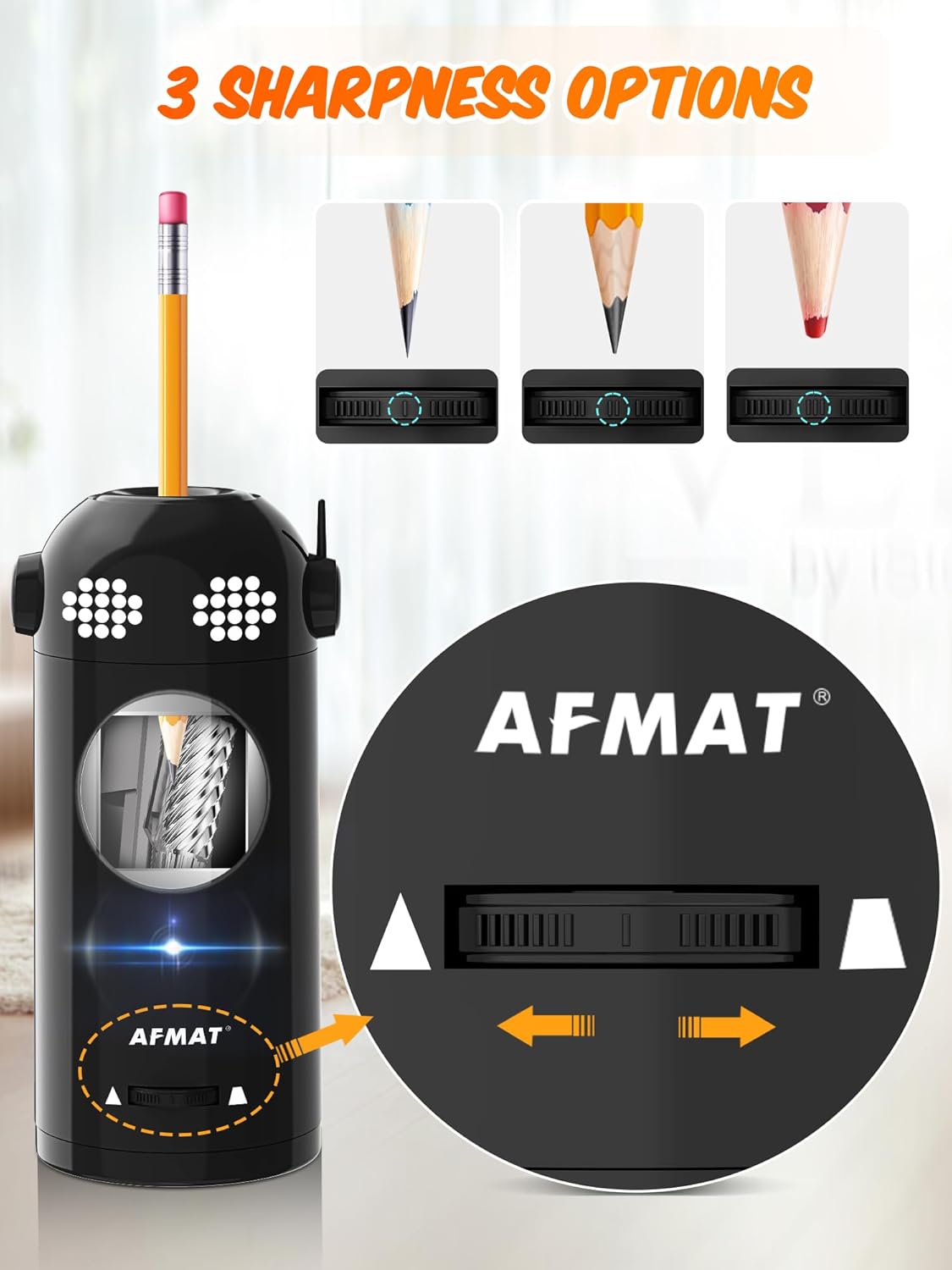
Image: A visual guide showing the three distinct sharpness outcomes (sharp, medium, blunt) and how to adjust the setting using the slider on the sharpener's front.
Note: For soft core pencils, it is recommended to use the medium or blunt tip setting to prevent tip breakage.
Maintenance
Emptying the Shaving Box
Regularly empty the shaving box to maintain optimal performance and prevent blockages.
- Gently pull the shaving box out from the bottom of the sharpener.
- Dispose of the pencil shavings.
- Slide the shaving box back into place until it clicks securely. The sharpener will not operate if the shaving box is not correctly installed.
Blade Replacement
The blade is replaceable to ensure long-term performance. Replacement blades can be purchased separately (ASIN: B0CJ8YYSV5).
- Ensure the sharpener is powered off and unplugged.
- Remove the shaving box.
- Carefully remove the old blade assembly. Refer to the replacement blade packaging for specific instructions.
- Insert the new blade assembly, ensuring it is securely seated.
- Reinstall the shaving box.
Caution: Blades are sharp. Handle with extreme care to avoid injury.
Troubleshooting
| Problem | Possible Cause | Solution |
|---|---|---|
| Sharpener does not turn on. | Low battery or not charged. Shaving box not properly installed. | Charge the sharpener. Ensure the shaving box is securely in place. |
| Pencil not sharpening or uneven tip. | Shaving box full. Blade is dull or damaged. Pencil inserted incorrectly. | Empty the shaving box. Replace the blade. Ensure pencil is inserted straight. |
| Pencil tip breaks frequently. | Using a soft core pencil with a sharp tip setting. Dull blade. | Switch to medium or blunt tip setting for soft core pencils. Replace the blade. |
| Sharpener stops during use. | Overheating protection activated. Shaving box full. | Allow sharpener to cool down. Empty the shaving box. |
Specifications
| Model Number | PSX5BKEW |
| Dimensions | 3.6 x 3.6 x 7.3 inches |
| Weight | 1.34 pounds |
| Color | Black |
| Material | ABS housing + S.S. blade |
| Power Source | Battery Powered / Plug in (Rechargeable) |
| Battery Capacity | 2000 mAh (approx. 600 uses per charge) |
| Compatible Pencil Diameters | 7mm - 11.5mm |

Image: The AFMAT sharpener displayed with its dimensions (3.6 inches width, 7.3 inches height), highlighting its space-saving and adorable design.
Warranty and Support
AFMAT products are designed for quality and reliability. For warranty information or technical support, please contact our customer service team.
- Customer Service: Refer to the contact information provided on the product packaging or the official AFMAT website.
- Online Resources: Visit the AFMAT Store on Amazon for FAQs and additional product information.
Related documentsPSX5BKEW


Ask a question about this manual
Ask about setup, troubleshooting, compatibility, parts, safety, or missing instructions. Manuals+ will review the question and use this page’s manual context to help answer it.