
1. Introduction
This manual provides comprehensive instructions for the JUMMICO Electric Standing Desk, model JDVC240162-1422. This adjustable height desk is designed to enhance your workspace with its versatile features and ergonomic design. It includes a powerful motor for smooth and quiet height adjustments, a durable desktop with an integrated monitor stand, and intelligent memory presets for personalized comfort.
Key features include:
- Stable Height Adjustment: Equipped with a powerful motor for smooth and quiet height adjustment (below 50 decibels), with an adjustable height range of 28.74-46.45 inches.
- Extraordinary Material: High-quality steel frame combined with a spacious desktop that is waterproof and scratch-resistant. T-shaped table leg design enhances stability.
- Monitor Stand Design: Integrated computer monitor stand offers a suitable eye level height to help relieve neck fatigue. The hollow design provides additional storage space.
- Intelligent Memory Presets: Store preferred sitting and standing postures for quick and effortless switching.
- Versatile Application: Suitable for various purposes such as work, study, reading, and gaming. Includes a headphone hook and cup holder.
2. Safety Information
Please observe the following safety guidelines to ensure safe operation and longevity of your JUMMICO Electric Standing Desk:
- Do not exceed the maximum weight limit of 132 pounds (60 kg) on the desktop.
- Ensure the desk is fully open and stable before placing heavy items or applying pressure.
- The rubber feet on the table legs are designed to protect your floors and ensure quiet movement. Do not remove them.
- Always read and follow all assembly instructions carefully, step by step.
- Keep children and pets away from the desk during height adjustments.
- Avoid placing liquids directly on the control panel or near electrical components.
3. Setup and Assembly
The JUMMICO Electric Standing Desk is designed for straightforward assembly. It is recommended that two people assist with the assembly process for ease and safety. While some basic tools may be included, standard household tools like a screwdriver might also be required.
Follow the detailed instructions provided in the separate assembly guide for step-by-step installation. Ensure all components are securely fastened before use.

Figure 3.1: Detailed dimensions of the JUMMICO Electric Standing Desk. The desktop measures 55 inches in length and 24 inches in width. The monitor stand has a depth of 8.66 inches and a height of 3.77 inches.
The desk includes a cup holder and a headphone hook, which can be installed on either the left or right side according to your preference.
4. Operating Instructions
4.1. Height Adjustment
The desk's height can be adjusted electrically using the control panel located on the front edge of the desktop. The adjustable height range is from 28.74 inches (lowest) to 46.45 inches (highest).
- Press the ▲ (Up) button to raise the desk.
- Press the ▼ (Down) button to lower the desk.
- The current height will be displayed on the LED screen.

Figure 4.1: The desk can be adjusted from a sitting height of 28.7 inches to a standing height of 48.1 inches, accommodating various user preferences.

Figure 4.2: The desk operates quietly, with noise levels below 50 decibels, ensuring minimal disruption in your workspace.
4.2. Memory Presets
The control panel allows you to save two preferred height settings for quick access.
- Adjust the desk to your desired height using the Up/Down buttons.
- Press the "M" button (Memory) once. The LED display will flash.
- Within 3 seconds, press either button "1" or "2" to save the current height to that preset. The display will show "S-1" or "S-2" to confirm.
- To recall a saved height, simply press the corresponding "1" or "2" button. The desk will automatically move to the stored position.
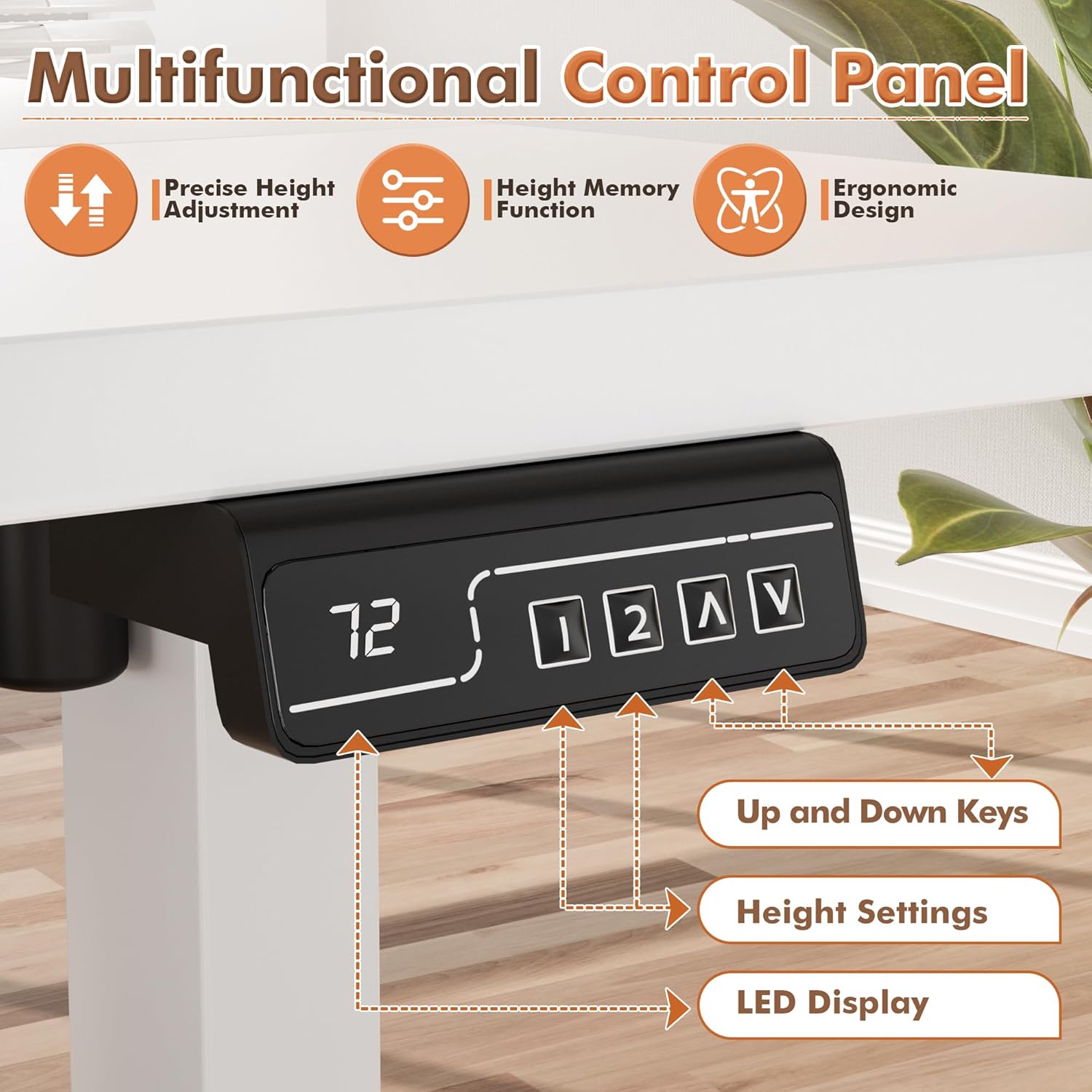
Figure 4.3: The control panel features an LED display, up and down keys for manual adjustment, and two memory preset buttons (1, 2) for saving preferred heights.
5. Maintenance
Regular maintenance ensures the longevity and optimal performance of your electric standing desk.
- Cleaning: Wipe the desktop and frame with a soft, damp cloth. Avoid abrasive cleaners or harsh chemicals that could damage the surface.
- Cable Management: Periodically check and organize cables to prevent tangling or damage during height adjustments.
- Fastener Check: Occasionally check all screws and bolts to ensure they are tight. Retighten if necessary.
- Weight Distribution: Distribute weight evenly across the desktop to prevent strain on the lifting mechanism.
6. Troubleshooting
If you encounter any issues with your JUMMICO Electric Standing Desk, refer to the following common troubleshooting steps:
- Desk Not Moving:
- Check if the power cord is securely plugged into both the desk and a working power outlet.
- Ensure there are no obstructions preventing the desk from moving up or down.
- If an error code appears on the display, consult the full troubleshooting guide (if provided separately) or contact customer support.
- Uneven Movement:
- Verify that the desk is placed on a level surface.
- Check for any loose connections or fasteners in the frame.
- Noise During Adjustment:
- A slight motor hum is normal. If the noise is excessive or unusual, check for obstructions or contact support.
For persistent issues or further assistance, please contact JUMMICO customer support.
7. Specifications
| Feature | Detail |
|---|---|
| Brand | JUMMICO |
| Model Number | JDVC240162-1422 |
| Product Dimensions (D x W x H) | 55"D x 24"W x 46"H |
| Desktop Size | 55 x 24 Inch |
| Color | White |
| Style | Modern |
| Base Material | Metal |
| Top Material Type | Metal (Laminated Finish) |
| Special Feature | Electric Height Adjustment |
| Recommended Uses | Office, Working, Gaming |
| Included Components | Cup Holder, Headphone Hook |
| Item Weight | 54 Pounds (approx. 24.5 kg) |
| Maximum Height | 46.45 Inches (approx. 118 cm) |
| Minimum Height | 28.74 Inches (approx. 73 cm) |
| Weight Capacity | 132 Pounds (approx. 60 kg) |
| Required Assembly | Yes |
| Recommended People for Assembly | 2 |
8. Warranty and Support
The JUMMICO Electric Standing Desk comes with a Limited Warranty. For specific warranty terms, conditions, and duration, please refer to the warranty card included with your product or contact JUMMICO customer support directly.
For any questions, technical assistance, or warranty claims, please contact the manufacturer, JUMMICO, through their official channels or the retailer where the product was purchased.


