
1. Introduction
This manual provides essential information for the safe and effective operation, setup, and maintenance of your Reboot RBM2500 6-in-1 Multi-Process Welding Machine. The RBM2500 is a versatile welding unit capable of performing Gas MIG (GMAW), Gas-free Flux Core MIG (FCAW), Stick/MMA, Spot Welding, and Lift TIG processes. It also supports an optional spool gun for aluminum welding.
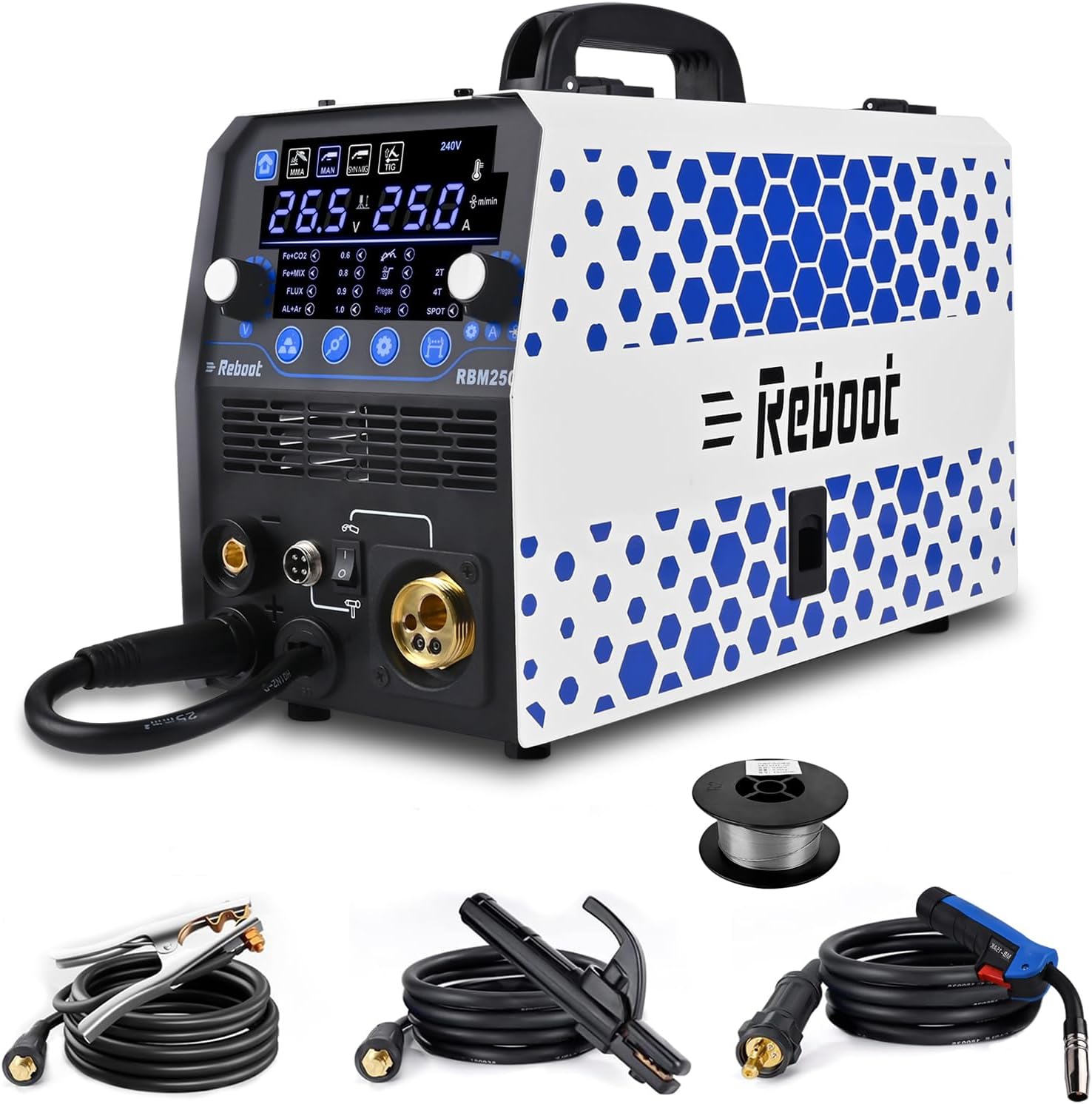
Figure 1: Reboot RBM2500 Multi-Process Welding Machine and included accessories.
2. Safety Precautions
WARNING: Welding can be dangerous. Always follow safety guidelines to prevent injury or death.
- Personal Protective Equipment (PPE): Always wear a welding helmet with appropriate shade, flame-resistant clothing, welding gloves, and safety shoes.
- Ventilation: Ensure adequate ventilation to remove welding fumes and gases from the work area.
- Fire Hazards: Keep flammable materials away from the welding area. Have a fire extinguisher readily available.
- Electrical Safety: Ensure the welding machine is properly grounded. Do not operate in wet conditions. Inspect cables for damage before use.
- Eye and Skin Protection: Welding arcs emit intense ultraviolet and infrared rays that can cause severe burns to eyes and skin.
- Fume Inhalation: Avoid breathing welding fumes. Use local exhaust ventilation or respirators if necessary.
3. Product Features and Components
3.1 Multi-Process Capabilities
The RBM2500 offers six distinct welding functions:
- Gas MIG (GMAW)
- Gas-free Flux Core MIG (FCAW)
- Stick/MMA Welding
- Spot Welding
- Lift TIG Welding (requires optional TIG torch)
- Spool Gun Connector (for aluminum welding, spool gun optional)
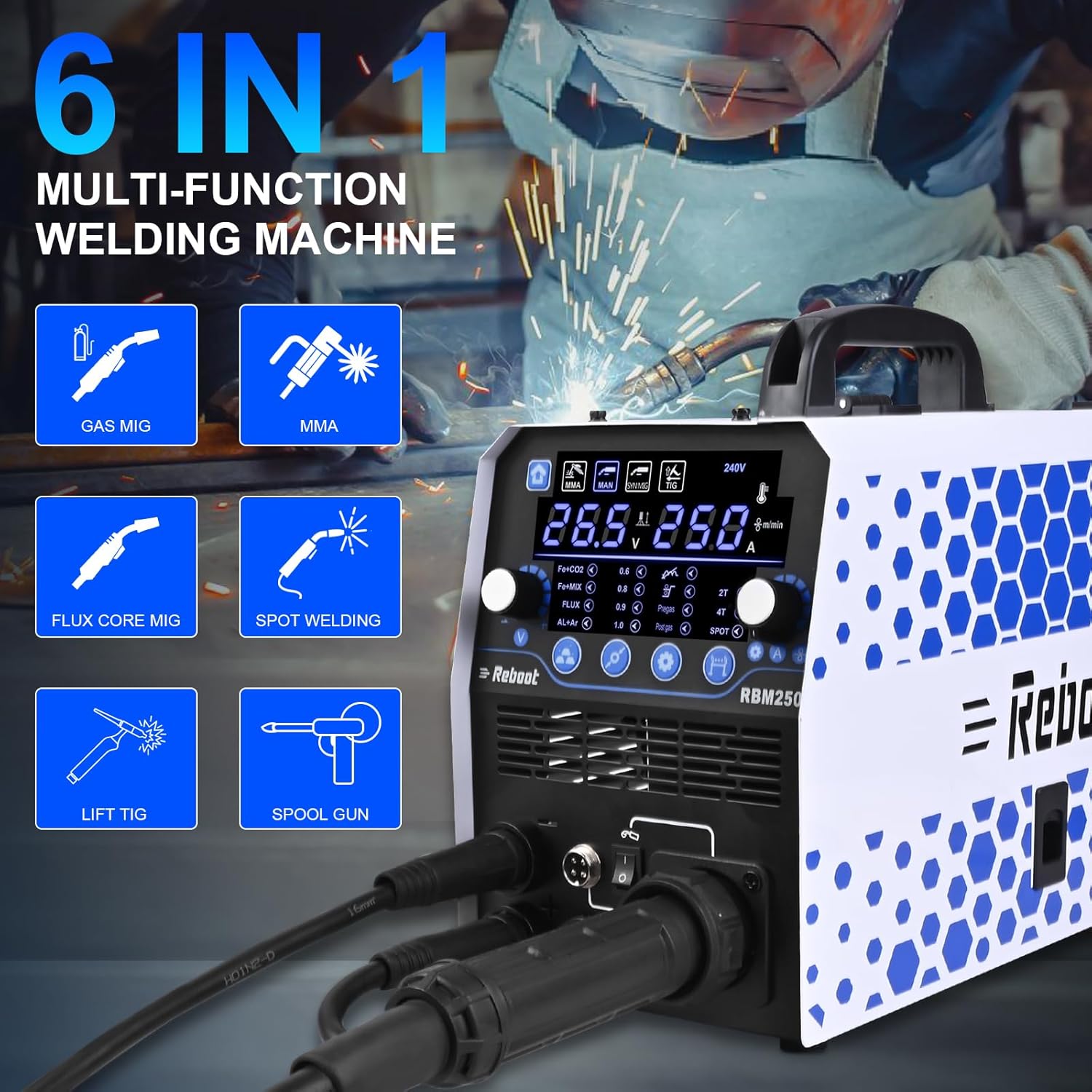
Figure 2: Overview of the RBM2500's 6-in-1 welding functions.
3.2 Control Panel and Display
The machine features a large LED display for clear monitoring of welding parameters. It allows for digital control and automatic adjustment of recommended current and wire feed speed based on selected wire diameter and material. Manual adjustments are also possible.

Figure 3: The large LED display provides accurate data for various welding modes.
3.3 Wire Feed Structure
The RBM2500 incorporates a stable and smooth wire feed mechanism, crucial for consistent welding performance.

Figure 4: The wire feed structure includes the welding wire spool, wire pressing wheel, automatic wire feed, and wire feeding wheel.
4. Setup Guide
4.1 Power Connection
- Ensure the machine's power switch is in the OFF position.
- Connect the power cord to a 240V power supply. Verify the power outlet is properly grounded and can handle the machine's wattage (6 KW).
4.2 Ground Clamp Connection
- Connect the ground clamp cable to the appropriate terminal on the front panel of the welding machine.
- Securely attach the ground clamp to the workpiece or a clean, bare metal portion of the welding table. Ensure good electrical contact.
4.3 Welding Torch/Holder Connection
- MIG Torch: Connect the MIG torch cable to the designated MIG connector on the front panel.
- Electrode Holder (MMA): Connect the electrode holder cable to the positive (+) terminal and the ground clamp to the negative (-) terminal for most electrodes. Consult electrode specifications for reverse polarity.
- Lift TIG Torch (Optional): Connect the TIG torch to the appropriate connector. A separate gas line will also be required for TIG welding.
4.4 Welding Wire Installation (MIG/Flux Core)
- Open the wire feed compartment.
- Place the welding wire spool onto the spindle, ensuring it rotates freely.
- Thread the wire through the wire guide and into the drive rollers.
- Adjust the wire pressing wheel tension to ensure proper wire feeding without crushing or slipping.
- Select the correct drive roller groove for your wire diameter (.023"/.030"/.035" solid wire, .023"/.030"/.035" flux core wire, .040" aluminum wire).
- Feed the wire through the MIG torch liner until it exits the contact tip.
4.5 Gas Cylinder Connection (for Gas MIG/Lift TIG)
- Securely mount the gas cylinder (e.g., Argon for TIG, Argon/CO2 mix for MIG).
- Attach the gas regulator to the cylinder valve and tighten.
- Connect the gas hose from the regulator to the gas inlet on the welding machine.
- Open the cylinder valve slowly and adjust the gas flow rate on the regulator as required for the welding process.
5. Operation Modes
5.1 General Controls
The RBM2500 features intuitive controls for selecting welding modes and adjusting parameters. The large LED display provides real-time feedback on voltage, amperage, and wire feed speed.
- Mode Selection: Use the dedicated buttons to switch between MMA, MAN MIG, SYN MIG, and TIG modes.
- Parameter Adjustment: Rotary knobs allow fine-tuning of welding current, voltage, and wire feed speed.
- Synergic Control: In SYN MIG mode, the machine automatically adjusts recommended current and wire feed speed based on selected wire diameter and material.
- Inductance Adjustment: This function allows control over the arc stiffness and puddle fluidity, affecting bead appearance and penetration.
- Pre-flow/Post-flow: These settings control the gas flow before and after the arc, protecting the weld puddle from atmospheric contamination.
- 2T/4T Trigger Modes: Select 2T for standard trigger operation (press to weld, release to stop) or 4T for continuous welding without holding the trigger (press and release to start, press and release again to stop).
- Fast Wire Feed: Press and hold the "welding wire selection" button for fast wire feeding.
5.2 MIG Welding (GMAW/FCAW)
The RBM2500 supports both Gas MIG (with shielding gas and solid wire) and Gas-free Flux Core MIG (with flux-cored wire).
- Select either 'MAN MIG' for manual control or 'SYN MIG' for synergic settings.
- Choose the appropriate wire diameter and material type on the control panel.
- Adjust voltage and wire feed speed. In SYN MIG, these will be pre-set but can be fine-tuned.
- For Gas MIG, ensure shielding gas is flowing at the correct rate.
- Begin welding, maintaining proper torch angle and travel speed.
5.3 Stick Welding (MMA)
- Select 'MMA' mode.
- Insert the appropriate electrode into the electrode holder.
- Set the welding current (amperage) according to the electrode manufacturer's recommendations.
- Strike an arc and maintain a consistent arc length and travel speed.
5.4 Lift TIG Welding
This mode requires an optional TIG torch and a shielding gas (typically Argon).
- Select 'TIG' mode.
- Ensure the TIG torch is connected and shielding gas is flowing.
- Set the welding current.
- Initiate the arc by gently touching the tungsten electrode to the workpiece and quickly lifting it a small distance.
- Maintain a consistent arc length and add filler rod as needed.
5.5 Spot Welding
The RBM2500 includes a spot welding function for joining overlapping metal sheets.
- Select 'SPOT' mode.
- Adjust the spot welding time and current as required for the material thickness.
- Position the MIG torch over the desired spot on the overlapping sheets and activate the trigger.

Figure 5: The RBM2500 is suitable for welding carbon steel, stainless steel, iron, and various alloys.
6. Maintenance
Regular maintenance ensures the longevity and optimal performance of your welding machine.
- Cleaning: Periodically clean the machine's exterior with a dry cloth. Use compressed air to clear dust from internal components, ensuring the machine is unplugged.
- Cable Inspection: Regularly inspect all welding cables, power cords, and gas hoses for cuts, abrasions, or loose connections. Replace damaged components immediately.
- Wire Feed Mechanism: Clean the drive rollers and wire guide to prevent wire feeding issues. Check the contact tip and nozzle of the MIG torch for spatter buildup and replace if worn.
- Cooling Fan: Ensure the cooling fan vents are clear of obstructions to prevent overheating.
7. Troubleshooting
This section addresses common issues you might encounter during operation.
- No Power: Check the power cord connection, wall outlet, and circuit breaker. Ensure the machine's power switch is ON.
- No Arc: Verify the ground clamp is securely attached to the workpiece. Check all cable connections. Ensure the correct welding mode is selected. For MIG, check wire feed and gas flow. For MMA, ensure the electrode is making good contact.
- Poor Weld Quality: Adjust welding parameters (current, voltage, wire feed speed). Ensure proper gas flow (for Gas MIG/TIG) and correct wire/electrode selection. Clean the workpiece of rust, paint, or oil.
- Wire Feeding Problems: Check wire spool tension, drive roller tension, and ensure the correct drive roller groove is used. Inspect the MIG torch liner for blockages or kinks. Replace worn contact tips.
- Overheating: If the machine shuts down due to overheating, allow it to cool down. Ensure cooling vents are clear and the duty cycle is not exceeded.
8. Technical Specifications
| Specification | Value |
|---|---|
| Model Number | RBM2500 |
| Manufacturer | Reboot-EU |
| Power Source | AC/DC |
| Input Voltage | 240 V |
| Wattage | 6 KW |
| Item Weight | 10.7 kg |
| Parcel Dimensions | 45.7 x 33 x 30 cm |
| Supported Wire Diameters | .023"/.030"/.035" solid wire, .023"/.030"/.035" flux core wire, .040" aluminum wire |
9. Warranty and Support
The Reboot RBM2500 welding machine comes with a 1-year warranty from the date of purchase. Additionally, a 30-day money-back guarantee is offered.
For any questions, technical assistance, or warranty claims, please contact Reboot customer support through their online support channels. Provide your product model number (RBM2500) and purchase details for efficient service.


