
BLUETTI AC240+B210
BLUETTI AC240 & B210 Solar Generator User Manual
Model: AC240+B210
1. Introduction
This manual provides essential information for the safe and efficient operation of your BLUETTI Solar Generator Pioneer 150 (AC240) and B210 Expansion Battery. This system is designed to provide reliable power for various applications, including camping, RV use, and as a home backup solution. Please read this manual thoroughly before use and retain it for future reference.
2. Safety Information
Adhering to safety guidelines is crucial for preventing injury and damage. Always operate the unit in a well-ventilated area. Do not expose the unit to extreme temperatures or direct sunlight for prolonged periods. Ensure all connections are secure before operation. Keep out of reach of children and pets. Do not disassemble or attempt to repair the unit yourself. Refer to qualified personnel for service.
3. Package Contents
Verify that all items are present upon unboxing:
- BLUETTI Solar Generator Pioneer 150 (AC240) Power Station
- BLUETTI B210 Expansion Battery (Ships Separately)
- AC Charging Cable
- Solar Charging Cable
- Car Charging Cable
- Grounding Screws
- User Manual (this document)
- Battery Expansion Cable (for connecting AC240 and B210)
4. Product Overview
The BLUETTI AC240 is a robust portable power station, and the B210 is its dedicated expansion battery, designed to significantly extend the system's capacity. Both units feature durable construction with IP65 dustproof and water-resistant ratings, making them suitable for outdoor and challenging environments.

Figure 4.1: The BLUETTI AC240 Power Station (left) and the B210 Expansion Battery (right). The AC240 serves as the primary unit with multiple output ports and an intuitive LCD screen, while the B210 provides additional energy storage.

Figure 4.2: The AC240 and B210 units are rated IP65 for water and dust resistance, ensuring durability in various outdoor conditions. This image highlights the robust design and internal components like the AI BMS for enhanced safety and longevity.
5. Setup
5.1 Initial Charging
Before first use, fully charge both the AC240 and B210 units. The AC240 can charge from 0-80% in approximately 45 minutes using its 2400W AC input. Full charge takes 1.8-2.3 hours with 1200W solar input.

Figure 5.1: The BLUETTI AC240 supports fast solar charging up to 1200W, allowing for quick replenishment of power in outdoor settings. The unit can also be charged via AC, car, AC+DC, generator, and lead-acid battery.
5.2 Connecting the B210 Expansion Battery
To expand the capacity of your AC240, connect the B210 Expansion Battery using the provided battery expansion cable. Ensure both units are powered off before making connections. Align the connectors carefully and push firmly until they click into place. The AC240 can support up to four B210 batteries, expanding its total capacity to 10,136Wh.
Video 5.1: Official BLUETTI Solar Generator AC240 overview, demonstrating its features including connectivity and durability. This video provides a visual guide to the product's capabilities and how it integrates with expansion batteries.
6. Operating Instructions
6.1 Powering On/Off
Press and hold the main power button on the AC240 unit for a few seconds to power on or off. The intuitive LCD screen will display the battery status, input/output wattage, and other operational information.
6.2 Output Ports
The AC240 features 9 output ports for versatile power delivery:
- 2 x 20A AC Outputs (3600W total)
- 1 x 30A TT30 Output
- USB-A Ports
- USB-C Ports
- 1 x Cigarette Socket
- 1 x 12V/30A DC Output
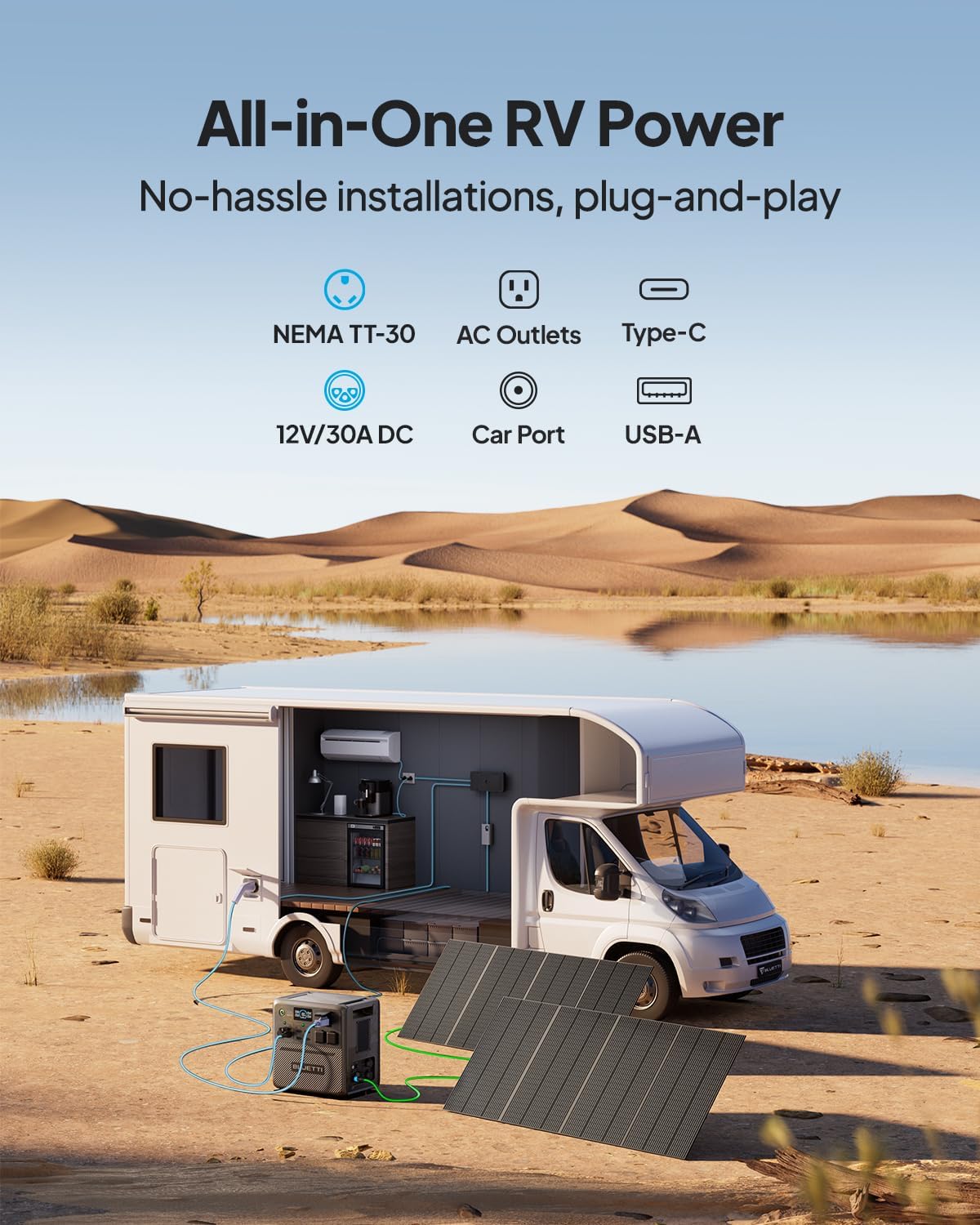
Figure 6.1: The BLUETTI AC240 provides comprehensive power solutions for RVs and off-grid living, featuring multiple output types including NEMA TT-30, AC outlets, Type-C, 12V/30A DC, and USB-A ports for various appliances.
6.3 Remote App Control
Manage your BLUETTI system remotely using the dedicated mobile application. The app allows you to monitor battery status, control output ports, update firmware, and access technical support.

Figure 6.2: The BLUETTI App provides comprehensive control and monitoring of your power station, including real-time data, settings adjustments, and remote operation.
6.4 UPS Functionality
The AC240 features an Uninterruptible Power Supply (UPS) function with a rapid 0.015-second switchover time, ensuring seamless power during outages for critical devices.
7. Maintenance
To ensure the longevity and optimal performance of your BLUETTI system, follow these maintenance guidelines:
- Cleaning: Use a soft, dry cloth to clean the exterior. For stubborn dirt, a slightly damp cloth can be used. Avoid abrasive cleaners or solvents.
- Storage: Store the units in a cool, dry place away from direct sunlight and extreme temperatures. If storing for extended periods, charge the battery to 50-80% every 3-6 months to maintain battery health.
- Inspection: Periodically inspect cables and connectors for any signs of wear or damage. Replace any damaged components immediately.
- Firmware Updates: Regularly check for and install firmware updates via the BLUETTI app to ensure your unit has the latest features and performance enhancements.
8. Troubleshooting
If you encounter issues with your BLUETTI system, refer to the following common problems and solutions:
| Problem | Possible Cause | Solution |
|---|---|---|
| Unit not powering on | Low battery; Power button not held long enough | Charge the unit; Press and hold the power button for 3-5 seconds |
| No output from AC ports | AC output not enabled; Overload protection triggered | Enable AC output on the screen; Reduce connected load; Restart unit |
| Slow charging | Insufficient input power; High ambient temperature | Ensure adequate power source (e.g., full sunlight for solar); Move to a cooler environment |
| B210 not recognized | Loose connection; Damaged expansion cable | Check and secure the battery expansion cable; Try a different cable if available |
For issues not listed here, please contact BLUETTI customer support.
9. Specifications
| Feature | Specification |
|---|---|
| Brand | BLUETTI |
| Model Name | AC240+B210 |
| Wattage (AC240) | 1536 Watt-hours |
| Wattage (B210) | 2150 Watt-hours (each) |
| Output Wattage | 2400 Watts (AC240), expandable to 4800W with parallel connection |
| Voltage | 120 Volts (AC) |
| Battery Type | LiFePO4 |
| IP Rating | IP65 (Dustproof and Water-resistant) |
| Charging Time (0-80% AC) | 45 minutes (2400W AC) |
| Max Solar Input | 1200W |
| Dimensions (AC240) | 16.5"L x 11.6"W x 16.1"H |
| Item Weight (AC240) | 72 Pounds |
| Total Power Outlets | 9 (on AC240) |
10. Warranty and Support
Your BLUETTI Solar Generator Pioneer 150 (AC240) and B210 Expansion Battery are covered by a 6-year warranty, ensuring peace of mind regarding product quality and performance. For technical assistance, troubleshooting, or warranty claims, please visit the official BLUETTI website or contact their customer support directly. Keep your purchase receipt as proof of purchase for warranty validation.
BLUETTI is committed to providing excellent after-sales service and support for all its products.
Related documentsAC240+B210


Ask a question about this manual
Ask about setup, troubleshooting, compatibility, parts, safety, or missing instructions. Manuals+ will review the question and use this page’s manual context to help answer it.