
1. Introduction
Thank you for choosing the Fila Smart Watch SW40-White. This manual provides essential information for setting up, operating, and maintaining your smartwatch. Please read it thoroughly to ensure optimal performance and longevity of your device.

Figure 1: Fila Smart Watch SW40-White, showcasing its sleek design and digital display.
2. What's in the Box
Your Fila Smart Watch SW40-White package includes the following items:
- Watch
- Watch Band
- Charging Cable
- User Manual

Figure 2: Unboxed Fila Smart Watch SW40-White components.
3. Setup
3.1 Initial Charging
Before first use, fully charge your Fila Smart Watch using the provided magnetic charging cable. Connect the charging cable to a USB power source (e.g., computer USB port, USB wall adapter). Align the magnetic end of the cable with the charging contacts on the back of the watch until it snaps into place. The watch display will indicate charging status.
3.2 App Installation and Pairing
To unlock the full functionality of your smartwatch, download and install the "FILA S-WATCH" app on your smartphone. The app is compatible with both Android and iOS devices.
- Scan the QR code in the user manual or search for "FILA S-WATCH" in your device's app store (Google Play Store for Android, Apple App Store for iOS).
- Install the app and open it.
- Follow the on-screen instructions within the app to create an account or log in.
- Enable Bluetooth on your smartphone.
- In the "FILA S-WATCH" app, navigate to the device pairing section and select your Fila Smart Watch from the list of available devices.
- Confirm the pairing request on both your smartphone and smartwatch.
Once paired, your watch will synchronize data with the app and you can customize settings.
4. Operating Instructions
The Fila Smart Watch features a 1.95" HD TFT full-touch color screen with 410*502 resolution, offering an excellent visual and interactive experience. Navigate the watch interface by swiping across the screen and tapping on icons.
4.1 Bluetooth Calling
The smartwatch is equipped with a built-in HD microphone and speaker, allowing you to make and receive calls directly from your wrist after connecting to your phone via Bluetooth.
- To make a call: Access the dial pad or contacts list on your watch and initiate the call.
- To receive a call: An incoming call notification will appear on your watch. Tap to answer or decline.
4.2 Message Notifications
The watch can synchronize contact information and display notifications from various apps (WhatsApp, Facebook, Instagram, Twitter, Skype, Line, etc.). All notifications are displayed on your wrist and accompanied by a vibration alert.
4.3 Health Tracking
Monitor your health metrics 24/7 with the integrated sensors.
- Heart Rate Monitor: Continuously tracks your heart rate.
- Sleep Monitor: Analyzes your sleep patterns to provide insights into sleep quality.
- Step Counter: Records your daily steps and distance.

Figure 3: Comprehensive health tracking features on the Fila Smart Watch.
4.4 Sports Modes
The Fila Smart Watch supports over 100 sports modes, including walking, running, cycling, football, and more. During workouts, the app records real-time data such as steps, calories burned, distance, and activity time to help you train more scientifically.

Figure 4: Diverse sports modes available on the Fila Smart Watch.
4.5 Smart Connectivity
Integrated with the "FILA S-WATCH" app, the smartwatch helps you track your data, set up training plans, and access a range of fitness courses. It also includes features like "Find My Watch" and "Find My Phone" for added convenience.

Figure 5: Smart connectivity features of the Fila Smart Watch.
4.6 Customization
Personalize your watch with various watch faces to match your style and preferences.
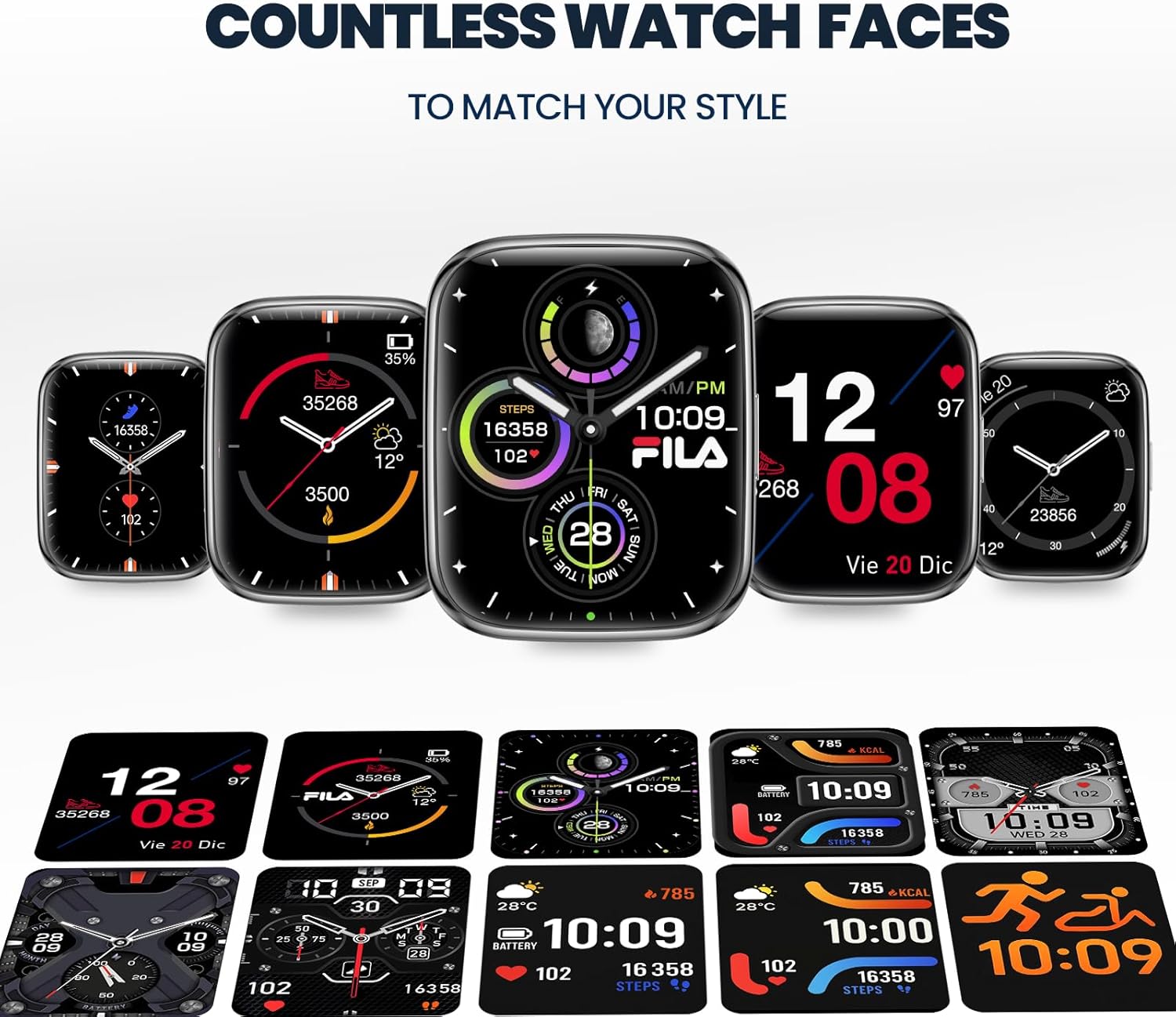
Figure 6: A selection of customizable watch faces.
5. Maintenance
To ensure the longevity and optimal performance of your Fila Smart Watch, follow these maintenance guidelines:
- Cleaning: Regularly wipe the watch screen and strap with a soft, dry cloth. If necessary, use a slightly damp cloth with mild soap, then dry thoroughly.
- Water Resistance: The watch is IP67 rated, meaning it is resistant to dust and can withstand immersion in water up to 1 meter for 30 minutes. Avoid prolonged exposure to water, hot water, or steam.
- Charging: Use only the provided charging cable. Ensure the charging contacts are clean and dry before charging.
- Storage: Store the watch in a cool, dry place away from direct sunlight and extreme temperatures.
6. Troubleshooting
If you encounter any issues with your Fila Smart Watch, try the following troubleshooting steps:
- Watch not turning on: Ensure the watch is fully charged. Connect it to the charger for at least 30 minutes.
- Unable to pair with phone: Make sure Bluetooth is enabled on your phone and the watch is within range. Restart both devices and try pairing again. Ensure the "FILA S-WATCH" app is updated to the latest version.
- Notifications not appearing: Check app notification settings on your phone and within the "FILA S-WATCH" app to ensure they are enabled for the watch.
- Inaccurate health data: Ensure the watch is worn snugly on your wrist, not too tight or too loose. Clean the sensor on the back of the watch.
- Short battery life: Reduce screen brightness, disable unnecessary notifications, or adjust continuous heart rate monitoring frequency in the app.
If problems persist, refer to the "FILA S-WATCH" app's help section or contact customer support.
7. Specifications
| Product Dimensions | 6.1 x 4.33 x 1.69 inches |
| Item Weight | 2.82 ounces (80 Grams) |
| Item Model Number | SW40-White |
| Batteries | 1 C battery required (included) |
| Standing Screen Display Size | 1.95 Inches |
| Memory Storage Capacity | 5000 MB |
| RAM Memory Installed Size | 128 MB |
| Operating System | Wear OS 3.0 |
| Special Features | Activity Tracker, Multisport Tracker, Notifications, Phone Call, Touchscreen |
| Battery Capacity | 210 Milliamp Hours |
| Connectivity Technology | Bluetooth |
| Wireless Communication Standard | Bluetooth |
| Battery Cell Composition | Lithium Ion |
| GPS | GPS Via Smartphone |
| Shape | Rectangular |
| Screen Size | 1.95 Inches |
| Manufacturer | FILA |
| Language | English, French, German, Italian, Spanish |
8. Official Product Video
Video: An official overview of the Fila Smart Watch, highlighting its key features and design.
9. Warranty and Support
For warranty information and customer support, please refer to the documentation provided in your product package or visit the official Fila Smart Watches website. You can also find additional support and FAQs within the "FILA S-WATCH" mobile application.


