
Lighting EVER 3200008-2, PR320019
Lepro Headlamp Bundle User Manual
Models: 3200008-2, PR320019
Brand: Lighting EVER
Introduction
Thank you for choosing the Lepro Headlamp Bundle. This bundle includes two versatile headlamps: the 3200008-2 LED Rechargeable Headlamp with 5 modes (white and red light) and the PR320019 Super Bright Headlamp featuring a motion sensor and 230° wide beam. Both headlamps are designed for various outdoor and indoor activities, providing reliable and bright illumination.
Please read this manual carefully before using the product to ensure proper operation, maximize performance, and extend the lifespan of your headlamps. Keep this manual for future reference.

Figure 1: Lepro Headlamp Bundle contents, including both headlamps and USB charging cables.
Setup
Charging the Headlamps
Both headlamps are equipped with a built-in rechargeable battery. Before first use, or when the light dims, fully charge the headlamp.
- Locate the USB charging port on the side of the headlamp.
- Connect the provided USB cable to the headlamp's charging port.
- Plug the other end of the USB cable into a standard USB power adapter (not included), a computer USB port, or a power bank.
- The charging indicator light will illuminate (e.g., red for charging, green for fully charged).
- A full charge typically takes approximately 4 hours and provides up to 30 hours of continuous lighting, depending on the mode used.

Figure 2: The 3200008-2 headlamp connected to a USB charging cable, showing the charging indicator light.

Figure 3: The PR320019 headlamp connected to a USB-C charging cable, indicating a full charge in 4 hours for 4-10 hours of usage.
Wearing the Headlamp
Adjust the elastic headband to fit comfortably and securely around your head. The lamp unit should be positioned on your forehead, allowing the light to illuminate your path or workspace.
Operating Instructions
Model 3200008-2 Headlamp Operation
This headlamp features 5 lighting modes, including white and red light options.
- Power Button: Press the power button to cycle through the white light modes.
- White Light Modes:
- High Brightness: Provides maximum illumination.
- Low Brightness: For extended battery life or less intense lighting.
- White Light Flash (Strobe): For signaling or emergency situations.
- Red Light Button: Press the dedicated red light button to activate red light modes.
- Red Light Modes:
- Stay on Red Light: Preserves night vision and is less disruptive.
- Red Light Flash: For signaling or emergency situations.
- Power Off: Press the power button repeatedly until the light turns off, or hold the power button for a few seconds.

Figure 4: Visual representation of the 3200008-2 headlamp's white (High, Low, Flash) and red (Stay on, Flash) lighting modes.
Model PR320019 Headlamp Operation
This headlamp offers a 230° wide beam, an adjustable spotlight, and a motion sensor function.
- Power Button: Press the power button to cycle through the lighting modes.
- Lighting Modes:
- COB Light (Flood Light): Provides a wide, 230° area illumination.
- High (350 lumens)
- Low (110 lumens)
- Spotlight: Provides a focused beam for long-distance illumination.
- High (150 lumens)
- Low (60 lumens)
Note: Spotlight and flood light cannot be on at the same time.
- COB Light (Flood Light): Provides a wide, 230° area illumination.
- Motion Sensor: Activate the motion sensor mode by pressing the dedicated motion sensor button. Once activated, you can wave your hand in front of the sensor to turn the COB light on or off without pressing the power button. This is particularly useful when your hands are dirty or occupied.
- Adjustable Spotlight: The spotlight can be adjusted to focus on specific areas by rotating the lens or head of the lamp.
- Power Off: Press the power button repeatedly until the light turns off, or hold the power button for a few seconds.

Figure 5: The PR320019 headlamp's flood light (High, Low, Motion Sensor) and spotlight (High, Low) modes.
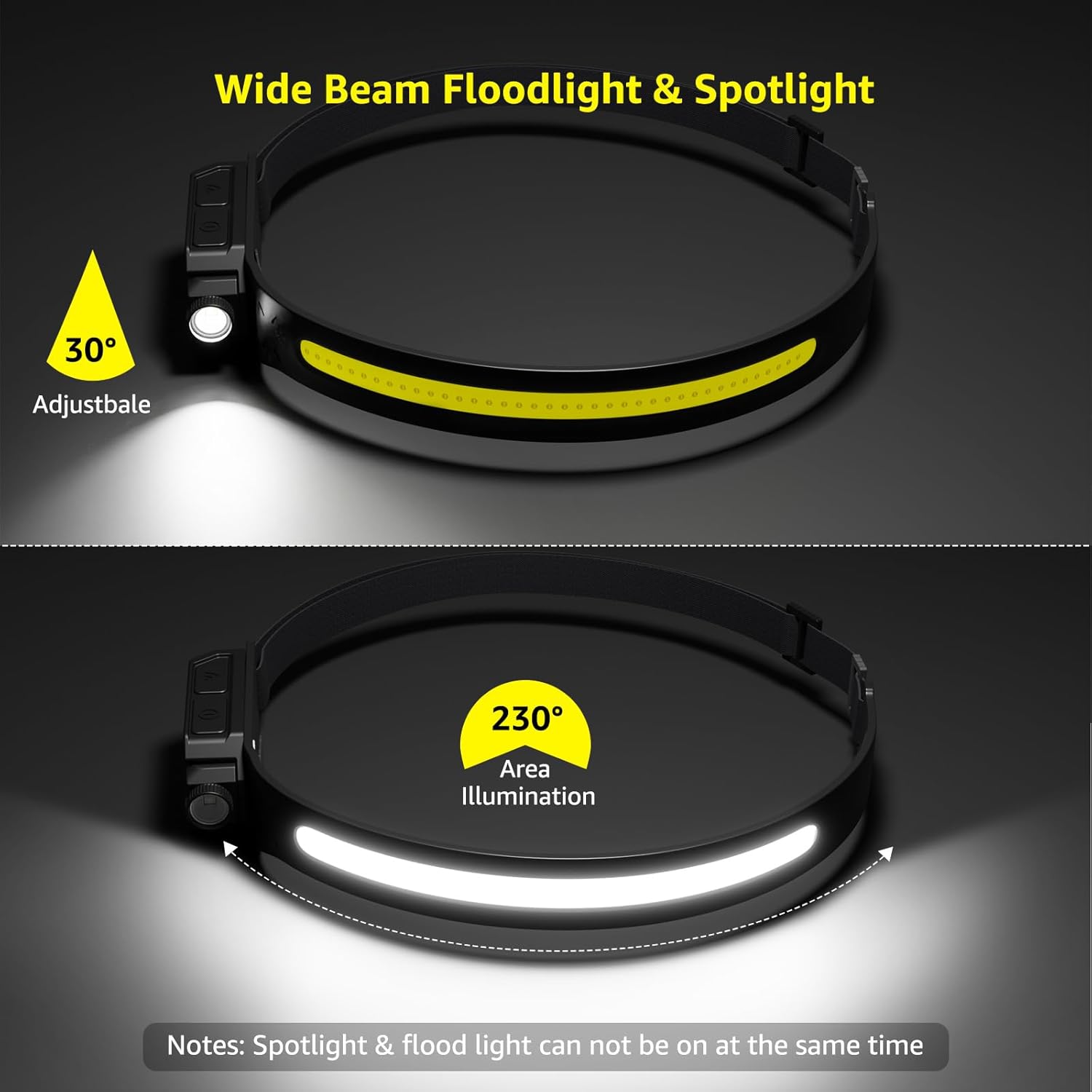
Figure 6: The PR320019 headlamp demonstrating its 230° area illumination (floodlight) and 30° adjustable spotlight.

Figure 7: The PR320019 headlamp providing super bright, long-range illumination in a natural setting.
Maintenance
Cleaning
To clean the headlamp, wipe it with a soft, damp cloth. Do not use abrasive cleaners or solvents, as they may damage the surface or internal components. Ensure the charging port cover is securely closed before cleaning or exposing to moisture.
Storage
Store the headlamp in a cool, dry place away from direct sunlight and extreme temperatures. If storing for an extended period, charge the battery every 3-6 months to maintain battery health.
Water Resistance
Both headlamps are rated IP44 water resistant, meaning they are protected against splashing water from any direction. They are suitable for use in light rain or damp conditions but should not be submerged in water.

Figure 8: The PR320019 headlamp in use during light rain, highlighting its IP44 water and dust resistance.
Troubleshooting
| Problem | Possible Cause | Solution |
|---|---|---|
| Headlamp does not turn on. | Battery is depleted. | Charge the headlamp fully. |
| Light is dim or flickers. | Low battery. | Recharge the headlamp. |
| Headlamp not charging. | Loose cable connection; Faulty cable/adapter; Dirty charging port. | Ensure cable is securely connected. Try a different USB cable or power adapter. Clean the charging port gently. |
| Motion sensor not responding (PR320019). | Motion sensor not activated; Obstruction; Sensor dirty. | Ensure motion sensor mode is enabled. Clear any obstructions in front of the sensor. Clean the sensor area. |
If you encounter issues not listed here, or if the problem persists after attempting the solutions, please contact customer support.
Specifications
| Feature | Specification |
|---|---|
| Brand | Lighting EVER |
| Models | 3200008-2, PR320019 |
| Light Source Type | LED |
| Power Source | Battery Powered (Rechargeable) |
| Battery Cell Composition | Lithium Ion |
| Voltage | 5 Volts (DC) |
| Brightness (PR320019) | 350 lumens (COB High) |
| Light Path Distance (3200008-2) | Up to 150 meters (500FT) |
| Runtime | Up to 30 hours (depending on mode) |
| Special Features | Rechargeable, Motion Sensor (PR320019) |
| Water Resistance Level | IP44 Water Resistant |
| Material | Resin, Plastic |
| Color | Black |
| Mounting Type | Head Mount |
| Recommended Uses | Outdoor activities, emergency preparedness, household tasks, various indoor activities |
Warranty and Support
Lighting EVER products are manufactured with high-quality materials and undergo strict quality control. For warranty information or technical support, please refer to the product packaging or contact Lighting EVER customer service directly.
You can typically find support contact information on the official Lighting EVER website or through your point of purchase.
Related documents3200008-2, PR320019


Ask a question about this manual
Ask about setup, troubleshooting, compatibility, parts, safety, or missing instructions. Manuals+ will review the question and use this page’s manual context to help answer it.