
1. Product Overview
The DollaTek ESP32-CAM is a compact WiFi and Bluetooth module integrated with a camera development board. It features a low-power dual-core 32-bit processor, making it suitable for various Internet of Things (IoT) applications, smart home devices, wireless monitoring, and QR code recognition systems.
Key features include:
- Ultra-compact 802.11b/g/n Wi-Fi + BT/BLE SoC module.
- Dual-core 32-bit low-power processor with up to 240 MHz clock speed and 600 DMIPS computing power.
- Integrated 520 KB SRAM and 4 MB external PSRAM.
- Support for OV2640 and OV7670 cameras with built-in flash.
- Micro USB interface for convenient and reliable connection.
- Support for various interfaces: UART, SPI, I2C, PWM, ADC, DAC.
- Wi-Fi image upload and TF card support.
- Multiple sleep modes and integrated Lwip and FreeRTOS.
- STA/AP/STA+AP operating modes.
- Smart Config/AirKiss one-click distribution network support.
- Serial local upgrade and remote firmware upgrade (FOTA) support.

Image 1.1: Complete DollaTek ESP32-CAM module kit, showing the main board, camera, and external antenna.
2. Package Contents
The package typically includes the following components:
- 1 x DollaTek ESP32-CAM WiFi Bluetooth Module Development Board
- 1 x Camera Module (OV2640 or OV7670 compatible)
- 1 x IPX 2.4G Antenna

Image 2.1: The ESP32-CAM module, highlighting the micro SD card slot and camera ribbon cable connector.
3. Specifications
| Feature | Detail |
|---|---|
| Model Name | ESP32 CAM (CP070565) |
| Processor | Dual-core 32-bit CPU (Espressif) |
| CPU Speed | Up to 240 MHz |
| Internal SRAM | 520 KB |
| External PSRAM | 4 MB |
| Connectivity | Wi-Fi (802.11b/g/n), Bluetooth |
| Interfaces | UART, SPI, I2C, PWM, ADC, DAC |
| Camera Support | OV2640, OV7670 (with flash) |
| Storage | TF Card support |
| Operating System | Linux (Lwip and FreeRTOS integrated) |
| USB Ports | 1 (Micro USB) |
| Compatible Devices | Camera, Personal Computer |
| Country of Origin | China |

Image 3.1: Physical dimensions of the ESP32-CAM module.
4. Setup Instructions
Follow these steps to set up your DollaTek ESP32-CAM module:
- Connect the Camera Module: Carefully connect the ribbon cable of the camera module to the designated FPC connector on the ESP32-CAM board. Ensure the connection is secure and correctly oriented.
- Attach the Antenna: If using the external IPX 2.4G antenna, connect it to the IPX connector on the ESP32-CAM board. For optimal performance, ensure the antenna is properly seated. Note: Some boards may require soldering to switch from an onboard antenna to an external one. Refer to specific board documentation if issues arise.
- Insert TF Card (Optional): If you plan to store images or data, insert a compatible TF (micro SD) card into the card slot on the module.
- Power Supply and Programming:
- Connect the ESP32-CAM module to your computer using a micro USB cable. This connection typically provides power and allows for programming.
- Ensure your computer has the necessary drivers for the USB-to-serial chip (e.g., CH340G) if required.
- For programming, you will need an appropriate development environment (e.g., Arduino IDE with ESP32 board support, ESP-IDF).
- Initial Firmware Upload: Upload your desired firmware to the ESP32-CAM. This usually involves setting the board to programming mode (often by pressing a specific button or shorting a pin during power-up) and using the chosen development environment.

Image 4.1: The external IPX 2.4G antenna, which can be connected to the module for improved wireless range.
5. Operating Instructions
Once the module is set up and programmed, you can begin operating it according to your application's firmware:
- Power On: Connect the module to a stable 5V power source via the micro USB port or dedicated power pins.
- Wi-Fi Connectivity: The module supports STA, AP, and STA+AP operating modes. Configure the Wi-Fi settings within your firmware to connect to a local network (STA mode) or create its own access point (AP mode).
- Camera Operation:
- Access the camera stream via the configured IP address if running a web server application.
- Capture images or record video as defined by your firmware.
- Utilize the built-in flash for low-light conditions if supported by your application.
- Data Storage: If a TF card is inserted, your application can save captured images, video, or other data directly to the card.
- Remote Access: For IoT applications, the module can transmit data and video streams over Wi-Fi to a server or cloud platform for remote monitoring and control.
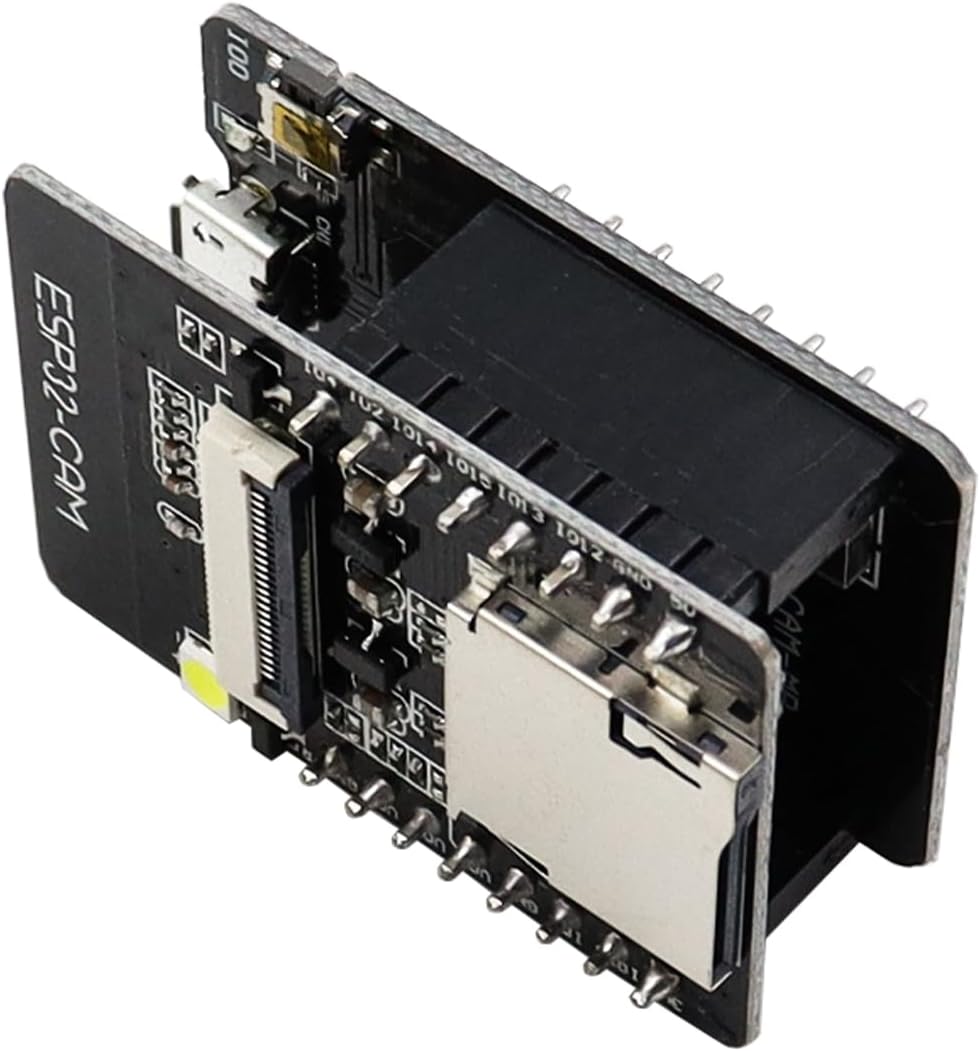
Image 5.1: Angled view of the ESP32-CAM module, illustrating the micro USB port for power and data, and the accessible pin headers.
6. Maintenance
To ensure the longevity and optimal performance of your ESP32-CAM module, follow these maintenance guidelines:
- Handle with Care: Electronic components are sensitive. Avoid dropping the module or subjecting it to physical shock.
- Keep Dry: Protect the module from moisture and liquids. Operate it in a dry environment.
- Cleanliness: Keep the module free from dust and debris. Use a soft, dry brush or compressed air for cleaning if necessary. Avoid using liquid cleaners.
- Temperature: Operate the module within its specified temperature range. Avoid extreme heat or cold.
- Power Supply: Use a stable and appropriate power supply (typically 5V). Incorrect voltage can damage the module.
- Firmware Updates: Regularly check for and apply firmware updates from the developer community or manufacturer to benefit from new features, bug fixes, and security enhancements.
7. Troubleshooting
If you encounter issues with your ESP32-CAM module, consider the following troubleshooting steps:
- Module Not Detected by PC:
- Ensure the micro USB cable is functional and securely connected.
- Verify that the correct USB-to-serial drivers (e.g., CH340G) are installed on your computer.
- Try a different USB port or cable.
- Camera Not Recognized:
- Check the camera ribbon cable connection. Ensure it is fully inserted and correctly oriented in the FPC connector.
- Verify that your firmware is configured for the correct camera model (OV2640 or OV7670).
- Ensure the camera module itself is not damaged.
- Wi-Fi Connectivity Issues:
- Double-check Wi-Fi SSID and password in your firmware.
- Ensure the external antenna is properly connected (if used).
- Verify that the module is within range of your Wi-Fi access point.
- Check for IP address conflicts on your network.
- Module Not Programming:
- Ensure the module is in programming/boot mode (usually by holding a specific button or shorting a pin while powering on).
- Verify correct board and port selection in your IDE.
- Check for power supply issues during programming.
- Poor Image Quality/Latency:
- Ensure the external antenna is used and properly connected, especially if the module is in an enclosure or far from the Wi-Fi router.
- Optimize your firmware for image compression and transmission speed.
- Check for environmental interference.
8. Warranty Information
Specific warranty details for the DollaTek ESP32-CAM module are not explicitly provided in the product information. For warranty claims or detailed information, please refer to the retailer or manufacturer's official support channels at the time of purchase.
Information regarding spare parts availability and guaranteed software updates is also not available.
9. Support
For further assistance, technical documentation, or community support, please consult the following resources:
- Manufacturer Website: Search for "DollaTek" online for official product pages or support.
- ESP32 Community Forums: The ESP32 platform has a large and active community. Many resources, tutorials, and troubleshooting guides are available online.
- Online Retailer Support: Contact the seller through the platform where you purchased the module for product-specific inquiries.
- Development Environment Documentation: Refer to documentation for Arduino IDE, ESP-IDF, or other development tools you are using for programming the ESP32.