
Midea MF10EW90B
Midea MF10EW90B Front-Load Washing Machine User Manual
Model: MF10EW90B
Introduction
This manual provides essential instructions for the safe and efficient operation, installation, and maintenance of your Midea MF10EW90B front-load washing machine. Please read this manual thoroughly before using the appliance and keep it for future reference.
Important Safety Information
Always follow basic safety precautions when using electrical appliances to reduce the risk of fire, electric shock, or injury to persons.
- Ensure the appliance is properly grounded.
- Do not allow children to play on or in the appliance.
- Do not install or store this appliance where it will be exposed to the weather or freezing temperatures.
- Do not repair or replace any part of the appliance or attempt any servicing unless specifically recommended in this manual or in published user-repair instructions that you understand and have the skills to carry out.
- Keep flammable materials and vapors away from the appliance.
Setup and Installation
Unpacking and Transport Bolt Removal
Before using the washing machine, it is crucial to remove the four transport bolts located at the rear of the appliance. Failure to do so will cause severe vibrations and potential damage to the machine during operation. Professional installation and additional accessories may be required.

Image Description: This image illustrates the rear view of the Midea washing machine, highlighting the four transport bolts that must be removed before use. A wrench is shown indicating the tool needed for removal, alongside diagrams of the bolts and their components (bolt, plastic spacer, rubber washer, metal washer).
Placement
Place the washing machine on a firm, level surface. Adjust the leveling feet to ensure stability and prevent excessive vibration.
Water and Drain Connections
Connect the water inlet hose to a cold water tap and the washing machine's inlet valve. Ensure all connections are tight to prevent leaks. Position the drain hose into a standpipe or laundry tub, ensuring it is securely fastened and allows for proper drainage.
Electrical Connection
Plug the power cord into a grounded electrical outlet. Verify that the voltage matches the specifications of the appliance (220-240V AC).
Operating Instructions
Control Panel Overview
The control panel features a program selector dial, a digital display, and various function buttons. Familiarize yourself with these controls for optimal use.
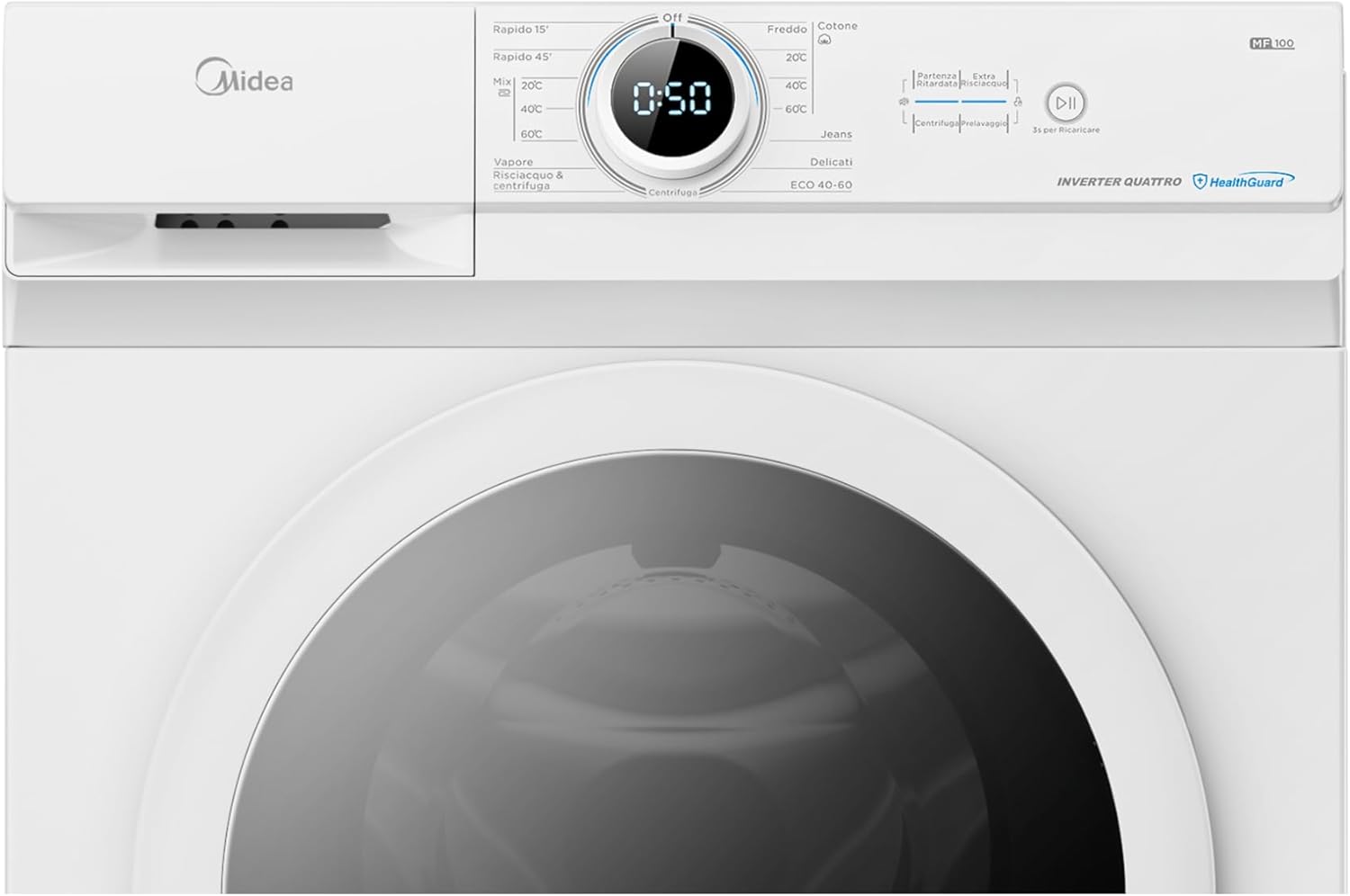
Image Description: This image provides a detailed view of the washing machine's control panel. It shows the central program selection dial with various wash cycles (e.g., Rapido 15', Rapido 45', Cotone, Delicati, Jeans, ECO 40-60), a digital timer display, and buttons for functions like temperature control, spin speed, and start/pause.
Loading Laundry
Open the door and load your laundry into the drum. Do not overload the machine. Close the door firmly.
Detergent Dispenser
Pull out the detergent dispenser drawer and add the appropriate amount of detergent and fabric softener to the designated compartments.
Program Selection
Turn the program selector dial to choose the desired wash program. The digital display will show the estimated cycle time.
Key Programs and Features:
- Quick Wash: Options for 15 minutes and 45 minutes, ideal for small, lightly soiled loads, saving time and energy.
- Steam Care: Enhances cleaning by eliminating up to 99.9% of bacteria and odors, while also reducing wrinkles.
- Temperature Settings: Select from Cold, 20°C, 40°C, or 60°C to suit different fabric types and stain levels.

Image Description: This image shows the Midea washing machine with its door open and clothes being loaded, emphasizing the "Quick Wash" feature. The text overlay indicates options for 15 and 45-minute cycles, designed to save time, water, and energy for small loads.

Image Description: This image visually represents the "Steam Care" feature. It shows layers of fabric with steam particles penetrating deeply, indicating how warm steam removes stubborn stains and bacteria for superior cleaning and family health protection.
Starting a Cycle
Press the Start/Pause button to begin the selected wash cycle.
Adding Garments During a Cycle
If you need to add forgotten garments, press the Start/Pause button for 3 seconds. The machine will pause, allowing you to open the door and add items. Close the door and press Start/Pause again to resume the cycle.

Image Description: This image shows a woman opening the washing machine door to add clothes during a cycle, illustrating the "Add Garments" feature. The accompanying text explains that there's no need to turn off and restart the cycle; simply press the "Start/Pause" button for 3 seconds to add items.
Maintenance
Cleaning the Detergent Dispenser
Regularly clean the detergent dispenser drawer to prevent residue buildup. Remove the drawer, rinse it under running water, and clean any stubborn deposits with a brush.
Cleaning the Drum
Run a maintenance wash cycle (e.g., a hot wash with no laundry and a descaling agent) periodically to clean the drum and remove any odors or residue.
Cleaning the Drain Filter
Locate the drain filter, usually at the bottom front of the machine. Open the cover, drain any residual water, and carefully remove and clean the filter. Reinstall securely.
Troubleshooting
If you encounter issues with your washing machine, refer to the following common problems and solutions:
- Machine does not start: Ensure the power cord is plugged in, the door is closed properly, and the Start/Pause button has been pressed. Check the circuit breaker.
- Water not filling: Check if the water tap is open and the water inlet hose is not kinked or blocked.
- Excessive vibration/noise: Verify that the transport bolts have been removed and the machine is level. Ensure the load is balanced.
- Water not draining: Check the drain hose for kinks or blockages. Clean the drain filter.
- Error codes: Consult the full user manual (if available) or contact customer support for specific error code interpretations.
Product Specifications
| Feature | Specification |
|---|---|
| Model | MF10EW90B |
| Capacity | 9 kg |
| Spin Speed | 1400 rpm |
| Energy Efficiency Class | A |
| Noise Level (Spin) | 72 dB |
| Dimensions (H x W x D) | 85 cm x 59.5 cm x 49.5 cm |
| Weight | 61 kg |
| Voltage | 220-240V (AC) |
| Special Features | Steam Care, BLDC Inverter Motor, Quick Wash, Delay Start, Child Lock |

Image Description: This image displays the Midea MF10EW90B washing machine from the front, showcasing its sleek design and prominent features. Labels on the machine indicate its 9 kg capacity, Steam Care function, Class A energy efficiency, and BLDC motor technology.

Image Description: This image provides a dimensional diagram of the Midea washing machine, showing its height (850mm), width (595mm), and depth (495mm). It also highlights key features such as Energy Class A, Add Garments function, BLDC Inverter Motor, 510mm Large Drum, Steam Care, and a 10-year motor warranty.

Image Description: This is the official EU Energy Label for the Midea MF10EW90B washing machine. It clearly indicates an 'A' energy efficiency class, 49 kWh per 100 cycles, 9.0 kg capacity, 3:48 cycle duration, 50 liters of water consumption, and a spin noise level of 72 dB.
For detailed product information, refer to the EPREL database: https://eprel.ec.europa.eu/qr/1853006
Warranty and Support
Your Midea MF10EW90B washing machine comes with a 10-year warranty on the motor, reflecting its durability and advanced BLDC Inverter Motor technology.
For technical assistance, spare parts, or warranty claims, please contact Midea customer support or your authorized dealer. Always provide your model number (MF10EW90B) and serial number when seeking support.
For more information, visit the official Midea website or refer to the full warranty documentation included with your purchase.
Related documentsMF10EW90B


Ask a question about this manual
Ask about setup, troubleshooting, compatibility, parts, safety, or missing instructions. Manuals+ will review the question and use this page’s manual context to help answer it.