
Memphis Audio PRX500.4V2
Memphis Audio PRX500.4V2 4-Channel 500 Watt Amplifier
Instruction Manual
1. Introduction
Thank you for choosing the Memphis Audio PRX500.4V2 4-Channel 500 Watt Amplifier. This manual provides essential information for the proper installation, operation, and maintenance of your amplifier. Please read this manual thoroughly before attempting installation or operation to ensure optimal performance and safety.
The PRX500.4V2 is designed to deliver powerful and clear audio output for your car audio system, featuring 4 channels with 125 Watts RMS per channel at 2-Ohm.

Image 1.1: Top view of the Memphis Audio PRX500.4V2 amplifier, showcasing its sleek black casing and illuminated Memphis logo.
Safety Information
- Always disconnect the vehicle's battery negative terminal before starting any electrical work.
- Ensure proper grounding to the vehicle chassis.
- Use appropriate gauge wiring for power, ground, and speaker connections.
- Avoid mounting the amplifier in areas exposed to excessive heat, moisture, or vibration.
- Consult a professional installer if you are unsure about any part of the installation process.
2. Setup and Installation
2.1 Unpacking
Carefully remove the amplifier from its packaging. Inspect for any signs of damage. If damage is present, contact your dealer immediately.
2.2 Mounting Location
Choose a mounting location that provides adequate ventilation for the amplifier. Avoid enclosed spaces that can trap heat. Ensure the location is secure and protected from moisture. Common locations include under seats, in the trunk, or behind panels.
2.3 Wiring Connections
Proper wiring is crucial for performance and safety. Refer to the following guidelines for connecting power, ground, remote, input, and speaker wires.
Power and Ground Connections
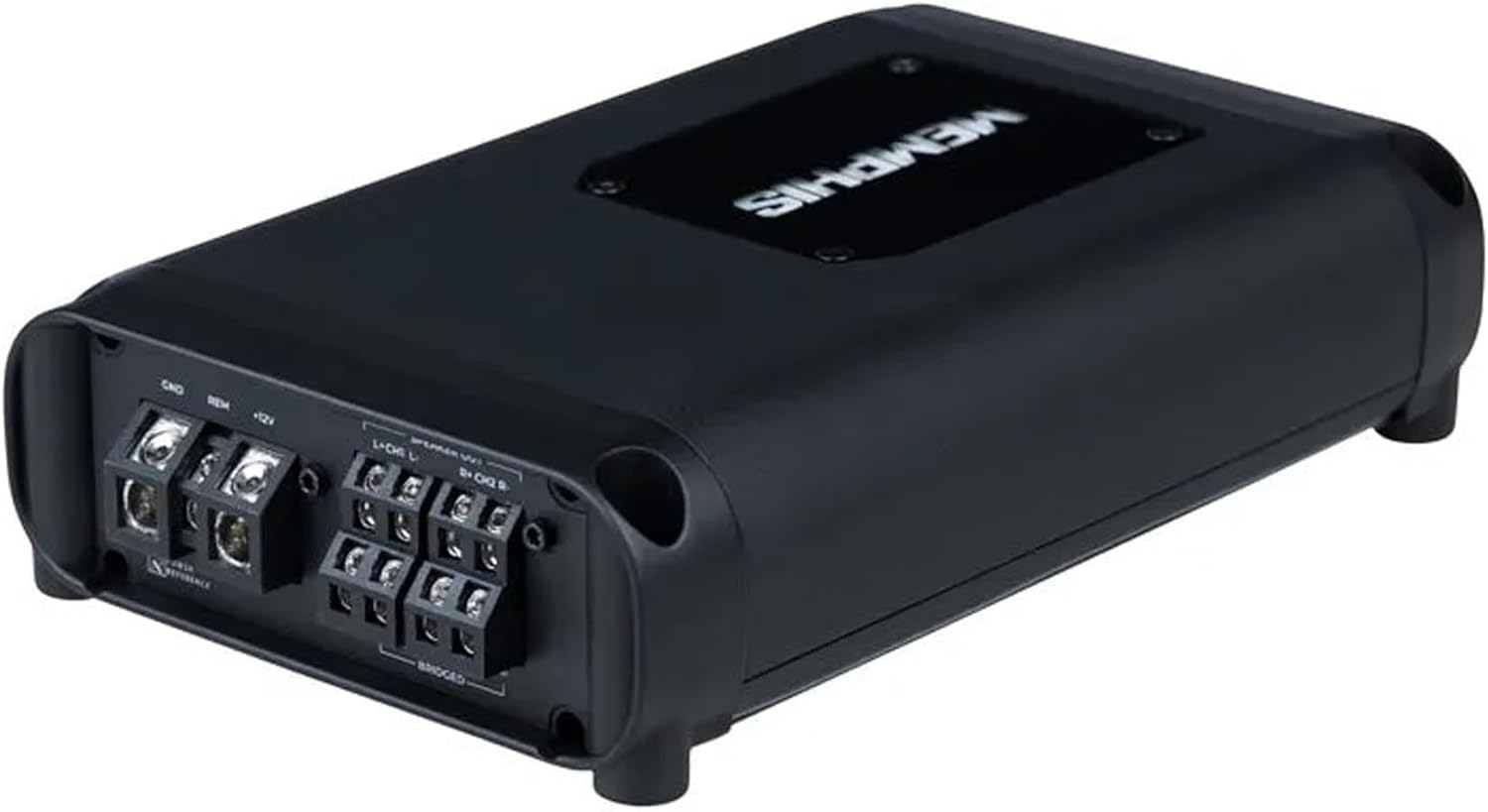
Image 2.1: Angled view of the Memphis Audio PRX500.4V2 amplifier, showing the power, ground, remote, and speaker output terminals.
- B+ (Power): Connect this terminal directly to the positive (+) terminal of the vehicle's battery using a fuse holder within 18 inches of the battery. Use appropriate gauge wire (e.g., 8 AWG for typical installations).
- GND (Ground): Connect this terminal to a clean, bare metal point on the vehicle's chassis. Ensure a solid electrical connection. The ground wire should be the same gauge as the power wire and as short as possible.
- REM (Remote Turn-On): Connect this terminal to the remote turn-on output of your head unit. This wire signals the amplifier to turn on and off with your stereo.
Input Connections

Image 2.2: Top-down view of the Memphis Audio PRX500.4V2 amplifier's input panel, detailing RCA inputs, REM/DC/AUDIO switch, and input level switch.
- RCA Inputs (CH1, CH2, CH3, CH4): Connect these to the RCA pre-amp outputs of your head unit. Ensure correct channel matching (e.g., Front Left to CH1, Front Right to CH2, Rear Left to CH3, Rear Right to CH4).
- REM/DC/AUDIO Switch: This switch determines how the amplifier turns on.
- REM: Uses the remote turn-on wire from the head unit.
- DC: Detects a DC offset on the speaker-level inputs (for head units without a remote output).
- AUDIO: Detects an audio signal on the speaker-level inputs.
Speaker Output Connections
Connect your speakers to the designated speaker terminals. The PRX500.4V2 is a 4-channel amplifier, allowing for various speaker configurations. Ensure correct polarity (+ to + and - to -) for all speakers.
- Standard 4-Channel: Connect one speaker to each channel output.
- Bridged Mode: The amplifier can be bridged to provide more power to fewer channels (e.g., 2-channel operation for subwoofers). Refer to the amplifier's terminal markings for correct bridging connections.
3. Operating the Amplifier
3.1 Initial Power-Up
After all connections are made, reconnect the vehicle's battery. Turn on your head unit. The amplifier should power on, indicated by an illuminated logo or status LED.
3.2 Controls and Adjustments

Image 3.1: Angled view of the Memphis Audio PRX500.4V2 amplifier, highlighting the input side with RCA connections and control switches.
- INPUT LEVEL (Gain Control): This control matches the amplifier's input sensitivity to the output level of your head unit. Start with the gain set to minimum. Play a familiar track at about 75% of your head unit's maximum volume. Slowly increase the amplifier's gain until you hear distortion, then back it off slightly.
- 2CH/4CH Switch: This switch determines whether the amplifier uses 2 or 4 input channels.
- 2CH: If your head unit only has 2 RCA outputs, this setting will feed the signal to all 4 amplifier channels.
- 4CH: For head units with 4 RCA outputs, allowing independent control of front and rear channels.
- LOW/HI (Crossover Switch): This switch activates the built-in crossover.
- LOW: Activates a low-pass filter, allowing only low frequencies to pass through (suitable for subwoofers).
- HI: Activates a high-pass filter, allowing only high frequencies to pass through (suitable for full-range or component speakers).
4. Maintenance
The Memphis Audio PRX500.4V2 amplifier requires minimal maintenance to ensure long-term performance.
- Cleaning: Periodically wipe the amplifier's exterior with a soft, dry cloth to remove dust and debris. Do not use harsh chemicals or abrasive cleaners.
- Ventilation: Ensure that the amplifier's cooling fins are free from obstructions to allow for proper heat dissipation.
- Connections: Occasionally check all wiring connections for tightness and corrosion. Loose connections can lead to poor performance or damage.
5. Troubleshooting
If you experience issues with your amplifier, refer to the following table for common problems and solutions.
| Problem | Possible Cause | Solution |
|---|---|---|
| Amplifier does not turn on | No power, ground, or remote signal; Blown fuse | Check power, ground, and remote wire connections. Verify fuse at battery and on amplifier. Check REM/DC/AUDIO switch setting. |
| No sound output | No input signal; Speaker wires disconnected; Amplifier in protect mode | Check RCA input connections. Verify speaker wire connections. Check amplifier status LED (if red, troubleshoot protect mode). Adjust gain. |
| Distorted sound | Gain set too high; Improper crossover settings; Poor ground connection | Reduce gain setting. Adjust crossover switch. Ensure solid ground connection. Check speaker impedance. |
| Amplifier overheats | Insufficient ventilation; Low impedance load; Prolonged high output | Ensure proper airflow around amplifier. Check speaker impedance (do not go below 2-Ohm per channel or 4-Ohm bridged). Reduce volume or gain. |
If the problem persists after attempting these solutions, contact Memphis Audio customer support or a qualified installer.
6. Specifications
The following are the technical specifications for the Memphis Audio PRX500.4V2 Amplifier:
- Model: PRX500.4V2
- Channels: 4
- Total Power: 500 Watts
- RMS Power Output (per channel): 125 Watts RMS x 4 at 2-Ohm
- Item Weight: 4.1 pounds
- Package Dimensions: 10.8 x 7.6 x 4.2 inches
- Manufacturer: Memphis Audio
- Date First Available: February 27, 2024
7. Warranty Information
The Memphis Audio PRX500.4V2 amplifier comes with a 1-Year Manufacturer Warranty from the date of purchase. This warranty covers defects in materials and workmanship under normal use. It does not cover damage caused by improper installation, accident, misuse, abuse, neglect, or unauthorized modification.
Please retain your proof of purchase for warranty claims. For detailed warranty terms and conditions, please refer to the official Memphis Audio website or contact their customer support.
8. Support and Contact
For technical assistance, troubleshooting beyond this manual, or warranty inquiries, please contact Memphis Audio customer support.
- Online Support: Visit the official Memphis Audio Store on Amazon or their corporate website for FAQs and support resources.
- Contact Information: Refer to the Memphis Audio official website for the most current contact details, including phone numbers and email addresses.
Related documentsPRX500.4V2


Ask a question about this manual
Ask about setup, troubleshooting, compatibility, parts, safety, or missing instructions. Manuals+ will review the question and use this page’s manual context to help answer it.