
1. Introduction
This manual provides essential information for the proper installation, use, and maintenance of the Urmet Domus 1704/90 Video Intercom Support Bracket. Please read this manual thoroughly before installation to ensure safe and efficient operation.
2. Product Features
- Specifically designed support bracket for Sentry video intercom systems.
- Includes an integrated connector for seamless integration.
- Durable construction for reliable mounting.
- Model number: 1704/90.
3. Package Contents
Verify that all items are present and undamaged upon opening the package:
- 1 x Urmet Domus 1704/90 Video Intercom Support Bracket with Connector
- (Mounting screws and video intercom unit are sold separately and are not included.)
4. Setup and Installation
This section outlines the steps for installing the support bracket. Ensure power to the intercom system is disconnected before beginning installation.
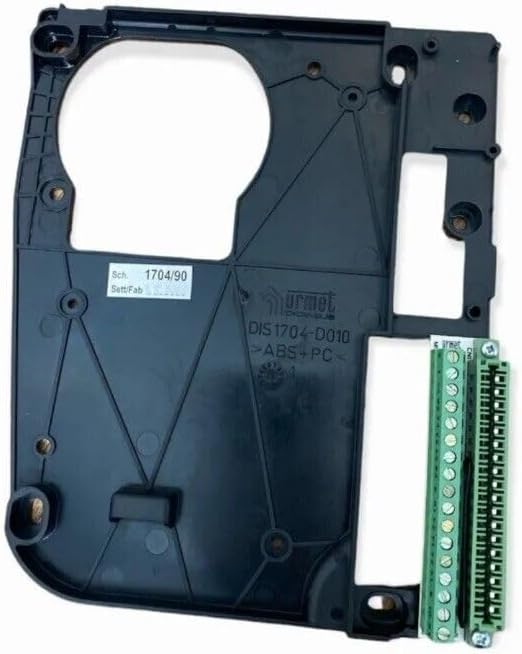
Figure 1: Front view of the Urmet Domus 1704/90 Video Intercom Support Bracket, showing the main mounting plate and the integrated green terminal block connectors on the right side. The model number "1704/90" is visible on a label on the left side of the bracket.
- Prepare Mounting Surface: Choose a suitable, flat, and stable surface for mounting the intercom. Ensure there is adequate space for wiring and the intercom unit.
- Mark Drilling Points: Hold the support bracket against the desired mounting location. Use a pencil to mark the positions for drilling through the designated screw holes on the bracket.
- Drill Holes: Drill pilot holes at the marked positions. The size of the drill bit should be appropriate for your chosen mounting screws and wall anchors (if necessary).
- Secure the Bracket: Align the bracket with the drilled holes and secure it firmly to the wall using appropriate screws. Do not overtighten.
- Connect Wiring: Route the necessary wiring for your Sentry video intercom through the designated openings in the bracket. Connect the intercom's wiring to the integrated terminal block connector on the bracket as per your intercom's specific wiring diagram. Refer to your Sentry video intercom's manual for detailed wiring instructions.
- Mount Intercom Unit: Once wiring is complete and secure, attach your Sentry video intercom unit to the support bracket. Ensure it clicks or fastens securely into place.
- Test System: Restore power to the intercom system and test its functionality according to the intercom's user manual.
5. Operation
The Urmet Domus 1704/90 is a passive support bracket designed to securely mount your Sentry video intercom and facilitate its electrical connections. It does not require active operation or user interaction beyond its initial installation.
6. Maintenance
The support bracket requires minimal maintenance. Periodically inspect the bracket and its mounting screws to ensure they remain secure. Clean the surface with a soft, dry cloth if necessary. Avoid using abrasive cleaners or solvents.
7. Troubleshooting
As a passive mounting component, the support bracket itself typically does not experience operational issues. Most problems related to the intercom system will stem from the intercom unit or its wiring. If you encounter issues:
- Intercom not functioning: Verify all wiring connections to the terminal block on the bracket are secure and correctly aligned with your intercom's wiring diagram.
- Bracket loose: Check and tighten mounting screws. If the wall material is compromised, consider using larger anchors or relocating the bracket.
- Intercom not seating correctly: Ensure there are no obstructions and that the intercom unit is correctly aligned with the bracket's mounting points.
For issues related to the Sentry video intercom's functionality, refer to its specific user manual or contact the intercom manufacturer's support.
8. Specifications
| Attribute | Value |
|---|---|
| Brand | Urmet |
| Model Number | 1704/90 |
| Product Type | Video Intercom Support Bracket with Connector |
| Power Type | None (Passive Component) |
| Included Components | Bracket with integrated connector |
| Material | ABS+PC |
9. Warranty and Support
This product is typically covered by a standard return policy. Please refer to your point of purchase for specific return and refund details, which may include a 30-day return window from the date of purchase.
For technical support or inquiries regarding the Urmet Domus 1704/90 support bracket, please contact the manufacturer, Urmet, or your product supplier. Information regarding spare parts availability is currently not provided.


