
BLUETTI MS-US-AC20
BLUETTI AC20 Portable Power Station User Manual
Model: MS-US-AC20
Your reliable power solution for outdoor adventures and emergencies.

The BLUETTI AC20 Portable Power Station, a compact and robust device designed to provide reliable power on the go. It features multiple output ports and a clear display.
1. Introduction
Thank you for choosing the BLUETTI AC20 Portable Power Station. This manual provides essential information for the safe and efficient operation of your device. Please read it thoroughly before use and retain it for future reference.
Package Contents
- BLUETTI AC20 portable power station
- AC adapter
- Type-C cable
- Car charging cable
- User manual
- Warranty card

An illustration showing the BLUETTI AC20 power station along with its included accessories: user manual, warranty card, AC adapter, Type-C cable, DC6530 to DC5521 cable, DC7909 to Car Charger cable, and cigarette lighter adapter.
2. Safety Instructions
To ensure safe operation, always follow these guidelines:
- Do not disassemble, repair, or modify the unit.
- Keep the unit away from fire or direct sunlight.
- Do not use or store the unit in a bathroom or in an area exposed to water or rain.
- Do not use the unit if it is damaged or modified.
- Keep out of reach of children.
- Ensure proper ventilation during use to prevent overheating.
- Use only original or certified charging cables and adapters.
The BLUETTI AC20 is built with an Auto-level battery cell and a premium BMS (Battery Management System) for comprehensive battery protection.
3. Setup Guide
Initial Charge
Before first use, fully charge the BLUETTI AC20. Connect the provided AC adapter to the input port on the power station and plug it into a wall outlet. The display will indicate charging status.
Understanding the Display
The integrated display provides real-time information on battery level, input power, and output power for various ports.
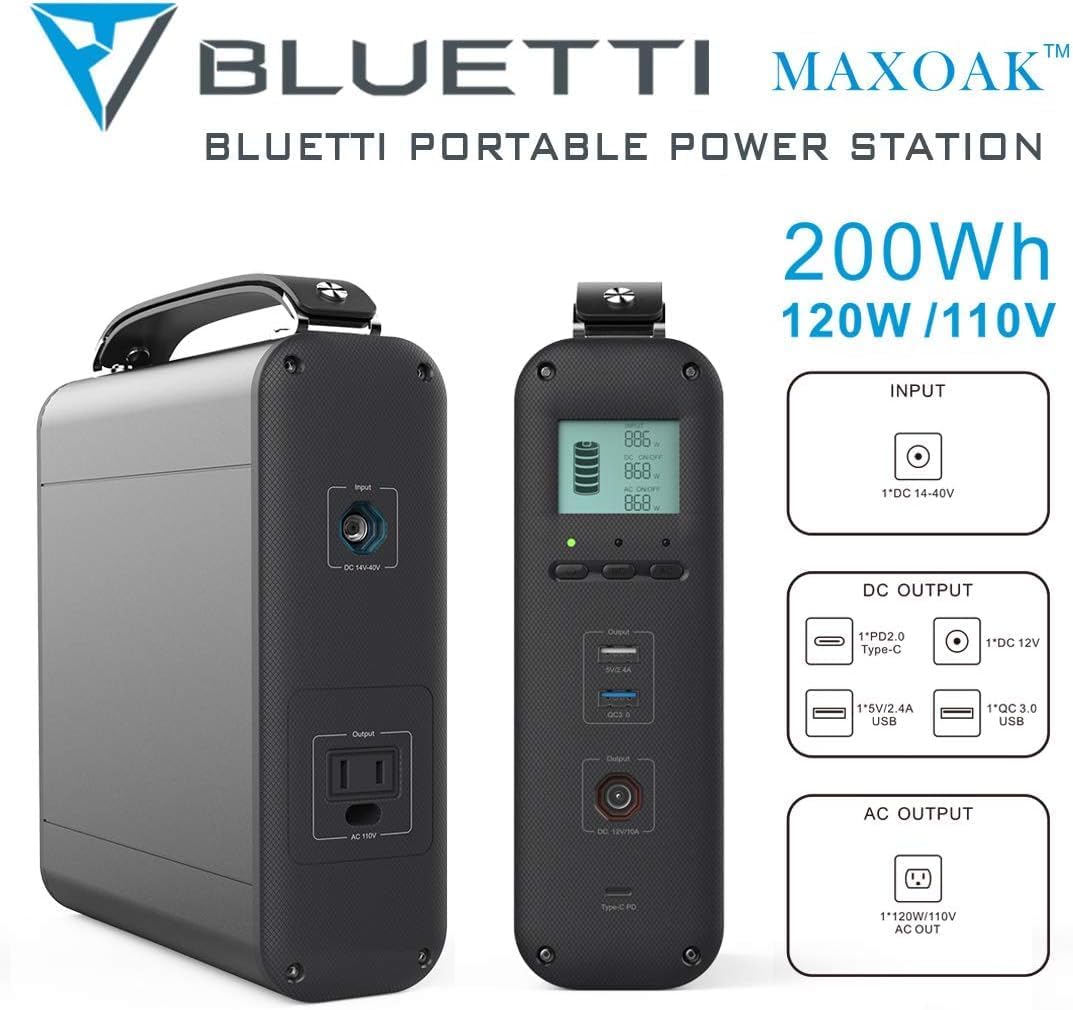
A detailed view of the BLUETTI AC20 power station highlighting its input and output ports, including the DC 14-40V input, PD2.0 Type-C, 5V/2.4A USB-A, QC 3.0 USB, DC 12V, and 120W/110V AC outlet.
4. Operating Instructions
Turning On/Off
Press and hold the power button for 3 seconds to turn the unit on or off.
Charging Devices
The AC20 offers multiple output options:
- AC Outlet: Provides 120W AC output for small appliances.
- USB-C Port: For fast charging compatible devices.
- USB-A Ports: Standard USB ports for charging phones, tablets, and other USB-powered devices.
- DC 12V Car Output: For powering 12V car appliances.
- QC USB Port: Quick Charge enabled USB port.
Simply plug your device into the appropriate port. The power station will automatically detect and begin charging.

The BLUETTI AC20 power station simultaneously charging a laptop, tablet, and multiple smartphones, demonstrating its versatility for various electronic devices.
Recharging the AC20
The BLUETTI AC20 can be recharged via:
- AC Wall Outlet: Using the provided AC adapter.
- Solar Panel (Optional): Connect a compatible solar panel to the DC input port for eco-friendly charging.
- Car Charger: Use the included car charging cable to recharge from your vehicle's 12V outlet.
Monitor the display for charging progress.
5. Maintenance
- Storage: Store the unit in a cool, dry place, away from direct sunlight and extreme temperatures.
- Charging Frequency: For optimal battery life, fully charge the unit every 3-6 months, even if not in use.
- Cleaning: Use a dry, soft cloth to clean the exterior. Do not use harsh chemicals or abrasive materials.
- Ventilation: Ensure the ventilation openings are clear of dust and debris.

The BLUETTI AC20 power station positioned outdoors near a tent and a person, illustrating its suitability for camping and off-grid use.
6. Troubleshooting
| Problem | Possible Cause | Solution |
|---|---|---|
| Unit not turning on | Battery is depleted. | Charge the unit fully using the AC adapter. |
| No output from ports | Output port not activated or device draws too much power. | Ensure the unit is on and the specific output port is active. Check if the device's power consumption exceeds the AC20's limits (120W AC). |
| Slow charging | Using a non-optimal charging method or cable. | Use the original AC adapter for fastest charging. Ensure solar panels are in direct sunlight if applicable. |
| Overheating | Poor ventilation or excessive load. | Place the unit in a well-ventilated area. Reduce the number or power of connected devices. |
7. Specifications
- Model: MS-US-AC20
- Capacity: 200Wh
- AC Output: 1 x 120W AC Outlet (110V)
- USB-C Output: 1 x Type-C (PD2.0)
- USB-A Output: 1 x 5V/2.4A, 1 x QC 3.0
- DC Output: 1 x DC 12V Car Output
- Input: DC 14-40V
- Dimensions: 7.87 x 8.15 x 2.63 inches
- Weight: 7.7 lbs
- Battery Type: Auto-level battery cell
- Cycle Life: 1000+ cycles
- Special Features: Built-in BMS for battery protection

An image of the BLUETTI AC20 power station with callouts indicating its 200Wh capacity, 120W/110V output, and various input/output ports including DC 14-40V input, PD2.0 Type-C, 5V/2.4A USB, QC 3.0 USB, DC 12V, and AC 120W/110V.
8. Warranty and Support
The BLUETTI AC20 Portable Power Station comes with a 24-month warranty from the date of purchase. This warranty covers defects in materials and workmanship under normal use.
For technical support, warranty claims, or any inquiries, please contact BLUETTI customer service through their official website or the contact information provided on your warranty card.
BLUETTI Official Website: www.bluettipower.com
9. Environmentally Friendly Disposal
Do not dispose of the BLUETTI AC20 with household waste. This product contains a battery and should be recycled responsibly. Please contact your local waste management authority for information on proper disposal and recycling options for electronic devices and batteries.
Related documentsMS-US-AC20


Ask a question about this manual
Ask about setup, troubleshooting, compatibility, parts, safety, or missing instructions. Manuals+ will review the question and use this page’s manual context to help answer it.