
1. Introduction
Thank you for choosing the iDance Beatmix 303 BT Wireless Speaker and DJ Mixer. This device combines a portable Bluetooth speaker with a modular DJ mixer, offering a versatile audio experience with built-in beats, drum pads, and disco lights. This manual provides essential information for safe and optimal use of your product. Please read it thoroughly before operation and retain it for future reference.
2. Product Overview
2.1 Key Features
- Portable and Wireless Bluetooth Speaker
- Integrated Modular DJ Mixer (S9XC) with 45 beats across 5 banks (Electro/House, Reggaeton/Latin, Hip Hop/Rock, Dubstep/Techno, Funky/Disco)
- 5 Drum Pads (E. Drums, Vocoder, Rock Session, Super FX, A.Drums)
- 50W Peak Music Power with Super Bass
- Built-in LED Disco Lights
- Wireless Bluetooth Streaming and MP3 Player via USB / TF Card
- Wireless Audio Sharing Mode with other Beatmix 303 units
- Karaoke Ready with 1 Microphone Input and Echo Effect
- Voice Changer Effect with 5 options: Echo, Male, Child, Female, Robot
- AUX IN 3.5 mm for external audio sources
- Includes 1 Wired Dynamic Vocal Microphone (CLM9)
2.2 Components
The iDance Beatmix 303 package includes the main speaker unit with integrated DJ mixer and a wired dynamic vocal microphone.

Figure 1: The iDance Beatmix 303 BT Wireless Speaker and DJ Mixer, shown with the included wired microphone. The speaker features a colorful LED grille and a top-mounted DJ mixer panel.
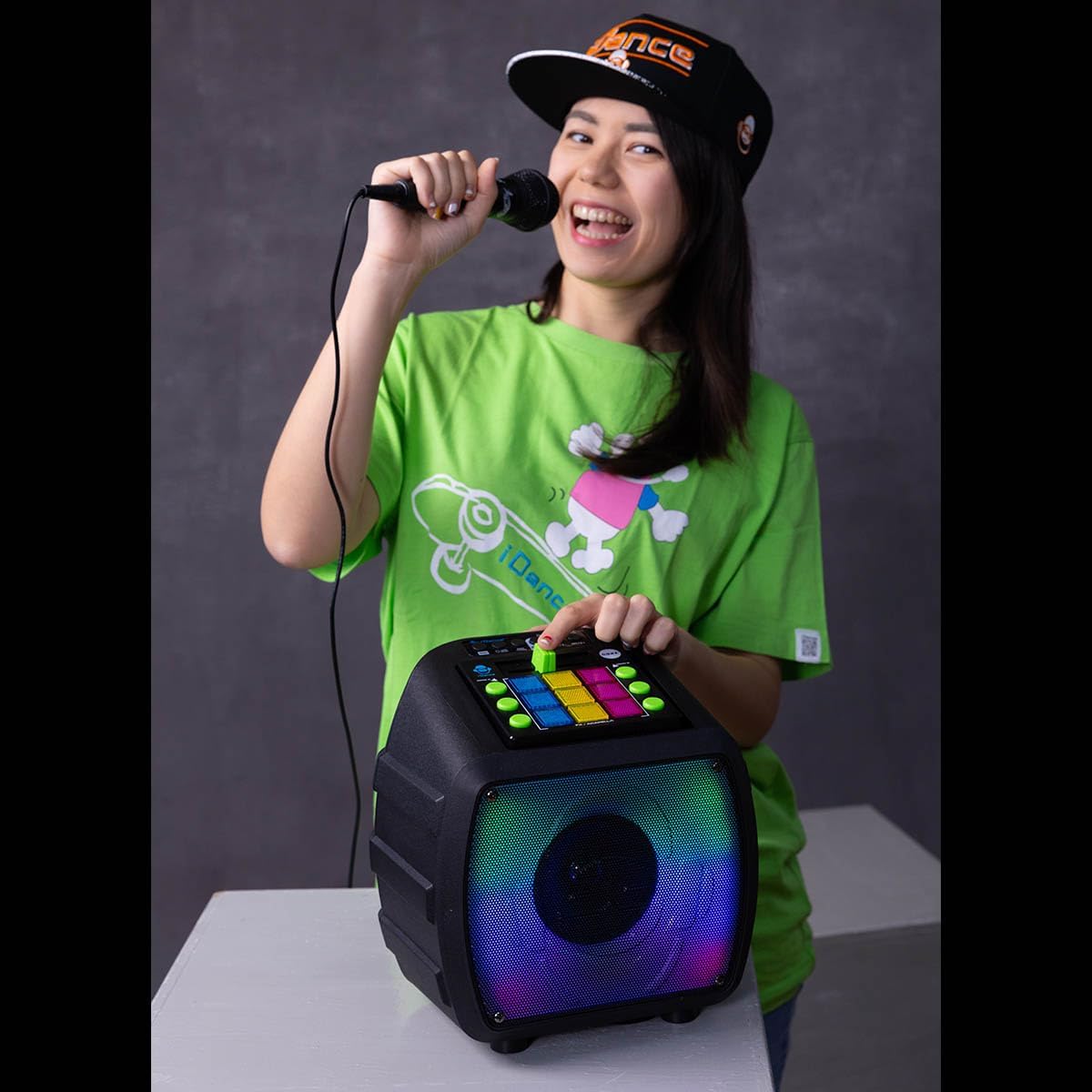
Figure 2: A close-up view of the DJ mixer panel on the iDance Beatmix 303. It features various buttons for beat selection (Electro, Reggaeton, Hip Hop, Dubstep, Funky), drum pads, and controls for volume and effects.
3. Setup
3.1 Charging the Device
Before first use, fully charge the Beatmix 303. Connect the provided charging cable to the DC 5V/1A input port on the unit and to a suitable USB power adapter (not included). The charging indicator light will illuminate during charging and turn off or change color when fully charged. Charging typically takes 5-8 hours.
3.2 Powering On/Off
To power on the device, locate the power button, usually marked 'ON/OFF', and press it. To power off, press the button again. A sound prompt may indicate power status.
3.3 Connecting the Microphone
Plug the wired dynamic vocal microphone (CLM9) into the designated microphone input jack on the Beatmix 303. Ensure it is securely connected.
4. Operating Instructions
4.1 Bluetooth Pairing
- Turn on the Beatmix 303. The unit will automatically enter Bluetooth pairing mode, indicated by a flashing LED.
- On your mobile device (smartphone, tablet, laptop), enable Bluetooth and search for available devices.
- Select "BEATMIX 303" from the list of devices.
- Once paired, the LED indicator will stop flashing, and a confirmation sound may be heard. You can now stream audio wirelessly.
4.2 DJ Mixer Functions
The integrated S9XC DJ Mixer allows for creative audio manipulation:
- Beat Banks: Use the dedicated buttons (Electro, Reggaeton, Hip Hop, Dubstep, Funky) to select from 45 pre-loaded beats across 5 different musical styles.
- Drum Pads: Activate the 5 drum pads (E. Drums, Vocoder, Rock Session, Super FX, A.Drums) to add percussive elements and sound effects to your mix.
- Mixing: Adjust the fader and other controls on the mixer panel to blend beats, music, and microphone input.
4.3 USB / TF Card Playback
Insert a USB flash drive or TF (microSD) card containing MP3 audio files into the respective port. The device will automatically detect and begin playing the audio files. Use the playback controls (play/pause, next/previous track) on the unit to manage your music.
4.4 Wireless Audio Sharing Mode
To share audio wirelessly with another Beatmix 303 unit:
- Ensure both Beatmix 303 units are powered on.
- Follow the instructions in the manual for the specific audio sharing mode activation (refer to the device's on-screen prompts or dedicated button if available).
- Once connected, audio played on the primary unit will be synchronized with the secondary unit.
4.5 Microphone and Karaoke Functions
- Microphone Use: Once the microphone is connected, speak or sing into it. Adjust the microphone volume control on the unit.
- Echo Effect: Activate the Echo effect to add reverberation to your vocals.
- Voice Changer: Use the Voice Changer effect to alter your voice. Select from 5 different effects: Echo, Male, Child, Female, Robot.
4.6 AUX Input
Connect an external audio source (e.g., an MP3 player, computer, or other audio device) to the 3.5 mm AUX IN port using a standard 3.5 mm audio cable. The device will automatically switch to AUX input mode, or you may need to select it manually using the mode button.
4.7 Disco Lights
The Beatmix 303 features built-in LED disco lights. These lights typically activate automatically with music playback or can be controlled via a dedicated 'LEDs ON/OFF' button on the unit.
5. Maintenance
- Cleaning: Wipe the unit with a soft, dry cloth. Do not use abrasive cleaners or solvents.
- Storage: Store the device in a cool, dry place away from direct sunlight and extreme temperatures.
- Battery Care: To prolong battery life, avoid fully discharging the battery frequently. Recharge the unit regularly, even if not in use for extended periods.
- Microphone Care: Handle the microphone cable carefully to prevent damage. Avoid sharp bends or excessive pulling.
6. Troubleshooting
| Problem | Possible Cause | Solution |
|---|---|---|
| No power | Battery is discharged; Power button not pressed. | Charge the unit fully; Press the power button firmly. |
| No sound | Volume too low; Incorrect input mode; Device not paired (Bluetooth). | Increase volume; Select correct input mode (BT, AUX, USB/TF); Re-pair Bluetooth device. |
| Bluetooth not connecting | Device too far; Bluetooth not enabled on source; Interference. | Move device closer; Ensure Bluetooth is on; Restart both devices. |
| Microphone not working | Microphone not connected properly; Microphone volume too low; Microphone damaged. | Ensure microphone is fully plugged in; Increase microphone volume; Test with another microphone if possible. |
| USB/TF card not playing | Incorrect file format; Card not inserted correctly; Corrupted files. | Ensure files are MP3 format; Re-insert card; Try a different card or files. |
7. Specifications
| Feature | Specification |
|---|---|
| Model Name | Beatmix 303 |
| Speaker Size | 13.32 cm |
| Musical Max Power | 50 W |
| RMS Power | 5 W |
| Power Consumption | 3.7 V 5 W |
| Output Power | 3.7 V 1 A |
| Speaker Impedance | 3 Ohms |
| Signal-to-Noise Ratio (S/N) | 80 dB |
| Frequency Response | 120 Hz ~ 16 kHz |
| Charging Time | 5-8 hours |
| Playback Time | 4-8 hours |
| Bluetooth Version | 5.0 |
| Bluetooth Wireless Frequency | 2.4 GHz |
| Input | 5 V / 1 A |
| Battery Type | 18650 Lithium |
| Battery Capacity | 3.7 V 2400 mAh |
| Dimensions (W x D x H) | 26 cm x 19 cm x 26 cm |
| Weight | 1.8 kg (including S9XC and CLM9) |
| Material | Plastic, Metal |
| Connectivity Technology | Wireless (Bluetooth), Wired (AUX) |
| Audio Input | XLR Microphone Input (Note: Product description states 1x microphone input, not specifically XLR) |
| Recommended Uses | Party music playback, DJ performances, Karaoke |
8. Safety Information
- Do not expose the unit to water, moisture, or extreme temperatures.
- Avoid dropping or subjecting the unit to strong impacts.
- Do not attempt to disassemble or repair the unit yourself. Refer all servicing to qualified personnel.
- Keep out of reach of children.
- Use only the specified charging voltage and current.
- Prolonged listening at high volumes may cause hearing damage.
9. Warranty and Support
For warranty information and technical support, please refer to the documentation provided at the time of purchase or contact your retailer. Keep your proof of purchase for any warranty claims.


