
Soundcore A3943
Soundcore Life Note C True Wireless Headphones User Manual
Model: A3943 | Brand: Soundcore by Anker
Your guide to setting up, operating, and maintaining your Soundcore Life Note C Earbuds.
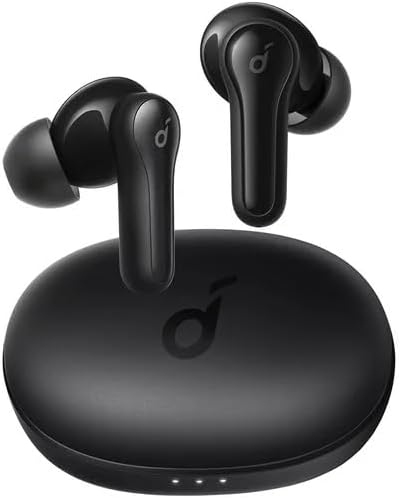
Image: Soundcore Life Note C True Wireless Earbuds, black, with their oval-shaped charging case. The earbuds are shown outside the case, highlighting their sleek design.
What's in the Box
Ensure all components are present before proceeding with setup.
- Charging Case
- User Manual
- Charging Cable
- Ear Cushions (various sizes)
Setup
1. Initial Charging
Before first use, fully charge the earbuds and the charging case.
- Place the earbuds into the charging case.
- Connect the charging case to a power source using the provided USB-C cable. The LED indicators on the case will illuminate to show charging status.
- A full charge typically takes approximately 2 hours for the case and earbuds.
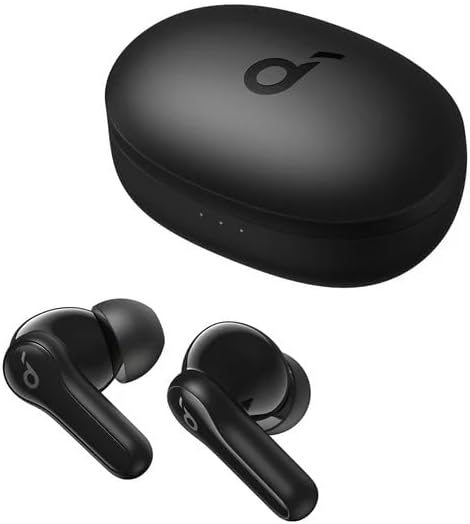
Image: Soundcore Life Note C Earbuds placed inside their open charging case, showing the charging contacts and the LED indicators on the front of the case.
2. Pairing with Your Device
The earbuds will automatically enter pairing mode when removed from the charging case.
- Open the charging case and remove both earbuds.
- On your device (smartphone, tablet, etc.), enable Bluetooth.
- Search for "Soundcore Life Note C" in the list of available Bluetooth devices and select it to connect.
- Once connected, you will hear an audible confirmation, and the LED indicators on the earbuds will turn off.
Note: If pairing fails, place the earbuds back into the case, close the lid, and then reopen it to re-enter pairing mode. For single earbud use, simply remove one earbud from the case.
3. Wearing the Earbuds
For optimal sound quality and secure fit, choose the correct size ear tips and wear the earbuds correctly.
- Select the ear tips that provide the best seal and comfort. Different sizes are included.
- Insert the earbuds into your ear canal and gently twist them to secure their position.
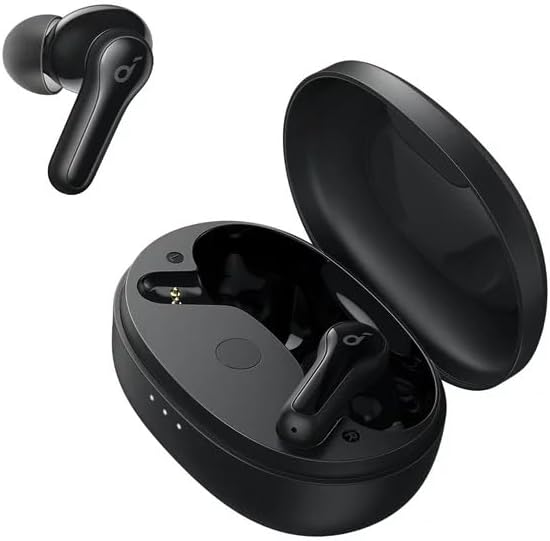
Image: Soundcore Life Note C Earbuds, one removed from the charging case and the other still inside, illustrating the compact design and how they fit into the case.
Operating Your Earbuds
The Soundcore Life Note C earbuds feature intuitive touch controls for various functions.
Power On/Off
- Power On: Open the charging case, and the earbuds will automatically power on.
- Power Off: Place the earbuds back into the charging case and close the lid. They will automatically power off and begin charging.
Music Controls
| Function | Action |
|---|---|
| Play/Pause | Tap the touch control area on either earbud once. |
| Next Track | Double-tap the touch control area on the right earbud. |
| Previous Track | Double-tap the touch control area on the left earbud. |
Call Controls
| Function | Action |
|---|---|
| Answer/End Call | Tap the touch control area on either earbud once. |
| Reject Call | Press and hold the touch control area on either earbud for 2 seconds. |
Voice Assistant
- Activate Voice Assistant: Triple-tap the touch control area on either earbud.
Water Resistance
The Soundcore Life Note C earbuds are water-resistant. This means they are protected against sweat and light splashes, making them suitable for workouts and outdoor activities. However, they are not designed for swimming or submersion in water.
Maintenance
Proper maintenance ensures the longevity and optimal performance of your earbuds.
- Cleaning: Regularly clean the earbuds and charging contacts with a dry, soft, lint-free cloth. Do not use harsh chemicals or abrasive materials.
- Ear Tips: Remove and clean the ear tips with water and mild soap if necessary. Ensure they are completely dry before reattaching.
- Storage: When not in use, always store the earbuds in their charging case to protect them and keep them charged.
- Battery Care: To preserve battery life, avoid fully discharging the earbuds and charging case frequently. Charge them regularly, even if not in constant use.
Troubleshooting
If you encounter issues with your Soundcore Life Note C earbuds, try the following solutions:
- Earbuds not pairing:
- Ensure both earbuds are fully charged.
- Place both earbuds back into the charging case, close the lid, wait 5 seconds, then open the lid and remove them again.
- On your device, forget "Soundcore Life Note C" from your Bluetooth settings and try pairing again.
- Only one earbud playing sound:
- Ensure both earbuds are charged.
- Place both earbuds back into the charging case, close the lid, and then reopen it.
- Perform a factory reset (refer to the manufacturer's official support for specific reset instructions if needed, as this model might not have a public reset procedure).
- Earbuds not charging:
- Ensure the charging cable is securely connected to both the case and the power source.
- Clean the charging contacts on both the earbuds and inside the case with a dry cotton swab.
- Try a different charging cable and power adapter.
- Poor sound quality:
- Ensure the ear tips provide a good seal in your ear canal. Try different sizes.
- Clean any debris from the earbud nozzles.
- Move closer to your connected device to avoid Bluetooth interference.
Specifications
| Feature | Detail |
|---|---|
| Model Name | A3943 |
| Connectivity Technology | Wireless (Bluetooth 5.0) |
| Ear Placement | In Ear |
| Water Resistance Level | Water Resistant |
| Frequency Range | 20 Hz - 20,000 Hz |
| Control Type | Media Control, Touch or Voice Control |
| Special Features | Fast Charging, Built-in Microphone, Sweatproof |
| Material | Plastic, Thermoplastic Elastomer (TPE) |
| Item Weight | 3.84 ounces |
| Manufacturer | Anker |

Image: A close-up of an earbud speaker driver with a graphic overlay stating "50% MORE BASS", highlighting the audio capabilities of the Soundcore Life Note C earbuds.
Warranty and Support
For warranty information and technical support, please refer to the official Soundcore by Anker website or contact their customer service directly. Keep your proof of purchase for warranty claims.
Official Soundcore Support: https://us.soundcore.com/pages/contact-us
Related documentsA3943


Ask a question about this manual
Ask about setup, troubleshooting, compatibility, parts, safety, or missing instructions. Manuals+ will review the question and use this page’s manual context to help answer it.