
Soundstream Bxm-100mx
Soundstream Epicentro Bass Restorer
Model: BXM-100MX Special Edition
Brand: Soundstream
1. Introduction
This manual provides detailed instructions for the installation, operation, and maintenance of your Soundstream Epicentro BXM-100MX Special Edition Bass Restorer. This device is designed to enhance the low-frequency response of your audio system, providing a richer and more impactful bass experience. Please read this manual thoroughly before installation and use to ensure proper function and safety.
2. Safety Information
Always observe the following safety precautions to prevent injury or damage to the unit and other components:
- Ensure the vehicle's battery is disconnected before beginning any installation.
- Connect the unit only to a 12V DC negative ground electrical system.
- Do not install the unit in locations exposed to direct sunlight, excessive heat, humidity, or dust.
- Use appropriate gauge wiring for power and ground connections to prevent overheating and potential fire hazards.
- Protect all wires from sharp edges and moving parts.
- Do not attempt to open or modify the unit. Refer all servicing to qualified personnel.
- Keep the volume at a level that allows you to hear outside sounds, such as emergency vehicles, to ensure safe driving.
3. Package Contents
Verify that all items are present in the package:
- Soundstream Epicentro BXM-100MX Bass Restorer Unit
- Remote Bass Level Control
- Remote Control Cable
- Power and Ground Wiring Harness
- User Manual (this document)
- Mounting Hardware (screws, etc.)

Figure 3.1: Contents of the Soundstream BXM-100MX package, including the main unit, remote bass control, and necessary cables.
4. Product Overview
The Soundstream BXM-100MX is a specialized audio processor designed to restore and enhance low-frequency signals. Below are detailed views of the unit's components and connections.

Figure 4.1: Front view of the BXM-100MX unit. Note the two main control knobs for bass adjustment and the LED indicators for power and bass activity.

Figure 4.2: Rear panel connections. From left to right: RCA input jacks (red and white), RCA output jacks (red and white), remote bass level control port (RJ-11), and the power/remote turn-on connector.

Figure 4.3: Bottom view of the unit, displaying the Soundstream logo, model number (BXM-100MX), and "Made in China" label.
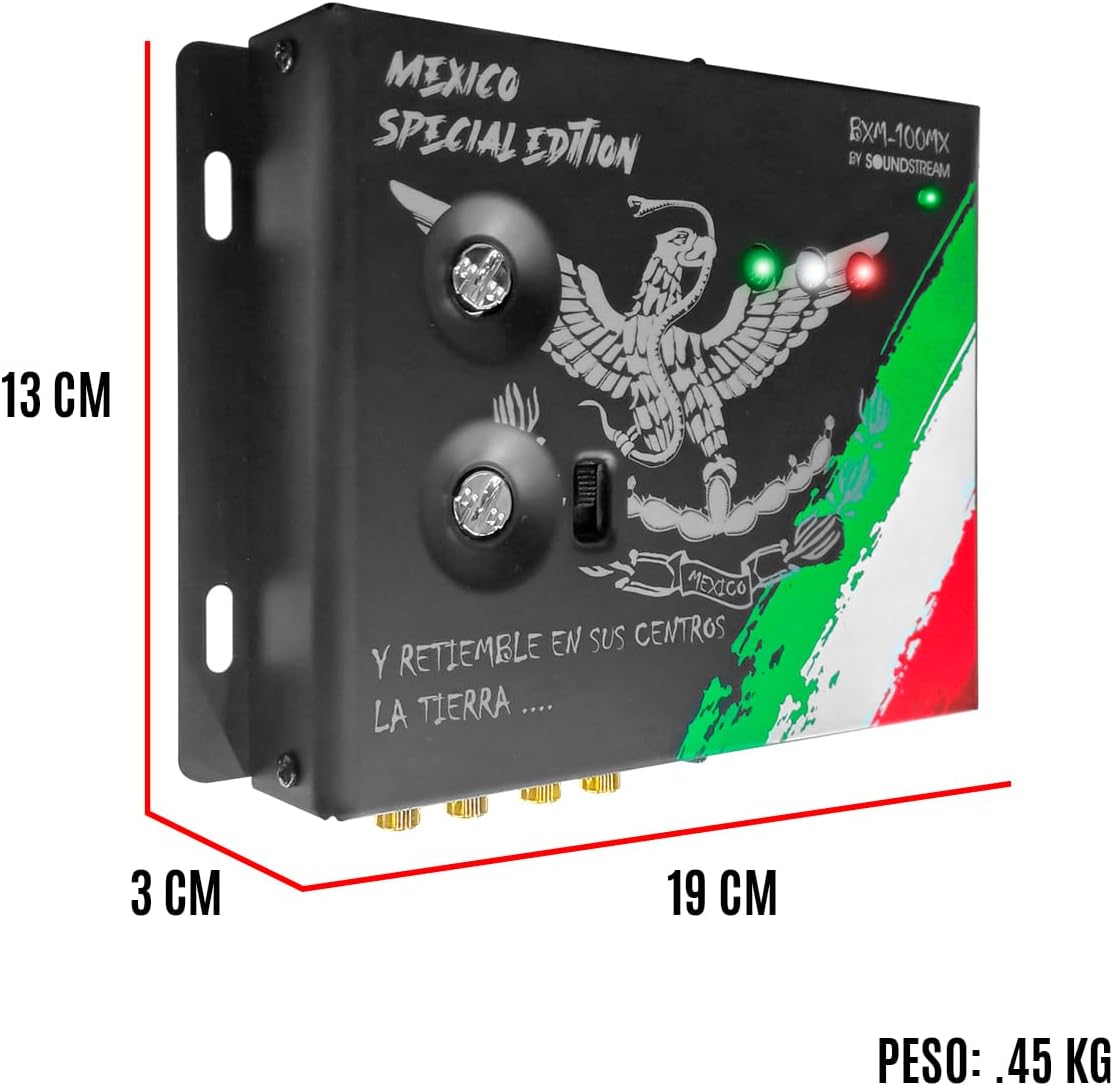
Figure 4.4: Product dimensions: 19 cm (length), 13 cm (width), and 3 cm (height).
5. Setup and Installation
Proper installation is crucial for optimal performance. It is recommended that installation be performed by a qualified professional.
5.1 Mounting Location
Choose a dry, well-ventilated location away from direct heat sources and moisture. Ensure there is enough space for wiring and ventilation. Common locations include under the seat, in the trunk, or behind the dashboard.
5.2 Wiring Connections
- Power (B+) Connection: Connect the +12V terminal of the unit to the positive terminal of the vehicle's battery using a fused power cable. The fuse should be located within 18 inches of the battery.
- Ground (GND) Connection: Connect the GND terminal to a clean, unpainted metal surface of the vehicle's chassis. Ensure a good electrical connection.
- Remote (REM) Turn-On Connection: Connect the REM terminal to the remote turn-on output of your head unit or amplifier. This will turn the bass restorer on and off with your audio system.
- RCA Input Connection: Connect the RCA output from your head unit or signal processor to the RCA INPUTs of the BXM-100MX.
- RCA Output Connection: Connect the RCA OUTPUTs of the BXM-100MX to the RCA inputs of your amplifier(s).
- Remote Bass Control: Connect the remote bass level control to the dedicated port on the rear of the BXM-100MX using the provided cable. Mount the remote control in an accessible location for easy adjustment.
Note: Always ensure all connections are secure and properly insulated to prevent short circuits.
6. Operating Instructions
Once installed, the BXM-100MX is ready for operation. Adjustments should be made carefully to achieve desired bass enhancement without distortion.
6.1 Initial Power-Up
Turn on your vehicle's audio system. The power LED on the BXM-100MX should illuminate, indicating the unit is active.
6.2 Adjusting Bass Enhancement
The BXM-100MX features two primary controls on the front panel, typically for frequency and width, and a remote level control for overall bass output.
- Frequency Control: This knob allows you to select the center frequency of the bass restoration. Experiment with different settings to find the optimal frequency for your music and speakers.
- Width Control: This knob adjusts the Q (bandwidth) of the bass restoration. A narrower Q will affect a smaller range of frequencies, while a wider Q will affect a broader range.
- Remote Bass Level Control: Use the wired remote control to adjust the overall output level of the bass restoration from your listening position. Start with a low setting and gradually increase until the desired bass impact is achieved.
Caution: Over-driving your speakers or amplifier with excessive bass can lead to damage. Listen for signs of distortion and reduce the bass level if necessary.
7. Maintenance
The Soundstream BXM-100MX requires minimal maintenance. Follow these guidelines to ensure longevity:
- Keep the unit clean by wiping it with a soft, dry cloth. Do not use harsh chemicals or abrasive cleaners.
- Ensure proper ventilation around the unit to prevent overheating.
- Periodically check all wiring connections for tightness and corrosion.
8. Troubleshooting
If you experience issues with your BXM-100MX, refer to the following table before contacting support:
| Problem | Possible Cause | Solution |
|---|---|---|
| No power / Unit does not turn on |
|
|
| No bass enhancement |
|
|
| Distorted bass |
|
|
9. Specifications
Key technical specifications for the Soundstream BXM-100MX Bass Restorer:
| Feature | Specification |
|---|---|
| Product Dimensions | 19 x 13 x 3 cm (Length x Width x Height) |
| Product Weight | 450 g |
| Color | Black |
| Power Requirement | 12V DC Negative Ground |
| Control Features | Frequency, Width, Remote Bass Level |
| Connectivity | RCA Inputs, RCA Outputs, RJ-11 Remote Port |
10. Warranty and Support
Soundstream products are designed for reliability and performance. For warranty information and technical support, please refer to the warranty card included with your product or visit the official Soundstream website. Keep your proof of purchase for any warranty claims.
For further assistance, please contact Soundstream customer service.
Ask a question about this manual
Ask about setup, troubleshooting, compatibility, parts, safety, or missing instructions. Manuals+ will review the question and use this page’s manual context to help answer it.