
DEMICEA X6
DEMICEA LibreRun X6 Open Ear Sport Headphones User Manual
Comprehensive instructions for setup, operation, and maintenance of your DEMICEA LibreRun X6 bone conduction headphones.
Introduction
Thank you for choosing the DEMICEA LibreRun X6 Open Ear Sport Headphones. These headphones are designed to provide a comfortable and high-quality audio experience for active lifestyles, featuring bone conduction technology, built-in MP3 storage, and a durable waterproof design. This manual will guide you through the features, setup, and usage to ensure optimal performance and longevity of your device.

Image: The DEMICEA LibreRun X6 Open Ear Sport Headphones, showcasing their ergonomic design with a black body and red accents.
Package Contents
Please verify that all items are present in your package:
- 1x DEMICEA LibreRun X6 Headphones
- 1x Magnetic Data & Charging Cable
- 1x User Manual (this document)
Product Overview
The LibreRun X6 headphones are designed for comfort and performance, allowing you to stay aware of your surroundings while enjoying audio.
Key Features:
- Open Ear Comfort: Lightweight design (0.99 oz) with a flexible Ti-alloy frame and skin-friendly silicone for extended wear without ear blockage.
- Bone Conduction Technology: 16mm BC acoustic drivers deliver clear audio through bone vibrations, enhanced by ResoRich™ Tech and SoundBeam™ directional sound to minimize leakage.
- Integrated MP3 Player: 32GB built-in storage for over 4000 songs, allowing music playback without a connected device.
- IP68 Waterproof Rating: Fully sealed design with nano-hydrophobic coating protects against sweat, rain, and submersion, suitable for swimming and intense workouts.
- Bluetooth 5.3 Connectivity: Advanced Bluetooth for stable, low-latency wireless connection to compatible devices.
- Long Battery Life: Up to 8 hours of music playback on a single charge, with quick charge capability (5 minutes for 30 minutes playback).
Component Identification:
Refer to the image below for the location of buttons and charging port.
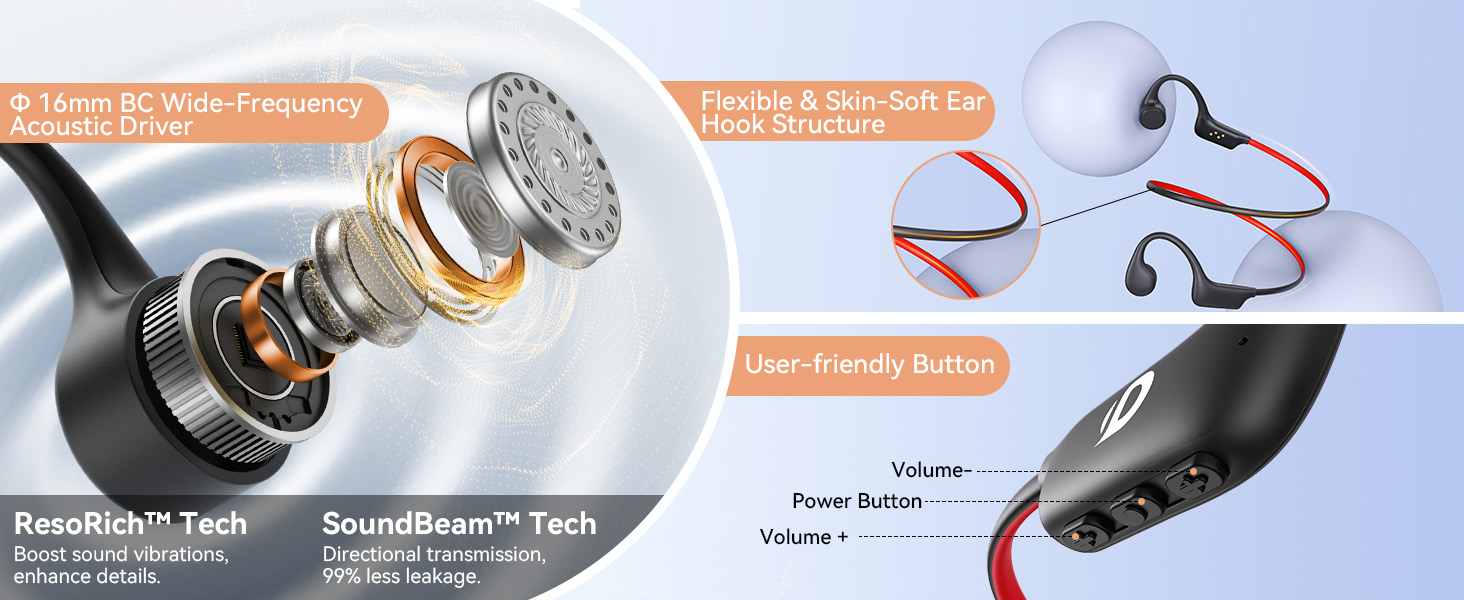
Image: Diagram illustrating the internal components of the bone conduction driver and the external button layout (Volume +, Power Button, Volume -) on the DEMICEA LibreRun X6 headphones.
- Power Button: On/Off, Play/Pause, Answer/End Call.
- Volume + Button: Increase volume, Next track (long press).
- Volume - Button: Decrease volume, Previous track (long press).
- Magnetic Charging Port: For charging and data transfer.
Setup
1. Charging the Headphones
Before first use, fully charge your LibreRun X6 headphones.
- Connect the magnetic charging cable to the charging port on the headphones.
- Connect the USB end of the cable to a standard USB power adapter (not included) or a computer's USB port.
- The LED indicator will show charging status (refer to LED indicator section for details). A full charge takes approximately 2 hours.
Note: Ensure the charging contacts are clean and dry before connecting the cable to prevent damage.
2. Powering On/Off
- Power On: Press and hold the Power Button for 3 seconds until the LED indicator flashes blue and you hear a power-on prompt.
- Power Off: Press and hold the Power Button for 5 seconds until the LED indicator flashes red and you hear a power-off prompt.
3. Bluetooth Pairing
To connect your headphones to a Bluetooth-enabled device:
- With the headphones powered off, press and hold the Power Button for 5-7 seconds until the LED indicator flashes red and blue alternately, indicating pairing mode.
- On your device (smartphone, tablet, etc.), enable Bluetooth and search for available devices.
- Select "LibreRun X6" from the list of found devices.
- Once paired, the LED indicator will flash blue slowly, and you will hear a connection prompt.
Note: The headphones will automatically attempt to reconnect to the last paired device when powered on.
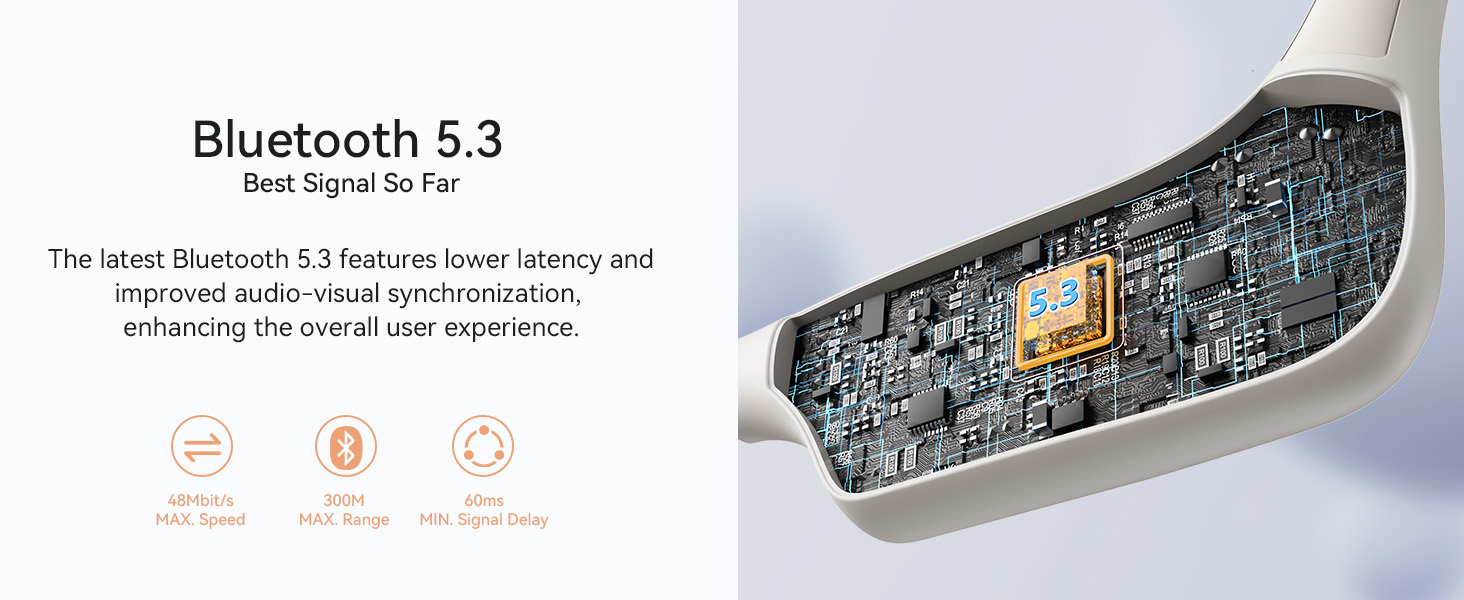
Image: An internal view of the headphones highlighting the Bluetooth 5.3 chip, indicating advanced connectivity with anti-interference, energy saving, and lower delay.
Operating Instructions
Music Playback (Bluetooth Mode)
- Play/Pause: Press the Power Button once.
- Volume Up: Press the Volume + Button once.
- Volume Down: Press the Volume - Button once.
- Next Track: Press and hold the Volume + Button for 2 seconds.
- Previous Track: Press and hold the Volume - Button for 2 seconds.
Music Playback (MP3 Mode - Built-in 32GB Storage)
The LibreRun X6 features 32GB of internal storage for offline music playback.
- Transferring Music:
- Connect the headphones to your computer using the magnetic data & charging cable.
- The headphones will appear as a removable disk drive.
- Drag and drop MP3 audio files into the headphone's storage folder.
- Safely eject the device from your computer before disconnecting the cable.
- Switching to MP3 Mode: While the headphones are on, double-press the Power Button to switch between Bluetooth mode and MP3 mode.
- MP3 Playback Controls: Use the same controls as Bluetooth mode for Play/Pause, Volume, Next/Previous Track.

Image: A visual representation of the headphones with a 32GB storage icon, emphasizing the capacity to store over 4000 songs for offline listening.
Call Management
- Answer/End Call: Press the Power Button once.
- Reject Call: Press and hold the Power Button for 2 seconds.
- Voice Assistant: Triple-press the Power Button (if supported by your connected device).
Maintenance
Proper care will extend the life of your headphones.
- Cleaning: Wipe the headphones with a soft, damp cloth. Do not use abrasive cleaners or solvents. Ensure the magnetic charging contacts are clean and dry.
- Storage: Store the headphones in a cool, dry place away from direct sunlight and extreme temperatures.
- Water Exposure: While IP68 rated, it is recommended to rinse the headphones with fresh water after exposure to saltwater or chlorinated water, then dry thoroughly before charging.
- Charging Port: Always ensure the magnetic charging port is dry before connecting the charging cable to prevent corrosion or short circuits.

Image: A man swimming underwater, wearing the DEMICEA LibreRun X6 headphones, demonstrating their IP68 waterproof capability.
Troubleshooting
| Problem | Possible Cause | Solution |
|---|---|---|
| Headphones do not power on. | Low battery. | Charge the headphones for at least 30 minutes. |
| Cannot pair via Bluetooth. | Headphones not in pairing mode; device Bluetooth off; too far from device. | Ensure headphones are in pairing mode (flashing red/blue). Turn device Bluetooth off and on. Move headphones closer to device. |
| No sound or low volume. | Volume too low; headphones not connected; incorrect audio source. | Increase volume on headphones and connected device. Re-pair headphones. Ensure correct audio output is selected on your device. |
| MP3 files not playing. | Not in MP3 mode; incorrect file format; files not transferred correctly. | Double-press Power Button to switch to MP3 mode. Ensure files are MP3 format. Reconnect to computer and verify file transfer. |
| Charging issues. | Dirty charging contacts; faulty cable/adapter. | Clean charging contacts on headphones and cable. Try a different USB port or power adapter. Ensure contacts are dry. |
| Sound intermittent during intense activity. | Low battery (as per product description); sweat interfering with contacts (rare, but reported in reviews). | Recharge the headphones. If issue persists during heavy sweating, ensure contacts are clean and dry before use. |
Specifications
| Feature | Detail |
|---|---|
| Model Name | LibreRun X6 |
| Connectivity | Bluetooth 5.3, Bone Conduction |
| Bluetooth Range | Up to 10 meters |
| Audio Driver | 16mm Bone Conduction Driver |
| Frequency Range | 20 Hz - 20,000 Hz |
| Sensitivity | 86 dB |
| Impedance | 8 Ohm |
| Internal Storage | 32GB (for MP3 files) |
| Battery Life | Up to 8 hours (music playback) |
| Charging Time | Approximately 2 hours |
| Water Resistance | IP68 (Waterproof) |
| Weight | 26 Grams (0.917 ounces) |
| Dimensions (L x W x H) | 5.12 x 3.94 x 1.97 inches |
| Materials | ABS, Metal, Silicone |
Warranty and Support
For warranty information and technical support, please refer to the official DEMICEA website or contact their customer service directly. Details are typically provided on the product packaging or the manufacturer's official online channels.
Manufacturer: MOONPANDA
Brand: DEMICEA
For further assistance, please visit: DEMICEA Official Store on Amazon
Related Documents - X6
 |
Demicea X6 Bone Conduction Wireless Headphones User Manual & Quick Guide Comprehensive guide for Demicea X6 bone conduction wireless headphones, covering setup, features, MP3 mode, Bluetooth pairing, troubleshooting, specifications, and warranty information. |
 |
LibreFit B17 OWS Bone Conduction Wireless Earphones User Manual and Quick Guide Comprehensive user manual and quick guide for the LibreFit B17 OWS bone conduction wireless earphones by Demicea, covering setup, music mode, call mode, aurora mode, Bluetooth pairing, factory reset, product specifications, warranty, and FCC compliance. |
 |
Demicea B19 Open Ear Air Conduction Earphones User Manual & Quick Guide Official user manual and quick guide for Demicea B19 Open Ear Air Conduction Earphones. Learn about setup, pairing, operation, troubleshooting, specifications, and warranty. |
 |
Demicea LibreFit B8 Wireless Earphones User Manual & Quick Guide Comprehensive user manual and quick guide for Demicea LibreFit B8 OWS bone conduction wireless earphones, covering music and call modes, Bluetooth pairing, factory reset, specifications, and warranty. |
 |
X6 Bone Conduction Headphones | IPX8 Waterproof MP3 Player Discover the X6 Bone Conduction Headphones, featuring IPX8 waterproofing, 32GB MP3 storage, and Bluetooth 5.3 for immersive underwater audio. Ideal for swimming, surfing, and running. |
 |
X6 Bone Conduction Wireless Headphones User Manual User manual for the X6 Bone Conduction Wireless Headphones, covering basic operations, Bluetooth pairing, MP3 mode, data transfer, troubleshooting, specifications, and warranty information. |
Ask a question about this manual
Ask about setup, troubleshooting, compatibility, parts, safety, or missing instructions. Manuals+ will review the question and use this page’s manual context to help answer it.