
VitalKos VitalKos-JR1602FCC
JR1602FCC 2.4GHz Bluetooth Remote Control User Manual
Model: VitalKos-JR1602FCC
Introduction
This user manual provides detailed instructions for the VitalKos JR1602FCC 2.4GHz Bluetooth Remote Control, designed for kids' powered electric vehicles such as Jeeps, Trucks, and Cars. Please read this manual thoroughly before use to ensure proper operation and safety.
Safety Information
WARNING: Use with adult accompaniment. This product contains small parts and is not suitable for children under 3 years due to choking hazard.
- Always supervise children when they are operating the electric vehicle with the remote control.
- Ensure the foot pedal function of the children's electric vehicle is in normal working condition before using the remote control.
- The remote control does not contain a battery. Install batteries correctly as per instructions.
- Non-rechargeable batteries are not to be recharged.
- Different types of batteries or new and used batteries are not to be mixed.
- Exhausted batteries are to be removed from the toy.
- The supply terminals are not to be short-circuited.
- The packaging must be retained as it contains important information.
Product Overview
The JR1602FCC remote control is a 2.4GHz Bluetooth transmitter designed for specific models of kids' ride-on electric vehicles. It features intuitive controls for forward, backward, speed adjustment, turning, and braking.

Figure 1: Front view of the JR1602FCC Remote Control. It is white with two circular control pads, each containing three black buttons. The left pad has buttons for forward, speed, and back. The right pad has buttons for brake, right, and left. A small red indicator light is visible below the "TRANSMITTER" label.
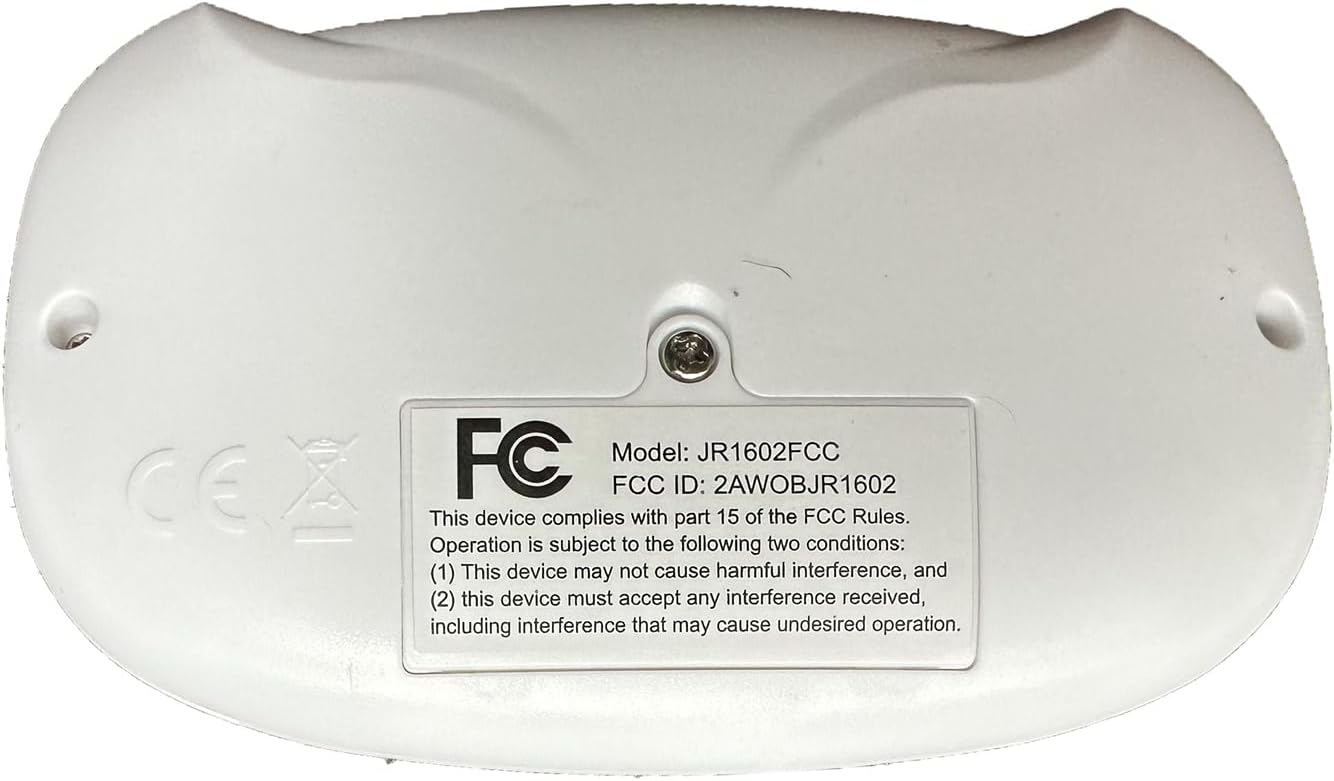
Figure 2: Back view of the JR1602FCC Remote Control. The back features a label with "Model: JR1602FCC", "FCC ID: 2AWOBJR1602", and FCC compliance statements. Two screw holes are visible on either side.
Setup
1. Battery Installation
The remote control requires two AAA (1.5V) batteries. Follow the diagram below for correct installation.
- Locate the battery compartment on the back of the remote control.
- Loosen the screw on the battery compartment cover using a screwdriver.
- Open the cover and insert two AAA (1.5V) batteries, ensuring correct polarity (+/-).
- Close the battery compartment cover and tighten the screw.

Figure 3: Diagram illustrating how to loosen the screw and load two AAA (1.5V) batteries into the remote control. It also labels the buttons: Forward, Speed, Back on the left pad; Brake, Right, Left on the right pad; and Speed display.
2. Bluetooth Pairing Instructions
The remote control has a one-on-one anti-interference function, requiring pairing when used for the first time or after battery replacement.
- After installing the remote control battery, press and hold both the '▲' (Forward) and '▼' (Back) buttons simultaneously for 3 seconds.
- The indicator light (LED) on the remote control will flash, indicating it is in pairing mode.
- While the remote control LED is flashing, turn on the power switch of the children's electric vehicle.
- The red indicator light on the remote control will stop flashing and remain solid, indicating successful pairing.
Note: If pairing fails, turn off both the vehicle and remote, then repeat the steps. Ensure the vehicle's foot pedal function is operational before attempting to pair.
Operating Instructions
Once successfully paired, you can operate the electric vehicle using the remote control:
- Forward (▲): Press the top button on the left control pad to move the vehicle forward.
- Back (▼): Press the bottom button on the left control pad to move the vehicle backward.
- Speed (S): Press the middle button on the left control pad to cycle through speed settings (if applicable).
- Left (◄): Press the left button on the right control pad to turn the vehicle left.
- Right (►): Press the right button on the right control pad to turn the vehicle right.
- Brake (P): Press the top button on the right control pad to apply the brake and stop the vehicle.

Figure 4: Example of a black electric Jeep-style ride-on car that can be controlled by the remote. The remote control is shown in the top left corner of the image.
Compatibility
The JR1602FCC remote control transmitter is compatible with various JR-RX series controller receivers. It is crucial to verify your vehicle's receiver model for compatibility before purchase or use.
Compatible Receivers: JR-RX, JR1810RX, JR1758RX, JR1858RX, JR1738RX, JR1922RX, JR1788RX, JR1888RX, JR1958, and other similar JR/HY series controllers.

Figure 5: Visual guide for compatibility. The JR1602FCC remote control is shown with a checkmark next to compatible JR/HY series receivers (top row) and a cross next to incompatible receiver types (bottom row).
If you are unsure about compatibility, take a photo of the controller located under your electric vehicle's seat and contact the manufacturer or seller for assistance.
For more information on compatible models, you may refer to the manufacturer's resources: http://api.e-toys.cn/page/app/76
Maintenance
- Keep the remote control clean and dry. Avoid exposure to water or excessive moisture.
- Clean the surface with a soft, dry cloth. Do not use abrasive cleaners or solvents.
- Store the remote control in a cool, dry place when not in use.
- Remove batteries if the remote control will not be used for an extended period to prevent leakage.
Troubleshooting
| Problem | Possible Cause | Solution |
|---|---|---|
| Remote control not responding. |
|
|
| Indicator light flashes continuously. | Remote control is in pairing mode but not yet connected. | Ensure the vehicle's power is turned on while the remote is flashing to complete pairing. |
| Vehicle not moving with remote, but foot pedal works. | Remote control or receiver issue. | Re-attempt pairing. If the issue persists, the remote control or receiver may be faulty. |
Specifications
- Model: JR1602FCC
- Brand: VitalKos
- Frequency: 2.4GHz Bluetooth
- Power Source: 2 x AAA (1.5V) batteries (not included)
- Product Dimensions: 3.16 x 5.2 x 1.2 inches
- Item Weight: 3.2 ounces
- Compatible Devices: Remote control Ride On Car (with compatible JR-RX series receivers)
- Max Number of Supported Devices: 1 (one-on-one pairing)
- Color: White
- Special Feature: Ergonomic design
- Manufacturer: VitalKos
- Country of Origin: China
Support
For further assistance, technical support, or inquiries regarding replacement parts, please contact VitalKos customer service through the platform where you purchased the product (e.g., Amazon).
You can also visit the VitalKos Store for more information: VitalKos Store
Ask a question about this manual
Ask about setup, troubleshooting, compatibility, parts, safety, or missing instructions. Manuals+ will review the question and use this page’s manual context to help answer it.