
1. Introduction
This manual provides essential information for the proper use, maintenance, and troubleshooting of your Vailikey Key Fob Remote Replacement. Please read this manual thoroughly before attempting to use or program the key fob to ensure optimal performance and longevity.
2. Product Overview
The Vailikey Key Fob Remote Replacement is designed to function as a direct replacement for your original Mercedes-Benz smart key. Each unit comes pre-installed with batteries and electronics, and is thoroughly tested to ensure functionality upon receipt.
What's Included:
- Key Fob Remote Control (Pack of 2)
Key Features:
- Compatible with FCC ID: IYZ3312, IYZDC.
- Pre-tested for quality assurance.
- Includes pre-installed batteries and internal electronics.
- Designed as a cost-effective replacement solution.
Product Images:
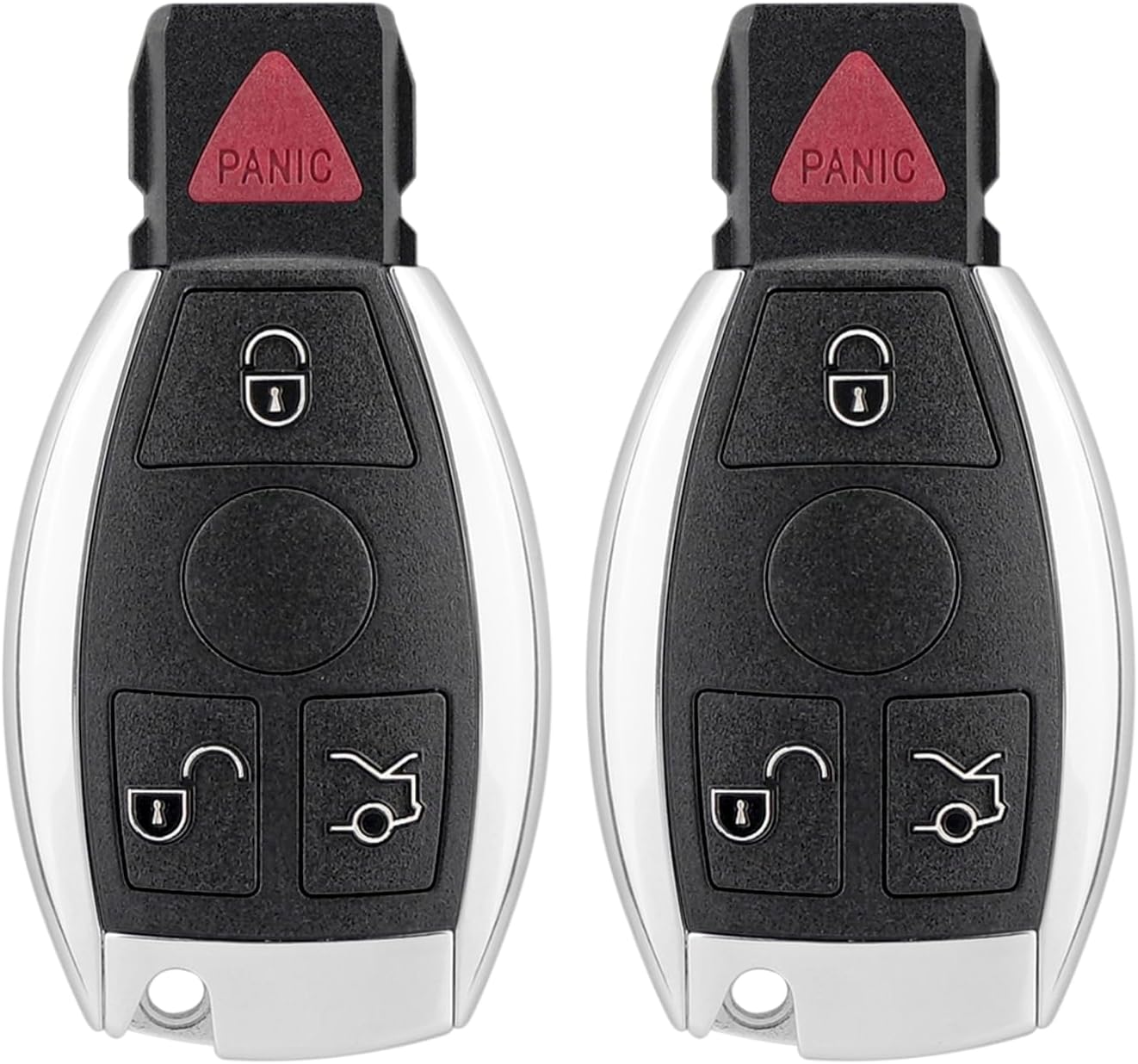


3. Compatibility
This key fob remote replacement is compatible with various Mercedes-Benz models. Please verify your vehicle's original key fob FCC ID matches IYZ3312 or IYZDC for proper compatibility.
Compatible Mercedes-Benz Models (2000-2016):
- C Class (2000-2014)
- CL Class (2000-2016)
- E Class (2000-2016)
- GL Class (2000-2016)
- ML Class (2007-2016)
- R Class (2000-2016)
- S Class (2000-2016)
4. Setup and Programming
The Vailikey Key Fob Remote Replacement comes with pre-installed batteries and electronics. However, programming the key fob to your vehicle is a complex process that cannot typically be performed by the end-user without specialized equipment.
Important: Self-programming is not possible unless you possess a high-end, two-way scanning tool and specific adapters for Mercedes-Benz keys. We strongly recommend that you have your new key fob programmed by a qualified professional, such as a local automotive locksmith or an authorized Mercedes-Benz dealership.
Programming Process Overview:
Professional programming involves syncing the key fob's unique electronic signature with your vehicle's immobilizer system. This often requires specialized diagnostic tools to read and write data to the vehicle's computer and the key fob's chip.
Frequency Detection Demonstration:
The following video demonstrates the frequency detection of a Mercedes-Benz key, which is a common step in verifying key fob functionality and preparing for programming.
Video 4.1: Demonstration of frequency detection for a Mercedes-Benz key fob using a specialized tool. This process verifies the key's signal output (ASK/FSK) and frequency (e.g., 314.96 MHz, 314.99 MHz), which is crucial for proper programming and operation.
5. Operating Instructions
Once successfully programmed, your Vailikey key fob will operate similarly to your original Mercedes-Benz smart key. The buttons typically perform the following functions:
- Lock Button (Closed Padlock Icon): Press to lock all vehicle doors.
- Unlock Button (Open Padlock Icon): Press to unlock all vehicle doors.
- Trunk Release Button (Car with Open Trunk Icon): Press and hold to open the vehicle's trunk or tailgate.
- Panic Button (Red Triangle with PANIC text): Press to activate the vehicle's alarm system. Press again to deactivate.
6. Maintenance
Battery Replacement:
The key fob uses a CR2032 coin/button cell battery. While the key fob comes with a pre-installed battery, it will eventually need replacement. Signs of a low battery include reduced range or intermittent functionality.
To replace the battery:
- Locate the small release tab or button on the side or back of the key fob to remove the emergency mechanical key.
- Once the emergency key is removed, you may find a slot or a small opening. Use a small flat-head screwdriver or a coin to gently pry open the key fob casing.
- Carefully remove the old CR2032 battery. Note its orientation (positive (+) side up or down).
- Insert a new CR2032 battery with the correct orientation.
- Snap the key fob casing back together firmly until it clicks into place.
- Reinsert the emergency mechanical key.
General Care:
- Avoid exposing the key fob to extreme temperatures, direct sunlight for prolonged periods, or high humidity.
- Do not immerse the key fob in water or other liquids.
- Protect the key fob from drops or strong impacts.
- Clean the exterior with a soft, dry cloth. Avoid using harsh chemicals or abrasive cleaners.
7. Troubleshooting
If your key fob is not functioning as expected, consider the following common issues and solutions:
| Problem | Possible Cause | Solution |
|---|---|---|
| Key fob does not unlock/lock doors. | Not programmed correctly; Low battery; Interference. | Ensure professional programming; Replace battery (CR2032); Move away from sources of strong radio interference. |
| Reduced operating range. | Low battery; Environmental interference. | Replace battery (CR2032); Test in a different location away from potential interference. |
| Buttons are unresponsive. | Internal damage; Battery issue. | Check/replace battery; If problem persists, contact support or a professional locksmith. |
If troubleshooting steps do not resolve the issue, it is recommended to consult with a professional automotive locksmith or contact Vailikey customer support.
8. Specifications
| Attribute | Detail |
|---|---|
| Model Numbers | IYZ3312, IYZDC |
| Brand | Vailikey |
| Package Dimensions | 6.18 x 4.61 x 0.67 inches |
| Item Weight | 1.76 ounces |
| Battery Type | 1 CR2032 battery (included) |
| Connectivity Technology | Radio Frequency |
| Max Number of Supported Devices | 4 |
| Special Feature | Ergonomic |
9. Warranty and Support
Vailikey provides 12 months of technical support service for this car key remote control. If you encounter any problems during receipt, installation, or use, please contact us immediately. We are committed to replying and proposing a solution within 24 hours.
For support, please refer to the contact information provided with your purchase or on the official Vailikey website.