
1. Introduction
This manual provides comprehensive instructions for the safe and efficient operation, maintenance, and troubleshooting of your Energizer PAC4000 Portable Air Compressor. Please read this manual thoroughly before using the device to ensure proper function and to prevent damage or injury.
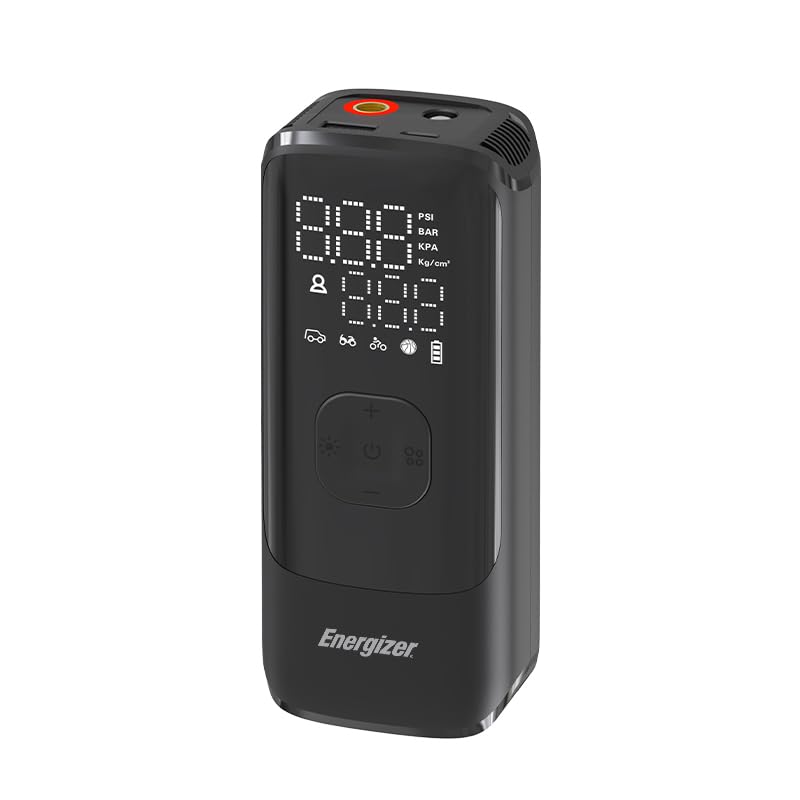
Image 1.1: The Energizer PAC4000 Portable Air Compressor, a compact device designed for various inflation needs.
2. Safety Information
Always observe the following safety precautions to reduce the risk of electric shock, fire, or injury:
- Keep the device away from water and moisture.
- Do not operate the compressor if it has been dropped or damaged.
- Ensure the inflation hose is securely attached before operation.
- Do not over-inflate items; always refer to the recommended pressure for the item being inflated.
- Keep out of reach of children.
- Use only the provided accessories and charging cable.
- Avoid prolonged continuous operation to prevent overheating. Allow the device to cool down between uses if necessary.
- Do not disassemble or attempt to repair the device yourself. Contact qualified service personnel.
3. Package Contents
Verify that all items are present in the package:
- Energizer PAC4000 Portable Air Compressor
- Inflation Hose
- Multiple Nozzles (e.g., Presta valve adapter, ball needle, swimming ring nozzle)
- USB-C Charging Cable
- Storage Pouch
- User Manual
4. Product Overview
The Energizer PAC4000 is a versatile portable air compressor featuring a powerful 150PSI inflation capability, multiple operating modes, an LCD display, and an auto shut-off function. It also includes a power bank feature and an integrated LED light for added utility.
Key Features:
- 150PSI Max Pressure: Capable of inflating various items from car tires to sports balls.
- 5 Inflation Modes: Pre-set modes for Car, Bike, Motorcycle, Ball, and a Custom mode for precise pressure control.
- LCD Digital Display: Provides real-time pressure readings and allows for easy setting adjustments.
- Auto Shut-Off: Automatically stops inflation once the target pressure is reached, preventing over-inflation.
- Power Bank Function: Built-in battery can charge mobile devices via USB.
- Integrated LED Light: Offers illumination for night use, with Normal, Strobe, and SOS modes.

Image 4.1: Close-up of the PAC4000's LCD Digital Display, showing pressure readings and mode indicators.

Image 4.2: The PAC4000 demonstrating its four primary operation modes for cars, motorcycles, bicycles, and balls.
5. Setup
5.1 Initial Charging
Before first use, fully charge the Energizer PAC4000. Connect the provided USB-C charging cable to the device's charging port and a suitable USB power adapter (not included). The battery indicator on the LCD display will show charging status. A full charge typically takes approximately 3 hours.
5.2 Attaching the Inflation Hose
Screw the inflation hose securely into the air outlet port on the top of the compressor. Ensure it is tightened to prevent air leakage during inflation.
6. Operating Instructions
6.1 Power On/Off
- To power on, press and hold the power button (ⓘ) for 2-3 seconds. The LCD display will illuminate.
- To power off, press and hold the power button again. The device will also automatically power off after a period of inactivity.
6.2 Selecting Units and Modes
- Unit Selection: Briefly press the unit button (often labeled 'M' or with a unit symbol) to cycle through pressure units: PSI, BAR, KPA, Kg/cm².
- Mode Selection: Briefly press the mode button (often labeled with icons for car, bike, etc.) to select one of the 5 pre-set inflation modes:
- Car Mode
- Motorcycle Mode
- Bike Mode
- Ball Mode
- Custom Mode (allows manual pressure setting)
6.3 Setting Target Pressure
- After selecting a mode, the default target pressure for that mode will be displayed.
- Use the '+' and '-' buttons to adjust the target pressure to your desired value.
- For Custom Mode, you will manually set the target pressure using the '+' and '-' buttons.
6.4 Inflation Process
- Attach the appropriate nozzle to the inflation hose.
- Connect the nozzle securely to the valve stem of the item to be inflated. The LCD will display the current pressure.
- Press the inflation button (often the power button or a dedicated play/pause symbol) to start inflation.
- The compressor will automatically stop once the set target pressure is reached.
- Carefully disconnect the nozzle from the valve stem.

Image 6.1: The PAC4000 in use, inflating a motorcycle tire, highlighting its compact design and ease of use.
6.5 Power Bank Function
The PAC4000 can function as a power bank to charge your mobile devices.
- Connect your device's charging cable to the USB output port on the PAC4000.
- The PAC4000 will automatically begin charging your device.
- Note that using the power bank function will deplete the compressor's internal battery.

Image 6.2: The PAC4000 being used as a power bank to charge a smartphone via its USB-C output port.
6.6 LED Light Function
The integrated LED light provides illumination in low-light conditions.
- Briefly press the light button (often with a light bulb icon) to cycle through the light modes:
- Normal (steady light)
- Strobe (flashing light)
- SOS (Morse code for SOS)
- Press the button again to turn off the light.

Image 6.3: The PAC4000's LED flashlight illuminating a tire in a dark environment, demonstrating its utility.
7. Maintenance
- Cleaning: Wipe the exterior of the compressor with a soft, dry cloth. Do not use harsh chemicals or abrasive cleaners.
- Storage: Store the device in a cool, dry place, away from direct sunlight and extreme temperatures. Ensure the battery is partially charged (around 50%) before long-term storage.
- Battery Care: To prolong battery life, avoid fully discharging the battery frequently. Recharge the device regularly, even if not in use, to maintain battery health.
- Hose and Nozzles: Inspect the inflation hose and nozzles for any signs of wear or damage before each use. Replace if necessary.
8. Troubleshooting
| Problem | Possible Cause | Solution |
|---|---|---|
| Device does not turn on. | Low battery; device malfunction. | Charge the device fully. If problem persists, contact support. |
| Compressor does not inflate. | Hose not securely attached; target pressure already reached; low battery. | Ensure hose is tight. Check target pressure. Charge device. |
| Inaccurate pressure reading. | Loose connection; sensor issue. | Ensure hose is tightly connected. Recalibrate if possible (refer to specific device instructions if available) or contact support. |
| Device overheats and shuts off. | Prolonged continuous operation. | Allow the device to cool down for at least 15-20 minutes before resuming operation. |
9. Specifications
| Feature | Detail |
|---|---|
| Brand | Energizer |
| Model Name | PAC4000 |
| Max Pressure | 150 PSI |
| Power Source | Battery Powered (Internal Lithium Polymer Battery) |
| Battery Capacity | 10000mAh (as per special features) |
| Voltage | 5 Volts |
| Special Features | 22.5W BoostedSpeed™, Double Output Ports: 2 USB, Quick Charge 3.0 & Power Delivery Technology, Type-C Input Port, LCD Display, Auto Shut-Off, LED Light |
| Recommended Uses | Tire Inflation (Car, Bike, Motorcycle), Ball Inflation, Custom Inflation |
| Noise Level | 3 Decibels (Note: This value seems unusually low for an air compressor and might be a typo in the source data. Users should expect typical compressor noise.) |
| Item Weight | 630 Grams |
| Material | Plastic |
| Package Dimensions | 20.5 x 12.09 x 5.41 cm |
| UPC | 842982104983 |
Note: Specifications are subject to change without prior notice.
10. Warranty and Support
Energizer products are manufactured to high-quality standards. For warranty information, technical support, or service inquiries, please refer to the warranty card included with your product or visit the official Energizer website. Keep your purchase receipt as proof of purchase.
Official Energizer Website: www.energizer.com


